Açıklama
Stratejiniz gerçekten örnek dışı çalışıyor mu — yoksa sadece bir geri testte şans eseri eğriye uyum sağladınız mı?
cTrader yerel olarak sürekli yürüyen ileri optimizasyona sahip değildir — sadece tek bir örnek içi/örnek dışı bölünme vardır. WFO Studio, gerçek yürüyen ileri doğrulamayı doğrudan platform içine ekler: CSV dışa aktarmalar yok, harici araçlar yok, elektronik tablolar yok.
NASIL ÇALIŞIR
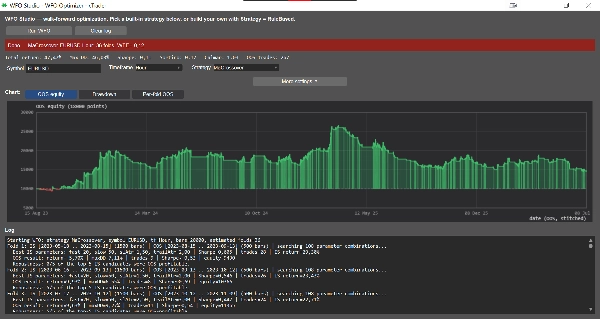
Bir sembol ve zaman dilimi seçin, bir strateji seçin, örnek içi/örnek dışı pencerelerinizi ayarlayın ve WFO'yu Çalıştır'a tıklayın. Tam bir rapor alırsınız:
• Geçmişiniz boyunca sürekli veya sabit katlamalar
• Yürüyen İleri Verimlilik (örnek içindeki avantajınızın örnek dışına ne kadarının kaldığı)
• Katlamalar arasında parametre kararlılığı — sadece şanslı bir parametre seti sayesinde çalışan stratejileri işaretler
• En İyi-N sağlamlık kontrolü — sadece en iyi tek set değil, en iyi-N örnek içi parametre setlerini örnek dışı veride doğrular
• Birleştirilmiş örnek dışı sermaye eğrisi, sermaye / geri çekilme / katlama başına getiri grafik görünümleri ve özet istatistik satırı (Toplam getiri, Maksimum DD, Sharpe, Sortino, Calmar, işlem sayısı)
KENDİ KURALLARINIZI OLUŞTURUN — KOD GEREKMEZ
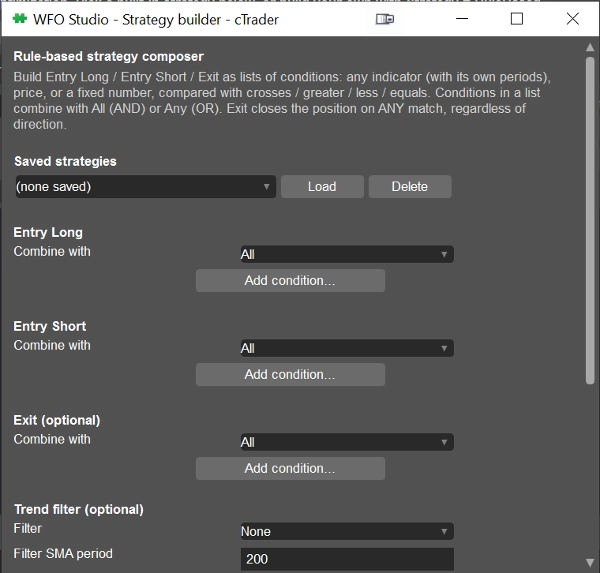
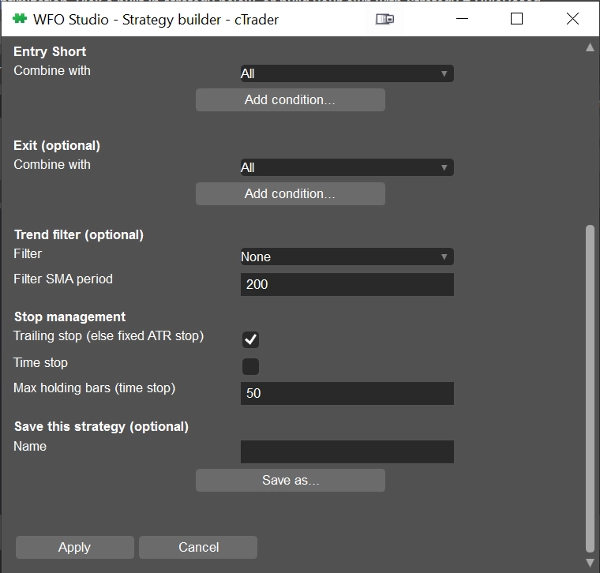
Sabit bir strateji yerine kendi mantığınızı mı tercih edersiniz? Dahili Strateji Oluşturucu, 15 göstergeden — RSI, MACD, Bollinger Bantları, Stokastik, ADX/DMI, Aroon, Parabolik SAR, Supertrend, Keltner Kanalları, SMA/EMA, ATR, Donchian Kanalları, CCI, Williams %R — Uzun Giriş, Kısa Giriş ve Çıkış koşullarını oluşturmanıza olanak tanır. Herhangi bir gösterge çizgisini başka bir gösterge, fiyat veya sabit bir sayı ile kesişmeler / büyüktür / küçüktür / eşittir kullanarak karşılaştırın, AND/OR ile birleştirin ve istediğiniz zaman geçiş yapmak için birden fazla strateji kaydedin.
Tüm gösterge hesaplamaları cTrader'ın kendi Göstergeler API'si üzerinden çalışır, böylece gördüğünüz sayılar grafiklerinizdekiyle tam olarak eşleşir — ayrı bir yeniden uygulama değildir.
KİMLER İÇİN
Gerçek sermayeyi riske atmadan önce bir fikri stres testinden geçirmek isteyen traderlar ve sıfırdan yazmak yerine hazır bir yürüyen ileri çerçeve isteyen geliştiriciler için.
WFO Studio bir araştırma ve doğrulama aracıdır — canlı işlemler yapmaz. Canlıya geçmeden önce cTrader'ın yerel geri test cihazında tam bir geri test ile son parametreleri her zaman doğrulayın.
Özet
Users select a symbol, timeframe, strategy, and define in-sample and out-of-sample windows to generate detailed reports including Walk-Forward Efficiency, parameter stability across folds, top-N robustness checks, and stitched out-of-sample equity curves with performance metrics such as total return, maximum drawdown, Sharpe ratio, and trade count.
Additionally, WFO Studio features a no-code Strategy Builder that allows users to create custom entry and exit rules using 15 technical indicators (e.g., RSI, MACD, Bollinger Bands, Stochastic, ADX/DMI) combined with logical operators. Indicator calculations use cTrader’s native Indicators API to ensure consistency with chart data.
This tool is designed for traders seeking to validate strategies before live deployment and for developers needing a ready-made walk-forward testing framework. It functions solely as a research and validation tool and does not execute live trades.
Tartışma
Müşteri değerlendirmeleri
5 | 100 % | |
4 | 0 % | |
3 | 0 % | |
2 | 0 % | |
1 | 0 % |