「Clustering」ロゴ
インジケーター
バージョン 1.0、Mar 2025
Windows、Mac
4.5
レビュー: 2
「Clustering」アップロード画像
登録日 21/12/2024

Clustering Indicator


Overview

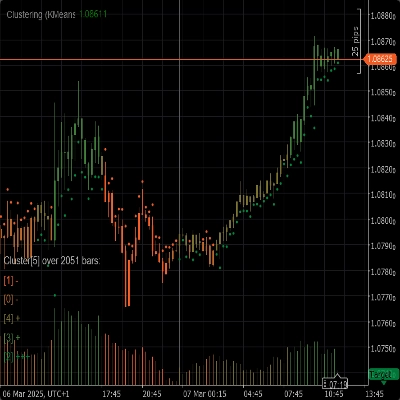
The Clustering Indicator is a powerful tool designed to help traders identify patterns, trends, and anomalies in market data. By grouping similar data points into clusters, this indicator provides valuable insights that can be used to make informed trading decisions.


Features

 - Clustering Algorithms: Utilizes advanced clustering algorithms like K-Means and Gaussian Mixture Model (GMM) to segment the market data effectively.

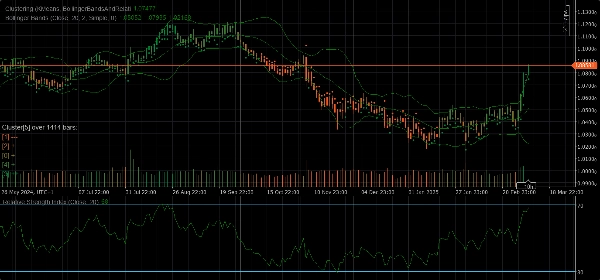
 - Feature Sets: Offers a variety of feature sets including Raw Price, Bollinger Bands, Relative Strength Index (RSI), Stochastic Oscillator, Bollinger Bands and RSI, and combinations of these indicators to capture different aspects of market behavior.

 - Dynamic Clustering: Automatically determines the optimal number of clusters ensuring that the clustering is as accurate as possible.

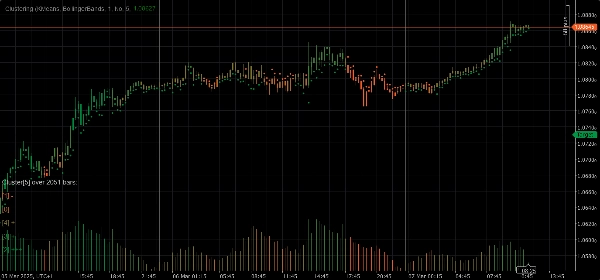
 - Visualization: Provides clear visual insights into cluster movements and volatility directly on your chart.


Parameters

 - Clustering Algorithm: Choose between K-Means or Gaussian Mixture Model (GMM) to best fit your trading strategy.

 - Feature Set: Select from Raw Price, Bollinger Bands, RSI, Stochastic Oscillator, Bollinger Bands and RSI, or a full market data set including various indicators.

 - Window: Define the number of bars to consider for each data point.

 - Auto K: Automatically determine the number of clusters based on your data.

 - Initial K: Set an initial number of clusters if Auto K is disabled.

 - Max Historical Bars: Limit the maximum number of historical bars used for clustering. If set to 0, all available bars are used.

 - Color By Clusters: Enable or disable chart re-coloring based on the actual cluster assignments.

 - Show Insights: Display detailed insights about each cluster directly on the chart.

 - Show Indicators: Show the indicators used in the feature sets.


Auto Adaptation Parameters

 - Auto Adapting: Enable or disable auto-adaptation mode, which allows the indicator to reinitialize clusters based on specified conditions.

 - Auto Adaptation Hour: The hour of the day when auto-adaptation can occur (0-23).

 - Auto Adaptation Period: The minimum number of hours that must pass since the last adaptation before another adaptation can occur.


Feature Set Parameters

Bollinger Bands Parameters

 - Period: The period for calculating the Bollinger Bands.

 - Deviation: The standard deviation multiplier for the Bollinger Bands.

 - Moving Average Type: The type of moving average used in the Bollinger Bands calculation (Simple, Exponential, etc.).


Relative Strength Index (RSI) Parameters

 - Period: The period for calculating the RSI.


Stochastic Oscillator Parameters

 - Period: The K period for the Stochastic Oscillator.

 - K Slowing: The K slowing factor for the Stochastic Oscillator.

 - D Period: The D period for the Stochastic Oscillator.

 - Moving Average Type: The type of moving average used in the Stochastic Oscillator calculation (Simple, Exponential, etc.).

 - Calculation Type: The calculation type for the Stochastic Oscillator (LowHigh, CloseClose, etc.).


Usage

 1. Add the Clustering Indicator to your chart.

 2. Configure the parameters according to your trading strategy.

 3. Analyze the clusters and their movements on the chart.

 4. Use the insights provided by the indicator to make informed trading decisions.

インジケーターのプロフィール
4.5
レビュー: 2
5
50 %
4
50 %
3
0 %
2
0 %
1
0 %
カスタマーレビュー
March 14, 2025
Weak ideas are easier to skip, but bad settings can ruin the idea.
March 8, 2025
Demo first, then maybe small size if the notes look sane. It should stay in the support stack.
Indices
RSI
Bollinger
cTrader Storeで入手可能な取引ボット、インジケーター、プラグインなどの商品は、第三者の開発者が提供するものであり、情報と技術の取得のみを目的としてご利用いただけます。cTrader Storeはブローカーではなく、投資助言や個人的な推奨を行うことも、将来のパフォーマンスを保証することもありません。

これも好きかも

インジケーター
RSI
Breakout
+1
📊 Liquidation Map: Potential areas where highly leveraged investors might face liquidations.
インジケーター
AI
ATR
+26
The Triple Momentum indicator for cTrader is a versatile trend-following tool.
インジケーター
ATR
ROC
+5
Percentile rank indicator with bar coloring, MTF filter, ATR signals & real-time strength panel.
インジケーター
Key Levels
Drawdown Monitor
+1
Real-time position monitor with break-even levels, MTF pivots, profit targets & alerts. Essential risk tool.
インジケーター
RSI
Forex
+6
What Constance Brown did with the RSI was to input a momentum calculation within the RSI itself. This the Composite RSI.
インジケーター
AI
Forex
+7
Signal Strike is a professional trading indicator delivers clear, high‑confidence entry signals directly on your chart
インジケーター
ADX
ATR
+5
Identifies TRENDING, RANGING and VOLATILE markets with pullback detection. Anti-noise filter. Works on ANY chart.
インジケーター
Prop
Forex
+13
Color Volume Bars – Visualize Market Strength Instantly
インジケーター
EMA dragon combination moving averages, and volume signal, ideal long trends, h4 chart,
インジケーター
Grid
Prop
+18
Volumen Delta", es una representación visual del flujo de órdenes basada en el volumen de transacciones.
インジケーター
AI
ATR
+25
On-chart draggable panel to show/hide Positions & Pending Orders with fixed warning banner and inline alerts per symbol.
インジケーター
AI
SMC
+5
Coloring trendline/ Colored Trendline / Color Trendline
インジケーター
ATR
RSI
+7
Automatically map professional market structure and get a real-time "Bias Score" based on institutional breakout logic.
インジケーター
RSI
Forex
+4
A powerful RSI-based hunter that detects early reversals and snipes market turning points with high accuracy.
インジケーター
Area of Interest with the power of AI to detect the market interest.
インジケーター
Forex
Crypto
+3
Day of Week Indicator for cTrader
インジケーター
Forex
cTrader Auto Support & Resistance detects key levels with Fibonacci analysis and sends real-time trading alerts.
インジケーター
Key Levels
Market Structure
Economic calendar news directly on the chart.
登録日 21/12/2024