Beschreibung
SessionVolatility-Radar — Volatilitäts × Struktur Kreuzanalyse mit einem adaptiven Signal-Engine
════════════════════════════════════════════════════════════════════════════════
PRODUKTÜBERSICHT
SessionVolatility-Radar (SVR) ist ein professioneller cTrader-Indikator, der für 24-Stunden-Märkte wie Forex, Spot-Gold/Silber und kontinuierliche 7*24-Märkte wie Krypto entwickelt wurde.
SVR bleibt nicht bei „Volatilität ist hoch/niedrig“ stehen. Es führt eine Kreuzanalyse durch:
- Volatilitätsregime (ATR / ATR-Mittelwert)
- Strukturregime (EMA-Seite + bestätigte fraktale Schwungstruktur)
Dann ordnet es diesen Kontext einem praktischen Signalverhalten zu:
Einstiegsrahmen (trendbewusst):
- Niedrige Volatilität + Trend → PB Pullback-zu-EMA Einstiege
- Struktur-Ausbruch + Trendkontext → BO Ausbruchseinstiege
- Kein Trendkontext → kein Einstiegssignal
Ausstiegsrahmen (unabhängige Monitore):
- HV: Ausstieg bei Volatilitätsspitze
- REV: Ausstieg bei Strukturumkehr (mit optionaler N-Bar-Bestätigung)
- RES: HV + REV Resonanzausstieg (beide müssen konvergieren)
Umkehr auf derselben Kerze wird unterstützt: Wenn Ausstiegs- und Umkehr-Einstiegsbedingungen auf derselben Kerze auftreten, werden beide signalisiert.
Dieses Zwei-Achsen-Modell hilft, eindimensionale Entscheidungen zu reduzieren und hält den Kontext in Echtzeit durch das On-Chart-Panel sichtbar.
════════════════════════════════════════════════════════════════════════════════
WARUM SVR ANDERS IST
1) Kontext zuerst, dann Signal
Die meisten Tools melden nur Volatilität. SVR kombiniert Volatilität und Struktur, bevor es signalisiert.
2) Sitzungsnativer Workflow
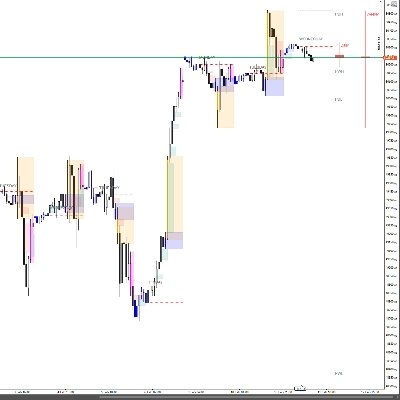
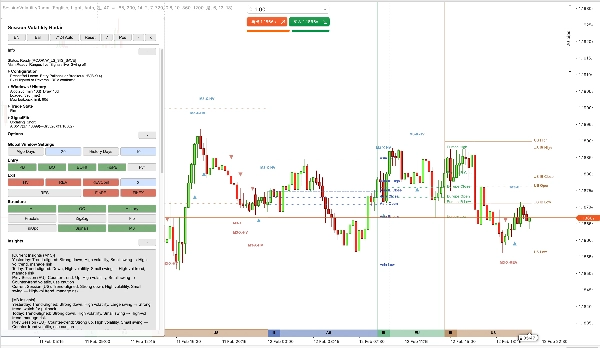
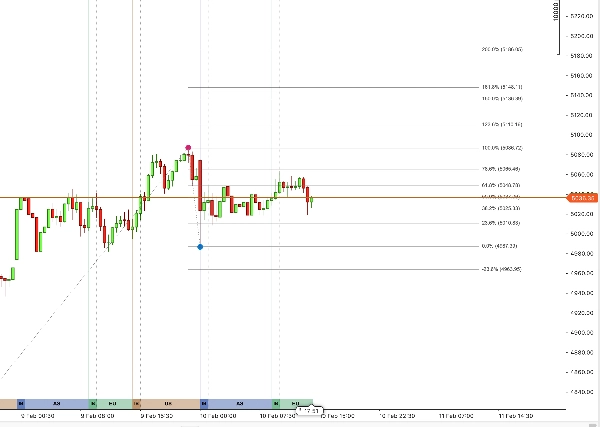
SVR legt Asien / Europa / US / Wochenend-(WK)-Sitzungsbänder mit IB-Bereichen direkt auf das Chart, plus Sitzungs-OHLC-Linien mit Textetiketten für den aktuellen Handelstag.
3) Adaptiv, keine feste Schwellenwertlogik
Volatilitäts- und Schwungschwellen werden automatisch aus aktuellen Daten neu berechnet. Parameter-Standardwerte dienen nur als Anfangsanker und Abstimmungseingaben.
4) SignalFib ist Teil der Logik, keine Dekoration
SignalFib kann an der Einstiegsfilterung und Ausstiegslogik teilnehmen (PB-Limit / Retrace-Ausstieg / Erweiterungs-Ausstieg), nicht nur am Zeichnen.
5) Praktisches Panel zur Live-Entscheidungsunterstützung
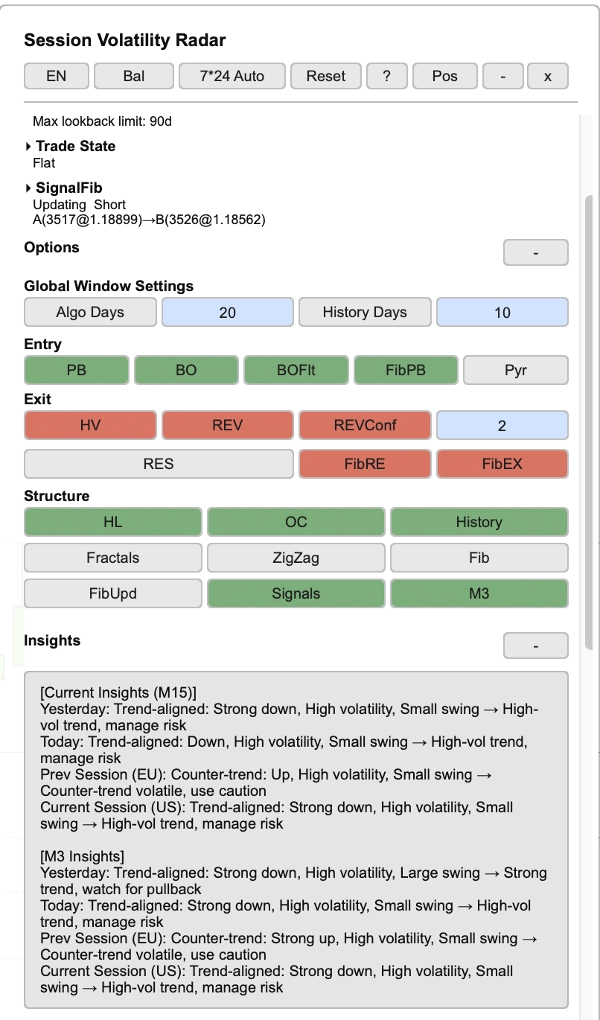
- Panel zeigt Handelsstatus (Long/Short/Flat), Trendrichtung, Konfigurationsübersicht, Sitzungsstatistiken, SignalFib-Status und Markteinblicke — mit zweisprachiger (Chinesisch / Englisch) Unterstützung, standardmäßig Englisch.
6) Automatische Verlaufsverwaltung
SVR lädt die Historie automatisch kettenweise in Richtung des Algorithmusfensterziels. Wenn Ihr Broker/Server nicht genügend Historie bereitstellen kann, wird SVR in einen sichtbaren degradierten/eingefrorenen Zustand wechseln (im Panel-Status angezeigt).
════════════════════════════════════════════════════════════════════════════════
HAUPTMERKMALE
────────────────────────────────────────────────────────────────────────────────
1. VOLATILITÄTS × STRUKTUR KREUZANALYSE
SVR bewertet den Marktstatus durch zwei synchronisierte Dimensionen:
- Volatilitätsdimension: ATR / ATR-Mittelwert-Klassifikation in niedrige / normale / hohe Volatilitätsregime.
- Strukturdimension: EMA-Seiten-Trend + bestätigte fraktale Schwungstruktur für Ausbruch- und Umkehrkontext.
Vier adaptive Voreinstellungen (Konservativ / Ausgewogen / Aggressiv / Benutzerdefiniert) bieten Ein-Klick-Sensitivitätssteuerung. Der benutzerdefinierte Modus ist standardmäßig Ausgewogen und kann frei abgestimmt werden. Voreinstellungen steuern nur die Schwellenwertsensitivität; Ein-/Ausstiegsschalter sind unabhängig konfigurierbar.
────────────────────────────────────────────────────────────────────────────────
2. SITZUNGSBÄNDER — SOFORTIGER INTRADAY-KONTEXT
SVR zeichnet konfigurierbare Sitzungsbänder im Chart-Hintergrund:
- Asien-Sitzung (AS): 9 Stunden
- Europa-Sitzung (EU): 5,5 Stunden
- US-Sitzung (US): 9,5 Stunden
- Wochenendsitzung (WK): 24 Stunden (wenn 7*24-Modus aktiv ist)
Die Sitzungsanpassung ist an den Beginn des New Yorker Handelstages verankert (Standard: 18:00 NY) und wird automatisch auf Chartzeit abgebildet. Sitzungen umfassen 24 Stunden vom Beginn des Handelstages bis zum Beginn des nächsten Handelstages.
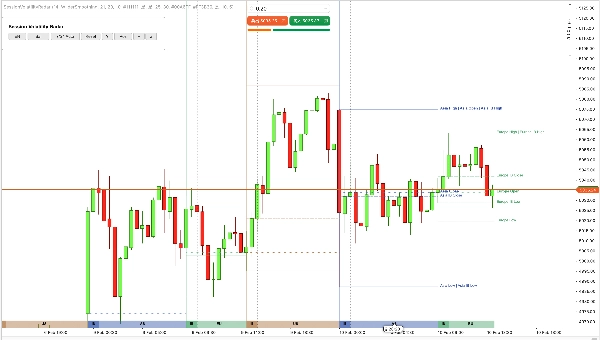
Jedes Band unterstützt konfigurierbare Höhe und Opazität. Bandfarben folgen einer eingebauten Palette (themenangepasst), mit Sitzungs-Open / High / Low / Close Referenzlinien und Textetiketten für den aktuellen Tag.
Die historische Sitzungsanzeige unterstützt bis zu 90 Handelstage (historische Tage zeigen nur Linien, keine Etiketten).
────────────────────────────────────────────────────────────────────────────────
3. INITIAL BALANCE (IB) — FRÜHE SITZUNGSSTRUKTUR
IB wird aus einer dedizierten Balkenserie berechnet, die aus der IB-Blockgröße (Standard 30-Minuten-Balken) abgeleitet wird und konfigurierbar ist durch:
- IB-Blockgröße (Minuten), Standard: 30
- IB-Blockanzahl, Standard: 2
Während der IB-Periode synchronisieren sich IB-Hoch/Tief-Linien dynamisch mit dem Sitzungs-Hoch/Tief in Echtzeit. Nach Schließen des IB-Fensters frieren IB-Hoch/Tief auf dem Eröffnungsbereich ein, eine IB-Schlusslinie wird hinzugefügt, und alle drei IB-Linien werden bis zum Sitzungsende zur Referenz verlängert.
────────────────────────────────────────────────────────────────────────────────
4. SIGNAL-ENGINE (EINSTIEG + AUSSTIEG)
Einstiegsseite:
- PB (Pullback): Einstiege bei niedrigvolatilen Trend-Pullbacks zur EMA, mit optionalem PB-Bestätigungsmodus (Aus / Basis / Stark)
- BO (Breakout): Einstiege bei Strukturausbruch, mit Standard-Hochvolatilitätsfilter und Körper/ATR-Mindestfilter
- Optionale M3 (3-Minuten) Signalprojektion auf aktuellen Zeitrahmen, mit Same-Bar-Deduplizierung
- Mindestabstand für Einstiege in gleicher Richtung durchgesetzt (keine aufeinanderfolgenden Einstiege in gleicher Richtung)
PB-Bestätigungsnotiz:
- In Bestätigungsmodi kann PB auf einer Kerze aktiviert und auf der nächsten bestätigt werden; Fib PB Limit folgt dem aktivierten Pullback-Kontext zur Konsistenz.
Ausstiegsseite:
- HV: Ausstieg bei Volatilitätsspitze
- REV: Ausstieg bei Umkehrstruktur, mit optionaler N-Bar-Bestätigung und Kreuzfiltermodus (ATR-Abstand oder nur EMA-Seite)
- RES: Ausstieg nur wenn HV und REV konvergieren (gegenseitiger Ausschluss mit eigenständigem HV/REV)
- Fib-Ausstiege: Retrace-Ausstieg und Erweiterungs-Ausstieg (unabhängig bewertet und mit aktivierten Ausstiegsmodi verodert; wenn RES aktiviert ist, sind eigenständige HV/REV aus Design deaktiviert)
Umkehr auf derselben Kerze: Wenn Ausstieg und Umkehr-Einstieg beide auf derselben Kerze ausgelöst werden, werden beide Signale annotiert.
Optionale Steuerungen umfassen Pyramiding (Wiedereinstieg in gleicher Richtung) und alle Fib-basierten Filter.
────────────────────────────────────────────────────────────────────────────────
5. SIGNALFIB — BERECHNUNGSABGESTIMMTE FIBONACCI
SignalFib ist die einzige Quelle der Wahrheit für die Signalkalkulation, mit optionaler Zeichnung im Chart. Es beteiligt sich an:
- PB-Tiefenbegrenzung (Einstiegsfilter)
- Retracement-basierter Ausstieg
- Erweiterungsbasierter Ziel-Ausstieg
- Optionale Ankeraktualisierungen über bestätigte fraktale Ratsche (nur richtungsschutzend)
Individuelle SignalFib-Level-Sichtbarkeitsschalter (0%, 23,6%, 38,2%, 50%, 61,8%, 78,6%, 100%, Erweiterungen bis 200% und negative Erweiterungen) sind nur Zeichenumschalter, die die Signalkalkulation nicht beeinflussen.
────────────────────────────────────────────────────────────────────────────────
6. INTERAKTIVES PANEL + VERLAUFSVERWALTUNG
- Live-Panel mit zweisprachiger (Chinesisch / Englisch) Unterstützung, alle Abschnitte einklappbar
- Kopfzeilen-Schaltflächen: Voreinstellung wechseln, Sprachumschaltung, 7*24-Modus wechseln (Auto / Erzwingen Ein / Erzwingen Aus), Zurücksetzen, Hilfe, Position, Minimieren, Schließen
- Schaltflächenbereiche nach Funktion organisiert: Einstiegsauswahl, Ausstiegsauswahl, Struktur-/Anzeigeumschalter
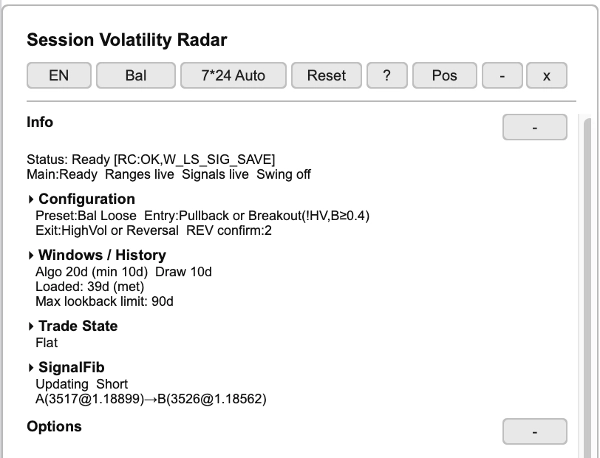
Infoabschnitt:
- Statuszeile: Systembereitschaft (Bereit/Lädt) und Subsystemzustände
- Konfigurationsübersicht: aktive Voreinstellung, Ein-/Ausstiegsmodi, REV-Bestätigungsbalken
- Fenster / Verlauf: Algo-Fenstertage, Zeichentage, geladener Verlaufstatus, max. Rückblicklimit
- Handelsstatusanzeige (Long / Short / Flat), unabhängig von Ein-/Ausstiegsanzeigeschaltern
- SignalFib-Status: aktualisiert/eingefroren, Richtung, Ankerpunkte (A→B)
Statistiktabellen:
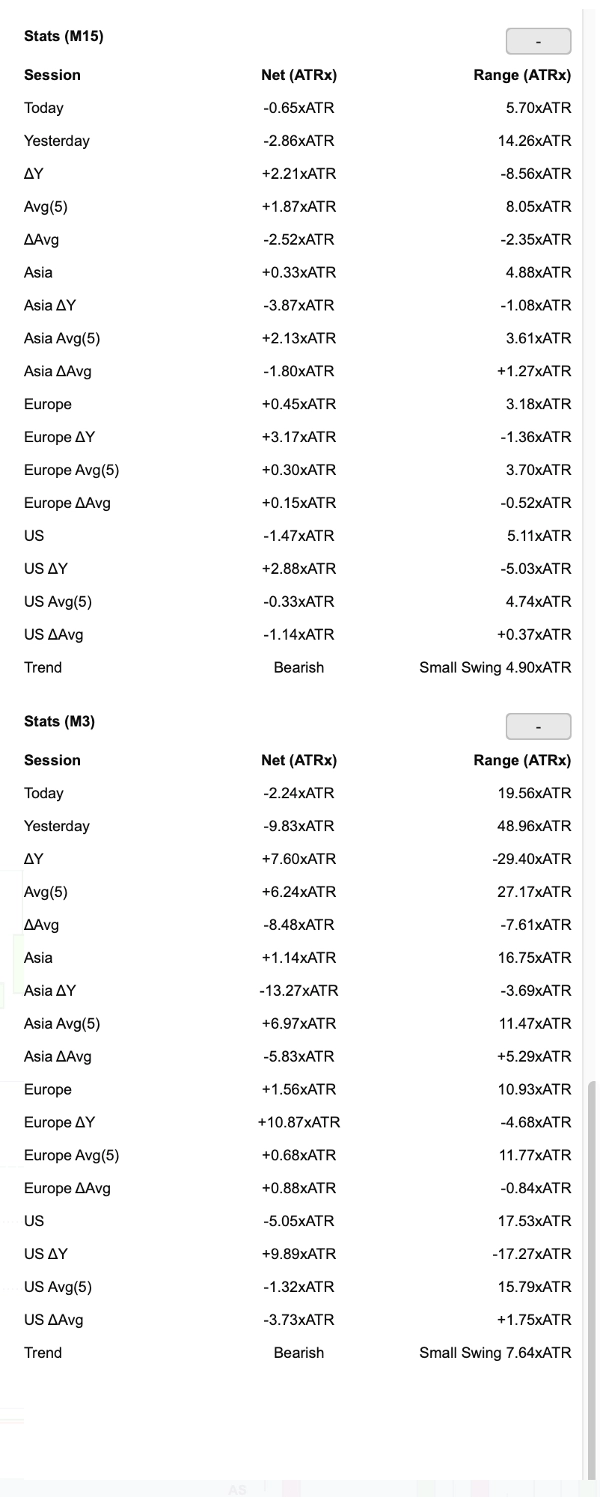
- Sitzungsstatistiken für Hauptzeitrahmen und M3 (wenn aktiviert): Heute, Gestern, ΔY, Durchschnitt, ΔDurchschnitt, pro Sitzung (Asien/Europa/US) mit Delta- und Durchschnittszeilen
- Spalten: Nettowechsel (ATRx), Bereich (ATRx)
- Trendzeile: Richtung (bullisch/bärisch) + Schwunggröße
Einblicke Abschnitt (abgeleitet aus den obigen Statistikdaten):
- Kontextuelle Marktinterpretation für Hauptzeitrahmen und M3
- Bezieht sich auf: Gestern, Heute, Vorherige Sitzung, Aktuelle Sitzung
- Jeder Einblick kombiniert Trendausrichtung, Volatilitätsniveau, Schwunggröße → umsetzbare Anleitung (z.B. „Starker Trend, auf Pullback achten“ oder „Gegen-Trend volatil, Vorsicht verwenden“)
Verlauf:
- Automatisches Kettenladen des Verlaufs in Richtung des Algorithmusfensterziels. Wenn der Verlauf nicht vollständig vom Broker/Server bezogen werden kann, degradiert/einfriert SVR und zeigt den Zustand in der Panel-Statuszeile an.
- Signale/Verlauf werden lokal mit automatischer Bereinigung gespeichert
- Panel-Zustand wird lokal auf Ihrem Gerät gespeichert (kein externer Datentransfer)
════════════════════════════════════════════════════════════════════════════════
PARAMETER (Übersicht)
────────────────────────────────────────────────────────────────────────────────
1. Algorithmuseinstellungen
- ATR-Periode — Standard: 14
- ATR MA-Typ — Standard: Wilder Glättung
- EMA-Periode — Standard: 21
- ATR Mittelwertperiode (Vol) — Standard: 34
- Struktur-Rückblick — Standard: 20
- Fraktal Links/Rechts Balken — Standard: 20 / 2
- Struktur-Schwung (ATRx) Schwellenwert — Standard: 1.25
- Niedrige Vol ATR/Mittel — Standard: 1.1
- Hohe Vol ATR/Mittel — Standard: 1.25
- Niedrige Vol Mindestbalken — Standard: 2
- Algo-Fenstertage — Standard: 20 (bis zu 90)
────────────────────────────────────────────────────────────────────────────────
2. Signaleinstellungen
- Pullback-Einstieg erlauben (PB) — Standard: EIN
- PB-Bestätigungsmodus — Standard: Aus (Optionen: Aus / Basis / Stark)
- Ausbruch erlauben (BO) — Standard: EIN
- BO Filter Hochvol — Standard: EIN
- BO Körper/ATR Mindestwert — Standard: 0.4
- Pyramiding erlauben — Standard: AUS
- M3-Signale verwenden — Standard: EIN (automatisch deaktiviert, wenn Ihr Chart-Zeitrahmen M3 ist)
- Mindestabstand Einstiegsbalken — Standard: 2
- Ausstieg bei hoher Volatilität (HV) — Standard: EIN
- Ausstieg bei Umkehr (REV) — Standard: EIN
- Ausstieg bei Resonanz (RES) — Standard: AUS
- REV-Bestätigung aktivieren — Standard: EIN
- REV-Bestätigungsbalken — Standard: 2
- REV-Kreuzfilter — Standard: ATR-Abstand (Alternative: Nur EMA-Seite)
- Fib PB Limit aktivieren — Standard: EIN
- Fib PB Limit Level — Standard: 78,6%
- Fib Retrace Exit aktivieren — Standard: EIN
- Fib Retrace Exit Level — Standard: 61,8%
- Fib Extension Exit aktivieren — Standard: EIN
- Fib Extension Exit Level — Standard: 123,6%
- Signal Fib Updates aktivieren (FibUpd) — Standard: AUS
────────────────────────────────────────────────────────────────────────────────
3. Sitzungseinstellungen
- Sitzungsbänder anzeigen — Standard: EIN
- Sitzungsbandhöhe / Opazität — konfigurierbar
- IB anzeigen — Standard: EIN
- HL-Linien anzeigen / OC-Linien anzeigen — Standard: EIN
- IB-Blockgröße (Min) / Anzahl — Standard: 30 / 2
- Sitzungsbandfarben — eingebaute Palette (themenangepasst)
────────────────────────────────────────────────────────────────────────────────
4. Struktureinstellungen
- Fraktale anzeigen — Standard: AUS
- ZigZag aktivieren — Standard: AUS
- Signal Fib anzeigen — Standard: AUS
- Individuelle SignalFib-Level-Sichtbarkeitsschalter (einschließlich Erweiterungen)
────────────────────────────────────────────────────────────────────────────────
5. Anzeigeeinstellungen
- Sprache — Chinesisch / Englisch, standardmäßig Englisch
- Zeichenthema — Hell / Dunkel
- Markt 7*24 Modus — Auto / Erzwingen Ein / Erzwingen Aus
- Panel anzeigen / Panelposition / Paneltextfarbe
- Ein-/Ausstiegssignale anzeigen — konfigurierbar
────────────────────────────────────────────────────────────────────────────────
6. Verlaufseinstellungen
- Verlauf anzeigen — Standard: EIN
- Verlaufstage — Standard: 10 (bis zu 90)
- Durchschnittstage (Panel) — Standard: 5
════════════════════════════════════════════════════════════════════════════════
WICHTIGE HINWEISE
ADAPTIVE SCHWELLENWERTE
Tatsächliche Schwellenwerte, die von der Signal-Engine verwendet werden, sind adaptive Werte, die aus aktuellen Daten abgeleitet werden. Parameter-Standardwerte sind nur Startanker.
SITZUNGSZEITEN
Sitzungen folgen einem Forex-Tagesanker (18:00 New York Eröffnung) und werden automatisch auf Chartzeit abgebildet. Für kontinuierliche 7*24 Märkte (z.B. Krypto) wird automatische Erkennung über Markt 7*24 Modus (Auto / Erzwingen Ein / Erzwingen Aus) unterstützt.
VERLAUFSLADE
SVR lädt die Historie automatisch kettenweise in Richtung des Algorithmusfensterziels. Wenn der Verlauf nicht vollständig vom Broker/Server bezogen werden kann, degradiert/einfriert SVR und zeigt den Zustand in der Panel-Statuszeile an.
NICHT-REPAINTENDER BEREICH
Bestätigte fraktale Schwünge und bestätigte historische Signale repainten nicht. Die sich noch bildende Kerze und der aktive In-Progress-Zustand können sich aktualisieren, wenn neue Daten eintreffen.
INDIKATOR, KEIN BOT
SVR ist ein analytischer Indikator, kein automatisierter Handelsroboter (cBot). Er platziert keine Aufträge, verwaltet keine Positionen und führt keine Risikokontrollen für Sie aus.
TESTVERSION
Eine 7-tägige Testversion ist im cTrader Store verfügbar.
════════════════════════════════════════════════════════════════════════════════
SUPPORT
Wenn Sie Fragen oder Feedback haben, kontaktieren Sie uns bitte über den cTrader Store.
Vielen Dank, dass Sie sich für SessionVolatility-Radar entschieden haben.