Açıklama
En son sürüm aşağıdaki bağlantıda güncellenmiştir:
https://ctrader.com/products/2100 (cbot)
https://ctrader.com/products/2101 (indicator)
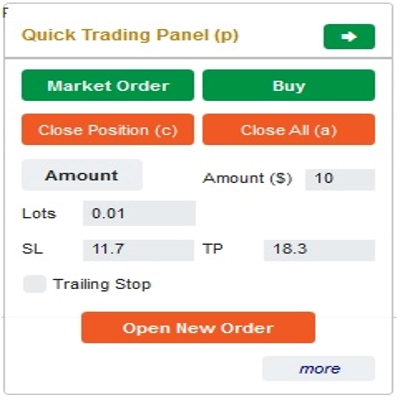
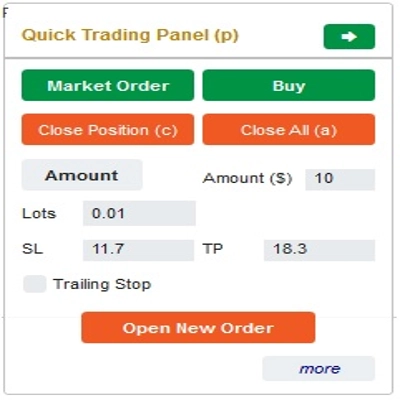
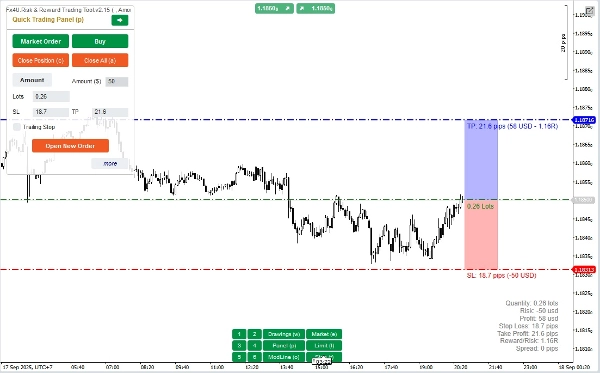
Bu, tüccarların sadece bir tıklamayla emir açıp/kapatmalarına/emirleri hızlıca değiştirmelerine yardımcı olan bir araçtır. Bu araç, her emir için risk miktarına ve seçtiğiniz StopLoss'a göre Lot sayısını zaten hesaplamıştır. Hem canlı ticaret için Gerçek Zamanlı modda hem de stratejilerinizi test etmek için Geri Test modunda çalışabilir.
Önemli not:
- "Mavi düğmeler" durum değiştirme düğmeleridir (Piyasa Emri => Limit Emri => Stop Emri => Piyasa Emri; Alış => Satış => Alış)
- "Kırmızı düğmeler" "İşlem" düğmeleridir. => Bir emir açmak için "Yeni Emir Aç" düğmesini kullanın; pozisyon kapatmak için "Pozisyonu Kapat" düğmesini veya "Hepsini Kapat" düğmesini kullanın; Bekleyen Emri iptal etmek için "Emri İptal Et" düğmesini veya "Hepsini Kapat" düğmesini kullanın.
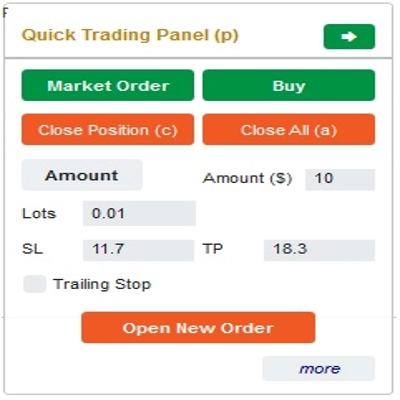
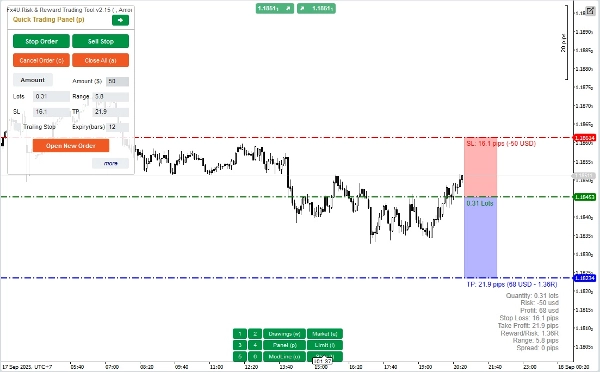
“Hızlı Ticaret Paneli”nde:
ALIŞ ve SATIŞ emirleri arasında geçiş yapmak için, grafikteki StopLoss çizgisini Giriş Çizgisinin üstüne veya altına sürükleyebilirsiniz.
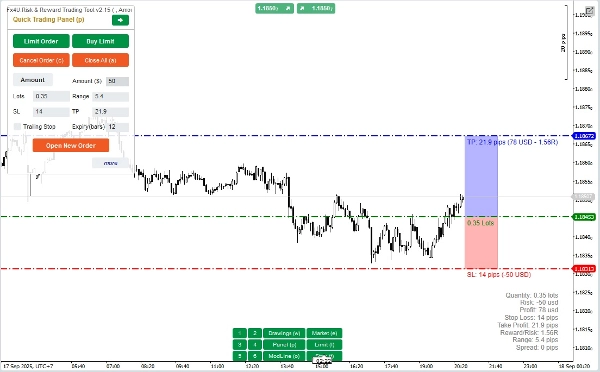
– Hem piyasa emirlerini hem de Limit veya Stop emirlerini açıp kapatabilirsiniz.
– Her emir için %Bakiye veya sabit emir miktarı olarak emir tutarını ayarlayabilirsiniz. Bu tutar ve seçtiğiniz StopLoss'a göre bot, emri açmak için Lot sayısını otomatik olarak hesaplar.
– StopLoss, TakeProfit veya Giriş Fiyatını (bekleyen emirler için) “Hızlı Ticaret Paneli”nde SL, TP veya Aralık sayılarını değiştirerek veya grafikteki yatay çizgileri sürükleyerek düzenleyebilirsiniz.
– SL, TP ve Aralık (bekleyen emirler için) Pips cinsinden hesaplanırken, Süre (dakika) Dakika cinsinden hesaplanır (Süre kullanmıyorsanız 0 veya boş bırakın)
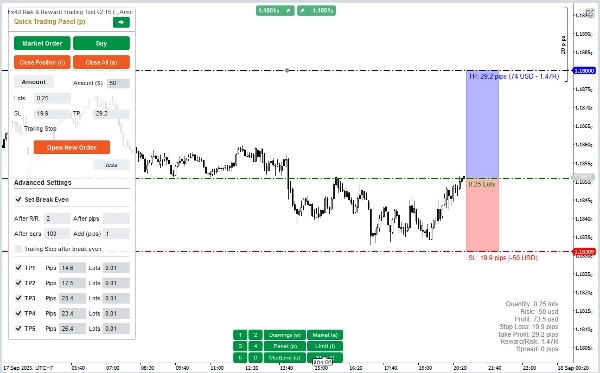
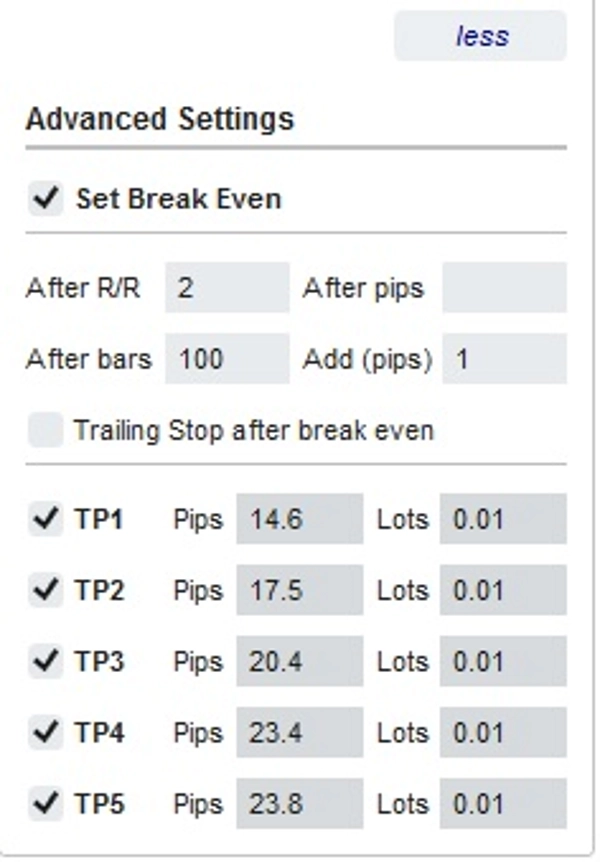
– Ayrıca size izin veren gelişmiş ayarlar bölümü vardır (Not: Gelişmiş Ayarlar sadece gösterge aktifken):
+ Fiyat belirli bir Pip hareket ettiğinde ("Sonra Pipler") veya fiyat pozitif "R/R" kere Stoploss hareket ettiğinde ("Sonra R/R") ya da emir açıldıktan sonra "n" bar sonra ("Sonra Barlar") "Break Even" ayarlayın
+ Seçmeniz için 5 seviyeli "Gelişmiş Kar Al" seçeneği sunar
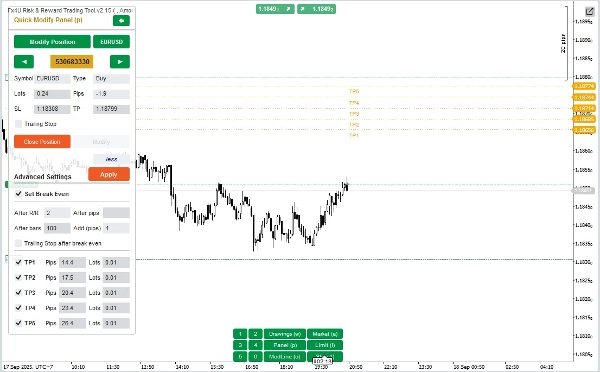
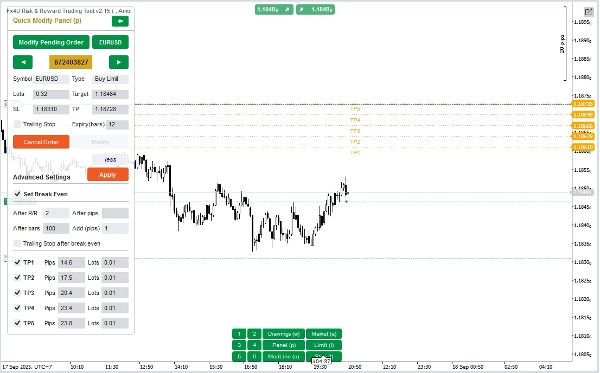
“Hızlı Değiştirme Paneli”nde:
– Bu Panelde emirleri kapatabilir veya StopLoss (Fiyatlarda), TakeProfit (Fiyatlarda), TrailingStop veya Aralık (Pips cinsinden) ve Süre (Dakika cinsinden) gibi emir parametrelerini düzenleyebilirsiniz
(Bu panelde StopLoss ve TakeProfit'in, taşımayı planladığınız fiyatlar olduğunu unutmayın)
– Bu Panelde ayrıca panelde sayı ile veya grafikte yatay çizgiyi istenen konuma sürükleyerek StopLoss, TakeProfit veya Aralık (Pips cinsinden) değiştirebilirsiniz.
– Panelde, o emirlerin parametrelerini görüntülemek için emirler arasında ileri geri geçiş yapabilirsiniz
Not: Sarı dikdörtgendeki sayı, düzenleme için seçilen emrin ID numarasıdır
– Ayrıca size izin veren gelişmiş ayarlar bölümü vardır (Not: Gelişmiş Ayarlar sadece gösterge aktifken):
+ Fiyat belirli bir Pip hareket ettiğinde ("Sonra Pipler") veya fiyat pozitif "R/R" kere Stoploss hareket ettiğinde ("Sonra R/R") ya da emir açıldıktan sonra "n" bar sonra ("Sonra Barlar") "Break Even" ayarını düzenleyin
+ Seçmeniz için 5 seviyeli "Gelişmiş Kar Al" ayarını düzenleyin
Başarılı işlemler dileriz!
Özet
Key features include a Quick Trading Panel for adjusting buy/sell orders by dragging stop loss lines on the chart, setting order amounts as a percentage of balance or fixed value, and editing stop loss, take profit, and entry prices either numerically or via chart interaction. Stop loss, take profit, and range parameters are measured in pips, while order expiry is set in minutes.
An advanced settings section allows configuration of break-even triggers based on price movement in pips, risk/reward multiples, or elapsed bars, as well as multi-level take profit targets with up to five levels.
The Quick Modifying Panel supports closing orders and editing parameters such as stop loss, take profit, trailing stop, range, and expiry, with visual order selection by ID. The tool supports major markets including Forex (e.g., EURUSD, GBPUSD), Crypto, and commodities like XAUUSD (gold).
Müşteri değerlendirmeleri
5 | 0 % | |
4 | 100 % | |
3 | 0 % | |
2 | 0 % | |
1 | 0 % |
!["[Fx4U] GBPUSD - Price Action" logosu](https://cdn.ctrader.com/image/webp/d80b34fc-da3c-4f01-a321-456450665649_26190)
!["[Fx4U] CADJPY - Price Action" logosu](https://cdn.ctrader.com/image/webp/1ba81247-b6b7-4f3c-a297-fa3eb1d57fe1_26195)

!["[Fx4U] EURAUD - Price Action" logosu](https://cdn.ctrader.com/image/webp/baf8dde4-1ef3-4beb-8ae2-0fed8320f65d_26177)

!["[Fx4U] AUDCHF - Price Action" logosu](https://cdn.ctrader.com/image/webp/0a22e9aa-c83b-42cd-b0b8-c1a2da593207_26148)