
Descripción
🛡️ Presentamos Account Guardian PRO — Versión 2.0
Nos complace anunciar el lanzamiento de la versión actualizada de Account Guardian PRO. Tras los comentarios de los usuarios y una revisión exhaustiva del código, esta actualización aborda correcciones críticas en la lógica de protección contra drawdown, ofreciendo una herramienta de gestión de riesgos más fiable y robusta para su cuenta de trading.
Si ya ha comprado una versión anterior, tiene derecho a recibir esta actualización completamente gratis. Simplemente contáctenos en Discord y nuestro equipo le proporcionará la última versión rápidamente.
Aquí tiene un resumen conciso de todos los cambios realizados en el cBot en comparación con la versión original:
1. La gestión de estado fue reemplazada por un enum (BotState) El original usaba dos flags booleanos (_isClosing y _stopForPeriod) que podían entrar en conflicto. Ambos fueron reemplazados por un único enum BotState con tres estados claros: Running, StoppedForPeriod y HaltedForLoss. Esta fue la causa raíz de que el bloqueo DD no funcionara — _isClosing se reiniciaba a false en el mismo tick en que se establecía a true, por lo que la acción se disparaba pero el estado se borraba inmediatamente.
2. El reinicio del período ahora siempre se ejecuta El original OnTick() retornaba temprano si no había posiciones abiertas (Positions.Count == 0), lo que impedía que las líneas base diarias y semanales del balance se actualizaran. La lógica de reinicio ahora se extrae en un método dedicado CheckPeriodReset() que se ejecuta en cada tick sin excepción.
3. La línea base inicial usa Equity en lugar de Balance _initialAccountBalance se establecía usando Account.Balance al iniciar. Si ya había posiciones abiertas con P&L flotante, el cálculo total del drawdown estaba incorrecto desde el principio. Ahora usa Account Equity para una línea base precisa.
4. ClosePosition() ahora verifica el resultado El original llamaba a ClosePosition() silenciosamente sin manejo de errores. La versión corregida verifica result.IsSuccessful y registra una advertencia si una posición no se cierra (por ejemplo, mercado cerrado, error del broker).
5. La pausa del período se reinicia correctamente en nuevo día/semana En el original, _stopForPeriod se reiniciaba dentro del bloque de verificación de fecha solo si OnTick() llegaba a ese punto — lo cual no ocurría si no había posiciones abiertas. Ahora el reinicio ocurre de forma fiable dentro de CheckPeriodReset().
6. Los parámetros usan etiquetas explícitas de Enable Las etiquetas booleanas de los parámetros fueron cambiadas de cadenas decorativas como "--- DAILY DRAWDOWN ---" a nombres funcionales como "Enable Daily Drawdown Limit", que se muestran correctamente en la interfaz de cTrader.
7. Método auxiliar GetWeek() extraído El cálculo de la semana del año estaba duplicado en el original. Ahora es un único método privado llamado donde sea necesario.
Account Guardian Pro es una herramienta poderosa y flexible para la gestión de su cuenta de trading. No es un bot que abra operaciones por sí solo, sino un copiloto automatizado 🧑✈️ para su trading manual. Su único propósito es hacer cumplir estrictamente sus reglas de riesgo y beneficio cerrando todas las posiciones abiertas cuando se alcanzan ciertos umbrales.
Piense en este bot como su gestor de riesgos personal que trabaja 24/7, permitiéndole concentrarse en su estrategia de trading con la tranquilidad de que una red de seguridad 🥅 siempre está activa.
¿Qué es PROP Account Guardian?
Cómo activar y usar el bot (Guía rápida) 🚀
Siga estos simples pasos para poner en marcha al guardián:
- Activación (El paso más importante) ✅
-
- Solo necesita ejecutar una sola instancia del bot para proteger toda su cuenta.
- Elija cualquier gráfico que desee 📉 (muchos traders usan un gráfico que no operan activamente, como AUD/CAD M1, solo para "alojar" el bot).
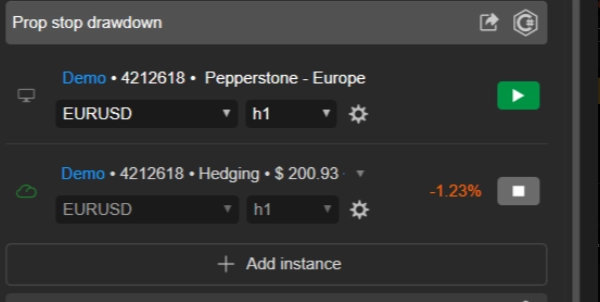
- Agregue la instancia del cBot
Account Guardian Proa ese único gráfico. - ¡No necesita abrir una instancia para cada activo que opere! ❌
- Configuración ⚙️
-
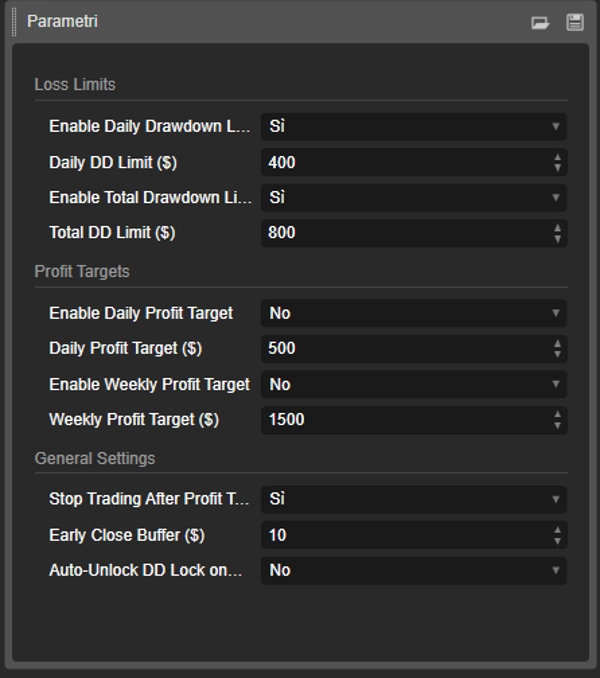
- Antes de presionar "Play," configure los parámetros del bot según su plan de trading. Decida qué límites de pérdida y objetivos de beneficio desea habilitar y con qué valores.
- Lanzar y monitorear ▶️
-
- Una vez configurados los parámetros, presione el botón "Play" en la instancia del cBot.
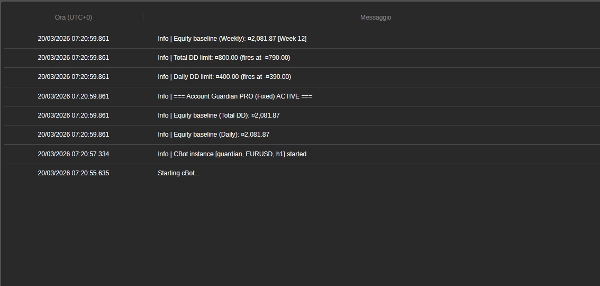
- Verá mensajes aparecer en la pestaña "Log" del bot 📜, confirmando que está activo y mostrando los límites que ha establecido.
- ¡Eso es todo! Ahora puede concentrarse en su trading manual. El bot funcionará silenciosamente en segundo plano y solo actuará cuando se cumpla alguna de sus reglas.
🚨 AVISO IMPORTANTE PARA TRADERS DE PROP FIRM 🚨
Este bot está equipado con un sistema de protección de equity de nivel profesional, esencial para aprobar los desafíos de prop firm. Para maximizar sus posibilidades de éxito, recomendamos encarecidamente no configurar el parámetro Max Daily Drawdown (%) del bot al mismo valor que el límite de su prop firm (por ejemplo, 4% o 5%).
💡 La estrategia ganadora: establezca un límite más estricto
La clave es usar el parámetro de drawdown del bot como su stop-loss diario personal y más conservador, manteniéndose bien dentro del límite absoluto de la prop firm.
🎯 Ejemplo práctico:
- Si su prop firm permite un 4% de drawdown diario...
- configure el parámetro
Max Daily Drawdown (%)del bot a 1% o 1.5%.
✅ Por qué funciona esto: Si tiene un día perdedor, el bot activará su Hard Stop tras una pérdida pequeña y controlada (por ejemplo, 1%). Esto protege su capital, lo mantiene lejos de violar las reglas de la prop firm y le permite operar nuevamente al día siguiente. Esta estrategia está diseñada para ayudarle a sobrevivir rachas perdedoras y aumentar dramáticamente su probabilidad de éxito a largo plazo.
🧠 Recuerde: El objetivo de un desafío no es arriesgar todo su buffer diario en un solo día, sino sobrevivir a largo plazo. Use los parámetros de riesgo del bot para imponer una disciplina férrea en su trading.
Desglose detallado de parámetros 📋
Aquí tiene una explicación de cada parámetro que encontrará en la interfaz del bot.
Grupo: Límites de pérdida 🛑
- EnableDailyDrawdownLimit (
Yes/No) -
- Explicación: Habilita (
Yes) o deshabilita (No) la verificación del drawdown máximo diario. - Cómo funciona: Si está habilitado, el bot calculará la pérdida máxima desde el balance de la cuenta al inicio del día.
- Explicación: Habilita (
- Límite diario de DD ($) (por ejemplo,
400.0) -
- Explicación: Establece la cantidad máxima de pérdida (en la moneda de su cuenta) que está dispuesto a aceptar en un solo día. Debe ser un número positivo.
- EnableTotalDrawdownLimit (
Yes/No) -
- Explicación: Habilita (
Yes) o deshabilita (No) la verificación del drawdown máximo total. - Cómo funciona: Si está habilitado, el bot calculará la pérdida máxima desde el balance que tenía cuando inició el bot por primera vez.
- Explicación: Habilita (
- Límite total de DD ($) (por ejemplo,
800.0) -
- Explicación: Establece la cantidad máxima total de pérdida que está dispuesto a aceptar.
Grupo: Objetivos de beneficio 🎯
- EnableDailyProfitTarget (
Yes/No) -
- Explicación: Habilita (
Yes) o deshabilita (No) el objetivo de beneficio diario.
- Explicación: Habilita (
- Objetivo de beneficio diario ($) (por ejemplo,
500.0) -
- Explicación: Establece la cantidad de beneficio diario en la que el bot cerrará todas las posiciones abiertas.
- EnableWeeklyProfitTarget (
Yes/No) -
- Explicación: Habilita (
Yes) o deshabilita (No) el objetivo de beneficio semanal.
- Explicación: Habilita (
- Objetivo de beneficio semanal ($) (por ejemplo,
1500.0) -
- Explicación: Establece la cantidad de beneficio semanal (calculado desde el lunes) en la que el bot cerrará todas las posiciones.
Grupo: Configuración general 🔧
- ¿Detener trading después de alcanzar el objetivo de beneficio? (
Yes/No) -
- Explicación: Este parámetro crucial decide qué sucede después de alcanzar un objetivo de beneficio.
- Si
Sí: El bot cierra todas las posiciones y deja de monitorear hasta el día (o semana) siguiente. Esta es la opción más segura para asegurar sus ganancias. 🔒 - Si
No: El bot cierra las posiciones pero continúa monitoreando. Si abre nuevas operaciones y estas van a pérdida, los límites de drawdown siguen activos y podrían activarse. 👀
- Buffer de cierre anticipado ($) (por ejemplo,
10.0) -
- Explicación: Este es su margen de seguridad 🛡️. La cantidad ingresada aquí se resta de sus límites de drawdown para crear un punto de activación anticipado.
- Ejemplo: Si su
Daily DD Limites $400 y suBufferes $10, el bot intervendrá y cerrará todo tan pronto como el drawdown alcance $390, asegurando que nunca alcance su límite máximo absoluto.
Resumen
Key features include:
- Daily and total drawdown limits to cap losses within set amounts.
- Daily and weekly profit targets that trigger position closures upon achievement.
- Configurable parameters with clear enable/disable options and safety buffers for early intervention.
- Robust state management ensuring reliable enforcement of drawdown protection.
- Continuous period resets for accurate baseline tracking of equity and balance.
- Error handling for position closures to ensure proper execution.
- Single-instance operation protecting the entire account, regardless of the number of traded assets.
The bot is suitable for various markets including Forex, indices, commodities, stocks, and cryptocurrencies. It supports swing trading with medium trade frequency and is compatible with prop firm trading challenges, advising conservative drawdown settings to enhance long-term survival.
Designed for use on any chart within the cTrader platform, PROP Account Guardian v.2 runs quietly in the background, providing 24/7 risk oversight aligned with your trading plan.
Valoraciones de clientes
5 | 0 % | |
4 | 100 % | |
3 | 0 % | |
2 | 0 % | |
1 | 0 % |