
Description
🛡️ Présentation d'Account Guardian PRO — Version 2.0
Nous sommes heureux d'annoncer la sortie de la version mise à jour d'Account Guardian PRO. Suite aux retours des utilisateurs et à un examen approfondi de la base de code, cette mise à jour corrige des erreurs critiques dans la logique de protection contre le drawdown, offrant un outil de gestion des risques plus fiable et robuste pour votre compte de trading.
Si vous avez déjà acheté une version précédente, vous avez droit à cette mise à jour complètement gratuite. Il vous suffit de nous contacter sur Discord et notre équipe vous fournira rapidement la dernière version.
Voici un résumé concis de tous les changements apportés au cBot par rapport à la version originale :
1. Gestion d'état remplacée par un enum (BotState) L'original utilisait deux indicateurs booléens (_isClosing et _stopForPeriod) qui pouvaient entrer en conflit. Les deux ont été remplacés par un seul enum BotState avec trois états clairs : Running, StoppedForPeriod, et HaltedForLoss. C'était la cause principale du blocage DD ne fonctionnant pas — _isClosing était réinitialisé à false dans la même tick où il était mis à true, donc l'action se déclenchait mais l'état était immédiatement effacé.
2. La réinitialisation de la période est maintenant toujours exécutée L'original OnTick() retournait prématurément s'il n'y avait pas de positions ouvertes (Positions.Count == 0), ce qui empêchait la mise à jour des bases de référence du solde quotidien et hebdomadaire. La logique de réinitialisation est maintenant extraite dans une méthode dédiée CheckPeriodReset() qui s'exécute à chaque tick quoi qu'il arrive.
3. La base de référence initiale utilise Equity au lieu de Balance _initialAccountBalance était défini en utilisant Account.Balance au démarrage. S'il y avait déjà des positions ouvertes avec un P&L flottant, le calcul total du drawdown était erroné dès le départ. Il utilise maintenant Account Equity pour une base de référence précise.
4. ClosePosition() vérifie maintenant le résultat L'original appelait ClosePosition() silencieusement sans gestion d'erreur. La version corrigée vérifie result.IsSuccessful et enregistre un avertissement si une position ne se ferme pas (par exemple marché fermé, erreur du courtier).
5. La pause de période se réinitialise correctement au nouveau jour/semaine Dans l'original, _stopForPeriod était réinitialisé dans le bloc de vérification de date seulement si OnTick() atteignait ce point — ce qui n'arrivait pas s'il n'y avait pas de positions ouvertes. La réinitialisation se fait maintenant de manière fiable dans CheckPeriodReset().
6. Les paramètres utilisent des étiquettes explicites Enable labels Les étiquettes des paramètres booléens ont été changées de chaînes décoratives comme "--- DAILY DRAWDOWN ---" à des noms fonctionnels comme "Enable Daily Drawdown Limit", qui s'affichent correctement dans l'interface cTrader.
7. Méthode d'assistance GetWeek() extraite Le calcul de la semaine de l'année était dupliqué dans l'original. C'est maintenant une méthode privée unique appelée partout où nécessaire.
Account Guardian Pro est un outil de gestion puissant et flexible pour votre compte de trading. Ce n'est pas un bot qui ouvre des trades de manière autonome, mais plutôt un copilote automatisé 🧑✈️ pour votre trading manuel. Son seul but est de faire respecter strictement vos règles de risque et de profit en fermant toutes les positions ouvertes lorsque certains seuils sont atteints.
Considérez ce bot comme votre gestionnaire de risque personnel travaillant 24h/24 et 7j/7, vous permettant de vous concentrer sur votre stratégie de trading avec la tranquillité d'esprit qu'un filet de sécurité 🥅 est toujours actif.
Qu'est-ce que PROP Account Guardian ?
Comment activer et utiliser le bot (Guide rapide) 🚀
Suivez ces étapes simples pour mettre le guardian en marche :
- Activation (L'étape la plus importante) ✅
-
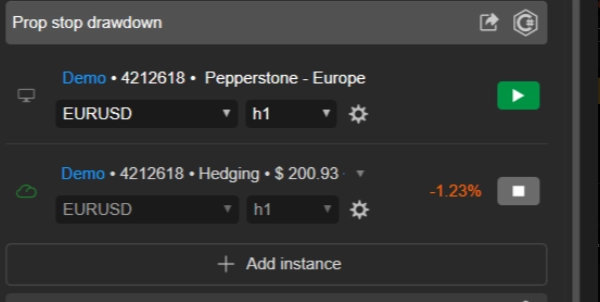
- Vous n'avez besoin de lancer qu'une seule instance du bot pour protéger l'ensemble de votre compte.
- Choisissez n'importe quel graphique que vous souhaitez 📉 (beaucoup de traders utilisent un graphique qu'ils ne tradent pas activement, comme AUD/CAD M1, juste pour "héberger" le bot).
- Ajoutez l'instance cBot
Account Guardian Proà ce seul graphique. - Vous n'avez pas besoin d'ouvrir une instance pour chaque actif que vous tradez ! ❌
- Configuration ⚙️
-
- Avant d'appuyer sur "Play", configurez les paramètres du bot selon votre plan de trading. Décidez quelles limites de perte et objectifs de profit vous souhaitez activer et avec quelles valeurs.
- Lancement & Surveillance ▶️
-
- Une fois les paramètres définis, appuyez sur le bouton "Play" sur l'instance cBot.
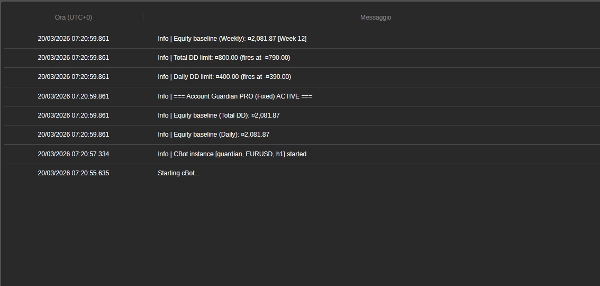
- Vous verrez apparaître des messages dans l'onglet "Log" du bot 📜, confirmant qu'il est actif et affichant les limites que vous avez définies.
- C'est tout ! Vous pouvez maintenant vous concentrer sur votre trading manuel. Le bot fonctionnera discrètement en arrière-plan et n'interviendra que lorsqu'une de vos règles sera atteinte.
🚨 AVIS IMPORTANT POUR LES TRADERS DE PROP FIRM 🚨
Ce bot est équipé d'un système de protection de l'équité de qualité professionnelle, essentiel pour réussir les challenges de prop firm. Pour maximiser vos chances de succès, nous déconseillons fortement de régler le paramètre Max Daily Drawdown (%) du bot à la même valeur que la limite de votre prop firm (par exemple, 4 % ou 5 %).
💡 La stratégie gagnante : Fixez une limite plus stricte
L'astuce est d'utiliser le paramètre de drawdown du bot comme votre stop-loss quotidien personnel, plus conservateur, en restant bien en dessous de la limite absolue de la prop firm.
🎯 Exemple pratique :
- Si votre prop firm autorise un drawdown quotidien de 4%...
- réglez le paramètre
Max Daily Drawdown (%)du bot à 1% ou 1,5%.
✅ Pourquoi cela fonctionne : Si vous subissez une journée perdante, le bot déclenchera son arrêt dur après une petite perte contrôlée (par exemple, 1 %). Cela protège votre capital, vous maintient loin de la violation des règles de la prop firm et vous permet de trader à nouveau le lendemain. Cette stratégie est conçue pour vous aider à survivre aux séries de pertes et augmenter considérablement vos chances de succès à long terme.
🧠 Rappelez-vous : Le but d'un challenge n'est pas de risquer toute votre marge quotidienne en une seule journée, mais de survivre à long terme. Utilisez les paramètres de risque du bot pour imposer une discipline de fer à votre trading.
Détail des paramètres 📋
Voici une explication de chaque paramètre que vous trouverez dans l'interface du bot.
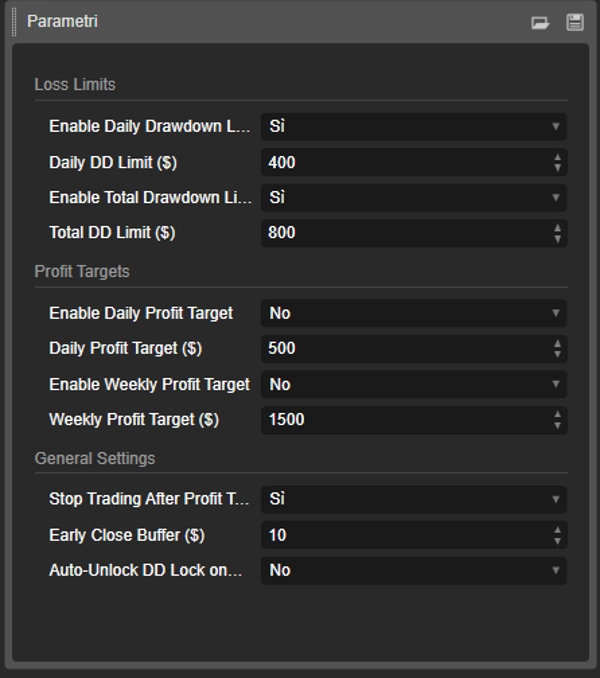
Groupe : Limites de perte 🛑
- EnableDailyDrawdownLimit (
Oui/Non) -
- Explication : Active (
Oui) ou désactive (Non) la vérification du drawdown maximal quotidien. - Fonctionnement : Si activé, le bot calculera la perte maximale à partir du solde du compte au début de la journée.
- Explication : Active (
- Limite DD Quotidienne ($) (par exemple,
400.0) -
- Explication : Définit le montant maximal de perte (dans la devise de votre compte) que vous êtes prêt à accepter en une seule journée. Ce doit être un nombre positif.
- EnableTotalDrawdownLimit (
Oui/Non) -
- Explication : Active (
Oui) ou désactive (Non) la vérification du drawdown maximal total. - Fonctionnement : Si activé, le bot calculera la perte maximale à partir du solde que vous aviez au démarrage du bot.
- Explication : Active (
- Limite DD Totale ($) (par exemple,
800.0) -
- Explication : Définit le montant maximal total de perte que vous êtes prêt à accepter.
Groupe : Objectifs de profit 🎯
- EnableDailyProfitTarget (
Oui/Non) -
- Explication : Active (
Oui) ou désactive (Non) l'objectif de profit quotidien.
- Explication : Active (
- Objectif de profit quotidien ($) (par exemple,
500.0) -
- Explication : Définit le montant de profit quotidien auquel le bot fermera toutes les positions ouvertes.
- EnableWeeklyProfitTarget (
Oui/Non) -
- Explication : Active (
Oui) ou désactive (Non) l'objectif de profit hebdomadaire.
- Explication : Active (
- Objectif de profit hebdomadaire ($) (par exemple,
1500.0) -
- Explication : Définit le montant de profit hebdomadaire (calculé à partir du lundi) auquel le bot fermera toutes les positions.
Groupe : Paramètres généraux 🔧
- Arrêter le trading après l'objectif de profit ? (
Oui/Non) -
- Explication : Ce paramètre crucial décide ce qui se passe après qu'un objectif de profit est atteint.
- Si
Oui: Le bot ferme toutes les positions et arrête la surveillance jusqu'au lendemain (ou à la semaine suivante). C'est l'option la plus sûre pour sécuriser vos profits. 🔒 - Si
Non: Le bot ferme les positions mais continue la surveillance. Si vous ouvrez de nouvelles positions et qu'elles deviennent perdantes, les limites de drawdown sont toujours actives et peuvent être déclenchées. 👀
- Marge de fermeture anticipée ($) (par exemple,
10.0) -
- Explication : C'est votre marge de sécurité 🛡️. Le montant saisi ici est soustrait de vos limites de drawdown pour créer un point de déclenchement anticipé.
- Exemple : Si votre
Limite DD Quotidienneest de 400 $ et votreBufferest de 10 $, le bot interviendra et fermera tout dès que le drawdown atteindra 390 $, vous assurant de ne jamais atteindre votre limite maximale absolue.
Résumé
Key features include:
- Daily and total drawdown limits to cap losses within set amounts.
- Daily and weekly profit targets that trigger position closures upon achievement.
- Configurable parameters with clear enable/disable options and safety buffers for early intervention.
- Robust state management ensuring reliable enforcement of drawdown protection.
- Continuous period resets for accurate baseline tracking of equity and balance.
- Error handling for position closures to ensure proper execution.
- Single-instance operation protecting the entire account, regardless of the number of traded assets.
The bot is suitable for various markets including Forex, indices, commodities, stocks, and cryptocurrencies. It supports swing trading with medium trade frequency and is compatible with prop firm trading challenges, advising conservative drawdown settings to enhance long-term survival.
Designed for use on any chart within the cTrader platform, PROP Account Guardian v.2 runs quietly in the background, providing 24/7 risk oversight aligned with your trading plan.
Avis clients
5 | 0 % | |
4 | 100 % | |
3 | 0 % | |
2 | 0 % | |
1 | 0 % |