
Deskripsi
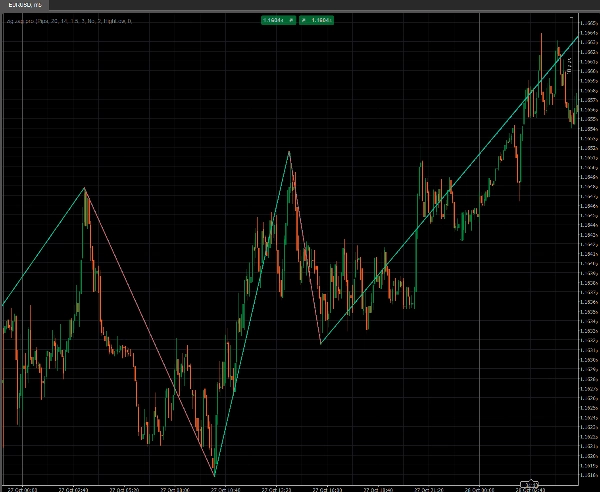
ZigZag Pro — Deteksi ayunan lanjutan dengan ambang ATR, konfirmasi fraktal, dan segmen berwarna. Struktur pasar yang bersih, pivot terkonfirmasi yang tidak mengecat ulang, kinerja dioptimalkan untuk grafik langsung.
Tagline: Deteksi ayunan lanjutan dengan ambang ATR, Konfirmasi Fraktal, dan Segmen Berwarna. Pivot yang terkonfirmasi adalah tidak mengecat ulang.
Ikhtisar
ZigZag Pro dibuat untuk trader diskresioner dan sistematis yang membutuhkan pembacaan struktur pasar yang bersih dan dapat diulang. Ini mendeteksi ayunan yang berarti, memberi label pivot, dan menghubungkan kaki dengan segmen berwarna. Ambang pembalikan dapat otomatis (ATR) atau tetap (pips/persen), sehingga indikator ini menyesuaikan dengan instrumen dan rezim volatilitas yang berbeda.
Mengapa memilih Pro
- ✅ Ambang ATR Dinamis dengan periode dan pengali
- ✅ Konfirmasi Fraktal (opsional) untuk validasi pivot yang lebih kuat
- ✅ Segmen Berwarna (Naik/Turun) untuk membaca arah impuls secara instan
- ✅ Label Pivot (H/L + harga terformat), opsional
- ✅ Sumber harga diperluas: HL / Close / HL2 / HLC3 / HLCC4
- ✅ Filter Min TickVolume (0 = mati)
- ✅ Pratinjau kaki terakhir langsung (perluasan opsional)
Pivot yang terkonfirmasi tidak mengecat ulang. Hanya kaki terakhir yang belum selesai yang dapat bergerak sampai pivot berikutnya terkonfirmasi (perilaku ZigZag standar).
Fitur Utama
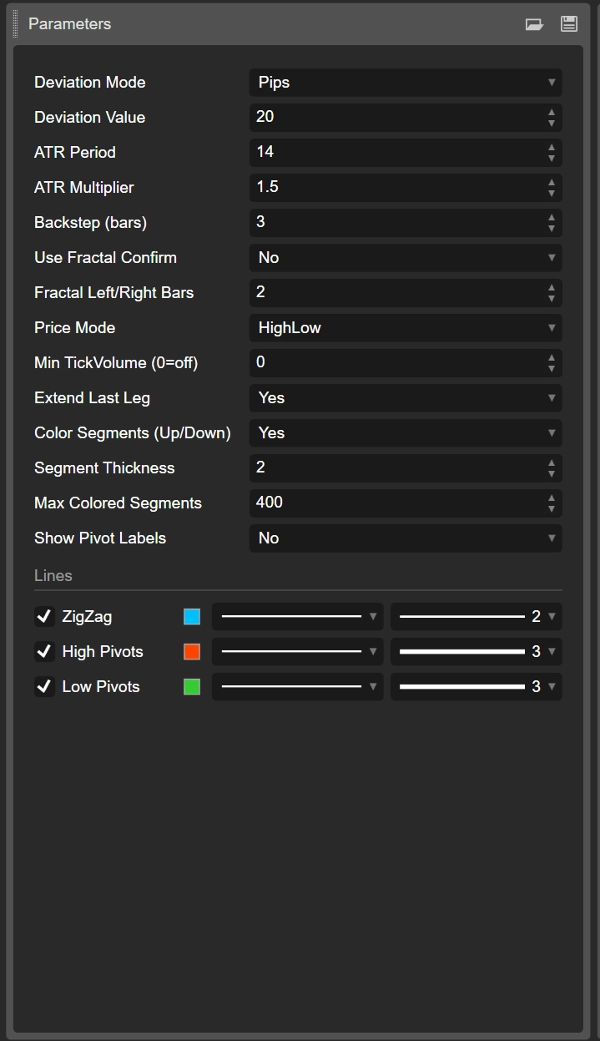
- Mode Deviasi: Pips • Persen • ATR (ATR Eksponensial)
- Mode Harga: Tinggi/Rendah • Tutup • Median (HL2) • Tipikal (HLC3) • Tertimbang (HLCC4)
- Konfirmasi Fraktal: bilah kiri/kanan yang dapat dikonfigurasi
- Backstep: jumlah minimum bar antara pivot berturut-turut
- Segmen Garis Tren: berwarna Naik/Turun, ketebalan & jumlah maksimum
- Label Pivot: H/L bersih + harga terformat
Parameter Kunci (Referensi Cepat)
- Mode Deviasi, Nilai Deviasi → ambang pembalikan
- Periode ATR, Pengali ATR → hanya digunakan dalam mode ATR
- Mode Harga → sumber harga untuk perhitungan
- Backstep (bar) → menyaring ayunan kecil
- Gunakan Konfirmasi Fraktal, Bilah Kiri/Kanan Fraktal → konfirmasi pivot
- Min TickVolume (0=matikan) → menyaring bar dengan aktivitas rendah
- Segmen Berwarna, Ketebalan Segmen, Maks Segmen Berwarna → visual & kinerja
- Perpanjang Kaki Terakhir, Tampilkan Label Pivot → keterbacaan waktu nyata
Cara Menggunakan
- Otomatisasi → Indikator → Baru: tempel dan kompilasi kode Pro.
- Terapkan ke grafik Anda. Mulai dengan Persen = 1–2% atau ATR = 1.0–1.5×.
- Pada pasar yang berisik, tingkatkan Backstep dan/atau aktifkan Konfirmasi Fraktal.
- Jika grafik menjadi penuh, kurangi Maks Segmen Berwarna atau nonaktifkan label.
Tips Trading
- Untuk simbol dengan volatilitas tinggi, pilih ATR; untuk pasangan FX utama, Pips sering kali lebih intuitif.
- Gunakan urutan pivot (HH/HL/LH/LL) untuk mengonfirmasi perubahan tren atau bias.
- Manajemen risiko: tempatkan stop di bawah/atas pivot terakhir yang terkonfirmasi; opsional gunakan trailing saat pivot baru terkonfirmasi.
Kinerja & Kompatibilitas
- Menggunakan API modern (
Bars.*,LineColor) dan AverageTrueRange bawaan. - Bekerja pada semua simbol dan kerangka waktu. Objek grafis dibatasi oleh Maks Segmen Berwarna untuk kinerja.
Ringkasan Penilaian
★★★★★ 4.8/5 — Keseimbangan kuat antara kejernihan visual dan kontrol lanjutan. Mode ATR dan Konfirmasi Fraktal membantu menekan pivot palsu selama fase turbulen.
Ringkasan
Key functionalities include color-coded trendline segments indicating upward or downward impulses, configurable pivot labels displaying high/low points with formatted prices, and multiple price source options such as High/Low, Close, Median, Typical, and Weighted prices. Users can filter minor swings with a backstep parameter and exclude low-activity bars using a minimum tick volume filter.
ZigZag Pro supports live chart performance with a preview of the last leg and limits graphical elements for efficiency. It is compatible with any symbol and timeframe, including Forex, indices, commodities, stocks, and cryptocurrencies like BTCUSD and EURUSD. Traders can customize deviation modes, ATR settings, fractal confirmation parameters, and visual aspects to suit different market conditions and trading styles.
The indicator facilitates trend and bias confirmation through pivot sequences and supports risk management by suggesting stop placements relative to confirmed pivots. It integrates modern APIs and built-in ATR calculations for robust and efficient operation.
Ulasan pelanggan
5 | 0 % | |
4 | 100 % | |
3 | 0 % | |
2 | 0 % | |
1 | 0 % |