
Descrizione
✅ UATKit è fornito gratuitamente come contributo di buona volontà alla comunità cTrader, creato da un trader professionista che comprende le sfide quotidiane dell'analisi dei grafici e dell'esecuzione.
⚠️Si prega di controllare periodicamente la pagina del prodotto per gli aggiornamenti, poiché cTrader non avvisa gli utenti quando vengono rilasciate nuove versioni degli indicatori.
⭐️ Sarebbe anche un piacere ricevere i vostri commenti e feedback nella Recensioni dei clienti e nelle Discussioni.
1. Cos'è questo prodotto
Un set completo di strumenti per migliorare il flusso di lavoro progettato per rendere il charting su cTrader più fluido, chiaro ed efficiente.
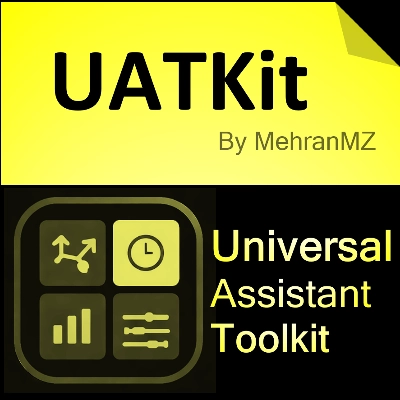
Universal Assistant Toolkit (UATKit) è un compagno multifunzione per il grafico di cTrader.
Riunisce diversi strumenti pratici - ciascuno progettato per risolvere una specifica esigenza di flusso di lavoro - in un unico indicatore leggero e unificato.
Ogni funzione di UATKit è completamente personalizzabile e opera in modo indipendente, dando ai trader il pieno controllo per regolare comportamento, aspetto e tasti rapidi, abilitando solo gli strumenti necessari per un'esperienza di charting pulita e reattiva.
UATKit è fornito gratuitamente come contributo di buona volontà alla comunità cTrader, creato da un trader professionista che comprende le sfide quotidiane dell'analisi dei grafici e dell'esecuzione.
2. Per chi è questo toolkit
UATKit è pensato per i trader che:
- Trascorrono molto tempo ad analizzare i grafici
- Preferiscono layout di grafici puliti, informativi e personalizzabili
- Desiderano un accesso più rapido alle azioni comuni tramite tasti rapidi
- Hanno bisogno di chiarezza visiva durante mercati in rapido movimento
- Apprezzano strumenti che migliorano il flusso di lavoro senza aggiungere rumore
Che tu faccia scalping, swing trading o semplicemente voglia un ambiente di charting più organizzato, UATKit si adatta al tuo stile.
3. Panoramica dei gruppi di funzionalità
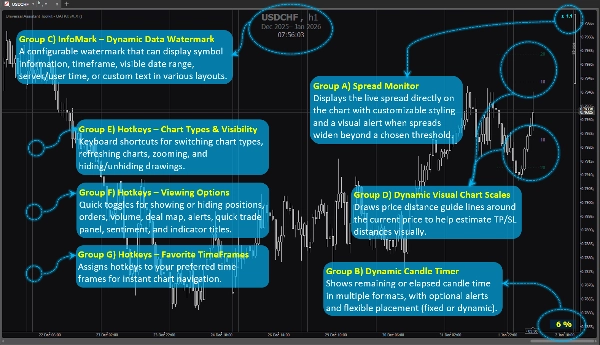
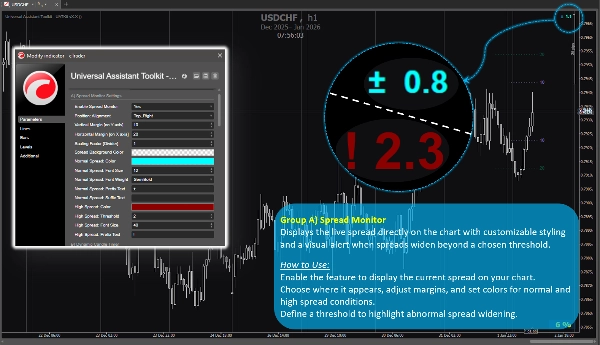
Gruppo di funzionalità A) 🔸 Monitoraggio Spread
Visualizza lo spread live direttamente sul grafico con uno stile personalizzabile e un avviso visivo quando gli spread si allargano oltre una soglia scelta.
Come usarlo:
Abilita la funzione per mostrare lo spread corrente sul tuo grafico.
Scegli dove appare, regola i margini e imposta i colori per condizioni di spread normali e elevate.
Definisci una soglia per evidenziare l'allargamento anomalo dello spread.
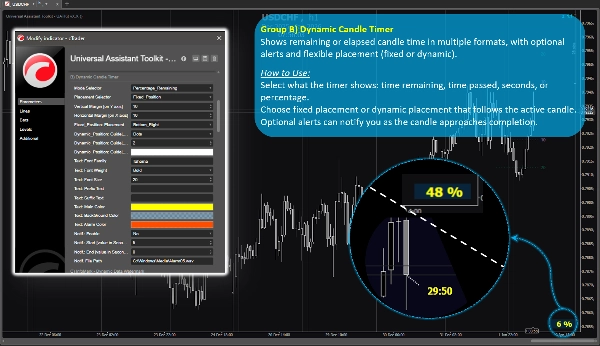
Gruppo di funzionalità B) 🔸 Timer Dinamico della Candela
Mostra il tempo rimanente o trascorso della candela in diversi formati, con avvisi opzionali e posizionamento flessibile (fisso o dinamico).
Come usarlo:
Seleziona cosa mostra il timer: tempo rimanente, tempo trascorso, secondi o percentuale.
Scegli posizionamento fisso o dinamico che segue la candela attiva.
Gli avvisi opzionali possono notificarti quando la candela sta per completarsi.
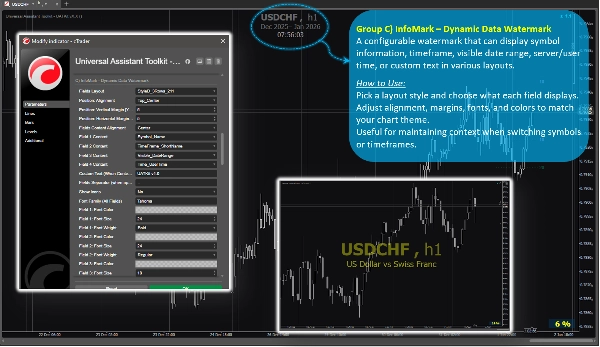
Gruppo di funzionalità C) 🔸 InfoMark – Filigrana Dinamica dei Dati
Una filigrana configurabile che può mostrare informazioni sul simbolo, timeframe, intervallo di date visibile, ora server/utente o testo personalizzato in vari layout.
Come usarlo:
Scegli uno stile di layout e cosa mostra ogni campo.
Regola allineamento, margini, font e colori per abbinare il tema del tuo grafico.
Utile per mantenere il contesto quando si cambiano simboli o timeframe.
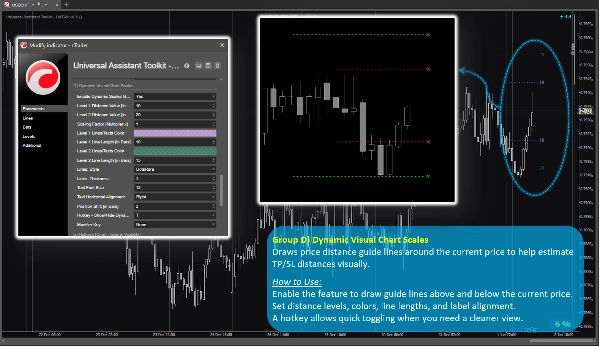
Gruppo di funzionalità D) 🔸 Scale Visive Dinamiche del Grafico
Disegna linee guida di distanza prezzo attorno al prezzo corrente per aiutare a stimare visivamente le distanze TP/SL.
Come usarlo:
Abilita la funzione per disegnare linee guida sopra e sotto il prezzo corrente.
Imposta livelli di distanza, colori, lunghezze delle linee e allineamento delle etichette.
Un tasto rapido permette di attivare/disattivare rapidamente quando serve una vista più pulita.
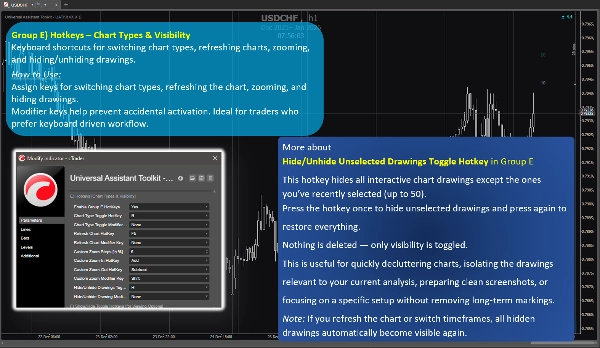
Gruppo di funzionalità E) 🔸 Tasti Rapidi – Tipi di Grafico e Visibilità
Scorciatoie da tastiera per cambiare tipi di grafico, aggiornare grafici, zoomare e nascondere/mostrare disegni.
Come usarlo:
Assegna tasti per cambiare tipi di grafico, aggiornare il grafico, zoomare e nascondere disegni.
I tasti modificatori aiutano a prevenire attivazioni accidentali. Ideale per trader che preferiscono un flusso di lavoro basato sulla tastiera.
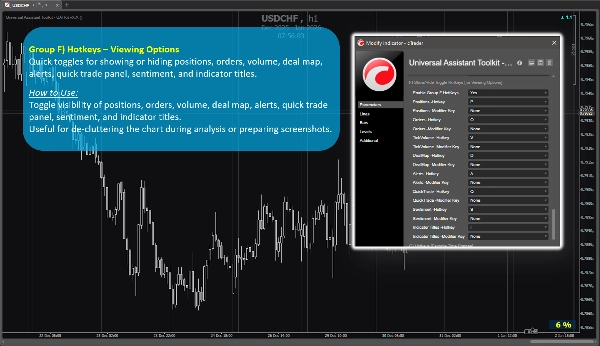
Gruppo di funzionalità F) 🔸 Tasti Rapidi – Opzioni di Visualizzazione
Toggle rapidi per mostrare o nascondere posizioni, ordini, volume, mappa degli scambi, avvisi, pannello di trading rapido, sentiment e titoli degli indicatori.
Come usarlo:
Attiva o disattiva la visibilità di posizioni, ordini, volume, mappa degli scambi, avvisi, pannello di trading rapido, sentiment e titoli degli indicatori.
Utile per ridurre il disordine del grafico durante l'analisi o per preparare screenshot.
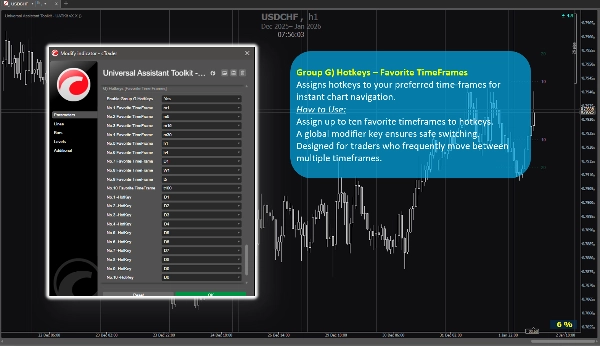
Gruppo di funzionalità G) 🔸 Tasti Rapidi – TimeFrame Preferiti
Assegna tasti rapidi ai tuoi timeframe preferiti per una navigazione istantanea del grafico.
Come usarlo:
Assegna fino a dieci timeframe preferiti ai tasti rapidi.
Un tasto modificatore globale garantisce uno switching sicuro.
Progettato per trader che si spostano frequentemente tra più timeframe.
4. Note aggiuntive per gli utenti
- Tutte le funzionalità sono opzionali e possono essere abilitate o disabilitate singolarmente.
- Il toolkit è ottimizzato per le prestazioni e progettato per non interferire con altri indicatori.
- La maggior parte dei parametri include tooltip integrati. Basta passare il mouse su qualsiasi impostazione per visualizzare ulteriori indicazioni e note d'uso.
- Non vengono utilizzate fonti di dati esterne; tutte le informazioni provengono dal grafico e dalla piattaforma.
- Questo toolkit è fornito gratuitamente per supportare la comunità cTrader e migliorare i flussi di lavoro quotidiani del charting.
- Le impostazioni predefinite sono sensate, quindi gli utenti che non necessitano di configurazioni speciali possono affidarsi ai parametri preimpostati senza perdere tempo in configurazioni.
- ⭐️ Feedback e suggerimenti sono benvenuti per aiutare a perfezionare le versioni future (usa la sezione discussioni in questa pagina).
- ⚠️Si prega di controllare periodicamente la pagina del prodotto per gli aggiornamenti, poiché cTrader non avvisa gli utenti quando vengono rilasciate nuove versioni degli indicatori.
Riepilogo
Key features include:
- **Spread Monitor:** Displays live spread on the chart with customizable visuals and alerts for spread widening.
- **Dynamic Candle Timer:** Shows remaining or elapsed candle time in various formats, with optional alerts and flexible positioning.
- **InfoMark Watermark:** Configurable watermark displaying symbol info, timeframe, date range, server/user time, or custom text.
- **Dynamic Visual Chart Scales:** Price-distance guide lines around current price to estimate take-profit/stop-loss distances visually.
- **Hotkeys for Chart Types & Visibility:** Keyboard shortcuts for switching chart types, refreshing, zooming, and toggling drawing visibility.
- **Hotkeys for Viewing Options:** Quick toggles for positions, orders, volume, deal map, alerts, quick trade panel, sentiment, and indicator titles.
- **Hotkeys for Favorite TimeFrames:** Assign up to ten favorite timeframes to hotkeys for instant navigation.
All features are optional and configurable, optimized for performance without interfering with other indicators. UATKit supports various markets including Forex, indices, commodities, crypto, and stocks. It is intended for traders who seek a clean, customizable, and efficient charting environment with enhanced workflow controls.
Recensioni dei clienti
5 | 100 % | |
4 | 0 % | |
3 | 0 % | |
2 | 0 % | |
1 | 0 % |