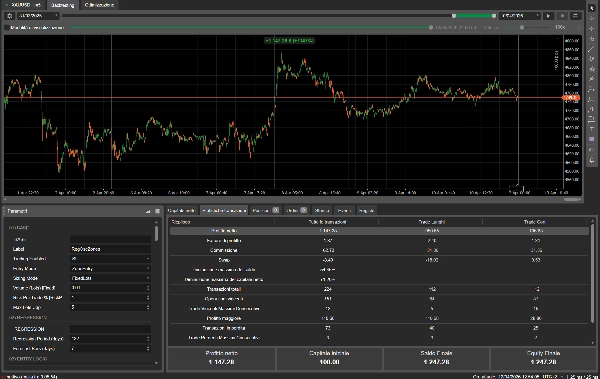

Descrizione
🤖 Zone di Regressione AI — Il cBot che sa QUANDO fare trading e QUANDO fermarsi
📊 Cos'è AI Regression Zones?
AI Regression Zones è un sistema di trading automatizzato di nuova generazione. Combina la potenza della regressione lineare con un'intelligenza artificiale integrata che classifica il mercato in tempo reale. Questo bot non cerca solo gli ingressi: prima analizza se le condizioni di mercato sono favorevoli, poi decide se e come fare trading.
La strategia principale è la mean-reversion: il bot calcola una linea di equilibrio sulle chiusure giornaliere e costruisce zone di ingresso dinamiche intorno ad essa. Quando il prezzo si allontana troppo dalla media, entra in posizione aspettandosi un ritorno. Ma a differenza dei classici bot di mean-reversion, AI Regression Zones ha un cervello: riconosce quando il mercato è in trend e NON apre posizioni contro di esso.
🧠 L'intelligenza che fa la differenza
La maggior parte dei bot di mean-reversion perde denaro perché opera alla cieca in qualsiasi condizione. AI Regression Zones risolve questo con 5 livelli di intelligenza che lavorano insieme.
🔍 FILTRO REGIME AI — Il modulo più importante. Classifica automaticamente il mercato come Ranging, Trending o Choppy analizzando ADX e pendenza della regressione. Nei mercati in trend blocca gli ingressi che perderebbero. Nei mercati choppy si ferma completamente. Opera solo quando le condizioni favoriscono la strategia. Può opzionalmente connettersi a un server AI esterno per una classificazione avanzata tramite machine learning.
💰 DIMENSIONAMENTO INTELLIGENTE — Dimentica i lotti fissi. AI Regression Zones calcola automaticamente la dimensione della posizione basandosi sul tuo capitale e sulla volatilità attuale. Rischi sempre la stessa percentuale per trade, sia che il mercato sia calmo o esplosivo. Il drawdown diventa prevedibile e controllabile.
📈 VOLATILITÀ ADATTIVA — Le zone di ingresso, lo stop loss e il take profit si adattano automaticamente alla volatilità reale del mercato usando la media o la mediana dell'ATR su 14 giorni. Niente più stop troppo stretti in mercati volatili o troppo larghi in mercati calmi. Tutto si calibra da solo.
🔎 CONFERMA MULTI-TIMEFRAME — Prima di ogni ingresso, il bot controlla l'RSI su H4 per confermare il timing. Un BUY viene eseguito solo se H4 conferma ipervenduto, un SELL solo se conferma ipercomprato. Riduce drasticamente ingressi prematuri.
🤖 INTEGRAZIONE AI ESTERNA — Per trader avanzati: collega un server di classificazione regime basato su machine learning. Il bot invia dati di mercato, riceve la classificazione e la usa per filtrare i trade. Completamente opzionale: il bot funziona perfettamente anche senza.
🛡️ Protezione del Capitale a 360°
AI Regression Zones non è solo intelligente negli ingressi. È implacabile nella protezione.
⛔ Percentuale massima di perdita giornaliera — una volta raggiunta la soglia, il bot si ferma fino al giorno successivo. ⛔ Perdita totale massima dal capitale iniziale — protezione contro il drawdown cumulativo. ⛔ Drawdown massimo dal picco del capitale — se il capitale scende troppo dal massimo, tutto si blocca. ⛔ Blocco dopo stop loss consecutivi — dopo 3 SL perdenti consecutivi (configurabile), il bot si ferma. Niente tilt. 🔒 Break-even automatico — quando la posizione va in profitto, lo SL si sposta al prezzo di ingresso. 📉 Trailing stop — segue il prezzo proteggendo i profitti lasciando correre il trade. 📶 Pyramiding protetto — aggiunge posizioni solo quando la prima è in profitto con SL già a break-even.
⚙️ Guida Completa ai Parametri
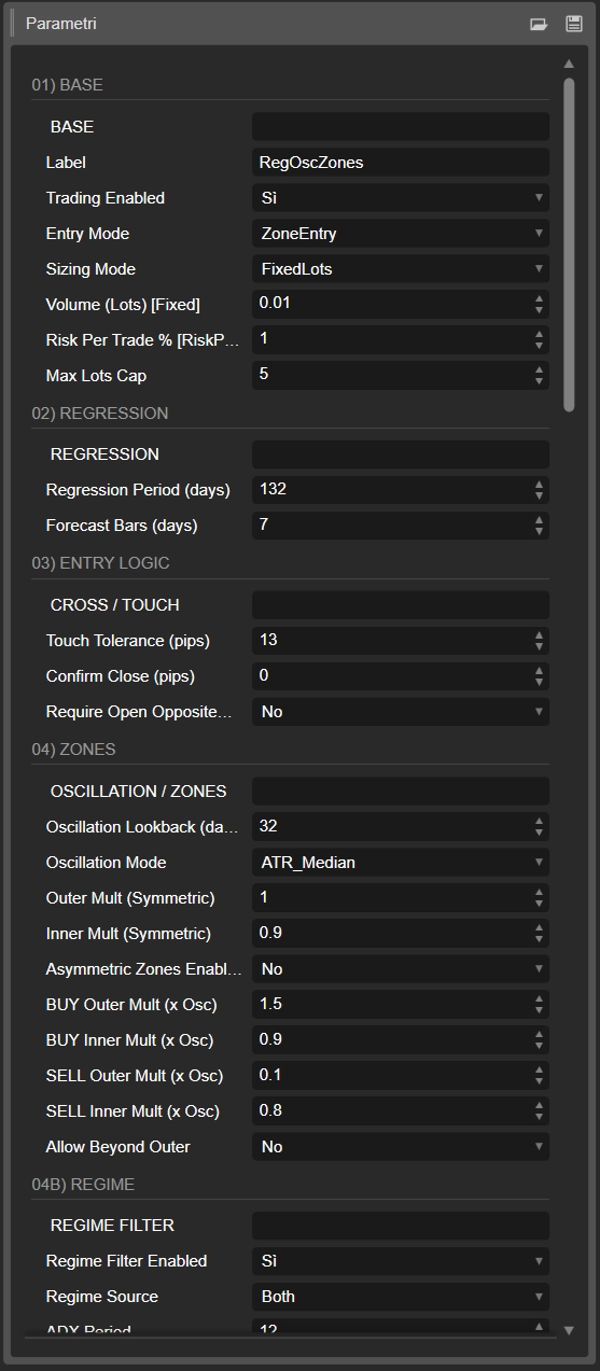
🏷️ 01) BASE — Impostazioni Principali
📌 Etichetta — Tag unico assegnato a ogni posizione aperta da questo bot. Se esegui più istanze sullo stesso simbolo, usa etichette diverse per tenerle separate. Default: RegOscZones.
📌 Trading Abilitato — Interruttore globale on/off. Se impostato su false il bot continua a calcolare i livelli, gestire il trailing e monitorare il rischio, ma non apre nuove posizioni. Utile durante eventi di notizie ad alto impatto. Default: true.
📌 Modalità di Ingresso — Definisce come il bot entra nei trade. Tre opzioni disponibili. ZoneEntry apre una posizione appena il prezzo tocca la zona di acquisto o vendita. RegressionCrossClose richiede una chiusura giornaliera completa oltre la linea di regressione. CrossCloseWithZoneFilter combina entrambi: segnale di cross-close più prezzo deve essere dentro la zona. CrossCloseWithZoneFilter è il più conservativo e raccomandato. Default: RegressionCrossClose.
📌 Modalità di Dimensionamento — Sceglie come viene calcolato il volume della posizione. FixedLots usa il valore statico di lotto impostato. RiskPercent calcola automaticamente i lotti come Equity × Percentuale di Rischio diviso per pips SL × valore pip per lotto. RiskPercent è fortemente raccomandato per una gestione professionale del rischio. Default: RiskPercent.
📌 Volume in Lotti — Dimensione lotto fissa usata solo quando la modalità di dimensionamento è FixedLots. Un lotto standard equivale a 100.000 unità. 0.01 è un micro lotto di 1.000 unità. Default: 0.01.
📌 Rischio per Trade % — Percentuale del capitale rischiata per ogni trade. Usata solo con dimensionamento RiskPercent. Il bot regola automaticamente la dimensione del lotto in base alla distanza dello stop loss e al capitale del conto. 0.5-1% è conservativo, 1-2% moderato, oltre 2% aggressivo. Default: 1.0%.
📌 Massimo Limite Lotti — Dimensione massima del lotto per singolo trade indipendentemente dal calcolo del rischio. Protezione contro posizioni sovradimensionate su conti grandi o stop molto stretti. Default: 5.0.
📐 02) REGRESSIONE — Impostazioni Regressione Lineare
📌 Periodo Regressione — Numero di candele giornaliere (D1) usate per calcolare la regressione lineare. Periodi più lunghi producono una linea più liscia che cattura il trend sottostante. Periodi più brevi reagiscono più velocemente ma introducono più rumore. 15-25 raccomandati per forex majors, 30-50 per indici. Default: 20 giorni.
📌 Barre di Previsione — Numero di giorni per proiettare la linea di regressione nel futuro. Questo sposta il punto di riferimento (LR Forecast) usato per costruire le zone. 0 significa usare l'ultimo valore calcolato, 1 proietta un giorno avanti. Valori sopra 3 diventano speculativi. Default: 1.
✋ 03) LOGICA DI INGRESSO — Impostazioni Cross e Touch
📌 Tolleranza Touch (pips) — Margine intorno alla linea di regressione che conta come "touch". Se il prezzo si avvicina a questa distanza dalla LR, viene trattato come se l'avesse toccata. Previene falsi negativi da candele che mancano la linea di pochi pips. 3-7 pips per forex majors, 10-20 per indici. Default: 5.
📌 Conferma Chiusura (pips) — Distanza minima oltre la LR che la chiusura giornaliera deve raggiungere nella direzione opposta per confermare il cross. Per un BUY la chiusura deve essere pari o superiore a LR più questo valore. Filtra candele indecise. Valori più alti significano segnali meno frequenti ma più affidabili. Default: 10.
📌 Richiedi Apertura Lato Opposto — Se abilitato, l'apertura della candela giornaliera deve essere sul lato opposto della LR rispetto alla direzione del trade. Per un BUY l'apertura deve essere sotto la LR. Aggiunge un ulteriore livello di conferma per un cross completo. Default: false.
🟩🟥 04) ZONE — Zone di Oscillazione e Trading
📌 Lookback Oscillazione — Numero di candele giornaliere usate per calcolare il valore di oscillazione (ATR, range, ecc.). Lookback più lunghi producono valori più stabili ma reagiscono più lentamente ai cambiamenti di volatilità recenti. 10-20 per stabilità, 5-7 per reattività. Default: 14 giorni.
📌 Modalità Oscillazione — Come viene calcolata l'oscillazione (misura base della volatilità). Cinque opzioni disponibili. RangeHighLow prende il massimo intervallo High-Low nel periodo di lookback. TrueRange prende il massimo True Range. MaxDeviationFromRegression misura la deviazione massima delle chiusure dalla linea di regressione. ATR_Average calcola la media del True Range sul lookback ed è il default raccomandato per stabilità. ATR_Median usa la mediana del True Range ed è il più robusto contro giorni anomali. Default: ATR_Average.
📌 Moltiplicatore Esterno — Moltiplicatore per il bordo esterno delle zone in modalità simmetrica. La zona BUY si estende da LR meno Osc×OuterMult a LR meno Osc×InnerMult. Valori più alti creano zone più ampie che richiedono movimenti maggiori prima dell'ingresso. 0.8-1.2 è tipico. Default: 1.0.
📌 Moltiplicatore Interno — Moltiplicatore per il bordo interno delle zone in modalità simmetrica. Definisce dove finisce la zona più vicina alla LR. Valori più bassi creano una zona più ampia, valori più alti una banda più sottile vicino al bordo esterno. Default: 0.25.
📌 Zone Asimmetriche Abilitate — Se abilitato, permette moltiplicatori separati per la zona BUY e la zona SELL. Utile su strumenti con skew direzionale, per esempio indici azionari che tendono a salire. Attivare solo dopo analisi statistica. Default: false.
📌 Moltiplicatori Esterno/Interno BUY — Moltiplicatori specifici solo per la zona BUY. Attivi quando le zone asimmetriche sono abilitate. Restringe la zona BUY su strumenti rialzisti. Default: 1.0 / 0.25.
📌 Moltiplicatori Esterno/Interno SELL — Moltiplicatori specifici solo per la zona SELL. Attivi quando le zone asimmetriche sono abilitate. Una zona SELL più ampia compensa il drift rialzista. Default: 1.1 / 0.25.
📌 Permetti Oltre Esterno — Se abilitato, il bot accetta ingressi anche se il prezzo è oltre il bordo esterno della zona, più lontano dalla LR. Se disabilitato, il prezzo deve essere strettamente dentro la banda Interno-Esterno. Impostare su false per pura mean-reversion, true per catturare spike estremi. Default: false.
🌡️ 04B) REGIME — Filtro Regime di Mercato
📌 Filtro Regime Abilitato — Interruttore principale per il sistema di classificazione regime. Se disabilitato il bot opera in qualsiasi condizione di mercato come un semplice bot di mean-reversion. Tenere sempre abilitato in produzione. È la protezione primaria contro le perdite da trend. Default: true.
📌 Fonte Regime — Da dove proviene la classificazione regime. Internal usa ADX più pendenza regressione calcolati internamente. AI_API usa il risultato da un server esterno di machine learning. Entrambi usano il server AI quando disponibile e la confidenza è sufficiente, altrimenti ricadono su Internal. Default: Internal.
📌 Periodo ADX — Periodo per l'Average Directional Index di Wilder calcolato su dati D1. ADX misura la forza del trend indipendentemente dalla direzione. 14 è lo standard industriale. 10 per maggiore reattività. Default: 14.
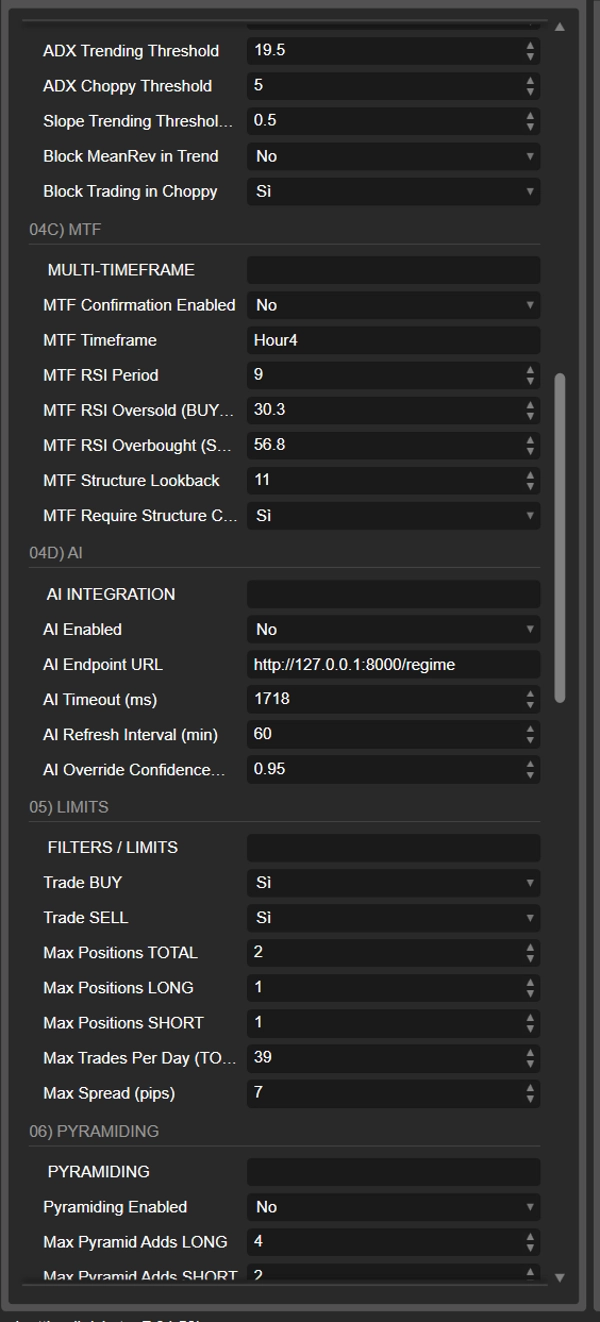
📌 Soglia ADX Trending — Sopra questo valore il mercato è classificato come Trending. Valori classici vanno da 20 a 30. Un ADX a 25 o più indica un trend ben definito dove la mean-reversion è pericolosa. 20-25 per forex, 25-30 per indici. Default: 25.
📌 Soglia ADX Choppy — Sotto questo valore il mercato è classificato come Choppy, cioè rumoroso senza direzione. ADX basso combinato con pendenza bassa indica assenza di struttura tradabile. 12-18 a seconda dello strumento. Default: 15.
📌 Soglia Pendenza Trending (pips/giorno) — Soglia di pendenza della regressione in pips al giorno per classificare il mercato come trending. Anche con ADX basso, una pendenza forte indica un trend. Criterio OR insieme ad ADX. 2-4 per forex majors, 5-10 per indici o crypto. Default: 3.0.
📌 Blocca MeanRev in Trend — Se abilitato, blocca tutti gli ingressi di mean-reversion quando il regime è Trending. Questa è la protezione chiave: impedisce di aprire posizioni contro un trend forte. Mai disabilitare in produzione. Default: true.
📌 Blocca Trading in Choppy — Se abilitato, blocca tutti i trade quando il regime è Choppy. Nei mercati senza direzione la mean-reversion ha poco edge e costi di spread elevati. Raccomandato true. Disabilitare solo su strumenti con spread molto bassi. Default: true.
🔎 04C) MTF — Conferma Multi-Timeframe
📌 Conferma MTF Abilitata — Attiva il filtro multi-timeframe. Se disabilitato, gli ingressi dipendono solo dalla logica D1 più regime. Tenere abilitato per ridurre falsi segnali. Default: true.
📌 Timeframe MTF — Timeframe per il calcolo RSI di conferma. Valori accettati: m1, m5, m15, m30, h1, h4, h8, h12, d1, w1. H4 offre un buon equilibrio tra rumore e timing per swing trading D1. H1 per scalping più aggressivo. Default: Hour4.
📌 Periodo RSI MTF — Periodo RSI calcolato sul timeframe MTF. 14 è lo standard di Wilder. 9-10 per maggiore reattività. Default: 14.
📌 RSI MTF Ipervenduto — Soglia RSI sotto la quale è permesso un BUY. Con la mean-reversion vogliamo comprare quando l'RSI MTF conferma una condizione di ipervenduto. Valori più alti sono più permissivi e permettono più trade. 30 per massima selettività, 45 per più trade. Default: 40.
📌 RSI MTF Ipercomprato — Soglia RSI sopra la quale è permesso un SELL. Vogliamo vendere quando l'RSI conferma ipercomprato. Valori più bassi sono più permissivi. 60-70 raccomandati, 70 per massima selettività. Default: 60.
📌 Lookback Struttura MTF — Numero di barre MTF per l'analisi della struttura di mercato di massimi e minimi crescenti. Il lookback è diviso in due metà e i punti pivot sono confrontati. 15-25 cattura strutture significative. Default: 20.
📌 Richiedi Conferma Struttura MTF — Se abilitato, oltre all'RSI richiede anche conferma della struttura. Per un BUY la struttura non deve essere ribassista (massimi e minimi decrescenti). Per un SELL la struttura non deve essere rialzista. Può ridurre significativamente il numero di trade. Default: false.
🤖 04D) AI — Integrazione Intelligenza Artificiale
📌 AI Abilitata — Attiva le chiamate HTTP all'endpoint AI. Se false, non vengono effettuate richieste di rete e il regime è determinato solo dal calcolo interno di ADX più pendenza. Il bot è completamente funzionale senza AI. Default: false.
📌 URL Endpoint AI — URL completo dell'endpoint che riceve dati di mercato via POST e restituisce una risposta JSON con regime, confidenza e bias. Usa l'API Http nativa di cTrader con AccessRights.None. Default: http://127.0.0.1:8000/regime.
📌 Timeout AI (ms) — Tempo massimo di attesa per la risposta HTTP. Se il server non risponde entro questo tempo, il bot ignora l'AI per quel ciclo e usa il fallback interno. 2000-5000 tipico, 1000 su VPS co-locato. Default: 3000.
📌 Intervallo di Aggiornamento AI (min) — Frequenza con cui il bot interroga l'endpoint AI. Poiché il regime cambia lentamente su base D1, non è necessario aggiornare troppo frequentemente. 30-120 minuti raccomandati. Default: 60.
📌 Soglia di Confidenza Override AI — Confidenza minima restituita dall'AI per accettare la sua classificazione. Sotto questa soglia il bot usa il regime calcolato internamente. Protegge da previsioni incerte. 0.65-0.80 raccomandato. Default: 0.7.
🚫 05) LIMITI — Filtri e Limiti Operativi
📌 Trade BUY — Abilita o disabilita l'apertura di posizioni long. Utile per forzare il bot a operare in una sola direzione su strumenti con forte bias direzionale. Default: true.
📌 Trade SELL — Abilita o disabilita l'apertura di posizioni short. Complementare a Trade BUY. Disabilitare su indici azionari durante mercati toro stabili. Default: true.
📌 Max Posizioni TOTALI — Numero massimo di posizioni aperte contemporaneamente (long più short) per questa istanza del bot su questo simbolo. 1-3 per conservativo, 4-5 con pyramiding attivo. Default: 2.
📌 Max Posizioni LONG — Numero massimo di posizioni long simultanee. Include la posizione base più eventuali aggiunte pyramid. 1 senza pyramiding, 2-3 con pyramiding. Default: 1.
📌 Max Posizioni SHORT — Numero massimo di posizioni short simultanee. Stessa logica del long. Default: 1.
📌 Max Trade Per Giorno — Numero massimo di nuovi trade (aperture) per giorno. Si resetta a mezzanotte UTC. Protegge da overtrading durante sessioni volatili. 2-4 per swing, 5-10 per intraday aggressivo. Default: 2.
📌 Max Spread (pips) — Spread massimo accettabile per aprire una posizione. Se lo spread corrente supera questo valore il bot non opera. Protegge da slippage e ore illiquide. 1.5-2.5 per EUR/USD, 3-5 per cross esotici. Default: 2.1.
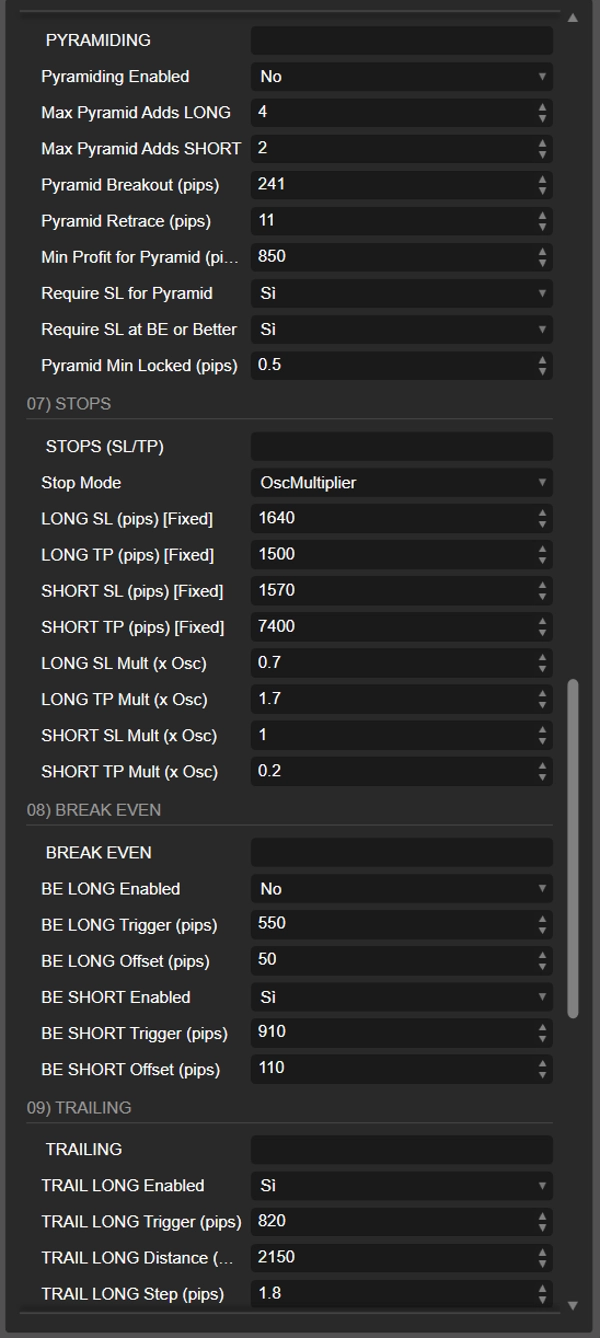
📶 06) PYRAMIDING — Aggiunta di Posizioni in Profitto
📌 Pyramiding Abilitato — Attiva il sistema di aggiunta a piramide. Se disabilitato il bot apre solo la posizione base. Attivare solo su strumenti con buon follow-through intraday. Default: true.
📌 Max Aggiunte Pyramid LONG — Numero massimo di posizioni long aggiuntive. Con 2 aggiunte e una base si possono avere fino a 3 posizioni long. 1-2 per conservativo, 3 o più per aggressivo. Default: 2.
📌 Max Aggiunte Pyramid SHORT — Stesso per posizioni short. Default: 2.
📌 Breakout Pyramid (pips) — Il prezzo deve muoversi almeno di questo numero di pips oltre l'ultimo prezzo di ingresso nella direzione favorevole per "armare" la piramide. Conferma che il trade sta funzionando prima di aggiungere. 20-40 per forex, 50-80 per indici. Default: 30.
📌 Ritracciamento Pyramid (pips) — Dopo il breakout, il prezzo deve ritirarsi di questo numero di pips dal picco o minimo per attivare l'aggiunta. Il ritracciamento è l'ingresso ottimale sulla continuazione. Metà del valore di breakout è un buon punto di partenza. Default: 15.
📌 Profitto Minimo per Pyramid (pips) — La posizione base deve essere in profitto di almeno questo numero di pips prima che il pyramiding si attivi. Protezione contro aggiunte premature. Mai impostare a 0 in produzione. Default: 10.
📌 Richiedi SL per Pyramid — La posizione base deve avere uno stop loss impostato per permettere aggiunte. Senza uno SL definito il rischio è indefinito e aggiungere capitale è imprudente. Tenere sempre true. Default: true.
📌 Richiedi SL a BE o Meglio — Lo stop loss della posizione base deve essere a break-even (prezzo di ingresso) o meglio. Garantisce che la posizione base sia essenzialmente "gratuita" prima di aggiungere rischio. Tenere sempre true. Default: true.
📌 Pyramid Min Locked (pips) — Numero minimo di pips di profitto bloccati dallo stop loss della posizione base. Per esempio con 5, lo SL deve essere almeno a ingresso più 5 pips. Più restrittivo del semplice break-even. 0-10 raccomandato. Default: 0.
🎯 07) STOP — Stop Loss e Take Profit
📌 Modalità Stop — Definisce come SL e TP sono calcolati. Tre opzioni. None significa nessuno SL o TP, molto rischioso. FixedPips usa valori statici di pips configurati separatamente per long e short. OscMultiplier calcola SL e TP come multipli del valore di oscillazione corrente, adattandosi automaticamente alla volatilità. OscMultiplier è fortemente raccomandato. Default: OscMultiplier.
📌 SL / TP LONG (pips) — Stop loss e take profit fissi per posizioni long in pips. Usato solo con modalità FixedPips. Impostare 0 disabilita quel livello specifico. Mantenere sempre un rapporto TP/SL di almeno 1.5. Default: 200 / 300.
📌 SL / TP SHORT (pips) — Stop loss e take profit fissi per posizioni short. Permette asimmetria tra long e short se lo strumento si comporta diversamente in ogni direzione. Default: 200 / 300.
📌 Moltiplicatore SL LONG (x Osc) — Moltiplicatore di oscillazione per lo stop loss long. SL in pips è uguale a Osc per Mult diviso PipSize. Con Osc di 100 pips e Mult di 1.0, lo SL è 100 pips. 0.8-1.2 per standard, sotto 0.5 è stretto, sopra 1.5 è largo. Default: 1.0.
📌 Moltiplicatore TP LONG (x Osc) — Moltiplicatore per il take profit long. Il rapporto TP/SL è TP Mult diviso SL Mult. Con default 1.5 e 1.0 si ottiene un reward-to-risk di 1.5 a 1. Tenere TP Mult più alto di SL Mult. Default: 1.5.
📌 Moltiplicatore SL SHORT (x Osc) — Moltiplicatore di oscillazione per lo stop loss short. Può differire dal long per compensare asimmetrie di mercato. Default: 1.0.
📌 Moltiplicatore TP SHORT (x Osc) — Moltiplicatore per il take profit short. Impostare 0.0 significa nessun TP e il trailing stop gestirà l'uscita. 1.5-2.0 raccomandato, 0 solo con trailing attivo. Default: 1.5.
🔒 08) BREAK EVEN — Spostamento SL al Prezzo di Ingresso
📌 BE LONG Abilitato — Attiva il break-even automatico per posizioni long. Tenere sempre true in produzione. Default: true.
📌 BE LONG Trigger (pips) — Profitto in pips che la posizione long deve raggiungere prima che lo SL venga spostato a break-even. Troppo basso attiva stop prematuri sul rumore, troppo alto ritarda la protezione. 20-40 per forex, 40-80 per indici. Default: 30.
📌 BE LONG Offset (pips) — Pips aggiunti al prezzo di ingresso quando si sposta lo SL a break-even. Copre spread e commissioni. Con offset 2 lo SL va a prezzo ingresso più 2 pips, garantendo un piccolo profitto se colpito. 1-3 per forex, 3-5 per indici. Default: 2.
📌 BE SHORT Abilitato — Come BE LONG ma per posizioni short. Tenere sempre true. Default: true.
📌 BE SHORT Trigger (pips) — Trigger per break-even short. Stessi criteri del long. Default: 30.
📌 BE SHORT Offset (pips) — Offset per BE short. Lo SL va a prezzo ingresso meno offset. Default: 2.
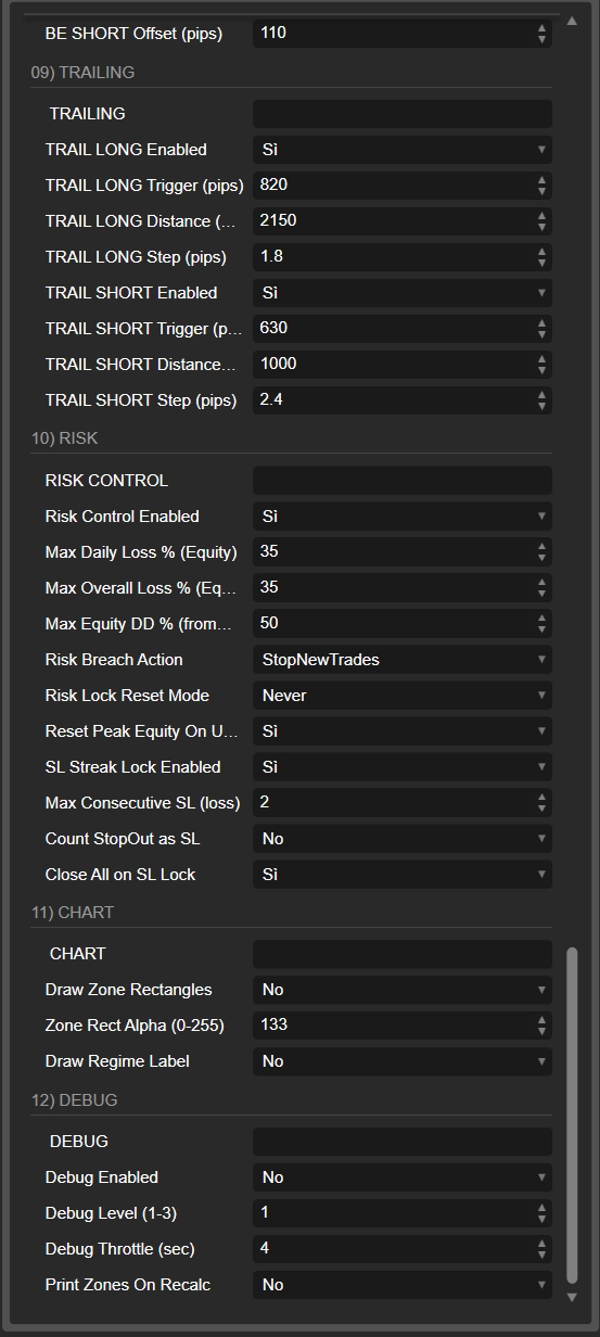
📉 09) TRAILING — Trailing Stop
📌 TRAIL LONG Abilitato — Attiva il trailing stop per posizioni long. Sempre abilitare se si vogliono catturare movimenti estesi. Default: true.
📌 TRAIL LONG Trigger (pips) — Profitto in pips che attiva il trailing. Deve essere uguale o superiore al BE Trigger per evitare conflitti. Default: 40.
📌 TRAIL LONG Distanza (pips) — Distanza tra prezzo corrente e trailing SL. Lo SL è posizionato a Bid meno Distanza. Distanze più strette proteggono più profitto ma rischiano stop prematuri. 15-30 per forex, 30-60 per indici. Default: 25.
📌 TRAIL LONG Passo (pips) — Movimento minimo dello SL per aggiornamento. Previene micro-regolazioni continue. Lo SL si muove solo se il nuovo livello è almeno Passo pips sopra quello corrente. 1-3 tipico, 0 per aggiornamenti continui. Default: 2.
📌 TRAIL SHORT Abilitato — Trailing stop per posizioni short. Default: true.
📌 TRAIL SHORT Trigger (pips) — Trigger per trailing short. Default: 40.
📌 TRAIL SHORT Distanza (pips) — Distanza trailing per short. SL a Ask più Distanza. Default: 25.
📌 TRAIL SHORT Passo (pips) — Passo minimo per trailing short. Default: 2.
⛔ 10) RISCHIO — Controllo del Rischio
📌 Controllo Rischio Abilitato — Abilita tutte le protezioni di rischio. Se disabilitato non si applicano limiti automatici, anche se gli SL individuali restano attivi. Mai disabilitare in produzione. Default: true.
📌 Perdita Massima Giornaliera % — Perdita massima giornaliera come percentuale del capitale all'inizio della giornata. Se la perdita raggiunge questa soglia il bot smette di fare trading fino al giorno successivo. 3-5% per conservativo, 5-8% per moderato. Default: 5%.
📌 Perdita Totale Massima % — Perdita totale massima come percentuale del capitale iniziale all'avvio del bot. Protezione contro drawdown cumulativo. 8-15% raccomandati, oltre 20% il recupero diventa molto difficile. Default: 10%.
📌 Drawdown Capitale Massimo % (dal Picco) — Drawdown massimo dal picco del capitale. Se il capitale scende di questa percentuale dal massimo storico durante la sessione del bot, il trading si blocca. Cattura perdite anche se il capitale era cresciuto prima. 8-15% raccomandati. Default: 10%.
📌 Azione in Caso di Violazione del Rischio — Cosa succede quando si raggiunge un limite di rischio. StopNewTrades blocca nuove aperture ma mantiene posizioni esistenti. CloseAllAndStop chiude tutte le posizioni e blocca nuove aperture. CloseAllAndStop fornisce la massima protezione. Default: CloseAllAndStop.
📌 Modalità Reset Blocco Rischio — Come viene rilasciato il blocco rischio. Never significa che resta bloccato fino al riavvio manuale. NextDayDailyLossOnly sblocca il giorno successivo solo se la causa era il limite di perdita giornaliera. NextDayAnyBreach sblocca il giorno successivo indipendentemente dalla causa. NextDayDailyLossOnly è il miglior compromesso. Default: NextDayDailyLossOnly.
📌 Reset Picco Capitale allo Sblocco — Quando il blocco rischio viene rimosso, il picco capitale viene resettato al capitale corrente. Previene che il vecchio picco causi un blocco immediato. Default: true.
📌 Blocco SL Consecutivi Abilitato — Dopo un numero configurabile di stop loss perdenti consecutivi, il trading si blocca fino al giorno successivo. Protegge da streak di perdite e tilt emotivo. Tenere sempre true. Default: true.
📌 Max SL Consecutivi — Numero di stop loss perdenti consecutivi prima che scatti il blocco. Il contatore si resetta con qualsiasi trade vincente. 2 per massima cautela, 4 per più tolleranza. Default: 3.
📌 Conta StopOut come SL — Se abilitato, gli StopOut (chiusure forzate dal broker per margine insufficiente) contano anche come stop loss nella streak consecutiva. Tenere sempre true. Default: true.
📌 Chiudi Tutto al Blocco SL — Quando scatta il blocco per streak SL, chiude anche tutte le posizioni aperte rimanenti. Se false, le posizioni esistenti restano aperte con i loro SL e trailing. Default: false.
📊 11) GRAFICO — Visualizzazione
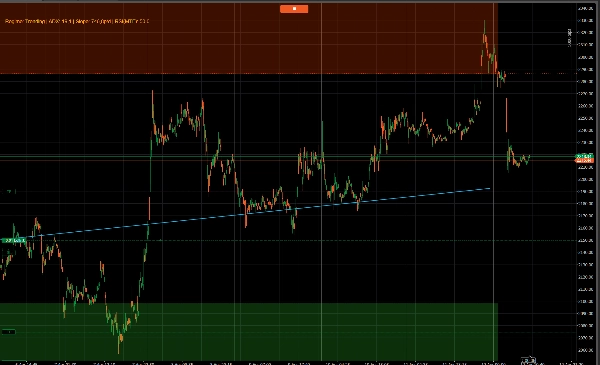
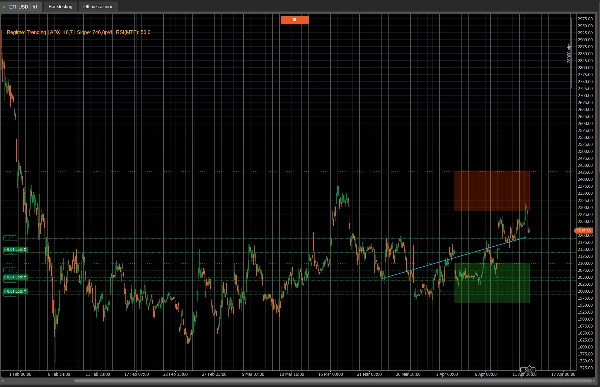
📌 Disegna Rettangoli Zona — Disegna rettangoli semi-trasparenti colorati per la zona BUY (verde) e SELL (rosso) sul grafico. Aiuta a visualizzare dove il bot cerca ingressi. Default: true.
📌 Trasparenza Rettangoli Zona — Trasparenza dei rettangoli zona. 0 è completamente trasparente, 255 opaco. 40-80 funziona bene per la maggior parte delle configurazioni. Default: 60.
📌 Disegna Etichetta Regime — Mostra un'etichetta nell'angolo in alto a sinistra del grafico con il regime corrente, valore ADX, pendenza, RSI MTF. Quando AI è attiva mostra anche il regime AI e la confidenza. Default: true.
🐛 12) DEBUG — Diagnostica e Logging
📌 Debug Abilitato — Abilita messaggi di debug nel log di cTrader. Se false vengono stampati solo messaggi critici come esecuzioni ed errori. Usare true durante i test, false o Livello 1 in produzione. Default: true.
📌 Livello Debug — Livello di verbosità. Livello 1 mostra solo eventi importanti come start, stop, trade, blocchi rischio. Livello 2 aggiunge filtri, zone, segnali bloccati. Livello 3 aggiunge valutazione tick-by-tick, ogni controllo zona, ogni aggiustamento trailing. Default: 2.
📌 Throttle Debug (sec) — Intervallo minimo tra messaggi debug dello stesso tipo. Previene flooding del log con messaggi ripetitivi ogni tick. 0 disabilita il throttling e stampa tutto. 10-30 durante i test, 60 o più in produzione. Default: 10.
📌 Stampa Zone a Ricalcolo — Se abilitato, stampa tutti i livelli calcolati (LR, OSC, zone BUY/SELL, ADX, pendenza, regime, RSI) ogni volta che i dati giornalieri vengono ricalcolati. True per verificare i calcoli, false in produzione. Default: true.
🤖 Server AI Personalizzato — Disponibile su Richiesta
Vuoi sbloccare tutta la potenza di AI Regression Zones? Sviluppiamo un server AI Python personalizzato su misura per le tue esigenze. Il server usa un modello di machine learning Random Forest addestrato su 12 caratteristiche di mercato tra cui ADX, esponente di Hurst, autocorrelazione, rapporto di volatilità e struttura dei prezzi. Classifica il regime di mercato in tempo reale e invia il risultato direttamente al cBot via HTTP.
Cosa ottieni: un server FastAPI pronto all'uso con endpoint di classificazione regime, un endpoint di training per riaddestrare il modello con i tuoi dati etichettati e documentazione completa. Il server gira su qualsiasi VPS o macchina locale e comunica con il cBot usando l'API Http nativa di cTrader — nessun FullAccess richiesto.
📩 Contattaci per discutere la tua configurazione e ottenere un server AI personalizzato costruito per il tuo stile di trading e strumenti.
✅ Specifiche Tecniche
AccessRights.None — 100% compatibile con cTrader Store, zero rischi di sicurezza. Zero dipendenze — ADX, RSI, ATR, regressione, struttura di mercato tutti calcolati internamente. Multi-istanza — etichette separate per esecuzione parallela su più simboli. Networking nativo — chiamate AI via Http.Send() di cTrader, senza workaround. Logging completo — ogni decisione documentata nel log con emoji per identificazione rapida.
⚠️ Disclaimer
AI Regression Zones è uno strumento di trading automatizzato. Le performance passate non garantiscono risultati futuri. Raccomandiamo di fare backtest su almeno 2-3 anni di dati e iniziare con un conto demo. Configura sempre il Controllo del Rischio prima di andare live. Il trading comporta un rischio significativo di perdita di capitale.
Riepilogo
Key features include:
- AI Regime Filter that blocks trades in unfavorable conditions and can optionally integrate with an external machine learning server for enhanced market classification.
- Intelligent position sizing based on account equity and current volatility, maintaining consistent risk per trade.
- Adaptive volatility-based entry zones, stop loss, and take profit levels using ATR measures.
- Multi-timeframe confirmation via RSI on higher timeframes to reduce false entries.
- Comprehensive risk management with daily loss limits, drawdown protection, consecutive loss locks, automatic break-even stops, trailing stops, and controlled pyramiding.
- Customizable parameters for regression periods, entry logic, zone definitions, and risk controls.
- Visual chart overlays showing buy/sell zones and regime labels.
- Optional AI server integration for tailored machine learning regime classification.
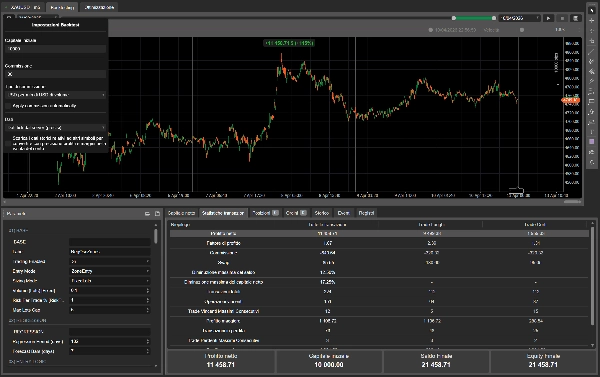
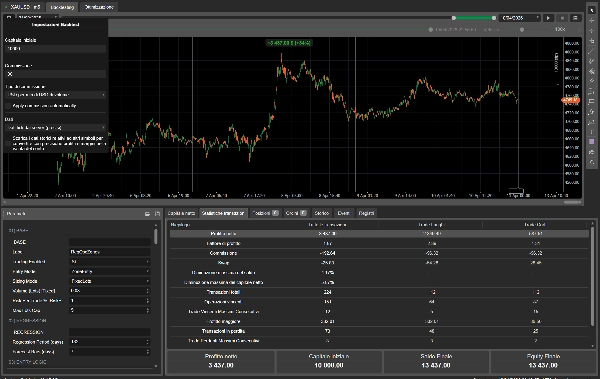
The bot supports professional risk management and is suitable for day trading with medium trade frequency on technical analysis. It is compatible with cTrader and requires a recommended minimum balance of $1,000.
Recensioni dei clienti
5 | 50 % | |
4 | 25 % | |
3 | 25 % | |
2 | 0 % | |
1 | 0 % |













![Logo di "[Fx4U]Risk & Reward Trading Tool Pro"](https://cdn.ctrader.com/image/webp/e26324ec-9547-4365-a38e-ccd0e7c4d86f_31374)