「Trend is your friend - cBot」ロゴ
cBot
FP Markets でテスト済み
バージョン 1.0、Mar 2026
Windows、Mac, Mobile, Web
28%
ROI
5.27
プロフィットファクター
4.56%
最大ドローダウン
「Trend is your friend - cBot」アップロード画像
79
販売
108
無料インストール

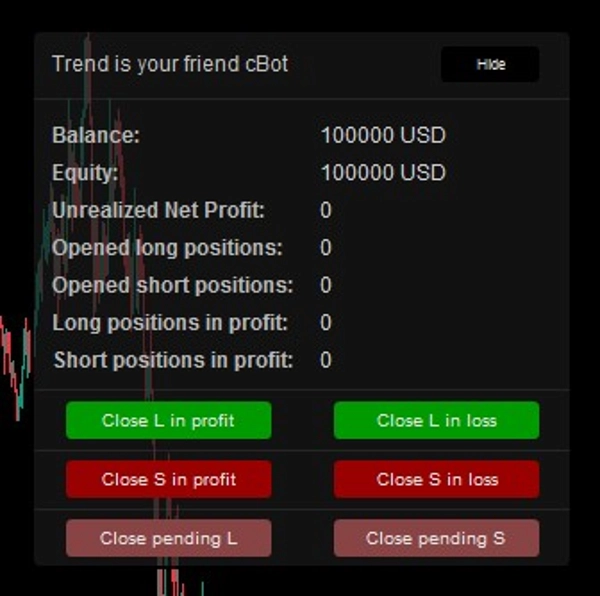
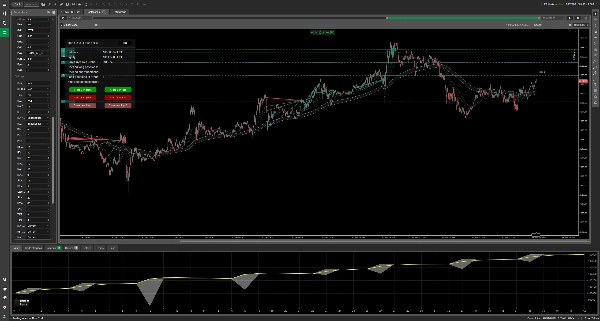
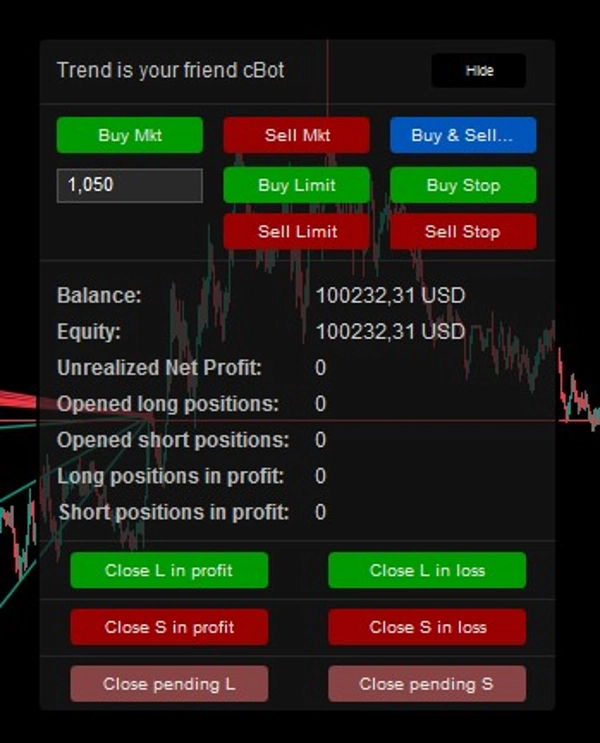
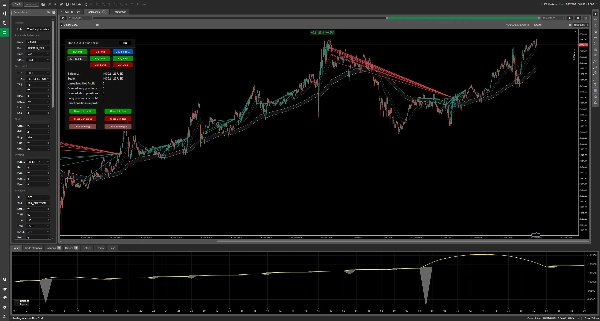
Manual Mode — Control Panel


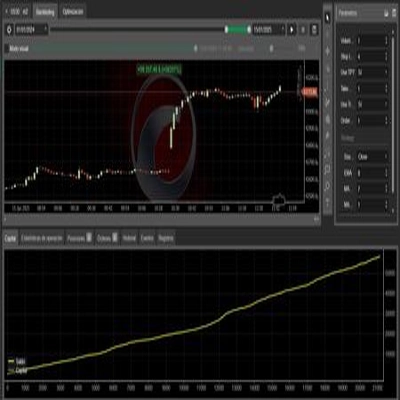
AUDCAD — H4 — Backtest from 01.01.2023 to 01.02.2026


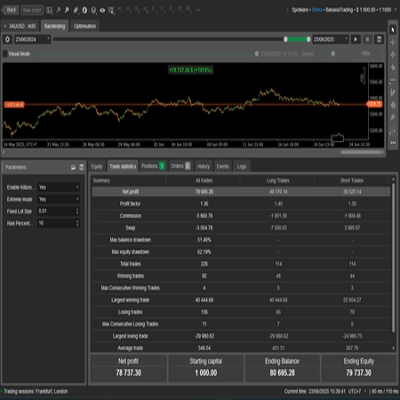
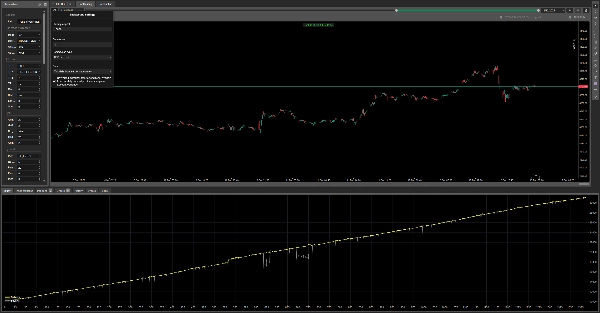
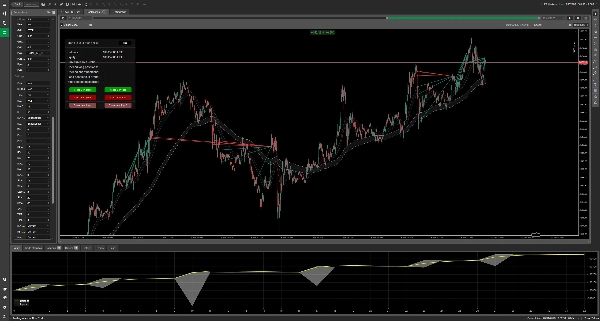
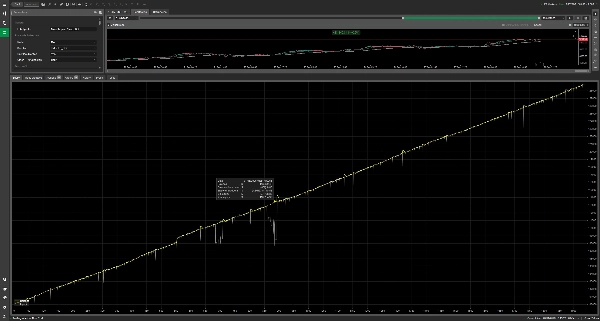
XAUUSD — M5 — Backtest from 01.01.2025 to 01.02.2026


1. Introduction

Trend Is Your Friend cBot is an advanced, multi-functional trading algorithm designed for the cTrader platform.

It combines several trading concepts into one configurable system:

- Trend-following entries
- Grid averaging
- Pyramid scaling
- Scalping-style signals
- Swing-trading setups
- Manual trading assistance
- Dynamic profit and risk management
- Basket management
- Multi-timeframe filtering
- Volatility filtering
- Price-level exits

The core idea behind the cBot is simple:

Follow the trend, manage exposure mathematically, and allow the strategy to adapt to different market conditions.

The cBot does not open trades randomly.

Every automatic entry is based on the selected signal mode, optional trend confirmation, distance filters, volatility filters, trading hours, direction rules, and position-management settings.

2. Core Philosophy

The strategy is built around three key ideas:


2.1 Follow Momentum

The cBot can identify trend direction using Moving Average logic.

When enabled, the bot can restrict entries only to the direction confirmed by the MA trend.

This can help reduce counter-trend entries and force the strategy to trade with the dominant market direction.


2.2 Manage Losing Positions with Grid Logic

If price moves against an initial position, the bot may open additional grid orders at predefined distances.

This can reduce the average entry price, but it also increases exposure and risk.

Grid logic should be used carefully, especially on accounts with strict drawdown limits.


2.3 Maximize Winning Trends with Pyramid Logic

If price moves in favor of an initial position, the bot can add more positions in the same direction.

This allows the strategy to benefit from strong market trends.

Pyramid logic is different from grid logic:

- Grid adds positions when price moves against the trade.
- Pyramid adds positions when price moves in favor of the trade.

3. Who Is This cBot For?

Beginners

Beginners can use Manual Mode and the on-chart control panel to open trades manually while the cBot helps with position handling, basket exits, visual information, and risk rules.


Scalpers

Scalpers can use lower timeframes such as M1-M15 with entry modes like:

- RSI
- Stochastic
- MA
- Same Candle Serie

These can be combined with tighter grid settings, small lot size, and strict take-profit rules.


Swing Traders

Swing traders can use higher timeframes such as H1-D1 with:

- MA mode
- MA Cross mode
- Pyramid mode
- Multi-timeframe MA trend filtering

This allows the bot to participate in larger directional moves.


Advanced and Professional Traders

Experienced users can customize:

- Multi-timeframe filters
- ATR volatility limits
- Grid distance and grid distance multiplier
- Pyramid re-entry logic
- Fixed, step, or martingale volume models
- Static and trailing protection
- MA-based stop loss
- Global price-level exits
- Trading sessions
- Basket take-profit logic


4. Important Risk Warning

Trading involves risk.

Grid and Martingale-based strategies can create large drawdowns and may lead to complete account loss if not managed carefully.

Before using this cBot on a live account:

- Test every setup on a demo account.
- Run long-term backtests.
- Avoid Martingale on strict drawdown accounts.
- Use fixed lot size for conservative setups.
- Always define clear maximum exposure.
- Use Stop Loss and/or Global Price-Level SL when necessary.
- Monitor margin usage carefully.
- Remember that past performance does not guarantee future results.

This cBot is a tool.

The final responsibility for settings, risk, and account protection belongs to the user.


5. General Operating Logic

The cBot follows this general workflow:

1. Checks whether trading is allowed according to trading-hour settings.
2. Checks volatility using ATR filters.
3. Checks MA distance filters if enabled.
4. Reads the selected entry mode signal.
5. Applies direction logic.
6. Applies optional MA trend confirmation.
7. Applies optional other-timeframe MA trend confirmation.
8. Opens the first position if all conditions are met.
9. Manages additional Grid orders if price moves against the position.
10. Manages Pyramid orders if price moves in favor of the position.
11. Monitors TP, SL, trailing stop, MA stop, global price levels, and session-end rules.
12. Closes positions when the configured exit condition is reached.
13. Can pause new entries after closing positions if Pause on Close is enabled.


6. Parameter Groups

The cBot settings are divided into the following groups:

1. General
2. Run Mode & Direction
3. Take Profit
4. Grid
5. Pyramid
6. Protection
7. Volume
8. Settings
9. Timer


7. General

Label Prefix

Defines the text label assigned to positions opened by this cBot.

The cBot uses this label to identify which positions belong to it.

This is important when:

- Running multiple cBot instances
- Trading multiple symbols
- Separating bot positions from manual trades
- Recovering existing positions after restart

Recommended practice:

Use a unique label for each symbol and each strategy setup.

Example:

Trend is your friend cBot EURUSD H1


8. Run Mode & Direction

This section controls when the cBot opens the first position and in which direction.


Mode

Defines the main entry engine.

Available modes:

MA

Opens trades based on Moving Average interaction.

MA_CROSS

Opens trades when MA channel crossover conditions are detected.

PIVOT

Opens trades near selected daily pivot levels.

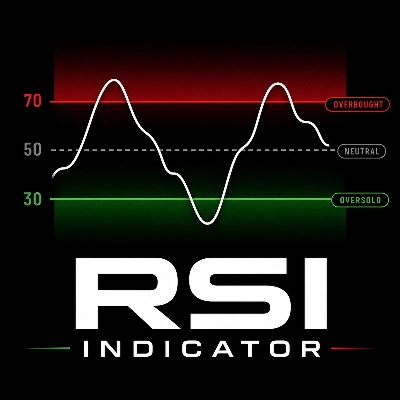
RSI

Opens trades based on RSI oversold/overbought conditions.

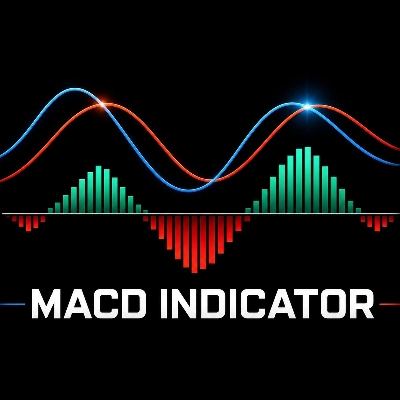
MACD

Opens trades based on MACD and Signal line crossover logic.

STOCHASTIC

Opens trades based on Stochastic crossover conditions.

SAME_CANDLE_SERIE

Opens trades after a sequence of candles in the same direction.

TIME

Opens trades at a specific configured time.

MANUAL

Disables automatic entries and allows manual control from the chart panel.


Direction

Controls allowed trading direction.

Available options:

LONG

Only Buy positions are allowed.

SHORT

Only Sell positions are allowed.

LONG_OR_SHORT

The bot may trade long or short, but generally follows one active side depending on signal logic and existing exposure.

BOTH_AT_ONCE

The bot may open both Buy and Sell exposure.

TRIGGER_SIDE

The bot follows the side of the active signal.


Only MA Direction

When enabled, the cBot opens trades only when the MA trend confirms the direction.

Example:

- A Buy signal from RSI will be accepted only if MA trend confirms an uptrend.
- A Sell signal from Stochastic will be accepted only if MA trend confirms a downtrend.

This filter can reduce false entries but may also reduce the number of trades.


Other TF MA Direction

Adds an additional Moving Average trend filter from another timeframe.

Example:

You can trade on M15, but require H1 trend confirmation.

If enabled, both the main MA trend logic and the selected additional timeframe MA trend must agree.

This can be useful for:

- Reducing counter-trend trades
- Filtering noisy signals
- Improving directional consistency
- Trading only with higher-timeframe momentum


9. Take Profit

This section controls how profitable positions are closed.


TP Type

Defines how the cBot decides when to close profitable positions.

Available options:

USD

Closes when net profit reaches the configured money amount.

PERCENT

Closes when a configured percentage of positions in the basket are profitable.

USD_OR_PERCENT

Uses USD TP first, but can switch to percentage-based basket closing after a configured number of Grid/Pyramid orders is reached.


Important Note About Percentage TP

The percentage TP is not a percentage of account balance.

It means:

The percentage of open positions in the basket that must be in profit.

Example:

If there are 10 open positions and TP percentage is set to 70%, the cBot can close the basket when approximately 70% of those positions are in profit.

If there is only one position, the cBot uses the USD TP value instead.


TP Scope

Defines whether profit is calculated separately per direction or globally.

Available options:

PER_DIRECTION

Buy and Sell baskets are managed separately.

GLOBAL

All cBot positions are calculated together.


TP $

The money amount at which the cBot closes positions.

Example:

If TP $ is set to 75, the cBot closes the relevant basket when net profit reaches at least 75 USD.


TP % of Grids in Profit

Defines how many positions in the basket must be profitable before the cBot closes the basket in percentage TP mode.

Example:

70 means approximately 70% of positions must be in profit.


Min Number of Grid Orders to Close by %

Defines how many averaging positions must exist before percentage TP logic can be used in hybrid mode.

In the source logic, both Grid and Pyramid positions can be counted for this threshold.


Disable $ TP When Min Grid Orders Opened

This parameter is important for USD_OR_PERCENT mode.

Behavior:

- If disabled, USD_OR_PERCENT behaves like USD TP.
- If enabled, the cBot uses USD TP until the minimum number of Grid/Pyramid orders is reached.
- After that threshold is reached, the cBot switches to percentage-based closing.

This can be useful when a basket becomes large and a fixed USD target may be harder to reach.


Long Price Level Global TP

Closes all Buy positions when price reaches or exceeds the specified level.

For long positions, the cBot checks the Bid price.

Set to 0 to disable.


Short Price Level Global TP

Closes all Sell positions when price reaches or falls below the specified level.

For short positions, the cBot checks the Ask price.

Set to 0 to disable.


10. Grid

Grid logic is used when price moves against the initial position.

The cBot opens additional positions at defined distances to average the entry price.


Grid Level Pips

Defines the base distance between grid orders.

Example:

If Grid Level is 22, the first grid order is opened after approximately 22 pips against the position.


Grid Level Martingale Multiplier

Controls how the distance between grid levels expands.

This parameter affects distance, not volume.

Example with Grid Level 20 and multiplier 2.0:

- First grid distance: 20 pips
- Second grid distance: 40 pips
- Third grid distance: 80 pips

If set to 1.0, grid distance remains fixed.


No Grid on Same Candle

When enabled, the cBot will not open more than one grid order on the same candle for the same direction.

This can help protect the account during:

- Very fast market moves
- News spikes
- Flash crashes
- High-volatility candles


Grid Orders Short

Maximum number of Sell grid orders.

Set to 0 to disable Sell grid expansion.


Grid Orders Long

Maximum number of Buy grid orders.

Set to 0 to disable Buy grid expansion.


11. Pyramid

Pyramid logic is used when price moves in favor of the initial position.

Instead of averaging losing positions, the bot adds to winning positions.


Pyramid Mode Run

Available modes:

STANDARD

Adds pyramid orders after price moves a configured number of pips in profit.

RE_ENTRY

Adds pyramid orders only when re-entry conditions are met again.


Re-entry Min Bars

Used in RE_ENTRY mode.

Defines how many candles must pass before the bot can add another pyramid position.

This prevents the cBot from opening too many pyramid positions too quickly.


Pyramid Level Pips

Used in STANDARD mode.

Defines how far price must move in favor of the position before the next pyramid order can be opened.


Pyramid Orders Short

Maximum number of Sell pyramid orders.

Set to 0 to disable Sell pyramiding.


Pyramid Orders Long

Maximum number of Buy pyramid orders.

Set to 0 to disable Buy pyramiding.


12. Protection

This section controls risk management and position protection.


SL Mode

Available options:

OFF

Stop Loss logic is disabled.

STATIC

Uses a fixed money-based Stop Loss.

STATIC_AND_TRAILING

Uses fixed money-based Stop Loss and dynamic Trailing Stop logic.


Static SL Scope

Defines how the static Stop Loss is calculated.

Available options:

PER_DIRECTION

Buy and Sell baskets are protected separately.

GLOBAL

All cBot positions are protected together.


Static SL $

Defines the maximum allowed loss in account currency.

Example:

If Static SL is set to 20, the cBot closes the relevant basket when net loss reaches -20 USD.


Trailing SL Trigger Pips

Defines how far price must move in favor of the position before the trailing stop becomes active.


Trailing SL Pips

Defines the offset from the selected MA wave used for trailing.

A negative value can place the trailing level behind the MA wave, allowing room for normal pullbacks.


Trailing SL Trigger Wave

Defines which MA wave is used for trailing stop calculations.

Available options:

FAST

Uses the fast MA wave.

SLOW

Uses the slow MA wave.


MA SL

Enables Moving Average based stop logic.

Available options:

OFF

MA Stop Loss disabled.

FAST

Uses the fast MA wave as an exit reference.

SLOW

Uses the slow MA wave as an exit reference.

For Buy positions:

The cBot checks if Bid falls below the selected MA level.

For Sell positions:

The cBot checks if Ask rises above the selected MA level.


Pause on Close Minutes

Defines how long the cBot pauses after closing positions due to TP, SL, global level, MA SL, trailing stop, or session logic.

This can prevent immediate re-entry after a close event.

Set to 0 to disable.


Long Price Level Global SL

Closes all Buy positions when Bid reaches or falls below the specified level.

Set to 0 to disable.


Short Price Level Global SL

Closes all Sell positions when Ask reaches or rises above the specified level.

Set to 0 to disable.


13. Volume

This section controls lot sizing for the initial position, grid orders, and pyramid orders.


First Order Fix Lot

Defines the lot size of the first position.

Example:

0.01 means the first position is opened with 0.01 lot.


Keep First Order Vol to Balance Ratio

When enabled, the cBot calculates the first order volume based on account balance instead of using only the fixed lot setting.

This creates a compounding-style effect.

Use carefully, because position size can increase as account balance grows.


Grid Volume Type

Defines how grid order volume is calculated.

Available options:

SAME_AS_ORDER

Uses the base order size.

STEP

Increases volume by a fixed step.

MARTINGALE

Multiplies volume using the martingale multiplier.

FIX_LOT

Uses a fixed grid lot size.


Grid Step Volume

Used when Grid Volume Type is set to STEP.

Each additional grid order can increase by this amount.


Grid Martingale Multiplier

Used when Grid Volume Type is set to MARTINGALE.

Example:

If initial lot is 0.01 and multiplier is 2.0, theoretical volumes may become:

- 0.01
- 0.02
- 0.04
- 0.08

Martingale is high risk and should be avoided on strict drawdown accounts.


Grid Fix Lot

Used when Grid Volume Type is set to FIX_LOT.

Grid positions use this lot size.


Pyramid Volume Type

Defines how pyramid order volume is calculated.

Available options:

SAME_AS_ORDER

Uses the initial position size.

STEP

Increases pyramid volume by a fixed step.

MARTINGALE

Multiplies pyramid volume by the configured multiplier.

FIX_LOT

Uses a fixed pyramid lot size.


Pyramid Step Volume

Used when Pyramid Volume Type is set to STEP.


Pyramid Martingale Multiplier

Used when Pyramid Volume Type is set to MARTINGALE.


Pyramid Fix Lot

Used when Pyramid Volume Type is set to FIX_LOT.


14. Settings

This section contains indicator settings, visual options, and filters.


Control Panel

Displays the cBot control panel on the chart.

In Manual Mode, the panel includes manual trade execution tools.

In automatic modes, the panel can display account and position information and position-management buttons.


BE Line

Displays the break-even line for baskets with more than one position.

The line helps visualize the approximate level where the basket reaches break-even, including estimated costs.


TSL Line

Displays the Trailing Stop Loss line when trailing stop logic is enabled.


MA Modes Channel Interaction

Defines whether the bot uses the fast or slow MA wave for MA interaction signals.

Available options:

FAST

Uses the fast MA wave.

SLOW

Uses the slow MA wave.


MA Fast Period

Period of the fast Moving Average.


MA Slow Period

Period of the slow Moving Average.


MA Fast Type

Moving Average type for the fast MA.

Example:

- Simple
- Exponential
- Weighted
- Other cTrader-supported MA types


MA Slow Type

Moving Average type for the slow MA.


Distance From MA Pips

Defines the allowed distance from the selected MA wave for entry.

If set to 0, the cBot internally uses a small effective tolerance.

This helps ensure that entries happen close to the selected MA wave instead of far away from it.


Pivot Start L

Defines which pivot level is used for long signals.

Available options:

- PP
- S1
- S2
- S3


Pivot Start S

Defines which pivot level is used for short signals.

Available options:

- PP
- R1
- R2
- R3


RSI Periods

Period used for RSI calculation.


RSI Buy Level

Oversold level for Buy signals.

Example:

30


RSI Sell Level

Overbought level for Sell signals.

Example:

70


MACD Fast Period

Fast period used by MACD.


MACD Slow Period

Slow period used by MACD.


MACD Smoothing

Signal smoothing period used by MACD.


Stochastic %K Periods

Main Stochastic %K period.


Stochastic %K Slowing

Slowing value for Stochastic %K.


Stochastic %D Periods

Signal line period for Stochastic %D.


Stochastic Buy Level

Oversold level used for Buy signals.

Example:

20


Stochastic Sell Level

Overbought level used for Sell signals.

Example:

80


Same Candle Serie Mode Length

Defines how many consecutive candles in the same direction are required for Same Candle Serie mode.

Example:

If set to 3, the bot looks for 3 candles in the same direction before triggering a signal.


TIME Mode Hour

Hour used by TIME mode.


TIME Mode Minute

Minute used by TIME mode.


MA Timeframe

Defines the timeframe used for MA calculations.


RSI Timeframe

Defines the timeframe used for RSI calculations.


MACD Timeframe

Defines the timeframe used for MACD calculations.


Stochastic Timeframe

Defines the timeframe used for Stochastic calculations.


Min MA Waves Distance Pips Filter

Minimum allowed distance between MA waves.

If the distance is smaller than this value, the bot will not open a new trade.


Max MA Waves Distance Pips Filter

Maximum allowed distance between MA waves.

If the distance is larger than this value, the bot will not open a new trade.

This can prevent entries during extremely extended trends.


Min ATR Filter

Minimum ATR required for new entries.

If ATR is below this value, the market may be considered too inactive.


Max ATR Filter

Maximum ATR allowed for new entries.

If ATR is above this value, the market may be considered too volatile or dangerous.


15. Timer

The Timer section controls when the cBot is allowed to open trades and how it should react after the trading session ends.


Open Trades in Certain Hour

Enables or disables trading-hour restrictions.

If disabled, the bot can trade at any time.


From Hour / From Minute

Defines the start of the allowed trading session.


To Hour / To Minute

Defines the end of the allowed trading session.


Timezone Difference Hours

Adjusts the time calculation relative to server time.

Example:

If your broker server time differs from your local time, use this parameter to align the session filter.


Close All After End

If enabled, the bot closes positions after the trading session ends.


Wait for BE After End

If enabled, the bot waits until the basket reaches break-even or better after the trading session ends, then closes it.

This is less aggressive than forced closing.


16. Entry Modes Explained


MA Mode

MA mode opens trades when price interacts with the selected MA wave.

Buy logic is based on price being above or near the selected MA wave.

Sell logic is based on price being below or near the selected MA wave.

The bot can additionally filter trades using:

- MA trend direction
- Other timeframe MA direction
- MA distance filter
- ATR filter
- Trading hours


MA Cross Mode

MA Cross mode detects changes in the MA channel structure.

Buy signal:

Fast MA Low crosses above Slow MA High.

Sell signal:

Fast MA High crosses below Slow MA Low.

This mode is more suitable for trend changes and swing-style setups.


Pivot Mode

Pivot mode calculates daily pivot levels using the previous daily candle:

- High
- Low
- Close

The bot then monitors selected support/resistance pivot levels for entry signals.

Long signals can use:

- PP
- S1
- S2
- S3

Short signals can use:

- PP
- R1
- R2
- R3


RSI Mode

RSI mode uses oversold and overbought conditions.

Buy signal:

RSI values are below the configured Buy level.

Sell signal:

RSI values are above the configured Sell level.

The bot checks recent RSI values and can combine the signal with MA direction filtering.


MACD Mode

MACD mode uses MACD and Signal line crossover logic.

In the implemented logic, the bot checks MACD crossover conditions on the selected MACD timeframe and then applies direction filters, MA filters, ATR filter, and trading-hour rules.

This mode can be used for momentum or reversal-style setups depending on the selected settings and market context.


Stochastic Mode

Stochastic mode uses %K and %D crossover conditions.

Buy signal:

%K crosses above %D while the oscillator is below the configured Buy level.

Sell signal:

%K crosses below %D while the oscillator is above the configured Sell level.


Same Candle Serie Mode

This mode detects a sequence of candles moving in the same direction.

Example:

If the required length is 3, the bot checks whether the last 3 candles were bullish or bearish.

A bullish sequence can trigger Buy logic.

A bearish sequence can trigger Sell logic.


TIME Mode

TIME mode opens trades only at the configured hour and minute.

The trade direction depends on the selected Direction mode and MA trend conditions.

Only one trade event per adjusted date is allowed by this mode.


MANUAL Mode

Manual Mode disables automatic entries.

The user can open trades from the on-chart control panel.

The cBot can then manage positions according to the configured rules, including:

- Grid handling
- Take Profit
- Stop Loss
- Trailing Stop
- MA Stop Loss
- Global level exits
- Position-closing tools


17. Manual Mode Control Panel

The Manual Mode panel provides quick chart-based controls.

Main functions include:

- Buy market execution
- Sell market execution
- Pending Buy Limit placement
- Pending Sell Limit placement
- Pending Buy Stop placement
- Pending Sell Stop placement
- Closing long positions in profit
- Closing long positions in loss
- Closing short positions in profit
- Closing short positions in loss
- Closing pending Buy orders
- Closing pending Sell orders
- Account and position statistics

Displayed account information includes:

- Balance
- Equity
- Unrealized net profit
- Number of opened long positions
- Number of opened short positions
- Number of long positions in profit
- Number of short positions in profit

Important note:

The control panel also includes a quick emergency closing function for cBot positions.

Always test the panel on demo first and make sure you understand each button before using it live.


18. Grid vs Pyramid

Grid Logic

Grid is used when price moves against the first position.

Example for Buy:

1. Bot opens Buy.
2. Price falls.
3. Bot opens another Buy after the configured grid distance.
4. Average entry price decreases.
5. Basket can close when TP conditions are reached.

Grid can be powerful, but it increases exposure.

Use conservative settings when trading accounts with strict drawdown limits.


Pyramid Logic

Pyramid is used when price moves in favor of the first position.

Example for Buy:

1. Bot opens Buy.
2. Price rises.
3. Bot opens another Buy after conditions are met.
4. Bot builds exposure into a winning trend.

Pyramid can help capture large moves without averaging into losses.


19. Position Recovery

When the cBot starts, it searches for existing open positions with the configured label prefix.

It can recover positions classified by labels such as:

- Initial
- Grid
- Pyramid

This allows the cBot to continue managing previously opened positions after restart, provided the labels match.

Using a unique and consistent label prefix is strongly recommended.


20. Chart Objects

The cBot can draw helpful chart lines.

Available visual lines include:

BE Line

Shows the calculated basket break-even level.

TSL Line

Shows the active trailing stop level.

Global TP Line

Shows configured global take-profit price levels.

Global SL Line

Shows configured global stop-loss price levels.

Labels may also show estimated profit or loss at the selected price level.


21. Conservative Setup Guidelines

There are no universal settings that work perfectly on every symbol, timeframe, broker, and market condition.

Every setup should be tested individually.

However, for conservative testing, especially on strict drawdown accounts, consider:

- Avoid Martingale volume.
- Use fixed lot size.
- Start with 0.01 lot.
- Limit the number of grid orders.
- Use wider grid spacing on volatile symbols.
- Use ATR filters.
- Use MA direction confirmation.
- Use higher-timeframe confirmation.
- Use static SL or global price-level SL.
- Avoid trading during major news events.
- Backtest over long periods, not only selected profitable months.
- Monitor maximum drawdown, not only total profit.
- Monitor margin usage.
- Test different market regimes.

For prop-firm style rules, where maximum drawdown may be limited, aggressive Grid and Martingale configurations are usually unsuitable.


22. Prop Firm Considerations

If you want to test the cBot for funded or prop-firm accounts, risk control must be the priority.


Avoid Martingale

Martingale can grow exposure too quickly and violate drawdown limits.

Prefer:

- FIX_LOT
- SAME_AS_ORDER
- Very small STEP, if used carefully


Limit Grid Orders

A high number of grid orders can create large floating drawdown.

For strict drawdown accounts, test with low grid limits first.


Use Fixed Lot

A fixed lot such as 0.01 is usually safer during early testing.


Use Stop Protection

Consider using:

- Static SL
- Global SL
- Price-level SL
- MA SL
- Session-end rules


Backtest Realistically

Backtests should include:

- Trend periods
- Range periods
- High-volatility periods
- News-like spikes
- Long sideways markets

Do not judge a setup only by total profit.

Always check:

- Max drawdown
- Margin usage
- Number of positions
- Worst losing period
- Recovery time
- Stability across market regimes


23. Frequently Asked Questions


Can I use this cBot manually?

Yes.

Set Mode to MANUAL.

You can open trades from the on-chart panel, while the cBot handles management features such as TP, SL, Grid, and position controls.


Does the cBot trade randomly?

No.

The cBot opens positions only when the selected signal mode and configured filters allow it.

Depending on settings, it may require:

- Indicator signal
- MA trend confirmation
- Other timeframe confirmation
- ATR filter approval
- MA distance filter approval
- Trading-hours approval


What is the safest volume mode?

The most conservative modes are generally:

- FIX_LOT
- SAME_AS_ORDER

The riskiest mode is usually:

- MARTINGALE


Is Martingale recommended?

Martingale can produce high returns in some backtests, but it can also destroy the account during strong adverse market moves.

It is not recommended for strict drawdown accounts.


What is the difference between Grid and Pyramid?

Grid adds positions when the market moves against your trade.

Pyramid adds positions when the market moves in your favor.


What does TP Percentage mean?

It means the percentage of open positions in the basket that must be profitable.

It does not mean account percentage profit.


Can I trade only during specific sessions?

Yes.

Use the Timer section to restrict trading to specific hours.

You can also choose whether the bot should close trades after the session or wait for break-even.


Can I use different timeframes for indicators?

Yes.

The cBot allows separate timeframe settings for:

- MA
- RSI
- MACD
- Stochastic

You can also use another timeframe for MA direction confirmation.


Does the bot support both Buy and Sell positions?

Yes.

Depending on Direction settings, it can trade:

- Only Buy
- Only Sell
- Either Buy or Sell
- Both directions
- Signal-triggered direction


Can the bot recover positions after restart?

Yes, if positions have matching labels.

The cBot checks labels containing the configured Label Prefix and attempts to classify positions as Initial, Grid, or Pyramid.


24. Support Policy

Direct instant support through private messaging apps may not always be available.

The author can reply when possible, but users should not expect permanent one-on-one live support.

Users are encouraged to:

- Read the manual carefully.
- Test settings on demo first.
- Run multiple backtests.
- Understand the risk of each parameter.
- Avoid using settings they do not understand.
- Start with the smallest lot size.
- Monitor open positions and drawdown.


25. Final Notes

Trend Is Your Friend cBot is a flexible and powerful trading tool.

Its performance depends heavily on:

- Symbol
- Timeframe
- Broker conditions
- Spread
- Volatility
- Risk settings
- Grid distance
- Grid multiplier
- Lot size
- Position limits
- Market regime
- User configuration

The cBot can be adapted for many trading styles, but there is no universal preset that works safely everywhere.

The best results come from careful testing, conservative risk management, and a clear understanding of how each parameter affects exposure.


26. Short Practical Checklist

Before running the cBot live:

- Choose the symbol and timeframe.
- Select entry mode.
- Define allowed direction.
- Decide whether MA direction filter is required.
- Decide whether other-timeframe confirmation is required.
- Set Grid limits.
- Set Pyramid limits.
- Choose a safe volume model.
- Configure TP.
- Configure SL.
- Configure global TP/SL levels if needed.
- Enable ATR filters if needed.
- Configure trading hours if needed.
- Run a long backtest.
- Run demo forward testing.
- Start with the smallest lot size.
- Monitor drawdown carefully.
- Monitor margin usage.
- Avoid settings you do not fully understand.


27. Risk Disclaimer

Trading Forex, CFDs, metals, indices, cryptocurrencies, and other leveraged instruments involves substantial risk.

Grid, averaging, and Martingale strategies can increase exposure quickly and may cause large losses.

Backtest results, including profitable historical tests, do not guarantee future performance.

Use this cBot only if you fully understand the risks.

You are fully responsible for your trading decisions, strategy settings, account risk, and money management.


® cGuru 2026

取引プロフィール
取引スタイル
デイトレード
戦略の種類
トレンド
分析の種類
アルゴリズム
取引頻度
最小推奨口座残高
$100
1回の取引あたりのリスク
100%
チャート期間
5分
バックテストのレバレッジ
1:500
1日のドローダウン制限
5%
プロップファームの規則への適合
リスク管理
リスクモデル
固定ロット
固定リスク割合
ボラティリティベース
有効証拠金ベース
動的
サポート対象の注文の種類
成行
指値
逆指値
ストップリミット
最大数量(ロット)
10000
サポート対象のリスク管理
損切り
利食い
トレーリングストップ
ブレイクイーブン
有効証拠金ストップロス
1日の制限
最大ドローダウン制限
セッションフィルター
スプレッドフィルター
ニュースフィルター
0.0
レビュー: 0
カスタマーレビュー
この商品にはまだレビューがありません。お使いになったことがある方は、ぜひレビューをお願いします。
Position Sizer
TP Manager
RSI
SL Manager
ATR
MACD
Trailing Stop Manager
cTrader Storeで入手可能な取引ボット、インジケーター、プラグインなどの商品は、第三者の開発者が提供するものであり、情報と技術の取得のみを目的としてご利用いただけます。cTrader Storeはブローカーではなく、投資助言や個人的な推奨を行うことも、将来のパフォーマンスを保証することもありません。

この作成者の他の商品

インジケーター
AI
ATR
+27
Trend Is Your Friend cBot - INDICATOR - Professional Grid, Pyramid, Swing & Scalp Trading Indicator
インジケーター
AI
ATR
+27
Supertrend Indicator
インジケーター
AI
ATR
+27
Nadaraya-Watson Envelope Indicator
インジケーター
AI
ATR
+27
Market Cipher B
インジケーター
AI
ATR
+26
MacD Custom Indicator-Multiple Time Frame
インジケーター
AI
ATR
+27
Supertrend Indicator
インジケーター
AI
ATR
+19
Market Cipher A
cBot
AI
ATR
+27
RSI Simple Grid cBot - grid trading strategy with RSI (Relative Strength Index) signals
26.8%
ROI
4.41
プロフィットファクター
0.29%
最大ドローダウン
cBot
AI
ATR
+27
SmartHedge cBot - Your Trading Companion
1.26
プロフィットファクター
0.47%
最大ドローダウン

これも好きかも

cBot
Balanced
AI Trading
+5
Automated cTrader bot: dynamic trendlines meet AI sentiment — nine filters, smart pyramiding, complete risk control,
2
プロフィットファクター
4%
最大ドローダウン
cBot
Grid
Forex
+2
Aggressive scalping grid strategy using martingale with rapid order stacking and dynamic recovery.
4.5
プロフィットファクター
15%
最大ドローダウン
cBot
ATR
RSI
+5
DynamicTrendlineProBot V22 – Smart trendlines, strict prop risk. UPDATE Prop
cBot
Prop
Forex
+9
Multi‑Timeframe Breakout Bot. Scalp or swing‑trade any FX pair. Backtested with +1019% ROI! Live signal - real results.
cBot
Grid
Forex
+9
Professional-grade automated strategy for cTrader, focused on risk control, diversification, and consistent growth.
cBot
ADX
ATR
+5
Automated EURUSD H1 strategy using progressive entries and basket exits to capture short market pullbacks!
6.06
プロフィットファクター
10.98%
最大ドローダウン
cBot
EMA
Volume
+5
Candle Color Algo is a smart cTrader robot designed to capture trend reversals using Heikin Ashi candle logic and EMA
1821%
ROI
8.12
プロフィットファクター
0.87%
最大ドローダウン
cBot
AI
ATR
+8
The Best Gold Trading AI Bot You have ever seen !!! Please Try it for yourself , Recommended For High Risk Trader
cBot
AI
ATR
+17
An advanced multi-tier grid trading system utilizing SMA anchors and ATR-driven volatility scaling for gold and forex.
1681.9%
ROI
2.73
プロフィットファクター
33.73%
最大ドローダウン
cBot
ATR
Grid
+4
Long-only QQE momentum cBot with ATR-based risk management. Designed for upward-biased instruments like indices.
9.2%
ROI
9.64
プロフィットファクター
13.72%
最大ドローダウン
cBot
ATR
RSI
+6
This bot is already optimized ✅ uses a 1-minute timeframe ⏱️, a max size of 5% of the capital 💰 and 1000x max leverage
cBot
Prop
Forex
+4
Automated Momentum Breakout Trading with USD Risk Control & Smart Trailing Stops
182.5%
ROI
1.5
プロフィットファクター
9.09%
最大ドローダウン
cBot
Forex
GBPUSD
+1
GBPUSD Price Action Trading Bot for cTrader – Smart Forex EA with Risk Control, High Profits and High Precision Strategy
7.7%
ROI
1.84
プロフィットファクター
23.11%
最大ドローダウン
cBot
Prop
Forex
+2
A powerful cTrader bot featuring an automated strategy, dynamic risk management, and advanced trend filtering.
cBot
AI
ATR
+27
Major Update Announcement: Advanced Prop Firm Risk Management is Here! 🚀
5
プロフィットファクター
5%
最大ドローダウン
cBot
ATR
Break Even
+5
The all-in-one Trade Management.
cBot
ATR
EMA
+5
XAUUSD trading bot designed to capture intraday impulses with disciplined risk control and fast execution.
1.16
プロフィットファクター
32.12%
最大ドローダウン
cBot
ATR
RSI
+4
Intelligent system, Available any instrument. Profit 12. Drawdown 1%
12.29
プロフィットファクター
1.44%
最大ドローダウン
79
販売
108
無料インストール