
Açıklama
🧠 ELLIOTT IQ ADAPTIVE
Uyarlanabilir zekaya sahip ilk Elliott Wave cBot
📌 Nedir?
Elliott IQ Adaptive, gerçek zamanlı olarak Elliott Wave desenlerini algılayan ve her birine 0'dan 100'e kadar bir IQ Puanı atayan tamamen otomatik bir cTrader cBotudur. İkili geçme/kalma mantığı kullanan geleneksel dalga botlarının aksine, bu sistem desen kalitesini 6 boyutta değerlendirir ve davranışını buna göre uyarlayarak zayıf kurulumları atlamaktan yüksek güven sinyallerinde pozisyon büyütmeye kadar hareket eder.
Bot, piyasa koşullarına bağlı olarak birlikte çalışabilen veya otomatik seçilebilen iki bağımsız strateji yürütür:
⚡ FadeWave5 — RSI uyumsuzluğu ile doğrulanan tamamlanmış 5 dalgalı impulsun sonunda karşıt işlemler açar. En iyi yatay/doygunluk piyasalarında çalışır.
⚡ TradeWave3 — Dalga 2'nin temiz bir Fibonacci düzeltmesinden sonra dalga 3'te işlem yapar. En iyi trend piyasalarında çalışır.
🔬 Uyarlanabilir Zeka
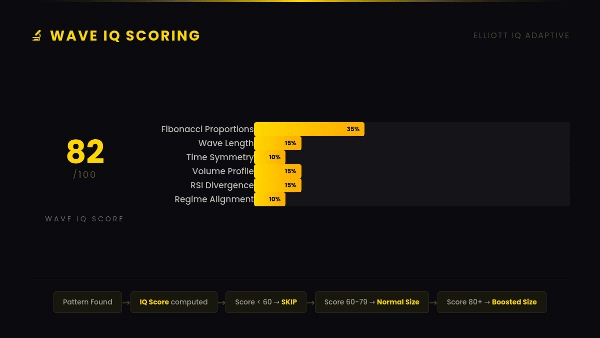
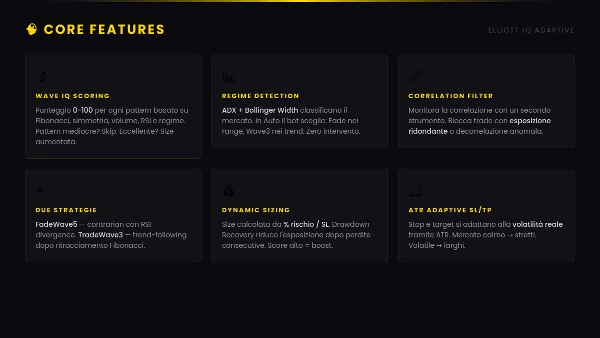
🧮 Dalga IQ Puanlama — Algılanan her desen, Fibonacci oranları (%35), dalga uzunluğu (%15), zaman simetrisi (%10), hacim profili (%15), RSI uyumsuzluğu (%15) ve rejim uyumu (%10) baz alınarak 0-100 arasında puanlanır. Eşik altındaki puanlar otomatik olarak atlanır. Yüksek puanlar pozisyon büyütmeyi tetikler.
📊 Piyasa Rejimi Tespiti — ADX + Bollinger Band Genişliği piyasayı Trend, Yatay veya Volatil olarak sınıflandırır. Otomatik modda, bot mevcut rejime göre doğru stratejiyi manuel müdahale olmadan seçer.
🔗 Korelasyon Filtresi — İkincil bir enstrümanla gerçek zamanlı Pearson korelasyonunu izler. Korelasyon çok yüksek olduğunda (fazla maruz kalma) veya çok düşük olduğunda (anormal piyasa koşulları) işlemleri engeller.
🛠️ Pozisyon Yönetimi
💰 Dinamik Pozisyon Büyüklüğü — Lot büyüklüğü, sermaye risk yüzdesi bölü stop loss mesafesinden hesaplanır. Sabit lotlar yok — risk volatiliteye bakılmaksızın sabit kalır.
📐 ATR-Uyumlu SL/TP — Stop loss ve kar al, Ortalama Gerçek Aralık çarpanları ile mevcut piyasa volatilitesine otomatik olarak uyum sağlar. Sakin piyasalarda sıkı, volatil piyasalarda geniş.
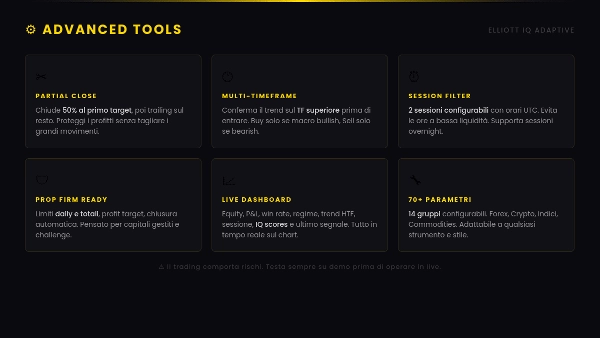
✂️ Kısmi Kapatma — Pozisyonun bir kısmını ilk hedefte otomatik olarak kapatır, kalanını ise takip eden stop ile devam ettirir.
🔄 Takip Eden Stop & Başabaş — Tetikleme mesafesi ile yapılandırılabilir takip eden stop. Başabaş kilidi, bir eşik aşıldığında karları korur.
📉 Zarar Azaltma Kurtarma — Ardışık kayıplardan sonra sistem otomatik olarak pozisyon büyüklüğünü azaltır, ardından bir kazanç sonrası normale döner.
🔍 Onay Filtreleri
🕐 Çoklu Zaman Dilimi — Giriş öncesi daha yüksek zaman dilimindeki MA üzerinde trend yönünü kontrol eder. Makro görünüm yükselişse sadece alır, düşüşse sadece satar.
⏰ Oturum Filtresi — İki yapılandırılabilir UTC işlem oturumu. Düşük likidite saatlerinden kaçınır. Gece oturumlarını destekler.
📊 Hacim Filtresi — Dalga 3 hacminin hareketli ortalamanın üzerinde olduğunu doğrular, gerçek momentumu onaylar.
📈 Stokastik Filtre — Giriş öncesi isteğe bağlı aşırı alım/aşırı satım kesişim onayı.
🛡️ Risk Yönetimi
🏢 Prop Firma Hazır — Günlük zarar limiti, toplam zarar limiti, kar hedefi. Limitler aşıldığında otomatik pozisyon kapatma. Fonlu hesaplar ve meydan okumalar için tasarlanmıştır.
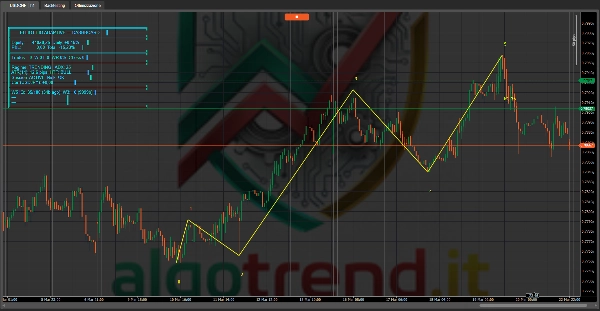
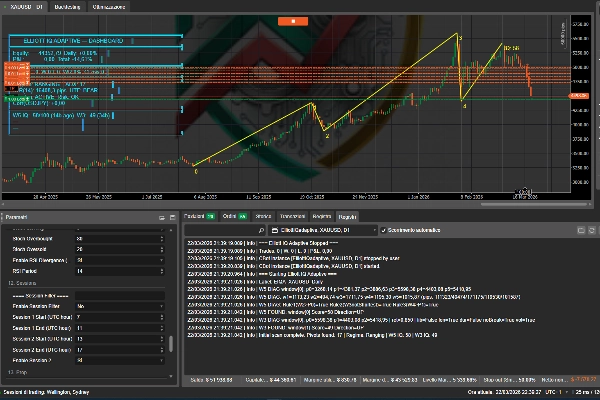
📈 Canlı Gösterge Paneli — Sermaye, kar/zarar, kazanma oranı, rejim, yüksek zaman dilimi trendi, oturum durumu, IQ puanları ve son sinyal bilgilerini gerçek zamanlı olarak grafik üzerinde gösterir.
⚠️ Uyarı
Ticaret risk içerir. Geçmiş performans gelecekteki sonuçları garanti etmez. Canlı işlem öncesi her zaman demo hesapta test edin.
📋 PARAMETRE KILAVUZU
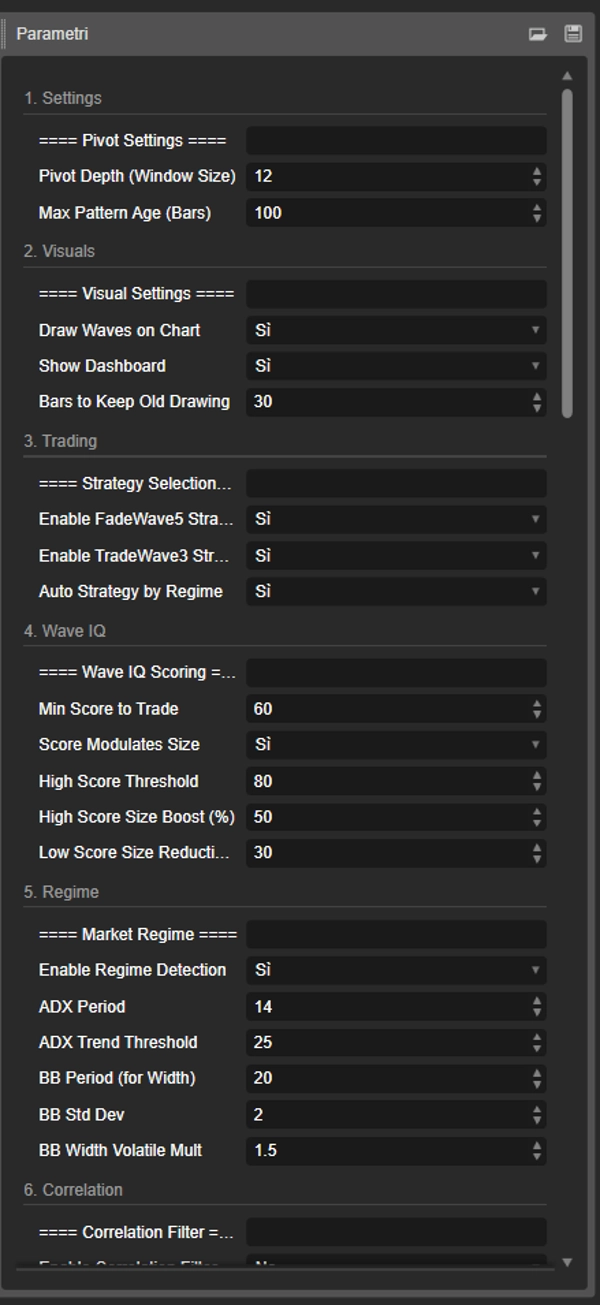
⚙️ 1. AYARLAR
🔹 Pivot Derinliği (Pencere Boyutu) — Varsayılan: 12 Bir salınım yüksek/düşük onaylamak için gereken sol ve sağdaki bar sayısı. Yüksek = daha az ama daha önemli pivotlar. Düşük = daha fazla pivot, daha fazla gürültü. Önerilen: H1 için 8-15, M5 için 5-8.
🔹 Maksimum Desen Yaşı (Barlar) — Varsayılan: 100 Bir desenin son pivotu ile mevcut bar arasındaki izin verilen maksimum bar sayısı. Bu yaştan büyük desenler yüksek IQ puanı olsa bile dikkate alınmaz. Bayat sinyallerle işlem yapılmasını önler.
🎨 2. GÖRSELLER
🔹 Grafikte Dalga Çiz — Varsayılan: Evet Sarı dalga çizgileri ve numara etiketlerini açar/kapatır.
🔹 Gösterge Panelini Göster — Varsayılan: Evet Grafik üzerindeki gösterge panelini (sol üst köşe) açar/kapatır.
🔹 Eski Çizimi Tutulacak Barlar — Varsayılan: 30 Son geçerli dalga desenini geçersiz olduktan sonra kaç bar boyunca göstermeye devam edeceği. Hemen kaldırmak için 0 yapın.
📈 3. TİCARET
🔹 FadeWave5 Stratejisini Etkinleştir — Varsayılan: Evet Tamamlanmış 5 dalgalı impulsları karşıt strateji olarak etkinleştirir.
🔹 TradeWave3 Stratejisini Etkinleştir — Varsayılan: Evet Dalga 3 başlangıcında giriş yapan trend takip stratejisini etkinleştirir.
🔹 Rejime Göre Otomatik Strateji — Varsayılan: Evet Etkinleştirildiğinde, bot tespit edilen piyasa rejimine göre stratejiyi otomatik seçer: Yatayta FadeWave5, Trendde TradeWave3, Volatilde her ikisi. Yukarıdaki manuel açma/kapatmayı geçersiz kılar.
🧮 4. DALGA IQ PUANLAMASI
🔹 İşlem İçin Minimum Puan — Varsayılan: 60 İşleme girmek için gereken minimum IQ puanı (0-100). Bu puanın altındaki desenler kaydedilir ama atlanır. Yüksek = daha az ama daha kaliteli işlemler.
🔹 Puan Büyüklüğü Modüle Eder — Varsayılan: Evet Etkinleştirildiğinde, IQ puanı pozisyon büyüklüğünü etkiler: yüksek puanlar büyütme, düşük puanlar (eşik yakınında) küçültme alır.
🔹 Yüksek Puan Eşiği — Varsayılan: 80 Büyütmenin uygulandığı IQ puanı eşiği.
🔹 Yüksek Puan Büyütme (%) — Varsayılan: 50 Yüksek eşik üzerindeki desenler için lot büyüklüğündeki yüzde artış. 50 = 1.5x normal büyüklük.
🔹 Düşük Puan Küçültme (%) — Varsayılan: 30 Minimum eşik üzerinde olan desenler için lot büyüklüğündeki yüzde azalma. 30 = 0.7x normal büyüklük.
📊 5. REJİM TESPİTİ
🔹 Rejim Tespitini Etkinleştir — Varsayılan: Evet ADX + Bollinger Band Genişliği piyasa sınıflandırma sistemini etkinleştirir.
🔹 ADX Periyodu — Varsayılan: 14 Ortalama Yön Endeksi hesaplama periyodu.
🔹 ADX Trend Eşiği — Varsayılan: 25 Piyasanın Trend olarak sınıflandırıldığı ADX değeri. Altında = Yatay (BB Genişliği Volatil demedikçe).
🔹 BB Periyodu (Genişlik için) — Varsayılan: 20 Volatilite tespiti için bant genişliği hesaplamasında kullanılan Bollinger Band periyodu.
🔹 BB Std Sapma — Varsayılan: 2.0 Bollinger Bandları için standart sapma çarpanı.
🔹 BB Genişliği Volatil Çarpanı — Varsayılan: 1.5 Mevcut BB genişliği 50 bar ortalamasını bu çarpanla aşarsa piyasa Volatil olarak sınıflandırılır.
🔗 6. KORELASYON FİLTRESİ
🔹 Korelasyon Filtresini Etkinleştir — Varsayılan: Hayır Çapraz enstrüman korelasyon kontrolünü etkinleştirir. Geçerli bir ikincil sembol gerektirir.
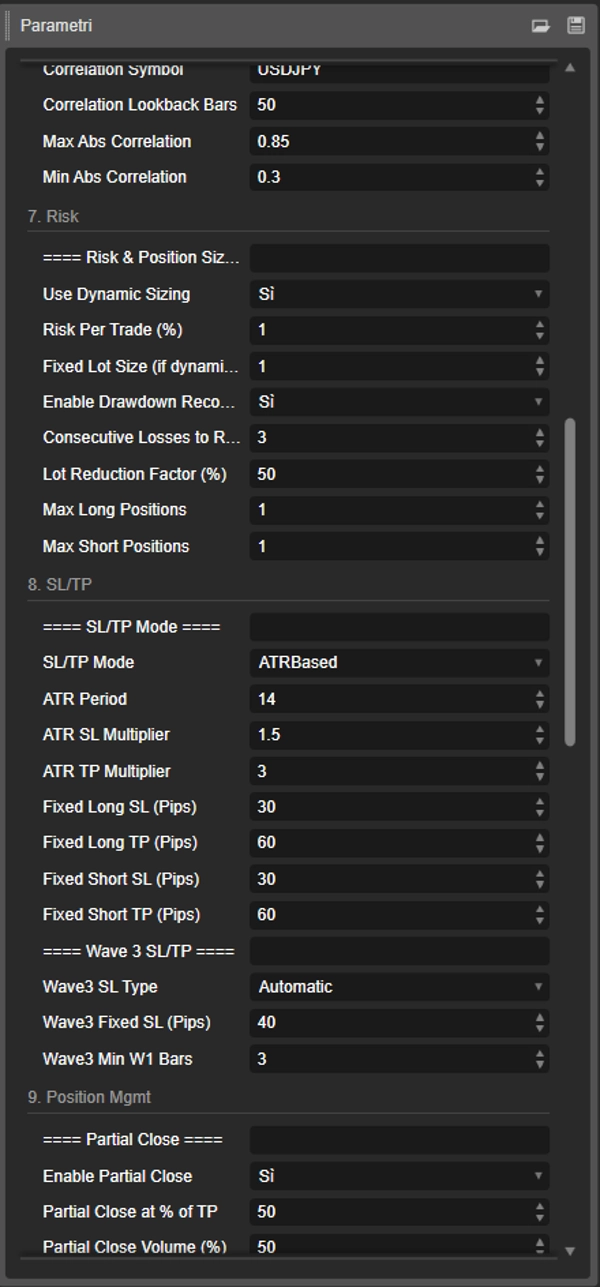
🔹 Korelasyon Sembolü — Varsayılan: USDJPY Korelasyon hesaplamak için ikincil enstrüman. USD çiftleri için DXY-korelasyonlu çiftler veya ilgili bir endeks kullanın.
🔹 Korelasyon Geriye Dönük Barlar — Varsayılan: 50 Pearson korelasyon katsayısını hesaplamak için kullanılan bar sayısı.
🔹 Maks Mutlak Korelasyon — Varsayılan: 0.85 Üst sınır. Mutlak korelasyon bu değeri aşarsa işlemler engellenir (fazla maruz kalma riski).
🔹 Min Mutlak Korelasyon — Varsayılan: 0.30 Alt sınır. Mutlak korelasyon bu değerin altına düşerse işlemler engellenir (anormal korelasyon bozukluğu).
💰 7. RİSK & BOYUTLANDIRMA
🔹 Dinamik Boyutlandırmayı Kullan — Varsayılan: Evet Sermaye risk yüzdesi ve stop loss mesafesine göre lot büyüklüğünü hesaplar. Kapalıysa sabit lot kullanır.
🔹 İşlem Başına Risk (%) — Varsayılan: 1.0 İşlem başına riske edilen hesap sermayesi yüzdesi. Dinamik boyutlandırma ile lot büyüklüğünü hesaplamak için kullanılır.
🔹 Sabit Lot Büyüklüğü — Varsayılan: 1.00 Dinamik boyutlandırma kapalıyken kullanılan lot büyüklüğü.
🔹 Zarar Azaltma Kurtarmayı Etkinleştir — Varsayılan: Evet Ardışık kayıplardan sonra lot büyüklüğünü azaltır.
🔹 Azaltma İçin Ardışık Kayıp Sayısı — Varsayılan: 3 Lot küçültmeyi tetikleyen ardışık kayıp sayısı.
🔹 Lot Azaltma Faktörü (%) — Varsayılan: 50 Zarar azaltma kurtarma sırasında lotların ne kadar azaltılacağı. 50 = normal büyüklüğün yarısı.
🔹 Maksimum Uzun Pozisyonlar — Varsayılan: 1 Aynı anda alınabilecek maksimum uzun pozisyon sayısı. Tamamen kapatmak için 0 yapın.
🔹 Maksimum Kısa Pozisyonlar — Varsayılan: 1 Aynı anda alınabilecek maksimum kısa pozisyon sayısı. Tamamen kapatmak için 0 yapın.
📐 8. SL/TP MODU
🔹 SL/TP Modu — Varsayılan: ATR Tabanlı Stop loss ve kar al için ATR-uyumlu veya sabit pipler arasında seçim yapar.
🔹 ATR Periyodu — Varsayılan: 14 SL/TP hesaplamasında kullanılan Ortalama Gerçek Aralık göstergesi periyodu.
🔹 ATR SL Çarpanı — Varsayılan: 1.5 Stop loss = ATR × bu çarpan. Yüksek = daha geniş stoplar.
🔹 ATR TP Çarpanı — Varsayılan: 3.0 Kar al = ATR × bu çarpan. Varsayılan 1:2 risk-ödül oranı verir.
🔹 Sabit Uzun SL (Pip) — Varsayılan: 30 Mod sabit pip ise uzun işlemler için sabit stop loss.
🔹 Sabit Uzun TP (Pip) — Varsayılan: 60 Uzun işlemler için sabit kar al.
🔹 Sabit Kısa SL (Pip) — Varsayılan: 30 Kısa işlemler için sabit stop loss.
🔹 Sabit Kısa TP (Pip) — Varsayılan: 60 Kısa işlemler için sabit kar al.
🔹 Dalga3 SL Türü — Varsayılan: Otomatik Dalga 3 stratejisi için: Otomatik, SL'yi dalga 1 başlangıcına yerleştirir. Sabit Pipler aşağıdaki değeri kullanır.
🔹 Dalga3 Sabit SL (Pip) — Varsayılan: 40 Dalga 3 işlemleri için sabit pip cinsinden stop loss (yalnızca tür Sabit Pipler ise).
🔹 Dalga3 Min W1 Bar Sayısı — Varsayılan: 3 Dalga 1'in geçerli sayılması için kapsaması gereken minimum bar sayısı. Sıçramaları ve gürültüyü filtreler.
✂️ 9. POZİSYON YÖNETİMİ
🔹 Kısmi Kapatmayı Etkinleştir — Varsayılan: Evet Pozisyonun bir kısmını kısmi hedefte kapatır, kalanını devam ettirir.
🔹 TP'nin %'si Kadar Kısmi Kapatma — Varsayılan: 50 Kısmi kapatmanın tetikleneceği kar al mesafesinin yüzdesi. 50 = kar almanın yarısı.
🔹 Kısmi Kapatma Hacmi (%) — Varsayılan: 50 Kapatılacak pozisyon hacminin yüzdesi. 50 = yarısı kapatılır.
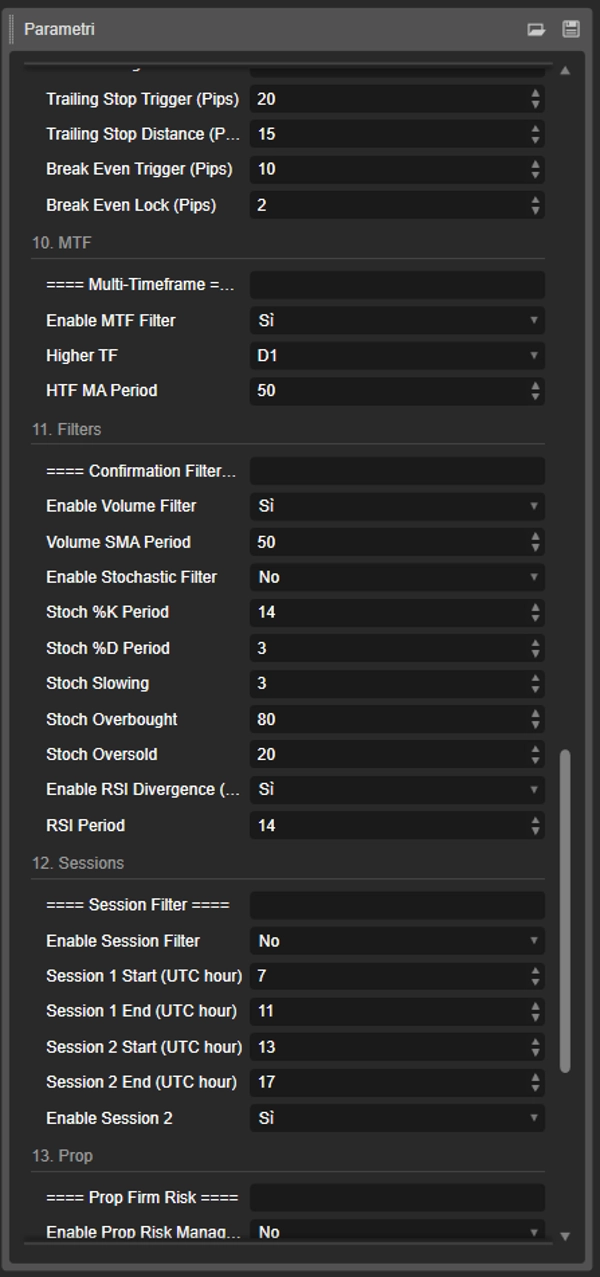
🔹 Takip Eden Stop Tetikleyici (Pip) — Varsayılan: 20 Takip eden stopu aktifleştirmek için gereken pip karı. 0 = devre dışı.
🔹 Takip Eden Stop Mesafesi (Pip) — Varsayılan: 15 Takip eden stopun fiyatın gerisinde tuttuğu mesafe (pip cinsinden).
🔹 Başabaş Tetikleyici (Pip) — Varsayılan: 10 Stop loss'u başabaşa taşımak için gereken pip karı. 0 = devre dışı.
🔹 Başabaş Kilidi (Pip) — Varsayılan: 2 Başabaş etkinleştiğinde kilitlenen kar pipi. 2 = SL giriş + 2 pip olur.
🕐 10. ÇOKLU ZAMAN DİLİMİ
🔹 MTF Filtresini Etkinleştir — Varsayılan: Evet Giriş öncesi işlem yönünü onaylamak için daha yüksek zaman dilimi gerektirir.
🔹 Daha Yüksek Zaman Dilimi — Varsayılan: Günlük Trend onayı için kullanılan zaman dilimi. Tipik: H1 girişleri için Günlük, M15 için H4.
🔹 HTF MA Periyodu — Varsayılan: 50 Daha yüksek zaman dilimindeki hareketli ortalama periyodu. Fiyat MA üzerinde = yükseliş, altında = düşüş.
🔍 11. ONAY FİLTRELERİ
🔹 Hacim Filtresini Etkinleştir — Varsayılan: Evet Dalga 3 ortalama hacminin hacim SMA'yı aşmasını gerektirir. Gerçek momentumu onaylar.
🔹 Hacim SMA Periyodu — Varsayılan: 50 Hacim basit hareketli ortalama periyodu.
🔹 Stokastik Filtresini Etkinleştir — Varsayılan: Hayır Giriş öncesi aşırı alım/aşırı satım bölgesinde stokastik kesişimi gerektirir.
🔹 Stokastik %K / %D / Yavaşlatma — Varsayılan: 14 / 3 / 3 Standart stokastik osilatör parametreleri.
🔹 Stokastik Aşırı Alım — Varsayılan: 80 Satış kesişimlerinin geçerli olduğu seviye.
🔹 Stokastik Aşırı Satım — Varsayılan: 20 Alış kesişimlerinin geçerli olduğu seviye.
🔹 RSI Uyumsuzluğunu Etkinleştir (FadeW5) — Varsayılan: Evet Sadece FadeWave5 için: tükenmeyi onaylamak için dalga 3 ve dalga 5 zirveleri arasında RSI uyumsuzluğu gerektirir.
🔹 RSI Periyodu — Varsayılan: 14 Göreceli Güç Endeksi periyodu.
⏰ 12. OTURUM FİLTRESİ
🔹 Oturum Filtresini Etkinleştir — Varsayılan: Evet İşlemleri belirli zaman aralıklarıyla sınırlar.
🔹 Oturum 1 Başlangıç / Bitiş (UTC) — Varsayılan: 7 / 11 İlk işlem oturumu. Varsayılan Londra açılışını kapsar.
🔹 Oturum 2 Başlangıç / Bitiş (UTC) — Varsayılan: 13 / 17 İkinci işlem oturumu. Varsayılan New York'u kapsar.
🔹 Oturum 2'yi Etkinleştir — Varsayılan: Evet İkinci oturumu açıp kapatır.
🛡️ 13. PROP FİRMA
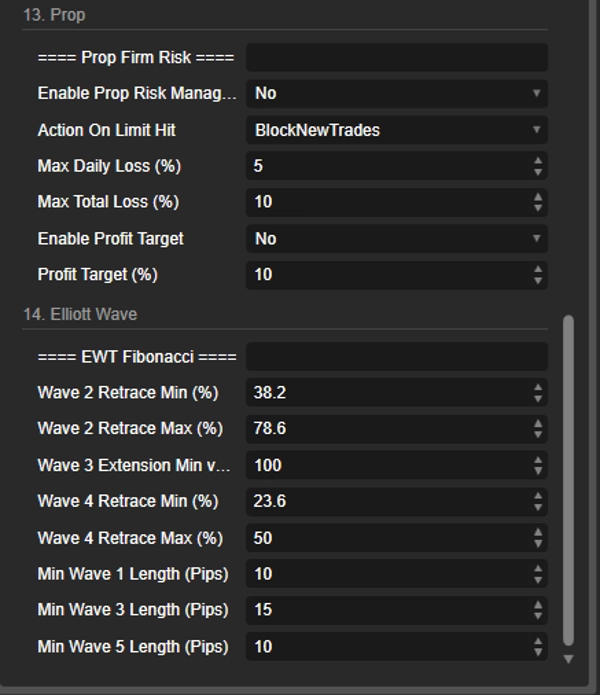
🔹 Prop Risk Yönetimini Etkinleştir — Varsayılan: Hayır Prop firma tarzı risk limitlerini etkinleştirir.
🔹 Limit Aşıldığında Yapılacak — Varsayılan: Yeni İşlemleri Engelle Limit aşıldığında ne yapılacağı: sadece yeni işlemleri engelle veya hepsini kapat ve engelle.
🔹 Maks Günlük Zarar (%) — Varsayılan: 5.0 Günlük başlangıç sermayesinin yüzde olarak izin verilen maksimum zarar.
🔹 Maks Toplam Zarar (%) — Varsayılan: 10.0 Başlangıç bakiyesi yüzdesi olarak izin verilen maksimum toplam zarar.
🔹 Kar Hedefini Etkinleştir — Varsayılan: Hayır Kar hedefi gerçekleştiğinde işlemleri durdurur.
🔹 Kar Hedefi (%) — Varsayılan: 10.0 Başlangıç bakiyesi yüzdesi olarak hedef.
🌊 14. ELLIOTT WAVE FİBONACCİ
🔹 Dalga 2 Düzeltme Min / Maks (%) — Varsayılan: 38.2 / 78.6 Dalga 2 için kabul edilebilir Fibonacci düzeltme aralığı. Klasik Elliott kuralları.
🔹 Dalga 3 Uzatma Min vs W1 (%) — Varsayılan: 100.0 Dalga 3 uzunluğunun dalga 1'e oranla minimum yüzdesi. 100 = en az eşit.
🔹 Dalga 4 Düzeltme Min / Maks (%) — Varsayılan: 23.6 / 50.0 Dalga 4 için dalga 3'e göre kabul edilebilir düzeltme aralığı.
🔹 Min Dalga 1 / 3 / 5 Uzunluğu (Pip) — Varsayılan: 10 / 15 / 10 Dalga uzunluğunun minimum pip cinsinden değeri. Mikro dalgaları filtreler. Enstrümanınızın pip boyutuna göre ayarlayın.
Özet
It operates two independent strategies: FadeWave5, which enters contrarian trades at the completion of a 5-wave impulse confirmed by RSI divergence, suited for ranging or exhaustion markets; and TradeWave3, which follows the trend by entering at the start of wave 3 after a Fibonacci retracement of wave 2, best for trending markets. The bot automatically selects the appropriate strategy based on market regime detection using ADX and Bollinger Band Width indicators.
Position management features include dynamic position sizing based on risk percentage and stop loss distance, ATR-adaptive stop loss and take profit levels, partial position closing, trailing stops, break-even locks, and drawdown recovery that reduces lot sizes after consecutive losses. Additional filters include multi-timeframe trend confirmation, session time restrictions, volume and stochastic filters, and a correlation filter to avoid redundant or anomalous trades.
Risk management supports prop firm requirements with configurable daily and total loss limits and profit targets. A live on-chart dashboard displays key metrics such as equity, P&L, win rate, regime, and signal information. The bot is suitable for forex, indices, commodities, and XAUUSD markets, employing a medium-frequency swing trading style based on technical analysis.
Müşteri değerlendirmeleri
5 | 50 % | |
4 | 50 % | |
3 | 0 % | |
2 | 0 % | |
1 | 0 % |