present
Zarejestruj się i otrzymaj 50 $ zniżki na pierwszy zakup
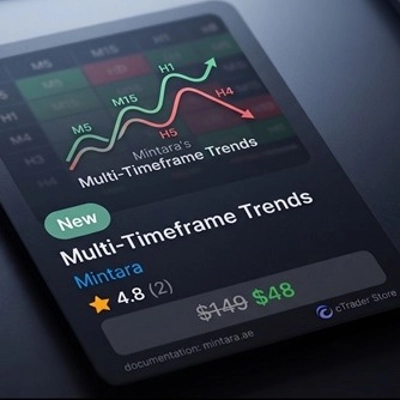
Trading product for Trends Wtyczka desktopowa Market Scanner, image 1
Trends
Wtyczka desktopowa
Wersja 1.0, May 2026
Windows, Mac
Trading product for Trends Wtyczka desktopowa Market Scanner, image 2
Trading product for Trends Wtyczka desktopowa Market Scanner, image 3
Od 23/03/2025

Opis

https://mintara.ae/ctrader/plugin/MTF_Trends_Documentation.html
Mapa ciepła trendów

Multi

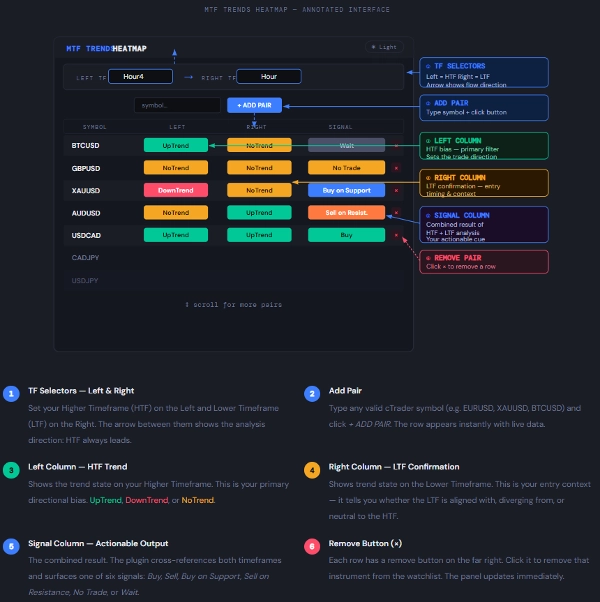
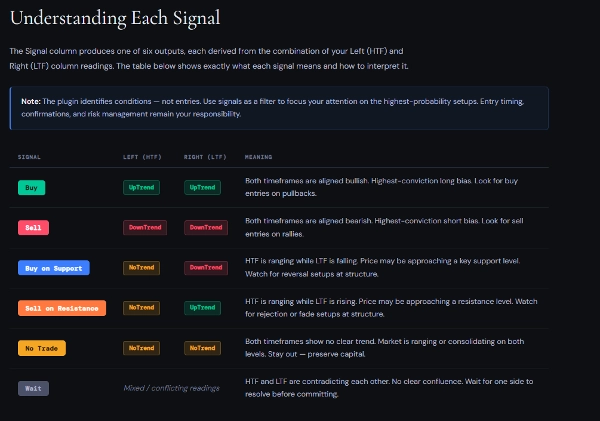
Skaner rynku w czasie rzeczywistym, który ocenia kierunek trendu na dwóch wybranych przez użytkownika ramach czasowych jednocześnie — dając Ci sygnał do działania na pierwszy rzut oka dla każdego instrumentu na Twojej liście obserwowanych.


Co robi

Wtyczka MTF Trends Heatmap monitoruje jednocześnie wiele instrumentów i ocenia warunki trendu na dwóch wybranych przez Ciebie ramach czasowych.  Lewy TF jest Twoją Wyższą Ramą Czasową (HTF), a Prawy TF jest Twoją Niższą Ramą Czasową (LTF). Wtyczka porównuje oba i generuje Sygnał w ostatniej kolumnie.

Zamiast ręcznie przełączać wykresy, otrzymujesz skonsolidowany widok dowolnej liczby instrumentów — kodowany kolorami, aktualizowany na żywo, przewijalny — wszystko w jednym panelu o zmiennym rozmiarze wewnątrz cTrader.

Kluczowa zasada: Lewy TF (HTF) ustala kierunkowe nastawienie. Prawy TF (LTF) je potwierdza lub zaprzecza. Kolumna Sygnał mówi, na co zwrócić uwagę — to Ty decydujesz, kiedy działać.

Zalecane kombinacje:
Day Trader → Lewy: H4 / Prawy: H1 — nastawienie na H4, timing wejścia na H1
Swing Trader → Lewy: Daily / Prawy: H4 — kierunek na Daily, setup na H4
Position Trader → Lewy: Weekly / Prawy: Daily — makro na Weekly, wyzwalacz na Daily

Ważne: Nigdy nie ustawiaj Lewego TF niżej niż Prawy TF. Wtyczka traktuje Lewy jako wyższą autorytet. Zamiana ich odwraca logikę Sygnału i daje mylące wyniki.


Podsumowanie

Podsumowanie AI
The Trends plugin is a real-time market scanner designed for the cTrader platform. It evaluates trend direction simultaneously across two user-selected timeframes: a Higher Timeframe (HTF) on the left and a Lower Timeframe (LTF) on the right. By comparing these timeframes, the plugin generates a consolidated signal indicating trend alignment or divergence for each instrument in the user’s watchlist. This signal helps traders identify directional bias from the HTF and confirmation or contradiction from the LTF, aiding decision-making without manually switching charts. The interface is a color-coded, live-updating, scrollable heatmap panel that can display multiple instruments at once. Recommended timeframe combinations vary by trading style, such as H4/H1 for day trading, Daily/H4 for swing trading, and Weekly/Daily for position trading. The plugin requires the HTF to be set higher than the LTF to maintain correct signal logic. This tool supports efficient multi-instrument trend analysis by providing an at-a-glance view of market conditions across different timeframes.
Profil wtyczki
Kategoria wtyczki
UX wykresu
Dostęp do danych
Dane rynkowe

Opinie klientów

0.0
Opinie: 0
Opinie klientów
Ten produkt nie ma jeszcze opinii. Wypróbowałeś(-aś) go już? Bądź pierwszy(-a) i powiedz o tym innym!

Dyskusja

Częste pytania

Market Scanner
Produkty dostępne za pośrednictwem cTrader Store, w tym boty handlowe, wskaźniki i wtyczki, dostarczane są przez deweloperów zewnętrznych i udostępniane wyłącznie w celach informacyjnych oraz w celu zapewnienia dostępu technicznego. cTrader Store nie jest brokerem i nie zapewnia doradztwa inwestycyjnego, nie udziela spersonalizowanych rekomendacji ani nie gwarantuje przyszłych wyników.

Możesz także polubić

Wtyczka desktopowa
AI
ATR
+27
Trade Analytics delivers advanced trading insights and heatmaps directly inside TradeWatch.
Wtyczka desktopowa
Break Even
Fixed Risk %
+5
Chart-based risk sizing, Entry/SL/TP planning and user-confirmed market or pending orders for cTrader Desktop.
Wtyczka desktopowa
Risk Reward management tools (风险回报管理工具)
Wtyczka desktopowa
ECN-friendly
Chart UI Tools
Any timeframe cTrader lacks: seconds, minutes, hours, tick & range bars, Heikin-Ashi in the timeframe menu.
Wtyczka desktopowa
Trade Journal
AI Integration
+1
#1 Trade Journal, PnL analytics, bot monitoring and strategy statistics.
Wtyczka desktopowa
Risk Alerts
Trade Alerts
+3
Daily loss limits, profit giveback protection and scheduled trading breaks to help you stay disciplined.
Wtyczka desktopowa
Market Scanner
An 8-currency strength ranking, multi-TF heatmap & impulse tracker — read the real driver at a glance. Read-only.
Wtyczka desktopowa
Prop
Forex
+4
Professional risk management plugin with automatic lot calculation, chart panels, and R:R automation. Version 1.4.2.
Wtyczka desktopowa
AI
Forex
+5
AI Trading Agent, predict market moves, detect trends, and execute profitable trades.
Wtyczka desktopowa
Trade Journal
AI Integration
+1
Turn your closed-trade history into an at-a-glance monthly calendar and a deep performance dashboard.
Wtyczka desktopowa
Risk/Reward
Trade Journal
+5
cTrader Journal - Automatic Trade Capture. Offline Reviews. No Subscription.
Wtyczka desktopowa
SMC
Grid
+5
The all-in-one trade management plugin that automates your risk, execution, and position management.
Wtyczka desktopowa
Forex
Signal
+2
Adaptive Renko chart builder for precise, flexible trading - ideal for both scalping and trend analysis.
Wtyczka desktopowa
AI
ATR
+27
Turn your cTrader trade history into a visual performance dashboard to see trading patterns and strategy strength
Logo „TradeGuard”
Popularne
4.6
(3)
Wtyczka desktopowa
ATR
Prop
+5
cTrader risk management plugin with daily & total drawdown limits, CBot control, and risk-based order execution.
Wtyczka desktopowa
Prop
Forex
+3
Visual calendar with daily PnL, trades, win rate, profit factor, and performance insights.
Wtyczka desktopowa
Forex
Crypto
+3
Build custom second and tick charts using adjustable bar sampling intervals.
Wtyczka desktopowa
Prop
Forex
+4
Visual monthly trading journal that displays your performance day-by-day in a calendar view.

Cena

Od 23/03/2025