

คำอธิบาย
PnL Studio
เปลี่ยนประวัติการเทรด cTrader ของคุณให้เป็นแดชบอร์ดประสิทธิภาพที่มองเห็นได้ และดูรูปแบบการเทรด จุดแข็ง และพื้นที่ที่ต้องปรับปรุงได้ทันที
PnL Studio เป็นปลั๊กอินวิเคราะห์ที่ทรงพลังซึ่งเปลี่ยนประวัติการเทรดของคุณให้เป็นแดชบอร์ดภาพที่ชัดเจน แทนที่จะเลื่อนดูรายการเทรดยาว ๆ คุณสามารถเข้าใจได้อย่างรวดเร็วว่าการเทรดของคุณทำงานอย่างไรในแต่ละวัน สัปดาห์ และกลยุทธ์ต่าง ๆ
ด้วยการติดตามประสิทธิภาพตามปฏิทิน สถิติสำคัญ และเครื่องมือตรวจสอบการเทรดอย่างละเอียด PnL Studio ช่วยให้นักเทรดวิเคราะห์ผลลัพธ์และระบุรูปแบบที่สามารถปรับปรุงการตัดสินใจได้
คุณสมบัติหลัก
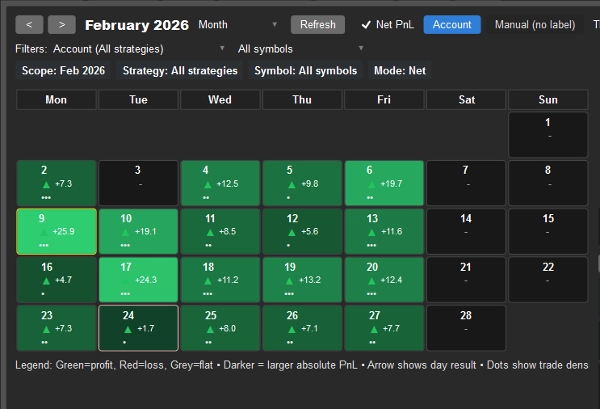
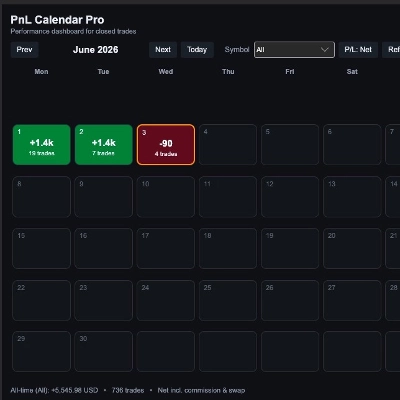
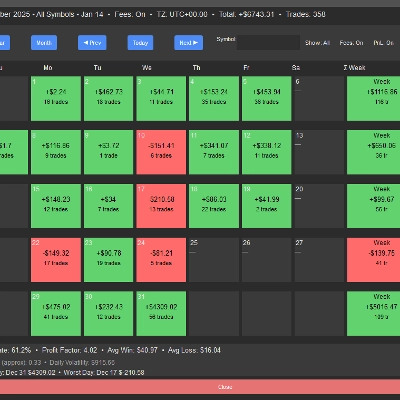
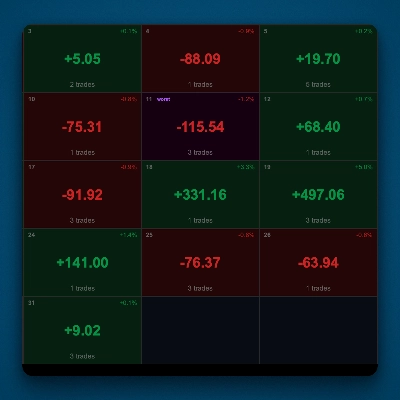
ปฏิทินประสิทธิภาพการเทรดแบบภาพ
ดูผลการเทรดในแต่ละวันได้ทันทีด้วยแผนที่ความร้อนปฏิทินที่ใช้สีเป็นรหัส
• สีเขียว = วันที่มีกำไร
• สีแดง = วันที่ขาดทุน
• สีเข้มขึ้น = กำไรขาดทุนมากขึ้น
• ตัวบ่งชี้กิจกรรมแสดงความเข้มข้นของการเทรด
• ลูกศรทิศทางเน้นวันที่ชนะหรือแพ้
คลิกที่วันใดก็ได้เพื่อเจาะลึกไปยังการเทรดที่สร้างผลลัพธ์นั้น
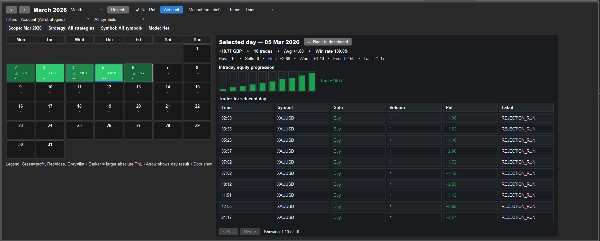
การตรวจสอบการเทรดรายวัน
เลือกวันใดก็ได้จากปฏิทินเพื่อตรวจสอบการเทรดที่แท้จริงเบื้องหลังผลลัพธ์
ดู:
• รายการเทรดพร้อมสัญลักษณ์ ทิศทาง ปริมาณ และกำไรขาดทุน
• ป้ายกลยุทธ์สำหรับแต่ละเทรด
• ความก้าวหน้าของทุนภายในวัน
• สถิติประจำวันรวมถึงเทรดที่ดีที่สุด เทรดที่แย่ที่สุด และอัตราการชนะ
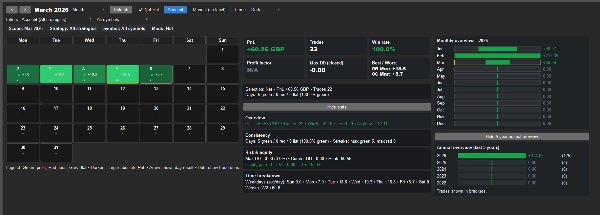
แดชบอร์ดประสิทธิภาพรายเดือน
เข้าใจประสิทธิภาพการเทรดรายเดือนของคุณอย่างรวดเร็วด้วยเมตริกสำคัญรวมถึง:
• กำไรรวม
• จำนวนการเทรด
• อัตราการชนะ
• ปัจจัยกำไร
• การลดลงสูงสุดที่ปิดแล้ว
• วันที่เทรดที่ดีที่สุดและแย่ที่สุด
การกรองกลยุทธ์และสัญลักษณ์
วิเคราะห์กลยุทธ์หรือ ตลาดเฉพาะโดยใช้ตัวกรองที่ยืดหยุ่น
กรองผลลัพธ์โดย:
• ป้ายกลยุทธ์
• สัญลักษณ์
• กำไรขาดทุนรวมหรือสุทธิ
• ขอบเขตเวลา (เดือนหรือปี)
ภาพรวมประสิทธิภาพกลยุทธ์
สรุปผลลัพธ์โดยอัตโนมัติสำหรับแต่ละป้ายกลยุทธ์เพื่อให้คุณเปรียบเทียบประสิทธิภาพได้อย่างรวดเร็ว
รวมถึง:
• กำไรรวม
• ผลลัพธ์เฉลี่ยของการเทรด
• จำนวนการเทรด
• การจัดอันดับความแข็งแกร่งของกลยุทธ์
ข้อมูลเชิงลึกประสิทธิภาพระยะยาว
ติดตามความสม่ำเสมอตลอดเวลาพร้อมสรุปในตัวรวมถึง:
• ภาพรวมรายเดือนสำหรับปีปัจจุบัน
• การแยกประสิทธิภาพรายปีห้าปี
สร้างขึ้นสำหรับนักเทรดที่ต้องการข้อมูลเชิงลึกลึกซึ้ง
ไม่ว่าคุณจะเทรดด้วยตนเองหรือใช้กลยุทธ์อัตโนมัติ PnL Studio ช่วยให้คุณเข้าใจว่าการเทรดของคุณทำงานอย่างไรในช่วงเวลาต่าง ๆ
ใช้เพื่อ:
• ระบุวันที่เทรดที่มีกำไร
• ตรวจจับรูปแบบประสิทธิภาพ
• วิเคราะห์พฤติกรรมกลยุทธ์
• ตรวจสอบความสม่ำเสมอของการเทรด
ทำงานร่วมกับเครื่องมือ AWTrades อื่น ๆ:
PnL Studio เป็นส่วนหนึ่งของชุดเครื่องมือ AWTrades ที่ออกแบบมาเพื่อช่วยให้นักเทรดเข้าใจทั้ง ประสิทธิภาพและความเสี่ยง ได้อย่างชัดเจนยิ่งขึ้น
คุณสามารถรวมกับ:
• Risk Watch – ปลั๊กอินติดตามความเสี่ยงแบบสดที่แสดงการเปิดรับความเสี่ยงปัจจุบัน ความเสี่ยงกรณีเลวร้ายที่สุด และความเข้มข้นของตำแหน่งเปิดในบัญชีของคุณ
• Trade Analytics – แดชบอร์ดขั้นสูงที่ประเมินคุณภาพทางสถิติของความได้เปรียบในการเทรดของคุณ รวมถึงความคาดหวัง ความสม่ำเสมอ และความเข้มข้นของกำไร
เครื่องมือเหล่านี้ร่วมกันสร้างกระบวนการทำงานการเทรดที่สมบูรณ์ยิ่งขึ้น:
PnL Studio – การตรวจสอบประสิทธิภาพแบบภาพ
Risk Watch – การติดตามความเสี่ยงและการเปิดรับแบบสด
Trade Analytics – การวิเคราะห์คุณภาพและความแข็งแกร่งของความได้เปรียบ
เรียบง่ายและน้ำหนักเบา
PnL Studio ทำงานโดยตรงภายใน cTrader และไม่ต้องการซอฟต์แวร์ภายนอก
เพียงเปิด แท็บ PnL Studio เพื่อแสดงภาพและวิเคราะห์ประสิทธิภาพการเทรดของคุณทันที
สรุป
The plugin offers a monthly performance dashboard showing key metrics like total PnL, number of trades, win rate, profit factor, maximum closed drawdown, and best/worst trading days. Flexible filters allow analysis by strategy label, symbol, gross or net PnL, and time scope (month or year). Strategy performance summaries include total profit, average trade result, trade count, and a strategy strength rating.
Long-term insights are available through monthly overviews and five-year annual performance breakdowns. PnL Studio supports both manual and automated trading analysis, helping traders identify patterns, assess strategy behavior, and monitor consistency over time. It integrates with other AWTrades tools such as Risk Watch for live risk monitoring and Trade Analytics for evaluating trading edge quality. The plugin runs directly inside cTrader without requiring external software.
รีวิวจากลูกค้า
5 | 33 % | |
4 | 67 % | |
3 | 0 % | |
2 | 0 % | |
1 | 0 % |
การสนทนา
คำถามที่พบบ่อย





!["Custom Timeframes [Iridio Capital]" โลโก้](https://cdn.ctrader.com/image/webp/4d75a920-23c7-4fea-a7b5-594a9d067f2e_63286)

ราคา