present
سجل واحصل على خصم 50 دولارًا على مشترياتك الأولى
Trading product for CTrader_Jornal إضافة سطح المكتب Consistent Returns No Overtrading, image 1
CTrader_Jornal
إضافة سطح المكتب
1 عمليات الشراء
الإصدار 1.7، Oct 2026
Windows, Mac
Trading product for CTrader_Jornal إضافة سطح المكتب Consistent Returns No Overtrading, image 2
Trading product for CTrader_Jornal إضافة سطح المكتب Consistent Returns No Overtrading, image 3
Trading product for CTrader_Jornal إضافة سطح المكتب Consistent Returns No Overtrading, image 4
Trading product for CTrader_Jornal إضافة سطح المكتب Consistent Returns No Overtrading, image 5
Trading product for CTrader_Jornal إضافة سطح المكتب Consistent Returns No Overtrading, image 6
Trading product for CTrader_Jornal إضافة سطح المكتب Consistent Returns No Overtrading, image 7
Trading product for CTrader_Jornal إضافة سطح المكتب Consistent Returns No Overtrading, image 8
Trading product for CTrader_Jornal إضافة سطح المكتب Consistent Returns No Overtrading, image 9
Trading product for CTrader_Jornal إضافة سطح المكتب Consistent Returns No Overtrading, image 10
Trading product for CTrader_Jornal إضافة سطح المكتب Consistent Returns No Overtrading, image 11
منذ 09/02/2026
26
المبيعات
167
التثبيتات المجانية

الوصف

دفتر تداول CTRADER - تسجيل أقل. تعلم أكثر.

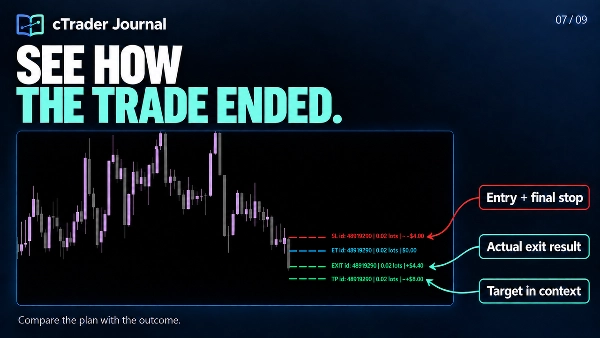
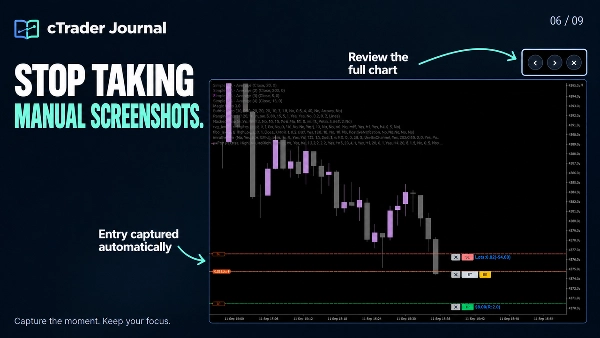
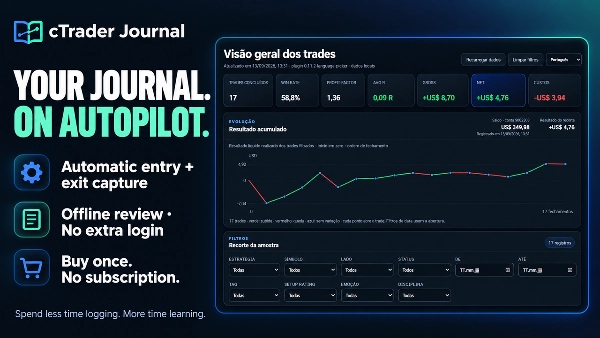
توقف عن قضاء وقت المراجعة في إعادة بناء ما حدث. يقوم دفتر تداول cTrader بتسجيل تداولاتك تلقائيًا والتقاط لقطات شاشة للدخول والخروج، حتى تتمكن من التركيز على فهم قراراتك، واكتشاف الأنماط، وتحسين عمليتك.

شراء لمرة واحدة. لا اشتراك في الدفتر. لا تسجيل دخول إضافي للدفتر. البساطة هي المفتاح!


✅ حوّل تاريخ تداولاتك إلى شيء مفيد

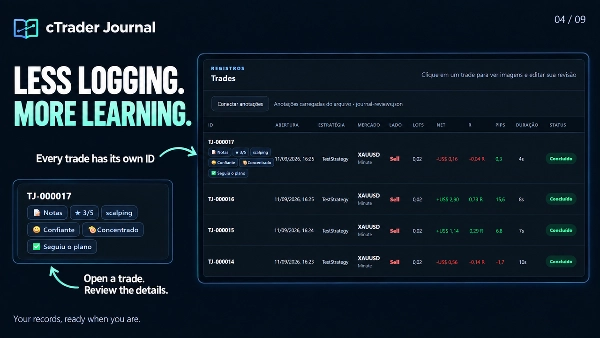
  • وفر الوقت: التقاط الدخول والخروج التلقائي يحافظ على السجلات ولقطات الشاشة المرتبطة بكل معرف تداول، بما في ذلك المراكز المتعددة.
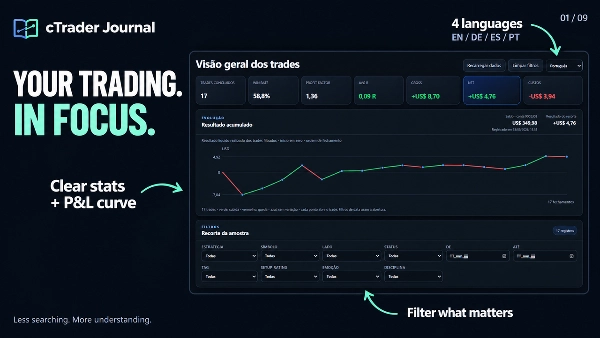
  • شاهد ما يستحق الانتباه: إحصائيات واضحة، منحنى الأرباح والخسائر المحققة التراكمي، وفلاتر مركزة تساعدك على مراجعة العينة المهمة.
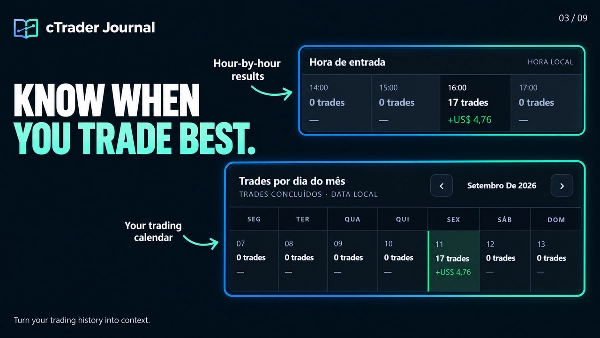
  • قارن نهجك: راجع الاستراتيجيات، الجلسات، ساعات الدخول وأيام التداول. افحص التكاليف، انزلاق التنفيذ وMFE/MAE لدعم تحليلك.
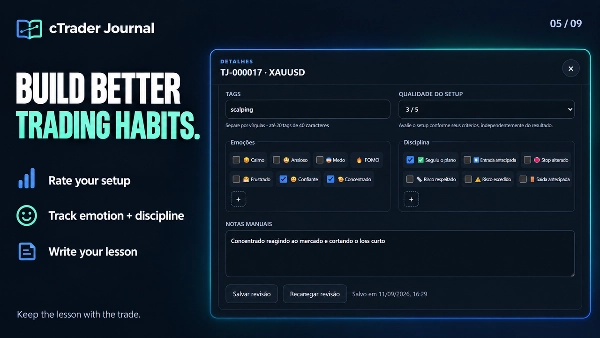
  • تعلم من قراراتك: أضف ملاحظات شخصية، تقييمات الإعداد، العلامات، المشاعر وعلامات الانضباط إلى التداولات الفردية. أنشئ خيارات المشاعر والانضباط الخاصة بك.
  • راجع الصورة الكاملة: كبر لقطات الشاشة وانتقل بين الدخول والخروج دون مغادرة العارض.
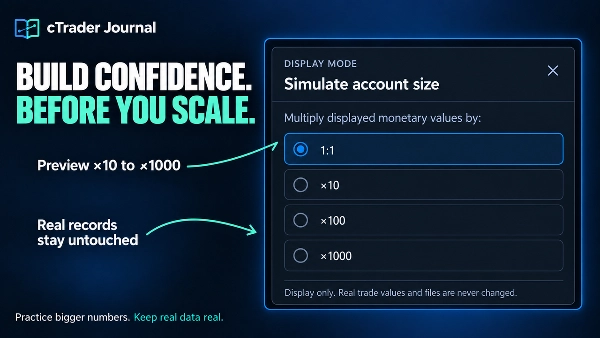
  • حاكي أحجام حسابات أكبر دون تغيير بيانات التداول المحفوظة.
  • أضف لقطات شاشة، علق على الرسوم البيانية وقم بتحديث قوائم التحقق من التداول.
  • تصفح السجلات واستكشف المنحنى التراكمي بشكل أسرع.
  • استرجع اللقطات المتقطعة من خلال إعادة المحاولة التلقائية الأكثر أمانًا.
  • احتفظ بالمراجعات، لقطات الشاشة والملاحظات مخزنة محليًا.

✅حدد حدودك. احمِ عمليتك.

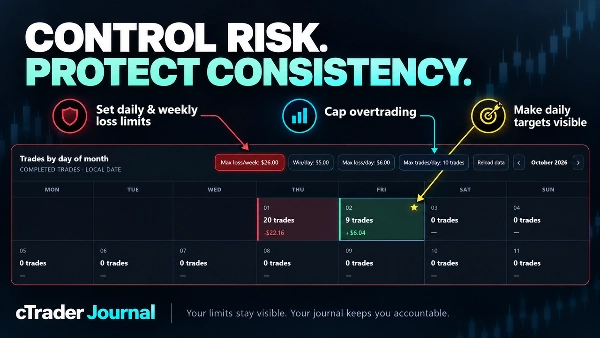
  • ابنِ انضباط تداول أقوى مع ضوابط المخاطر المستمرة مباشرة داخل تقويم دفتر التداول الخاص بك.
  • حدد حدود خسارة يومية وأسبوعية بالقيمة النقدية أو عدد التداولات الخاسرة.
  • منع الإفراط في التداول بعدد أقصى من التداولات في اليوم.
  • حدد هدف ربح يومي وشاهد على الفور الأيام المحققة معلمة بنجمة ذهبية.
  • احتفظ بالحدود والتحذيرات النشطة عبر إعادة التحميل وتحديث المتصفح.


🖥️ دفترك، مع مساحة للتفكير

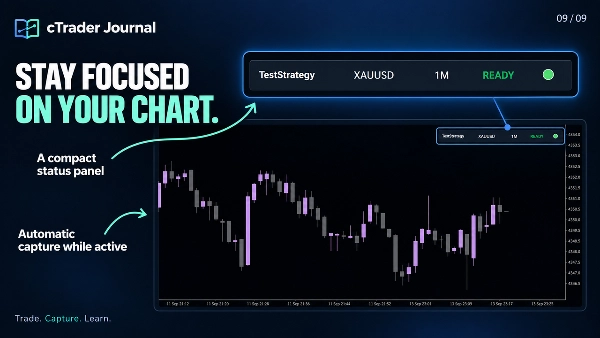
  1. يفتح الدفتر محليًا في متصفحك، مما يمنح الرسوم البيانية، الإحصائيات، لقطات الشاشة والمراجعات الشخصية مساحة نافذة متصفح كاملة. تبقى لوحة مدمجة على مخطط cTrader الخاص بك.
  2. تبقى ملفات الدفتر على جهاز الكمبيوتر الخاص بك. راجع البيانات المحفوظة دون اتصال، دون استضافة خادم أو تسجيل الدخول إلى خدمة دفتر منفصلة.
  3. يدعم الواجهة الإنجليزية، البرتغالية، الألمانية والإسبانية. الإنجليزية هي الافتراضية؛ اكتب ملاحظاتك وتسمياتك المخصصة بأي لغة.


📂 أين تجد دفتر تداولك

انقر على "فتح الدفتر" على اللوحة المدمجة للوصول إلى عنوانه المحلي. إذا لم يفتح المتصفح تلقائيًا، اختر العنوان المعروض، انسخه باستخدام Ctrl+A / Ctrl+C والصقه في شريط العنوان الخاص بـ Edge أو Chrome.


الصفحة المُنشأة هي journal .html. موقع ويندوز نموذجي هو:

Documents\cAlgo\Data\Plugins\CTrader Jornal\jornal\journal.html


الموقع الدقيق يعتمد على تكوين مستنداتك/OneDrive، اسم الإضافة المثبتة وإعداد مجلد الدفتر الفرعي. استخدم العنوان المعروض بواسطة الإضافة الخاصة بك.


✍️ اربط مراجعاتك الشخصية

  1. افتح journal .html في Microsoft Edge أو Google Chrome.
  2. انقر على ربط التعليقات.
  3. اختر journal-reviews .json من نفس مجلد الدفتر واسمح للمتصفح بحفظ التغييرات.
  4. افتح تداولًا، أضف مراجعتك وانقر على حفظ المراجعة.

مثال: قيّم الإعداد 3/5، اختر "قلق"، أضف علامة انضباط الدخول المبكر واكتب: “دخلت قبل التأكيد. انتظر إغلاق الشمعة في المرة القادمة.”

مهم: هذا يربط ملف المراجعة الموجود؛ لا تحتاج إلى استيراد التداولات يدويًا. احتفظ بملف journal-reviews .json مع دفتر التداول الخاص بك وضمنه عند نسخ المجلد احتياطيًا. إذا طلب منك المتصفح إعادة الاتصال لاحقًا، اختر نفس الملف.


🌐 اختر Edge أو Chrome للتجربة الكاملة

الدفتر مُحسّن لـ Microsoft Edge و Google Chrome، اللذين تدعم ميزات الوصول إلى الملفات فيهما حفظ مراجعاتك مباشرة إلى ملف JSON المحلي.

في Firefox والمتصفحات التي لا تدعم ذلك، يمكنك عرض لوحة التحكم، الإحصائيات ولقطات الشاشة. إنشاء أو تحرير المراجعات - بما في ذلك الملاحظات، التقييمات، المشاعر، الانضباط والعلامات - غير متاح في هذا التدفق. بدون ملف مراجعة متصل، تعكس التعليقات المعروضة آخر لقطة لوحة تحكم تم إنشاؤها.


⚙️ نطاق الالتقاط

احتفظ بالإضافة نشطة والمخطط الأصلي مرئيًا لالتقاط لقطات الشاشة. يغطي التسجيل التلقائي المراكز الجديدة على رمز المخطط النشط؛ تستمر التداولات المسجلة في التتبع بواسطة المعرف عند تغيير المخططات. المراكز المفتوحة بالفعل قبل التسجيل لا تُستورد تلقائيًا. يسجل الدفتر التداولات ويراجعها؛ لا يقوم بوضع أو إدارة الأوامر.

الملخص

AI summary
cTrader Journal is a plugin designed for automatic trade capture and offline review within the cTrader platform. It records trades by automatically capturing entry and exit data along with linked screenshots, enabling traders to focus on analyzing their decisions rather than manual logging. The journal tracks multiple positions per trade ID and provides clear statistics, including cumulative realized profit and loss curves, filters for focused review, and detailed metrics such as costs, execution slippage, and maximum favorable/adverse excursions (MFE/MAE).

Users can add personal notes, setup ratings, tags, emotions, and discipline markers to individual trades, with customizable options to support personalized analysis. The journal interface opens locally in a web browser (optimized for Microsoft Edge and Google Chrome) and stores all data on the user's computer, allowing offline access without requiring subscriptions or external servers. A compact panel integrates with the cTrader chart for easy access.

The plugin supports multiple languages for the interface and allows connection of personal review files for annotation and editing directly within the browser. It captures trades only from the active chart symbol while the plugin is active and visible, but does not place or manage orders. This tool is intended to enhance trading review efficiency and insight through automated data capture and comprehensive trade journaling.
ملف تعريف الإضافة
فئة الإضافات
الخدمات
الوصول إلى البيانات
المراكز
بيانات السوق
الأوامر
الرسم البياني

تقييمات العملاء

0.0
التقييمات: 0
تقييمات العملاء
لا توجد تقييمات لهذا المنتج حتى الآن. هل جرَّبته بالفعل؟ كن أول من يخبر الآخرين!

مناقشة

الأسئلة الشائعة

Consistent Returns
No Overtrading
Risk/Reward
SL/TP Templates
Trade Journal
Performance Report
Trade Statistics
يتم توفير المنتجات المتاحة من خلال cTrader Store، بما في ذلك روبوتات التداول والمؤشرات والإضافات، من قبل مطوري الطرف الثالث وإتاحتها لأغراض الوصول المعلوماتي والفني فقط. cTrader Store ليس وسيطًا ولا يقدم نصائح استثمارية أو توصيات شخصية أو أي ضمان للأداء المستقبلي.

المزيد من هذا المؤلف

مؤشر
BOS
CHOCH
+5
Spot market structure shift with ease, overlay timeframes, avoid false breakouts with open close pivots, hide chart bars
مؤشر
Volume
Imbalance
+5
Spot Institutional Order Flow with Proportional Volume Bubbles & Integrated Cumulative Volume Delta (CVD) Intelligence.
مؤشر
Forex
EURUSD
+5
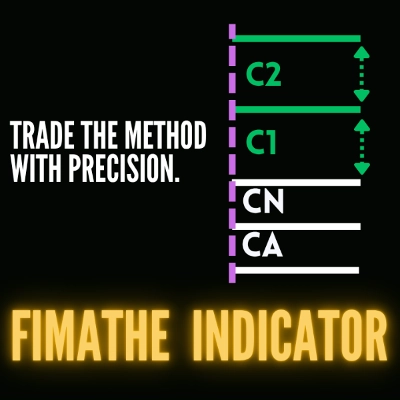
Fimathe Indicator - Fimathe PCM - Automated Trend Channels & Levels — Ideal for live trading and backteting
شعار "ZigXRay"
الأعلى تقييمًا
4.6
(5)
$29
/
$49
مؤشر
CHOCH
Key Levels
+5
ZigZag Market Structure Identifier - Multi-Layer Scanner: Convergent Pivot Detection, 4-TF Overlay & Naked Chart Mode.
شعار "DrbcLevels"
الأعلى تقييمًا
4.0
(4)
$19
/
$29
مؤشر
Key Levels
Break & Retest
+5
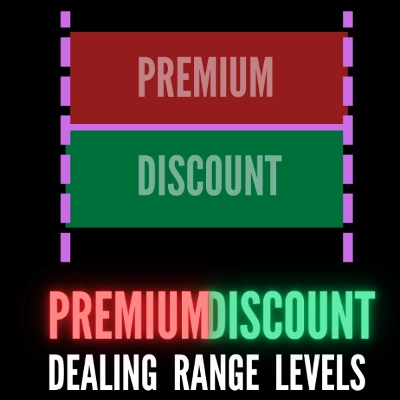
Premium Discount Levels - Professional Dealing Range Zones with Draggable Lines, Alerts, Wartermark & Backtest Mode.
cBot
Fixed Lot
TP Manager
+5
Hotkeys Trading Assistant - Professional Shortcut Assitant with Risk Manager, Hotkeys & Lot Sizing.
مؤشر
CHOCH
Inducement
+5
TradeLens - Frame the Trade. Refine the Entry. Two Timeframes. One Decision.
شعار "fvg_levels"
الأعلى تقييمًا
4.0
(4)
$19
/
$29
مؤشر
Key Levels
Order Block
+5
FVG Levels — Auto-Detection of Multi-Timeframe Fair Value Gaps & GAPs, Smart Filters and Liquidity Zone Monitoring

قد يعجبك أيضًا

إضافة سطح المكتب
AI
Forex
+5
AI Trading Agent, predict market moves, detect trends, and execute profitable trades.
شعار "TradeGuard"
مشهور
4.6
(3)
$25
إضافة سطح المكتب
ATR
Prop
+5
cTrader risk management plugin with daily & total drawdown limits, CBot control, and risk-based order execution.
إضافة سطح المكتب
Prop
Forex
+4
Visual monthly trading journal that displays your performance day-by-day in a calendar view.
إضافة سطح المكتب
ECN-friendly
Chart UI Tools
Any timeframe cTrader lacks: seconds, minutes, hours, tick & range bars, Heikin-Ashi in the timeframe menu.
إضافة سطح المكتب
Chart UI Tools
Draw dynamic, angled Fibonacci retracements on cTrader charts. Fully customize up to 20 levels, colors, and styles.
إضافة سطح المكتب
Risk Reward management tools (风险回报管理工具)
إضافة سطح المكتب
Market Scanner
An 8-currency strength ranking, multi-TF heatmap and impulse tracker. Read the real driver at a glance. Read-only.
إضافة سطح المكتب
Forex
Signal
+2
Adaptive Renko chart builder for precise, flexible trading - ideal for both scalping and trend analysis.
إضافة سطح المكتب
Trade Journal
AI Integration
+1
Turn your closed-trade history into an at-a-glance monthly calendar and a deep performance dashboard.
شعار "BatchTPSL"
مشهور
4.5
(2)
$40
/
$60
إضافة سطح المكتب
Forex
Crypto
+4
Apply Stop Loss and Take Profit to all positions and pending orders in one click.
إضافة سطح المكتب
Prop
Forex
+5
Place professional OCO & OSO orders in cTrader — visually, instantly, and without execution mistakes.
إضافة سطح المكتب
Risk/Reward
Chart UI Tools
+3
Visual cTrader backtesting tool with trade drawing, risk sizing, stats, and automatic trade simulation.
إضافة سطح المكتب
Prop
Forex
+3
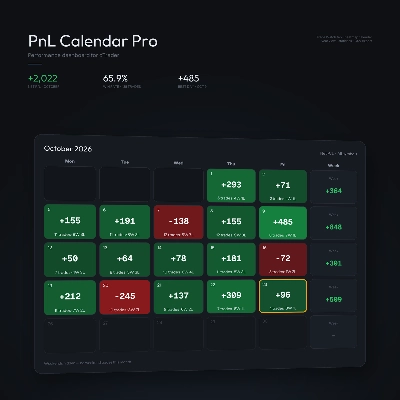
Visual calendar with daily PnL, trades, win rate, profit factor, and performance insights.
إضافة سطح المكتب
Prop
Forex
+4
Professional risk management plugin with automatic lot calculation, chart panels, and R:R automation. Version 1.4.2.
إضافة سطح المكتب
Trade Journal
AI Integration
+1
#1 Trade Journal, PnL analytics, bot monitoring and strategy statistics.
إضافة سطح المكتب
AI
ATR
+27
Turn your cTrader trade history into a visual performance dashboard to see trading patterns and strategy strength
إضافة سطح المكتب
SMC
Grid
+5
The all-in-one trade management plugin that automates your risk, execution, and position management.
إضافة سطح المكتب
AI
ATR
+27
Trade Analytics delivers advanced trading insights and heatmaps directly inside TradeWatch.

السعر

منذ 09/02/2026
26
المبيعات
167
التثبيتات المجانية