
설명
cTrader용 맞춤 시간 프레임: 원본 플러그인
👨🔧개발자가 직접 제작, 테스트 및 유지 관리합니다.
트레이더가 일반적인 cTrader 작업 흐름을 깨뜨리지 않고 차트 세분화에 대한 정확한 제어를 할 수 있도록 cTrader의 원본 맞춤 시간 프레임 플러그인을 만들었습니다. 저는 매일 cTrader에서 거래하고 개발하며, 주요 cTrader 데스크톱 릴리스마다 이 플러그인을 테스트하고 업데이트하여 안정성을 유지합니다.
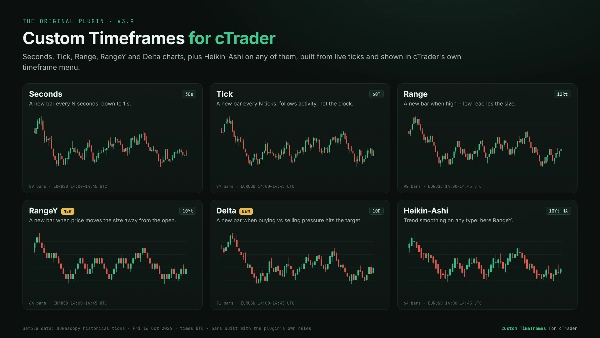
차트 유형
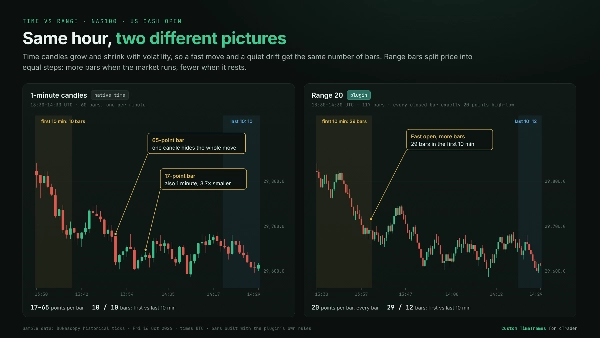
초: 1초 단위까지 맞춤 간격. 1분 캔들이 숨기는 분 내 움직임을 확인하세요.
틱: N틱마다 새 바 생성. 바는 시계가 아닌 시장 활동을 따르므로, 바쁜 세션은 더 많은 세부 정보를 제공하고 조용한 기간은 압축됩니다.
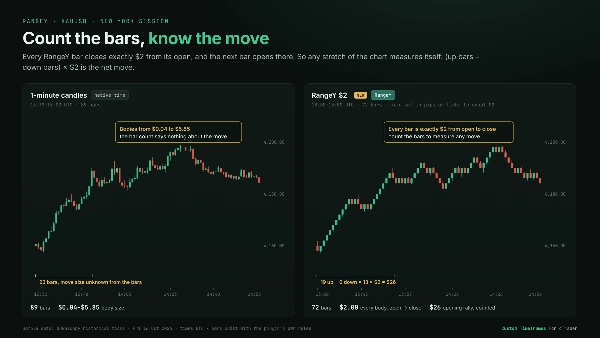
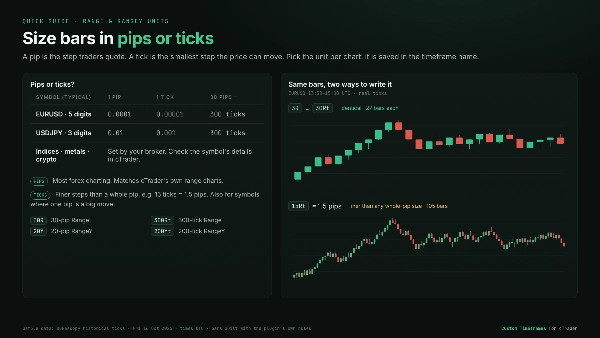
범위: 고가에서 저가를 뺀 값이 설정한 크기에 도달할 때마다 새 바 생성. 모든 바는 동일한 가격 범위를 포함합니다. 작은 바들로 클러스터를 분할하고 돌파구를 돋보이게 합니다. 크기는 핍 또는 틱 단위로 설정하세요.
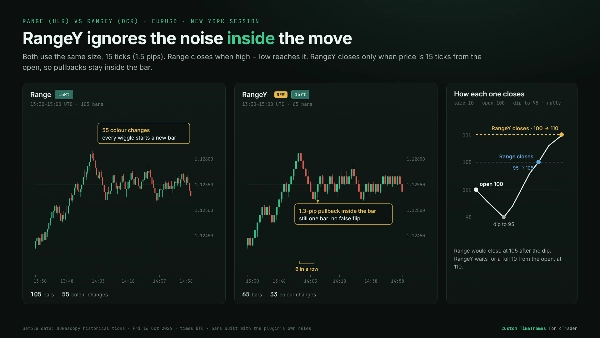
⭐RangeY: 가격이 바의 시가에서 설정한 크기만큼 어느 방향으로든 움직일 때마다 새 바 생성. 되돌림은 바 내부에 머무르므로 각 바는 실제 움직임을 표시합니다. 모든 바는 시가에서 정확히 한 크기만큼 닫히므로 바 수를 세면 움직임을 측정할 수 있습니다. 크기는 핍 또는 틱 단위로 설정하세요.
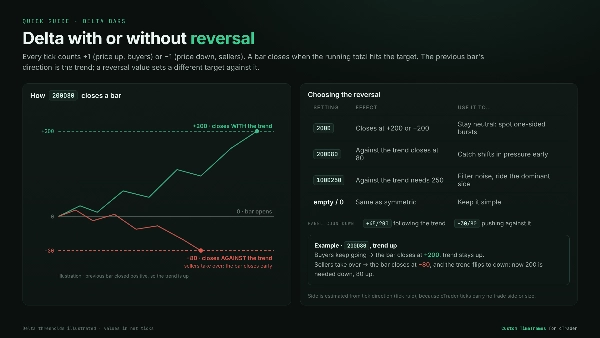
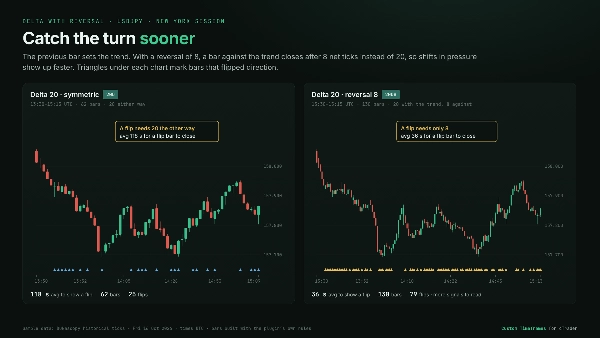
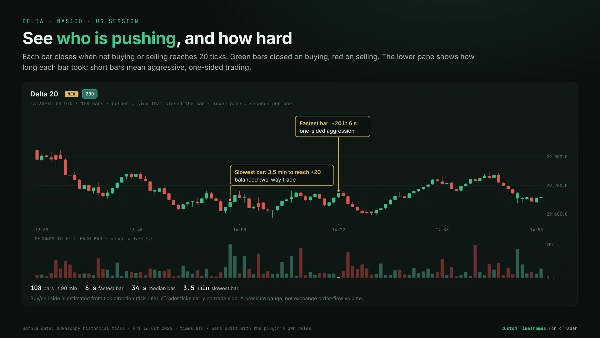
⭐델타: 매수 대 매도 압력이 설정한 목표에 도달할 때 새 바 생성. 각 틱은 가격이 움직인 방향에 따라 매수 또는 매도로 계산됩니다. cTrader는 매수자/매도자 데이터를 제공하지 않기 때문입니다. 일방적인 공격성은 바를 빠르게 닫고, 균형 잡힌 거래는 바를 열어 둡니다. 선택적으로 별도의 반전 목표를 설정할 수 있어 이전 바에 대한 압력 변화가 더 빨리 나타납니다.
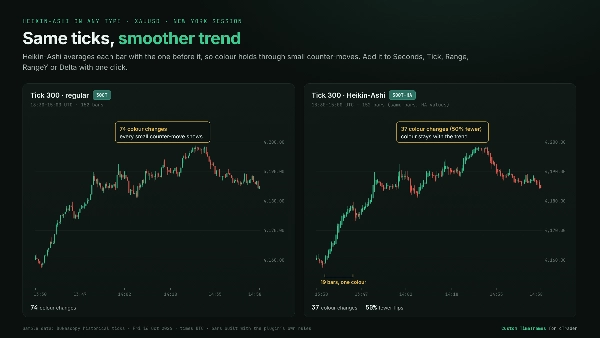
헤이킨-아시: 위의 모든 차트 유형에서 추세 부드럽게 처리 가능.
일일 거래를 위해 설계됨
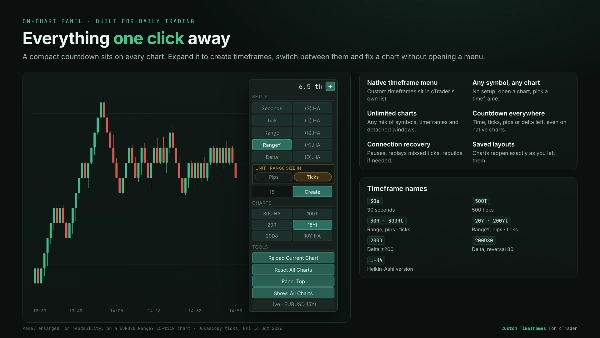
- 네이티브 시간 프레임 메뉴: 맞춤 시간 프레임이 cTrader의 표준 시간 프레임 목록에 네이티브 차트처럼 나타납니다.
- 모든 심볼, 모든 차트: 심볼 설정 불필요. 아무 차트나 열고 맞춤 시간 프레임을 선택하세요.
- 무제한 차트: 메인 및 분리 창에서 심볼과 시간 프레임을 자유롭게 조합하여 동시에 실행할 수 있습니다.
- 일반 차트처럼 전환: 심볼이나 시간 프레임 변경이 내장 시간 프레임과 동일하게 작동합니다.
- 차트 내 제어판: 다음 바까지의 간단한 카운트다운, 시간 프레임 생성 확장, 모든 맞춤 시간 프레임의 원클릭 목록, 다시 불러오기/재설정 도구 포함. 설정은 즉시 적용되며 플러그인 재시작이 필요 없습니다.
- 모든 차트에 카운트다운: 현재 바에 남은 시간, 틱, 핍 또는 델타를 포함하며 표준 cTrader 차트에도 적용됩니다.
- 레이아웃에서 복원: 저장된 레이아웃은 정확히 동일한 맞춤 차트로 다시 열립니다.
신뢰할 수 있는 데이터 처리
- 자동 이력 및 실시간 업데이트: 이력은 자동으로 로드되며, 뒤로 스크롤하면 더 오래된 바가 로드됩니다.
- 연결 복구: 연결이 끊기거나 데이터 피드가 멈추면 차트가 일시 중지되고 누락된 데이터를 재생하며 간격 없이 계속됩니다. 해당 데이터가 없으면 차트가 자체적으로 재구성됩니다.
- 자원 절약: 더 이상 보지 않는 심볼은 데이터 로드를 중지하고, 매우 바쁜 차트는 청크 단위로 로드되어 플랫폼의 반응성을 유지합니다.
👉 갤러리에서 실제 시장 예시, 표준 시간 차트와의 비교, 그리고 핍 대 틱 및 델타 설정에 대한 빠른 가이드를 확인하세요.
활발한 개발. 제작자의 직접 지원. 장기 사용을 위해 제작됨.
요약
The plugin integrates seamlessly into the trading interface with an on-chart panel for quick bar type and size selection, eliminating the need for separate settings menus or restarts. Custom timeframes appear directly in the platform’s standard Period dropdown menu. It loads historical data and updates live in real time, maintaining smooth performance even on high-activity instruments.
This tool is applicable across multiple markets including Forex, indices, cryptocurrencies, and stocks, supporting market, limit, stop, and stop-limit order types. It is designed to facilitate fast execution and detailed price action analysis by providing flexible charting options tailored to user preferences.
고객 리뷰
5 | 100 % | |
4 | 0 % | |
3 | 0 % | |
2 | 0 % | |
1 | 0 % |










!["Custom Timeframes [Iridio Capital]" 로고](https://cdn.ctrader.com/image/webp/4d75a920-23c7-4fea-a7b5-594a9d067f2e_63286)







