present
Daftar dan dapatkan potongan bernilai $50 untuk pembelian pertama anda
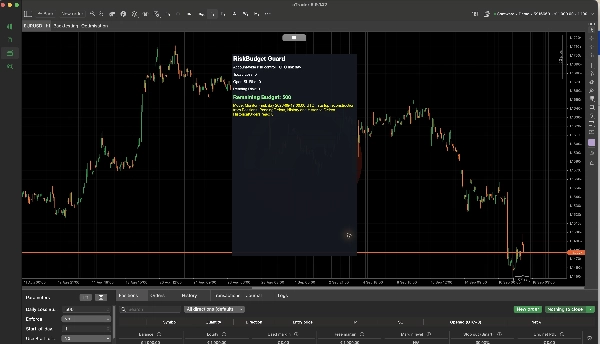
Trading product for RiskBudget Guard cBot Drawdown Guard Daily Loss Limit, image 1
RiskBudget Guard
cBot
Versi 1.0, Oct 2026
Windows, Mac, Web
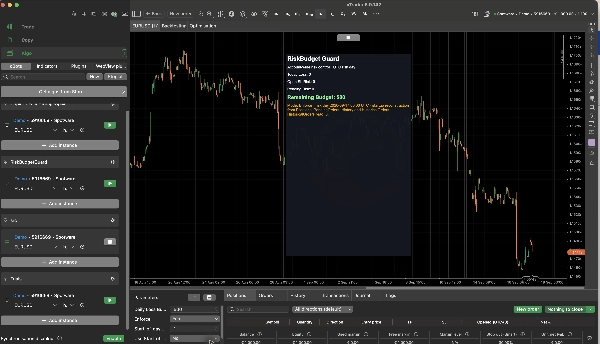
Trading product for RiskBudget Guard cBot Drawdown Guard Daily Loss Limit, image 2
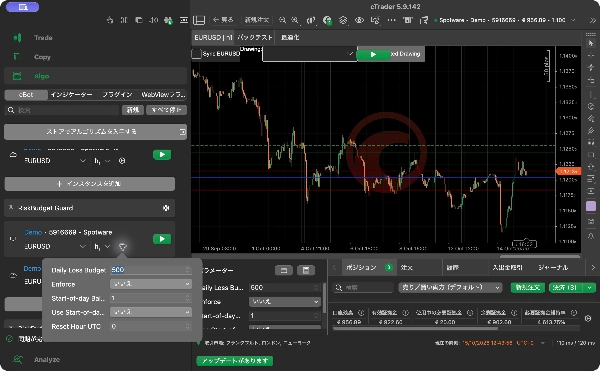
Trading product for RiskBudget Guard cBot Drawdown Guard Daily Loss Limit, image 3
Trading product for RiskBudget Guard cBot Drawdown Guard Daily Loss Limit, image 4
Sejak 16/09/2026

Penerangan

RiskBudget Guard is an account-wide risk monitoring cBot. It brings realised losses, open-position stop-loss risk and pending-order risk into one budget view across the symbols in your account. It does not open new positions.


Read your remaining risk budget


The chart HUD displays Today Loss, Open SL Risk, Pending Risk and Remaining Budget. The budget combines losses realised during the current UTC risk day with the calculated stop-loss risk of open positions and pending orders. Profitable trades do not replenish the loss allowance for that day.


Choose a fixed budget in account currency, or a percentage of a reconstructed start-of-day balance. You can also set the UTC hour at which a new risk day starts. Start-of-day balance reconstruction can be approximate when deposits or withdrawals occur during the day.


Monitor or enforce


With Enforce = No, the cBot monitors and displays account risk without cancelling orders or closing positions. This is the default mode.


With Enforce = Yes, the cBot can attempt to cancel a newly created pending order or close a newly opened or filled position when the resulting account risk exceeds the budget. These actions occur after order creation or execution. RiskBudget Guard cannot block a manual order before it reaches the broker and does not promise a hard cap on realised losses.


Positions or pending orders without a usable Stop Loss can be treated as unbounded risk. Review the HUD and your account's protection settings before enabling enforcement. Broker execution, slippage and failed trade requests can affect the outcome.


Get started


1. Install RiskBudget Guard and add a cBot instance to the account you want to monitor.

2. Leave Enforce set to No while checking the displayed budget and account state.

3. For a fixed budget, enter Daily Loss Budget and leave Use Start-of-day % Budget disabled. For a percentage budget, enable that option and set Start-of-day Balance %.

4. Set Reset Hour UTC from 0 to 23. The default is 0.

5. Start the cBot and review the four HUD values and current mode. Enable Enforce only when you want the cBot to perform the post-execution actions described above.


The default fixed budget is 500 in account currency; the default percentage is 1%. RiskBudget Guard must remain running to monitor events and act on them. It does not generate entry signals or promise trading returns.

Ringkasan

AI summary
RiskBudget Guard is a cBot designed for account-wide risk monitoring in trading. It consolidates realized losses, open-position stop-loss risk, and pending-order risk into a single budget view across all symbols in the account. The tool does not initiate new trades but tracks risk exposure continuously.

Key features include a chart HUD displaying Today Loss, Open Stop-Loss Risk, Pending Risk, and Remaining Budget. Users can set a fixed daily loss budget in account currency or define it as a percentage of a reconstructed start-of-day balance, with the option to specify the UTC hour when the risk day resets.

RiskBudget Guard operates in two modes: monitoring only (default), which displays risk metrics without intervention, and enforcement mode, which can cancel new pending orders or close positions if the resulting risk exceeds the set budget. Enforcement actions occur post-execution and depend on stop-loss settings and broker execution factors.

The cBot requires continuous operation to monitor and act on risk events. It is intended to assist in managing daily loss limits and drawdown guard strategies by providing real-time risk budget visibility and optional automated risk control actions.
Profil dagangan

Ulasan pelanggan

0.0
Ulasan: 0
Ulasan pelanggan
Belum ada ulasan untuk produk ini. Anda sudah mencuba produk tersebut? Jadilah yang pertama untuk berkongsi pendapat anda!

Perbincangan

Soalan Lazim

Drawdown Guard
Daily Loss Limit
Produk yang tersedia melalui cTrader Store, termasuk bot dagangan, indikator dan plugin, disediakan oleh pembangun pihak ketiga dan diberikan akses untuk tujuan maklumat dan teknikal sahaja. cTrader Store bukan broker dan tidak memberikan nasihat pelaburan, syor peribadi atau sebarang jaminan prestasi masa hadapan.

Lebih banyak produk daripada penulis ini

Indikator
BOS
MSS
+4
See confirmed BOS, CHOCH and SWEEP structure events on your cTrader chart.
Indikator
BOS
Add standard-timeframe context candles to a native Renko chart.
Indikator
EMA
Volume
Map range high, mid, low, price location and a deterministic pressure proxy on your cTrader chart.
Indikator
Channel
Key Levels
+1
Monitor a selected chart trendline and confirm breaks on candle close.
Plugin desktop
Trade Journal
Trade Statistics
See not only what you made or lost, but which trading behaviours caused the damage.
Plugin desktop
Chart UI Tools
Keep lines, zones and channels synced across selected same-symbol charts from one desktop plugin.

Anda juga mungkin suka

cBot
Fixed Lot
Equity Stop
+5
Copy trades between cTrader accounts on one PC or VPS. Symbol names mapped across brokers for you. Three-step setup.
cBot
AI
RSI
+6
Prices Action Focus Bot, Please use default setting before making any changes!!! ENJOY!!!
cBot
SMC
Prop
+12
Risk On Trade | Auto Position Size Calculator | Risk & Reward Tool | Auto Lot Size Calculator
cBot
AI
MACD
+4
EVOtrix Inventor EA uses the concept of following trends
11.8%
ROI
22
Faktor keuntungan
cBot
EMA
MACD
+5
A disciplined MACD‑EMA trading bot with smart protection, timed SL control, and reliable automated trade execution.
1
Faktor keuntungan
cBot
EMA
TP Manager
+5
Multi-asset trend-following cBot for Forex, crypto, gold, indices, and more, with configurable risk management.
1.36
Faktor keuntungan
cBot
ATR
RSI
+3
Intelligent system, Available any instrument. Profit 12. Drawdown 1%
cBot
ATR
Prop
+4
πŸš€ HTF Power 3 (PO3) – Automated ICT AMD Strategy
70.2%
ROI
1.31
Faktor keuntungan
cBot
SL Manager
Break Even
+5
Swing trading bot using body-based range breakout, volume fusion, and structured risk management for clean entries.
17%
ROI
2.74
Faktor keuntungan
cBot
Prop
Forex
+5
Quantum Queen Ctrader Cbot
cBot
RSI
EURUSD
+2
Performance Status: Prop Firm Challenge Passed (The5ers)
2
Faktor keuntungan
cBot
Prop
Forex
+4
AutoBreakeven Pro: The Only Cloud-Based cTrader Bot for Mobile Traders | Partial Close & Multi-Level Profit Lock (No VPS
cBot
EMA
Balanced
+5
Sniper Entry Bot – Advanced EMA Crossover Trading Robot for cTrader
677%
ROI
2.5
Faktor keuntungan
cBot
Fixed Risk %
Market Structure
Gold Edge trades XAUUSD using market-structure swing detection, fixed-percentage risk per trade, a minimum RR
1.13
Faktor keuntungan
cBot
EURUSD
Bollinger
Turn $1,000 into $24,000+ πŸ“ˆ This algorithmic cBot generated 2,300% ROI in under 2 years on EURUSD.
cBot
ATR
RSI
+5
πŸ“Š EMA CROSS COMPLETE BOT - Professional Trading System
2.1
Faktor keuntungan
cBot
AI
ATR
+27
βœ… Buy 3 prop accounts and manage just 1: cut management effort by 66% with a professional tool.
cBot
Forex
Crypto
+5
Smart position sizing, visual SL/TP lines, risk-based lot calculation, RR display, margin & lot limits, and hotkey trade

Harga

Sejak 16/09/2026