คำอธิบาย
RiskFit Trader - Risk Sizing เป็นปลั๊กอิน cTrader Desktop สำหรับวางแผนและวางคำสั่งซื้อขายด้วยตนเองโดยใช้การกำหนดขนาดตำแหน่งตามความเสี่ยง แผงควบคุมนี้นำเสนอ Entry, Stop Loss, Take Profit ที่เป็นทางเลือก, ปริมาณที่คำนวณ และประเภทคำสั่งในขั้นตอนการทำงานเดียวกัน
วางแผนและกำหนดขนาดการซื้อขาย
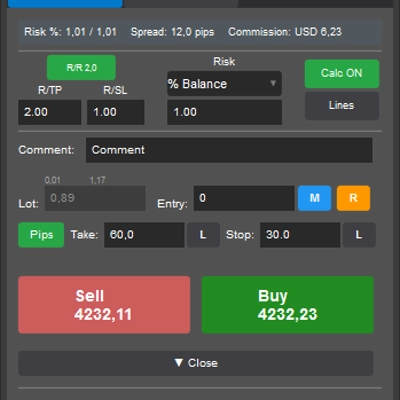
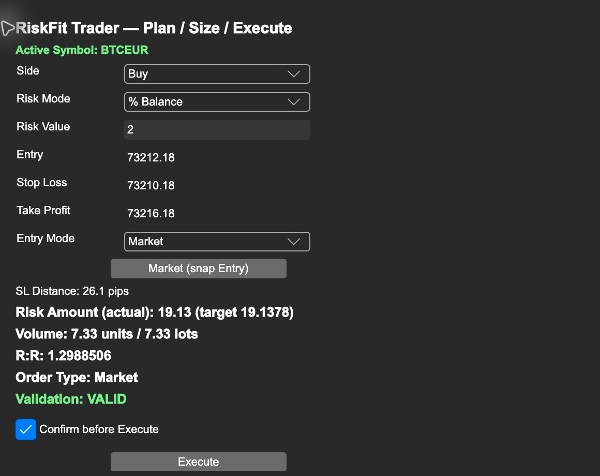
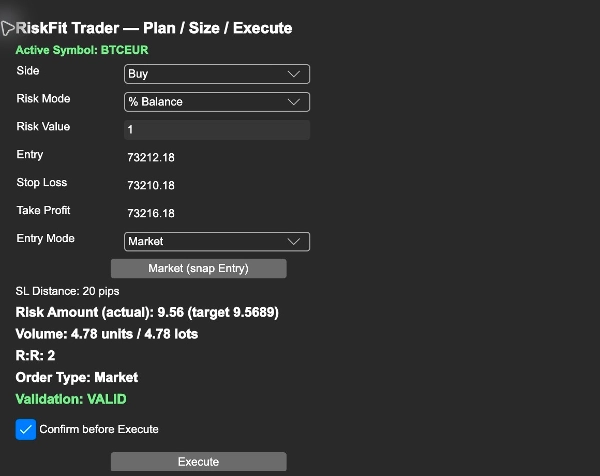
เลือก Buy หรือ Sell และป้อนความเสี่ยงของคุณเป็นเปอร์เซ็นต์ของยอดเงินในบัญชี, เปอร์เซ็นต์ของทุน หรือจำนวนเงินคงที่ในสกุลเงินบัญชี ตั้งค่า Entry และ Stop Loss จากนั้นเพิ่ม Take Profit เป็นทางเลือก แผงควบคุมจะแสดงระยะห่างของจุดหยุด, ปริมาณที่คำนวณในหน่วยและล็อต, ความเสี่ยงจากการหยุดขาดทุนที่ประมาณไว้ และอัตราส่วนความเสี่ยงต่อผลตอบแทนเมื่อมีการระบุ Take Profit
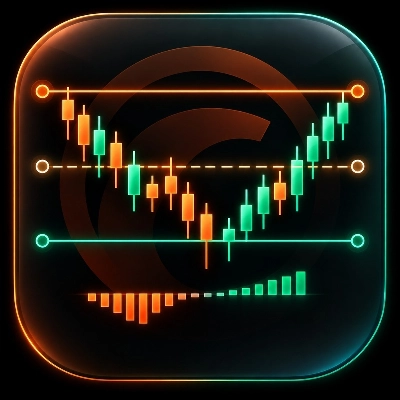
Entry, Stop Loss และ Take Profit ยังแสดงเป็นเส้นบนกราฟที่ใช้งานอยู่ การเลื่อนเส้นจะอัปเดตข้อมูลการวางแผน ตรวจสอบสัญลักษณ์และค่าที่แสดงหลังจากเปลี่ยนกราฟ
เลือกขั้นตอนการทำงานของคำสั่ง
โหมดตลาดใช้ราคาตลาดปัจจุบันสำหรับด้านที่เลือก โหมดวางแผนใช้ราคาที่คุณป้อนเป็น Entry เพื่อจัดประเภทคำสั่งเป็น Buy Limit, Sell Limit, Buy Stop หรือ Sell Stop ตรวจสอบประเภทคำสั่งที่แสดงก่อนดำเนินการต่อ
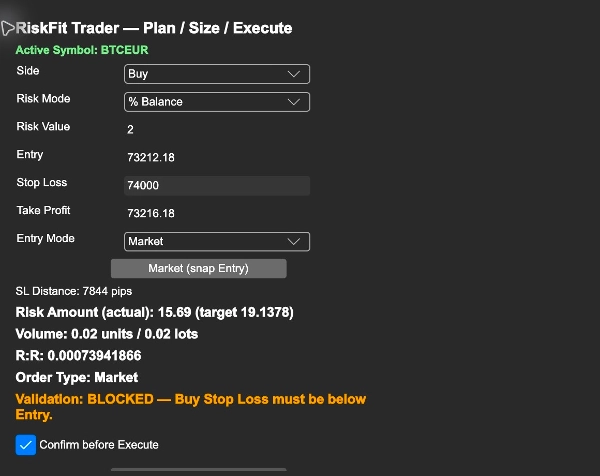
ปลั๊กอินจะปัดปริมาณลงให้เป็นขั้นตอนที่สัญลักษณ์รองรับ มันจะบล็อกการป้อนข้อมูลที่ไม่ถูกต้องและขนาดที่ต่ำกว่าขั้นต่ำของสัญลักษณ์ เมื่อขนาดที่คำนวณเกินขนาดสูงสุดของสัญลักษณ์ มันจะจำกัดปริมาณและแสดงความเสี่ยงที่ประมาณไว้ที่เกิดขึ้น
เริ่มต้นใช้งาน
1. ติดตั้ง RiskFit Trader - Risk Sizing ที่ซื้อไว้ใน cTrader Desktop ภายใต้ cTrader ID เดียวกันที่ใช้สำหรับการซื้อ เปิด Settings > Plugins และเปิดใช้งาน RiskFit Trader - Risk Sizing
2. เปิดกราฟ cTrader ดั้งเดิมสำหรับสัญลักษณ์ที่คุณต้องการซื้อขาย แสดง TradeWatch โดยใช้ตัวควบคุมเลย์เอาต์และเลือกแท็บ RiskFit Trader ของมัน ชื่อแผงควบคุมคือ RiskFit Trader — Plan / Size / Execute
3. ตรวจสอบ Active Symbol, เลือก Side, Risk Mode และ Risk Value จากนั้นตั้งค่า Entry, Stop Loss และ Take Profit เป็นทางเลือก
4. เลือก Market หรือ Planned ภายใต้ Entry Mode ใช้ Market (snap Entry) เพื่อคืนค่า Entry เป็นราคาตลาดปัจจุบัน
5. ตรวจสอบ Volume, Risk Amount, R:R, Order Type และ Validation เมื่อเปิดใช้งาน Confirm before Execute การคลิกครั้งแรกจะขอให้คุณตรวจสอบการซื้อขาย; คลิก Confirm Execute เพื่อส่งคำสั่ง ยืนยันเปิดใช้งานโดยค่าเริ่มต้น
การซื้อขายต้องมีสิทธิ์การซื้อขาย cTrader ที่เกี่ยวข้อง ตรวจสอบผลลัพธ์ที่แสดงโดยปลั๊กอินหลังจากส่งแต่ละครั้ง การประมาณความเสี่ยงขึ้นอยู่กับระยะหยุดที่เลือกและการตั้งค่าสัญลักษณ์; ราคาการดำเนินการ, การลื่นไถล, ค่าธรรมเนียม และเงื่อนไขของโบรกเกอร์สามารถส่งผลต่อการขาดทุนที่เกิดขึ้นจริง RiskFit Trader ไม่ได้ให้สัญญาณการซื้อขายหรือสัญญาผลตอบแทนจากการซื้อขาย
การอ่านภาพหน้าจอ
ภาพหน้าจอแสดงปลั๊กอินเดสก์ท็อปเต็มรูปแบบบนบัญชีสาธิต: เปอร์เซ็นต์ความเสี่ยงและขนาดที่คำนวณ; Entry, Stop Loss และ Take Profit พร้อมประเภทคำสั่ง; และ Buy Stop Loss ที่ไม่ถูกต้องซึ่งถูกบล็อกก่อนการดำเนินการ พวกเขาแสดงการควบคุมและการตรวจสอบ ไม่ใช่ผลลัพธ์การซื้อขาย ไม่มีการวางคำสั่งเพียงแค่เปลี่ยนข้อมูลการวางแผน
ข้อจำกัด
นี่คือปลั๊กอินเดสก์ท็อป ไม่ใช่ cBot หรือกลยุทธ์อัตโนมัติ ต้องการกราฟ cTrader ดั้งเดิมที่ใช้งานอยู่และข้อกำหนดสัญลักษณ์ที่โบรกเกอร์รองรับ ราคาตลาดและการประมาณอาจเปลี่ยนแปลงขณะตรวจสอบแผน ตรวจสอบบัญชี, สัญลักษณ์, ทิศทางคำสั่ง, ราคาต่าง ๆ และขนาดที่คำนวณทันที ก่อนยืนยันคำสั่ง เริ่มต้นบนบัญชีสาธิตเพื่อเรียนรู้การควบคุม ไม่มีการทดลองใช้งานแยกต่างหากจาก Store
สรุป
Entry, Stop Loss, and Take Profit levels are visually represented as lines on the active chart, which can be adjusted interactively. The plugin supports Market mode, using current market prices, and Planned mode, which classifies orders as Buy Limit, Sell Limit, Buy Stop, or Sell Stop based on the Entry price. It enforces symbol-specific volume steps and limits, blocking invalid inputs and capping volume at the symbol maximum while showing the resulting estimated risk.
RiskFit Trader requires an active native cTrader chart and relevant trading permissions. It provides trade planning and sizing tools but does not generate trading signals or guarantees trading outcomes. The plugin includes confirmation prompts before order execution to review trade details.
การสนทนา
รีวิวจากลูกค้า
5 | 60 % | |
4 | 40 % | |
3 | 0 % | |
2 | 0 % | |
1 | 0 % |