present
Sign up and get $50 off your first purchase
Trading product for CCALENDARR Desktop plugin Economic Calendar External Data, image 1
CCALENDARR
Desktop plugin
Version 1.0, Oct 2026
Windows, Mac
Trading product for CCALENDARR Desktop plugin Economic Calendar External Data, image 2
Trading product for CCALENDARR Desktop plugin Economic Calendar External Data, image 3
663.91K
Traded volume
1.13K
Pips won

Description

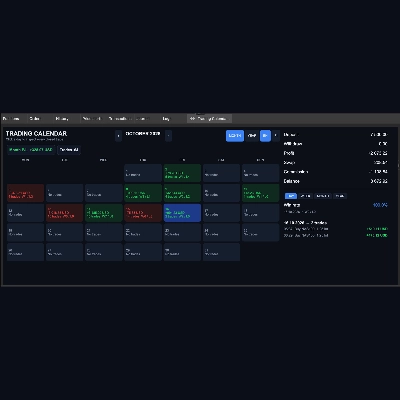
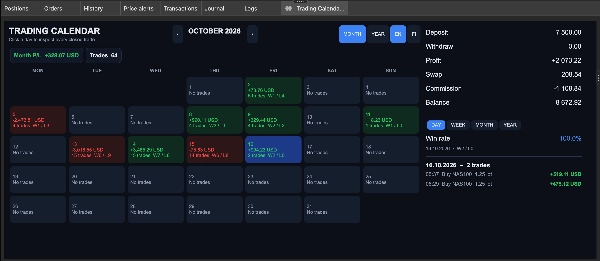
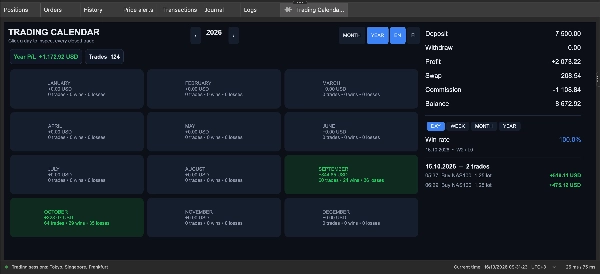
Trading Calendar turns your closed trade history into a clear, color-coded calendar right inside cTrader. See at a glance which days made money, which lost, and how your results develop month by month and year by year.


WHAT IT ADDS

- A monthly calendar where every day shows its net P/L, number of trades and wins/losses (W/L)

- Green days for profit, red days for loss, grey days for no trades

- A yearly view with a summary card for each month

- A month and year summary showing total P/L and number of trades

- English and Finnish language toggle


HOW IT WORKS IN YOUR WORKFLOW

The plugin opens as its own tab in the Trade Watch panel (next to Positions, Orders and History). It reads your account history and updates automatically whenever a position is closed. Click any day to see every closed trade of that day: time, direction, symbol, lot size and net result.


ACCOUNT AND PERFORMANCE PANEL

- Deposit, withdraw, profit, swap, commission and balance

- Win rate for the selected day, week, month or year, including the date range and win/loss count


KEY SETTINGS

- MONTH / YEAR buttons switch between the calendar views

- Arrows move between months (or years in the yearly view)

- DAY / WEEK / MONTH / YEAR buttons choose the win rate period

- EN / FI buttons change the language


TYPICAL USE CASES

- Daily and weekly trading review

- Spotting your best and worst trading days and overtrading days

- Keeping a visual record of your consistency

- Tracking progress on a demo or live account


BEST SUITED FOR

Day traders, swing traders and anyone who keeps a trading journal, from beginners to experienced traders. Works with any symbol and any account.


LIMITATIONS AND USAGE NOTES

- The plugin only reads your history. It does not place, modify or close trades (no account access rights are required).

- Deposit is calculated from your balance and total results. If you have made withdrawals, the deposit figure may be off.

- Statistics are based on the trade history available in your cTrader account.

Summary

Plugin profile

Discussion

Customer reviews

0.0
Reviews: 0
Customer reviews
No reviews for this product yet. Already tried it? Be the first to tell others!

FAQ

Economic Calendar
External Data
Trade Journal
Daily Loss Limit
Performance Report
Market Scanner
Trade Statistics
Products available through cTrader Store, including trading bots, indicators and plugins, are provided by third-party developers and made available for informational and technical access purposes only. cTrader Store is not a broker and does not provide investment advice, personal recommendations or any guarantee of future performance.

You may also like

Desktop plugin
Forex
Signal
+2
Adaptive Renko chart builder for precise, flexible trading - ideal for both scalping and trend analysis.
Desktop plugin
Forex
Indices
+1
Deriv Calculator Plugin for cTrader
Desktop plugin
A powerful Plugin for cTrader that enables traders to identify and visualize advanced market patterns
Desktop plugin
AI
Forex
+5
AI Trading Agent, predict market moves, detect trends, and execute profitable trades.
Desktop plugin
AI
ATR
+27
Turn your cTrader trade history into a visual performance dashboard to see trading patterns and strategy strength
Desktop plugin
Forex
Crypto
+3
Seconds | Ticks | Range | RangeY | Delta | Heikin-Ashi Bar types. Any size or Symbol.
Desktop plugin
Market Scanner
Scan markets, compare timeframe bias, and track key SMC zones in a customizable desktop dashboard.
Desktop plugin
External Data
Trade Journal
+2
Real Quant Audit, Live equity, open-position risk and 24 quant tests on your full account. IS THE EDGE REAL?
Desktop plugin
Risk/Reward
Trade Alerts
+3
QC Signals - regime-aware entries, enforced reward:risk, and risk-based one-click trading, right in the Symbol panel.
Desktop plugin
Chart UI Tools
Keep lines, zones and channels synced across selected same-symbol charts from one desktop plugin.
Desktop plugin
Prop Firm Fit
Trade Journal
+1
Paper trade your broker’s live prices in cTrader: demo accounts, prop challenges, a stats dashboard and trading journal
Desktop plugin
Prop
Forex
+4
Professional risk management plugin with automatic lot calculation, chart panels, and R:R automation. Version 1.4.2.
Desktop plugin
Market Scanner
An 8-currency strength ranking, multi-TF heatmap and impulse tracker. Read the real driver at a glance. Read-only.
Desktop plugin
Position Sizer
Risk Calculator
Risk set once, lot auto-calculated from your stop Ҁ” open any trade in one click. Market or limit. Free.
Desktop plugin
Forex
Commodities
Close all non crypto trades at 19:55 utc Friday
Desktop plugin
Prop
Forex
+4
Visual monthly trading journal that displays your performance day-by-day in a calendar view.
Desktop plugin
Risk Alerts
Prop Firm Fit
+5
Read-only risk cockpit for prop-firm traders: live drawdown gauges, FTMO-style permitted loss, alerts and reports.
Desktop plugin
SL Manager
Risk/Reward
+5
Drag SL & TP on the chart, see risk, reward, R:R and lot size live, then place Buy or Sell orders in one click

Price

663.91K
Traded volume
1.13K
Pips won