
Opis
Precision FVG Analysis - Profesjonalny wskaźnik Fair Value Gap
Przegląd
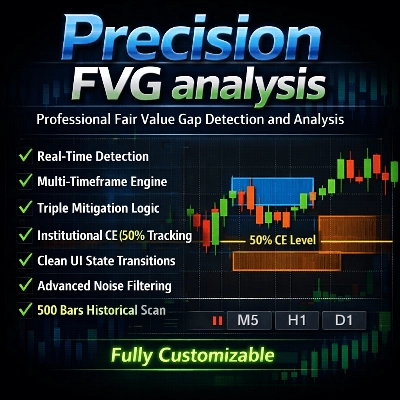
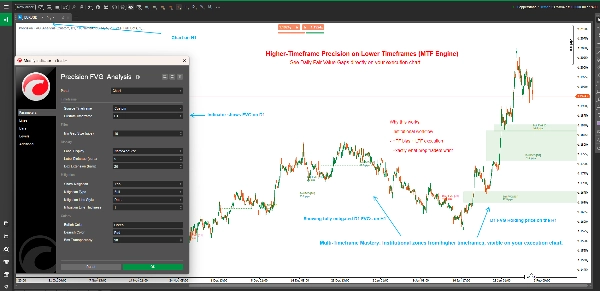
Precision FVG Analysis to potężny i elastyczny wskaźnik wykrywający Fair Value Gap (FVG), zaprojektowany dla poważnych traderów korzystających z koncepcji Smart Money Concepts (SMC) oraz metodologii ICT. Ten zaawansowany wskaźnik automatycznie identyfikuje, śledzi i wizualizuje Fair Value Gaps na wielu interwałach czasowych z zaawansowanymi możliwościami śledzenia mitigacji.
Fair Value Gaps reprezentują nierównowagi na rynku, gdzie cena poruszyła się zbyt szybko, pozostawiając niesprawności, które często są ponownie odwiedzane. Zrozumienie i handel tymi lukami jest kluczowy dla nowoczesnych traderów opierających się na analizie price action.
Kluczowe cechy
🎯 Analiza wielointerwałowa
- Adaptacyjne wykrywanie interwału: Wybierz wyświetlanie FVG z aktualnego interwału wykresu lub dowolnego niestandardowego interwału
- Handel między interwałami: Wyświetlaj FVG z wyższych interwałów na wykresach niższych interwałów dla lepszego kontekstu handlu
- Inteligentne etykiety interwałów: Automatyczna identyfikacja interwału w etykietach przy użyciu niestandardowych interwałów
📊 Zaawansowane śledzenie mitigacji
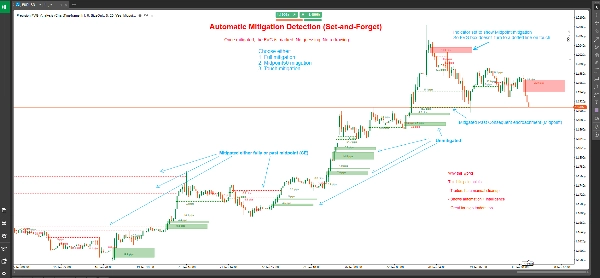
- Trzy typy mitigacji:
-
- Pełna mitigacja: Cena całkowicie wypełnia całą lukę (najbardziej konserwatywne podejście)
- 50% punkt środkowy (CE): Cena osiąga poziom Consequent Encroachment (zrównoważone podejście)
- Mitigacja dotknięcia: Cena dotyka granicy luki (najbardziej czułe)
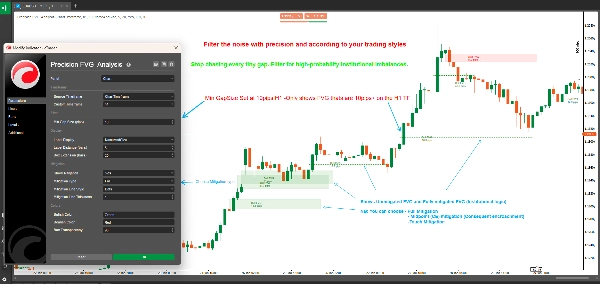
- Zmiany stanu wizualnego: Niezmitigowane FVG wyświetlane są jako wypełnione pola; zmitigowane FVG zmieniają się w linie przerywane
- Precyzyjne oznaczenie mitigacji: Pokazuje dokładną świecę, na której nastąpiła mitigacja
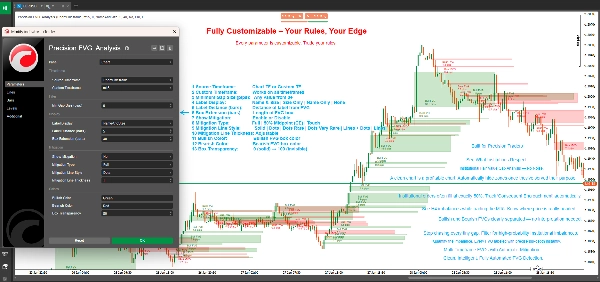
🎨 W pełni konfigurowalny wyświetlacz
- Elastyczne rozszerzenie pola: Kontroluj, jak daleko pola FVG rozciągają się w przyszłość (0-500 słupków)
- Inteligentny system etykietowania: Wybierz spośród czterech trybów etykiet:
-
- Nazwa i rozmiar: Pełne szczegóły z typem FVG i rozmiarem w pipsach
- Tylko rozmiar: Tylko rozmiar luki w pipsach
- Tylko nazwa: Identyfikacja typu FVG
- Brak: Czysty wykres bez etykiet
- Kolory niestandardowe: Oddzielne schematy kolorów dla byków i niedźwiedzi
- Regulowana przezroczystość: Przezroczystość pola od 0-100%
- Dostosowanie linii mitigacji: Wybierz styl i grubość linii dla zmitigowanych FVG
⚙️ Profesjonalne filtrowanie
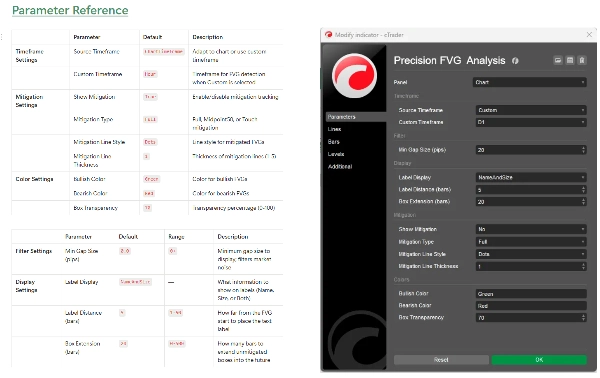
- Filtr minimalnego rozmiaru luki: Ustaw minimalny wymóg pipsów, aby odfiltrować nieistotne luki
- Automatyczne wykrywanie: Identyfikacja FVG w czasie rzeczywistym przy zamknięciu każdej świecy
- Skanowanie historyczne: Automatyczne skanowanie do 500 historycznych słupków podczas inicjalizacji
Czym są Fair Value Gaps?
Fair Value Gaps (FVG) występują, gdy istnieje niesprawność cenowa pomiędzy trzema kolejnymi świecami:
Byczy FVG: Tworzy się, gdy niska cena bieżącej świecy jest wyższa niż wysoka cena świecy sprzed dwóch słupków, a środkowa świeca zamyka się powyżej tej wysokiej ceny. Tworzy to lukę w górę, która często działa jako wsparcie.
Niedźwiedzi FVG: Tworzy się, gdy wysoka cena bieżącej świecy jest niższa niż niska cena świecy sprzed dwóch słupków, a środkowa świeca zamyka się poniżej tej niskiej ceny. Tworzy to lukę w dół, która często działa jako opór.
Te luki reprezentują obszary, gdzie miały miejsce agresywne zakupy lub sprzedaże, pozostawiając nierównowagi cenowe, które rynek często odwiedza ponownie w celu "sprawiedliwej wartości" przed kontynuacją w pierwotnym kierunku.
Zrozumienie typów mitigacji
Pełna mitigacja (konserwatywna)
- Byczy FVG: Mitigowany, gdy cena handluje poniżej dolnej granicy luki
- Niedźwiedzi FVG: Mitigowany, gdy cena handluje powyżej górnej granicy luki
- Przypadek użycia: Potwierdzenie, że luka została całkowicie wypełniona, odpowiednie dla traderów swingowych i strategii poszukujących potwierdzenia
50% punkt środkowy / CE (zrównoważony)
- Byczy FVG: Mitigowany, gdy cena osiąga lub przechodzi poniżej punktu środkowego
- Niedźwiedzi FVG: Mitigowany, gdy cena osiąga lub przechodzi powyżej punktu środkowego
- Przypadek użycia: Poziom Consequent Encroachment (CE) to często miejsce składania zleceń przez instytucje, co czyni go idealnym do wejść z dobrym stosunkiem ryzyka do zysku
Mitigacja dotknięcia (agresywna)
- Byczy FVG: Mitigowany, gdy cena dotyka lub przechodzi górną granicę
- Niedźwiedzi FVG: Mitigowany, gdy cena dotyka lub przechodzi dolną granicę
- Przypadek użycia: System wczesnego ostrzegania dla traderów chcących łapać reakcje na granicach FVG, idealny do skalpowania i szybkich wejść
Jak używać
Podstawowa konfiguracja
- Dodaj Precision FVG Analysis do swojego wykresu
- Ustaw preferowany Źródłowy interwał czasowy:
-
- Wybierz "ChartTimeframe", aby wykrywać FVG na aktualnym wykresie
- Wybierz "Custom" i wybierz konkretny interwał (np. H4, D1), aby zobaczyć FVG z wyższych interwałów
- Skonfiguruj Minimalny rozmiar luki, aby odfiltrować małe, nieistotne luki (zalecane: 2-5 pipsów dla forex)
Konfiguracja mitigacji
- Włącz Pokaż mitigację, aby aktywować śledzenie mitigacji
- Wybierz swój Typ mitigacji zgodnie ze stylem handlu:
-
- Traderzy dzienni i skalperzy: rozważ "Touch" lub "Midpoint50"
- Traderzy swingowi: używaj "Full" dla potwierdzenia
- Dostosuj wygląd linii mitigacji za pomocą Styl linii i Grubość
Dostosowanie wizualne
- Ustaw Rozszerzenie pola, aby kontrolować, jak daleko pola się projektują (domyślnie 20 słupków)
- Wybierz preferowany Wyświetlacz etykiet
- Dostosuj Kolor byczy i Kolor niedźwiedzi, aby dopasować do motywu wykresu
- Doprecyzuj Przezroczystość pola dla optymalnej widoczności
Strategie handlowe
Strategia 1: FVG z wyższego interwału z wejściem na niższym interwale
- Ustaw wskaźnik na interwał H4 lub D1 na wykresie M15 lub M5
- Zidentyfikuj niezmitigowane FVG z wyższego interwału
- Czekaj, aż cena zbliży się do FVG na niższym interwale
- Szukaj potwierdzenia na niższym interwale (formacje świecowe, bloki zleceń itp.)
- Wejdź, gdy cena osiągnie wybrany poziom mitigacji
Strategia 2: Strefy konfluencji FVG
- Użyj wielu instancji wskaźnika z różnymi interwałami
- Zidentyfikuj obszary, gdzie nakładają się FVG z różnych interwałów
- Te strefy konfluencji oferują lokalizacje o wysokim prawdopodobieństwie udanego handlu
- Użyj śledzenia mitigacji, aby precyzyjnie wyznaczyć moment wejścia
Strategia 3: Potwierdzenie wybicia
- Zidentyfikuj kluczowe poziomy wsparcia/oporu
- Obserwuj formowanie się FVG podczas wybicia
- Niezmitigowane FVG w kierunku wybicia sugerują kontynuację
- Zmitigowane FVG sugerują potencjalne nieudane wybicie lub odwrócenie
Strategia 4: Skalpowanie oparte na mitigacji
- Używaj mitigacji dotknięcia na niższych interwałach (M1, M5)
- Wchodź natychmiast, gdy FVG zostanie dotknięty
- Celuj w poprzedni lokalny szczyt/dno
- Używaj ciasnych stopów poniżej/powyżej FVG
Specyfikacje techniczne
- Platforma: cTrader
- Typ: Wskaźnik nakładkowy
- Obliczenia: W czasie rzeczywistym przy zamknięciu słupka
- Historyczne słupki: Skanuje do 500 słupków podczas inicjalizacji
- Maksymalna liczba aktywnych FVG: 500 jednoczesnych luk
- Zużycie zasobów: Lekki i zoptymalizowany pod kątem wydajności
Najlepsze praktyki
Ogólne wytyczne handlowe
- Łącz z innymi koncepcjami: FVG działają najlepiej w połączeniu z blokami zleceń, pulami płynności i strukturą rynku
- Szanuj kontekst rynku: FVG z wyższych interwałów mają większe znaczenie niż te z niższych
- Używaj wielu interwałów: Nakładaj FVG z różnych interwałów dla konfluencji
- Zarządzanie ryzykiem: Zawsze stosuj odpowiednie stop lossy; nie wszystkie FVG się utrzymają
Wskazówki optymalizacyjne
- Dostosuj minimalny rozmiar luki: Ustaw na podstawie średniej zmienności instrumentu
- Rozszerzenie pola: Dłuższe dla handlu swingowego (50-100 słupków), krótsze dla day tradingu (10-20 słupków)
- Typ mitigacji: Dopasuj do swojego interwału i stylu handlu
- Odległość etykiety: Dostosuj w zależności od zagracenia wykresu i poziomu zoomu
Typowe pułapki do unikania
- Nadmierny handel: Nie każda luka FVG jest okazją do handlu
- Ignorowanie kontekstu: FVG przeciwko silnym trendom są mniej wiarygodne
- Zły typ mitigacji: Skalperzy używający pełnej mitigacji tracą wejścia; traderzy swingowi używający dotknięcia są wybijani
- Brak potwierdzenia: Zawsze czekaj na potwierdzenie price action na poziomach FVG
Najczęściej zadawane pytania
P: Dlaczego niektóre FVG znikają natychmiast? O: Gdy "Pokaż mitigację" jest włączone z mitigacją "Touch", FVG, które są natychmiast cofnięte, szybko zmieniają się w linie przerywane. To normalne zachowanie.
P: Czy mogę zobaczyć FVG z wielu interwałów jednocześnie? O: Tak! Dodaj wskaźnik wielokrotnie do wykresu z różnymi niestandardowymi interwałami dla analizy wielointerwałowej.
P: Czym różni się ten wskaźnik od innych wskaźników FVG? O: Precision FVG Analysis oferuje możliwość pracy na wielu interwałach, trzy typy mitigacji oraz lepszą czytelność wizualną dzięki renderowaniu stanów (pola vs linie).
P: Który typ mitigacji powinienem używać? O: Zacznij od Midpoint50 (CE), ponieważ równoważy wczesne sygnały z niezawodnością. Dostosuj w zależności od wyników i stylu handlu.
P: Czy działa na wszystkich instrumentach? O: Tak, wskaźnik działa na Forex, indeksach, towarach i kryptowalutach. Dostosuj parametr "Minimalny rozmiar luki" w zależności od zmienności instrumentu.
P: Jak daleko sięga skanowanie historyczne? O: Wskaźnik skanuje do 500 słupków podczas inicjalizacji, zapewniając kompleksowy kontekst historyczny.
Wsparcie i aktualizacje
Ten wskaźnik jest aktywnie utrzymywany i aktualizowany. Użytkownicy otrzymują:
- Regularne aktualizacje z nowymi funkcjami
- Optymalizacje wydajności
- Poprawki błędów i ulepszenia
- Aktualizacje dokumentacji
W przypadku pytań, sugestii lub wsparcia prosimy o kontakt przez system wiadomości sklepu cTrader.
Zastrzeżenie
Handel wiąże się z dużym ryzykiem utraty kapitału i nie jest odpowiedni dla wszystkich inwestorów. Wyniki historyczne nie gwarantują przyszłych rezultatów. Ten wskaźnik jest narzędziem analitycznym i nie stanowi porady finansowej. Zawsze stosuj odpowiednie zarządzanie ryzykiem i nigdy nie ryzykuj więcej, niż możesz sobie pozwolić stracić.
Historia wersji
Wersja 1.0 (Aktualna)
- Wykrywanie FVG na wielu interwałach
- Trzy typy mitigacji (Pełna, Midpoint50, Touch)
- Zmiany stanu wizualnego (pola na linie przerywane)
- Niestandardowe kolory i przezroczystość
- Elastyczny system etykietowania
- Skanowanie historyczne (500 słupków)
- Wykrywanie i śledzenie w czasie rzeczywistym
Precision FVG Analysis - Podnieś swój handel Fair Value Gap na profesjonalny poziom.
Podsumowanie
Key features include adaptive multi-timeframe detection, allowing users to view FVGs from the current or custom timeframes, and advanced mitigation tracking with three types: Full Mitigation (complete gap fill), 50% Midpoint (Consequent Encroachment), and Touch Mitigation (gap boundary touch). Visual states change accordingly, with unmitigated gaps shown as filled boxes and mitigated ones as dotted lines, including precise candle marking of mitigation events.
The indicator offers extensive customization options such as box extension length, label display modes (name, size, both, or none), separate bullish/bearish color schemes, transparency control, and mitigation line styling. It filters gaps by minimum size and scans up to 500 historical bars on initialization for comprehensive context.
Applicable to Forex, Indices, Commodities, Cryptocurrencies, and Stocks, it supports various trading strategies including multi-timeframe analysis, confluence zones, breakout confirmation, and mitigation-based scalping. The tool operates in real-time on bar close and is optimized for performance with up to 500 active gaps tracked concurrently.
Dyskusja
Opinie klientów
5 | 50 % | |
4 | 50 % | |
3 | 0 % | |
2 | 0 % | |
1 | 0 % |
Częste pytania








Cena
