
Opis
Volume Profile TPO Bubble — autorstwa The Quant
Volume Profile TPO Bubble to premium wskaźnik cTrader stworzony przez The Quant.
Chcesz do nas dołączyć? Linki w bio
━━━━━━━━━━━━━━━━━━━━━━
VOLUME PROFILE TPO BUBBLE
━━━━━━━━━━━━━━━━━━━━━━
Volume Profile TPO Bubble to kompletny wskaźnik do analizy rynku dla cTrader.
Łączy potężne narzędzia do analizy rynku w jednym przejrzystym wskaźniku:
◆ Volume Profile
◆ Bubble Chart
◆ TPO
◆ Sygnały Break & Retest POC dla robotów
To narzędzie jest przeznaczone dla traderów, którzy chcą czytać strefy wolumenu wyraźniej, identyfikować ważne poziomy POC i wykorzystywać te poziomy w strategiach manualnych lub automatycznych.
Jest zbudowany dla cTrader, z myślą o analizie wizualnej i automatyzacji cBot.
━━━━━━━━━━━━━━━━━━━━━━
CO ROBI TEN WSKAŹNIK
━━━━━━━━━━━━━━━━━━━━━━
Strefy Aktywności Rynku
Volume Profile TPO Bubble pomaga zidentyfikować strefy, w których rynek był aktywny.
Te strefy nazywane są POC lub Punktami Kontroli.
POC to obszar cenowy, gdzie koncentrowała się aktywność.
Gdy cena wraca do tego obszaru, może go przełamać, przetestować, odrzucić lub zareagować na nim.
Główny Cel
Celem nie jest przewidywanie rynku.
Celem jest uczynienie ważnych stref rynkowych łatwiejszymi do zobaczenia, łatwiejszymi do zrozumienia i łatwiejszymi do użycia w strategii.
━━━━━━━━━━━━━━━━━━━━━━
GŁÓWNE TRYBY WIZUALNE
━━━━━━━━━━━━━━━━━━━━━━
◆ Volume Profile
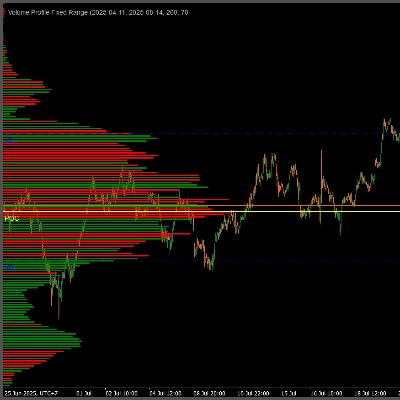
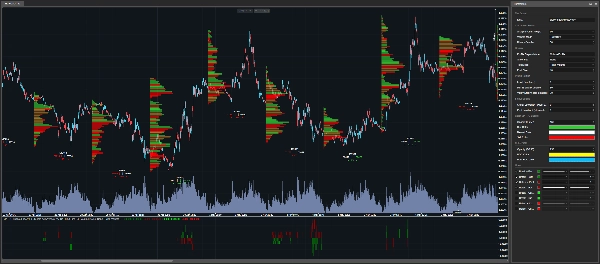
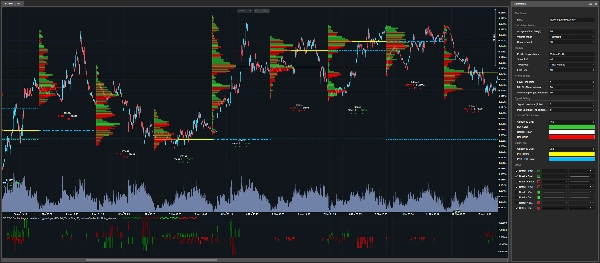
Tryb Volume Profile wyświetla poziome słupki wolumenu bezpośrednio na wykresie cTrader.
Im większy słupek, tym ważniejsza była strefa cenowa podczas wybranej świecy analizy.
Ten tryb jest przydatny, gdy chcesz zobaczyć pełną strukturę rozkładu wolumenu.
◆ Bubble Chart
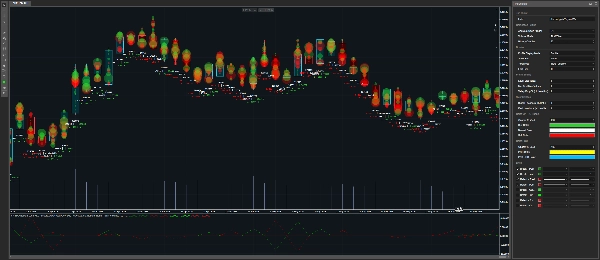
Tryb Bubble Chart wyświetla ważne strefy wolumenu jako bąbelki.
Im większy bąbelek, tym ważniejsza jest wykryta strefa.
Ten tryb jest stworzony do szybkiego odczytu wizualnego.
Pomaga szybko zauważyć najważniejsze obszary na wykresie.
Jeśli chcesz używać wskaźnika głównie jako Bubble Chart, możesz ustawić Show POC na None, a następnie dostosować:
• Min % of Max Volume
• Valley Drop %
Te ustawienia kontrolują, ile bąbelków chcesz zobaczyć.
Niższe wartości pokazują więcej bąbelków.
Wyższe wartości pozostawiają tylko najczystsze strefy.
◆ TPO
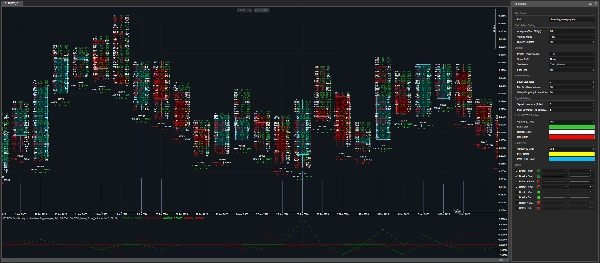
Tryb TPO daje bardziej szczegółowy obraz tego, co działo się wewnątrz świecy.
Wyświetla:
• Wolumen kupna
• Wolumen sprzedaży
• Deltę
• Aktywność na poziomie cenowym
Ten tryb jest przydatny, gdy chcesz zrozumieć wewnętrzną strukturę strefy, a nie tylko zobaczyć, gdzie był wolumen.
━━━━━━━━━━━━━━━━━━━━━━
LOGIKA TICK I TICKXSIZE
━━━━━━━━━━━━━━━━━━━━━━
Kontekst Wolumenu CFD
Na CFD traderzy nie otrzymują scentralizowanego wolumenu giełdowego jak na rynkach futures.
Zamiast tego wolumen opiera się na danych tick brokera.
Ten wskaźnik oferuje dwa tryby obliczania wolumenu:
• Tick
• TickXSize
◆ Tick
Każdy tick liczy się jako jednostka.
To proste odczytanie przepływu ticków brokera.
◆ TickXSize
Ticki są ważone według wielkości ruchu cenowego.
Tick, który przesuwa cenę o 1 pips, ma większą wagę niż tick przesuwający cenę o 0,1 pipsa.
To może pomóc ujawnić strefy, gdzie ruch miał większy wpływ, nawet jeśli sam surowy licznik ticków nie czyni strefy oczywistą.
Prosta różnica
Tick liczy zdarzenia.
TickXSize liczy zdarzenia z wagą ruchu.
━━━━━━━━━━━━━━━━━━━━━━
DETEKCJA POC
━━━━━━━━━━━━━━━━━━━━━━
Jak wykrywane są POC
Wskaźnik wykrywa strefy POC, wykorzystując szczyty wolumenu i logikę filtrowania.
Strefa musi być wystarczająco silna i wystarczająco odizolowana, aby była uznana za istotną.
To pomaga uniknąć wyświetlania każdej małej, hałaśliwej strefy na wykresie.
Aktualne i przeszłe POC
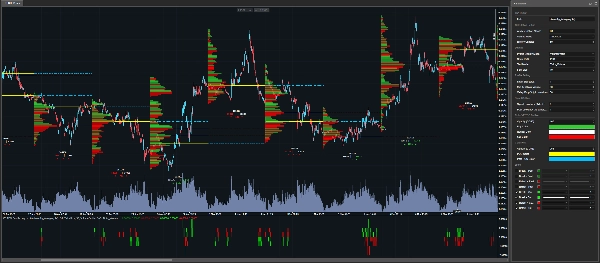
Aktualne POC mogą być wyświetlane bezpośrednio na wykresie.
Mogą być również rozszerzone na następną świecę analizy za pomocą linii przerywanych.
Przeszłe POC również mogą być wyświetlane, pozwalając traderom śledzić starsze poziomy, które mogą nadal mieć znaczenie.
━━━━━━━━━━━━━━━━━━━━━━
SYGNAŁY BREAK & RETEST GOTOWE DO ROBOTA
━━━━━━━━━━━━━━━━━━━━━━
Wskaźnik wizualny i narzędzie automatyzacji
Volume Profile TPO Bubble to nie tylko wskaźnik wizualny.
Udostępnia również serie wyjściowe, które mogą być używane w cBot lub robocie handlowym.
Wykrywane typy sygnałów
Wskaźnik może wykrywać:
• Przełamanie aktualnych poziomów POC
• Retest aktualnych poziomów POC
• Przełamanie przeszłych poziomów POC
• Retest przeszłych poziomów POC
To pozwala robotowi wykrywać, kiedy cena wchodzi w interakcję z ważnymi strefami wolumenu.
━━━━━━━━━━━━━━━━━━━━━━
WYNIKI SYGNAŁÓW
━━━━━━━━━━━━━━━━━━━━━━
Co oznacza wynik
Wskaźnik nie zwraca tylko sygnału.
Zwraca również wynik.
Wynik mówi robotowi, która strefa POC została dotknięta, przełamana lub przetestowana.
Logika wyniku
Ranking opiera się na cenie otwarcia wybranej świecy analizy.
Wyniki dodatnie oznaczają strefy POC powyżej otwarcia.
Wyniki ujemne oznaczają strefy POC poniżej otwarcia.
Przykłady
• +1 = pierwsza strefa POC powyżej otwarcia
• -1 = pierwsza strefa POC poniżej otwarcia
• +2 = druga strefa POC powyżej otwarcia
• -3 = trzecia strefa POC poniżej otwarcia
Im dalej liczba jest od zera, tym dalej strefa jest od otwarcia.
Dlaczego to ma znaczenie dla automatyzacji
To jest przydatne dla automatyzacji, ponieważ robot nie tylko wie, że sygnał się pojawił.
Wie również, gdzie sygnał się pojawił.
━━━━━━━━━━━━━━━━━━━━━━
PARAMETRY
━━━━━━━━━━━━━━━━━━━━━━
Wszystkie parametry są zorganizowane według kategorii, abyś mógł szybko zrozumieć, co kontroluje każde ustawienie.
━━━━━━━━━━━━━━━━━━━━━━
USTAWIENIA OBLICZEŃ
━━━━━━━━━━━━━━━━━━━━━━
◆ Analiza interwału czasowego
• Wybiera interwał czasowy używany do budowy profili.
• Ten interwał jest bazą do budowy profili, wykrywania POC i organizowania wyników sygnałów.
Przykłady:
• Dzienny = jeden profil na dzień
• H4 = jeden profil co cztery godziny
◆ Tryb wolumenu
• Wybiera sposób obliczania wolumenu ticków.
Dostępne tryby:
• Tick = jeden tick to jedna jednostka
• TickXSize = ticki ważone według wielkości ruchu cenowego
Tick to tryb prosty.
TickXSize nadaje większe znaczenie tickom, które silniej przesuwają cenę.
◆ Świece historii
• Określa, ile przeszłych świec z wybranego interwału analizy jest przechowywanych na wykresie.
• Więcej świec daje więcej kontekstu historycznego.
• Mniej świec utrzymuje wykres lżejszym.
• Wskaźnik może wewnętrznie utrzymywać mały dodatkowy margines, aby POC, Break i Retest były poprawnie obliczane.
━━━━━━━━━━━━━━━━━━━━━━
USTAWIENIA WYŚWIETLANIA
━━━━━━━━━━━━━━━━━━━━━━
◆ Tryb wyświetlania profilu
• Wybierz, co jest wyświetlane na wykresie:
• Brak
• Volume Profile
• Bubble
• TPO
Brak jest przydatny do automatyzacji, ponieważ usuwa rysunki z wykresu, pozostawiając dostępne wyjścia wskaźnika.
Pozwala to traderom utrzymać czysty wykres i nadal korzystać z sygnałów w robocie.
◆ Pokaż POC
• Kontroluje, które poziomy POC są wyświetlane.
Dostępne opcje:
• Brak = brak linii POC
• PoC = aktualne poziomy POC
• PoC Past = przeszłe poziomy POC
• Wszystkie = aktualne i przeszłe poziomy POC
Aktualne POC mogą być rozszerzone na następną świecę analizy za pomocą linii przerywanych.
◆ Tryb tekstowy
• Kontroluje informacje o wolumenie wyświetlane pod świecą.
Dostępne opcje:
• Brak = brak tekstu
• Wolumen ticków = informacje o wolumenie ticków
• Procent delty = nierównowaga pokazana jako procent
Dla automatyzacji można ustawić na Brak, aby utrzymać wykres czysty.
◆ Rozmiar czcionki
• Kontroluje rozmiar wyświetlanego tekstu.
• Zwiększ, aby poprawić czytelność.
• Zmniejsz, jeśli wykres jest zbyt zatłoczony.
━━━━━━━━━━━━━━━━━━━━━━
USTAWIENIA PROFILU
━━━━━━━━━━━━━━━━━━━━━━
◆ Rozmiar poziomu
• Kontroluje rozmiar każdego poziomu cenowego.
• Mniejsze wartości dają więcej szczegółów.
• Większe wartości tworzą czyściejszy i lżejszy profil.
• Wskaźnik zawiera mechanizm bezpieczeństwa, aby uniknąć tworzenia zbyt wielu obiektów na wykresie.
Jeśli pojawi się komunikat zalecający zwiększenie Rozmiaru poziomu, oznacza to, że wskaźnik chroni wykres przed niepotrzebnym przeciążeniem.
W takim przypadku bezpieczny minimalny poziom jest już stosowany wewnętrznie.
◆ Min % maksymalnego wolumenu
• Filtruje strefy na podstawie ich siły.
• Wskaźnik najpierw znajduje najsilniejszą strefę wolumenu wewnątrz świecy.
• Następnie zachowuje tylko strefy, które osiągają co najmniej wybrany procent tej maksymalnej strefy.
Przykład:
• Jeśli Min % maksymalnego wolumenu jest ustawiony na 80%, tylko strefy z co najmniej 80% najwyższego wolumenu mogą być wybrane.
Niższe wartości pokazują więcej stref.
Wyższe wartości pokazują mniej, ale silniejszych stref.
Min % maksymalnego wolumenu to filtr mocy.
◆ Valley Drop %
• Sprawdza, czy POC jest wyraźnie odizolowany.
• Pomyśl o POC jako o szczycie góry.
• Aby potwierdzić, że jest to prawdziwy szczyt, wskaźnik sprawdza, czy wolumen wokół niego wystarczająco spada.
Niższe wartości akceptują więcej stref.
Wyższe wartości pozostawiają tylko czystsze i bardziej oddzielone strefy.
Valley Drop to filtr izolacji.
━━━━━━━━━━━━━━━━━━━━━━
USTAWIENIA SYGNAŁÓW
━━━━━━━━━━━━━━━━━━━━━━
◆ Okres sygnału wstecz
• Wybiera, która zamknięta świeca dostarcza POC używane do aktualnych sygnałów Break i Retest.
Dostępne wartości:
• 0 = ostatnia zamknięta świeca
• 1 = świeca przed ostatnią zamkniętą świecą
• 2 = jeszcze dalej wstecz
To pozwala traderom testować sygnały na podstawie nowszych lub starszych odniesień POC.
◆ Okres wsteczny przeszły
• Określa, ile starszych świec jest skanowanych, aby zbudować przeszłe poziomy POC.
• Wyższa wartość pozwala wskaźnikowi szukać starszych stref POC, które mogą nadal mieć znaczenie.
━━━━━━━━━━━━━━━━━━━━━━
USTAWIENIA KOLORÓW
━━━━━━━━━━━━━━━━━━━━━━
◆ Kolory profilu
Te ustawienia dostosowują kolory wizualnego profilu:
• Kolor kupna
• Kolor sprzedaży
• Kolor neutralny
• Przezroczystość profilu
Te ustawienia kontrolują wygląd Volume Profile, Bubble Chart i TPO elementów.
◆ Kolory POC
Te ustawienia dostosowują kolory aktualnych i przeszłych poziomów POC:
• Kolor POC
• Kolor przeszłego POC
• Przezroczystość POC
Używanie różnych kolorów dla aktualnych POC i przeszłych POC ułatwia czytanie wykresu.
━━━━━━━━━━━━━━━━━━━━━━
DLA KOGO JEST TEN WSKAŹNIK?
━━━━━━━━━━━━━━━━━━━━━━
Ten wskaźnik jest przeznaczony dla:
◆ użytkowników cTrader
◆ traderów Volume Profile
◆ traderów TPO
◆ użytkowników Bubble Chart
◆ traderów POC
◆ traderów algorytmicznych
◆ deweloperów cBot
◆ Traderów, którzy chcą narzędzi wizualnych i wyjść gotowych dla robotów
◆ Traderów, którzy chcą testować logikę Break i Retest wokół stref wolumenu
━━━━━━━━━━━━━━━━━━━━━━
WAŻNA UWAGA
━━━━━━━━━━━━━━━━━━━━━━
Ten wskaźnik nie jest magicznym przyciskiem.
On nie przewiduje rynku.
Pomaga traderom identyfikować ważne strefy rynkowe, obserwować reakcje cen i budować strategie, które można testować, optymalizować i automatyzować.
Zawsze testuj swoją strategię przed użyciem jej na żywo.
━━━━━━━━━━━━━━━━━━━━━━
THE QUANT
━━━━━━━━━━━━━━━━━━━━━━
The Quant to projekt handlu i handlu algorytmicznego skoncentrowany na:
◆ Danych
◆ Automatyzacji
◆ Backtestingu
◆ Optymalizacji
◆ Przeciwdziałaniu nadmiernemu dopasowaniu
Celem jest pomóc traderom przejść od pomysłów do testowalnych, ustrukturyzowanych i automatyzowalnych strategii.
The Quant, dla wierzących w dane.
Podsumowanie
Designed for both manual traders and algorithmic developers, it supports cBot automation by providing break and retest signals of current and past POC levels, along with scoring to indicate the relative position of these zones to the candle open price. This facilitates the creation and testing of volume-based trading strategies.
Volume calculation can be set to simple tick counts or weighted by price movement size (TickXSize), enhancing the detection of impactful volume zones, especially in CFD markets where volume data is broker-dependent. The indicator offers customizable display modes, filtering parameters for volume zone strength and isolation, and color settings for clarity.
Intended for cTrader users interested in volume profile, TPO, bubble chart visualization, and automated trading strategies, it aids in identifying significant volume zones and price reactions without predicting market direction.
Opinie klientów
5 | 100 % | |
4 | 0 % | |
3 | 0 % | |
2 | 0 % | |
1 | 0 % |
![Logo „Trend Angle Indicator [Iridio Capital]”](https://cdn.ctrader.com/image/webp/75f1045e-ef06-4d88-8208-bc347c788992_61558)