present
Daftar dan dapatkan potongan bernilai $50 untuk pembelian pertama anda
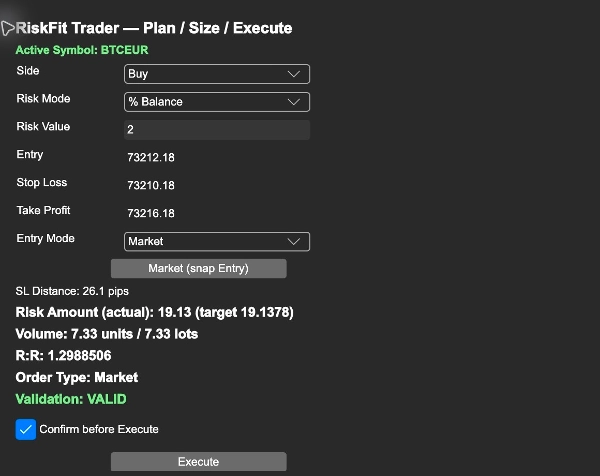
Trading product for RiskFit Trader - Risk Sizing Plugin desktop Position Sizer Risk Calculator, image 1
RiskFit Trader - Risk Sizing
Plugin desktop
Versi 1.0, Oct 2026
Windows, Mac
Trading product for RiskFit Trader - Risk Sizing Plugin desktop Position Sizer Risk Calculator, image 2
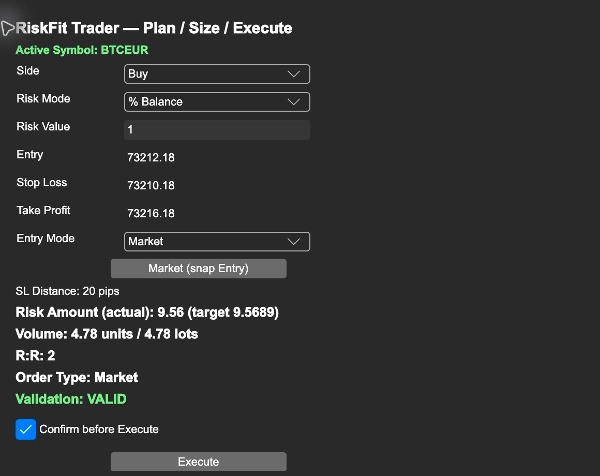
Trading product for RiskFit Trader - Risk Sizing Plugin desktop Position Sizer Risk Calculator, image 3
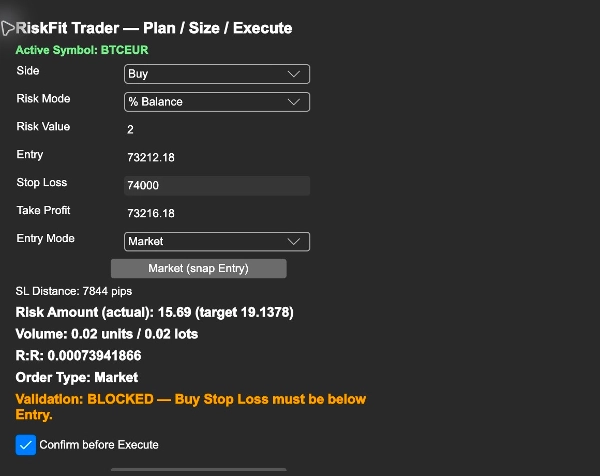
Trading product for RiskFit Trader - Risk Sizing Plugin desktop Position Sizer Risk Calculator, image 4
Sejak 16/09/2026

Penerangan

RiskFit Trader - Risk Sizing is a cTrader Desktop plugin for planning and placing manual trades with risk-based position sizing. Its panel brings Entry, Stop Loss, optional Take Profit, calculated volume and order type into one workflow.


Plan and size a trade


Choose Buy or Sell and enter your risk as a percentage of account balance, a percentage of equity, or a fixed amount in the account currency. Set the Entry and Stop Loss, then optionally add a Take Profit. The panel shows the stop distance, calculated volume in units and lots, estimated stop-loss risk, and risk-to-reward ratio when a Take Profit is supplied.


Entry, Stop Loss and Take Profit are also represented by lines on the active chart. Moving the lines updates the planning inputs. Review the displayed symbol and values after switching charts.


Choose an order workflow


Market mode uses the current market price for the selected side. Planned mode uses your Entry price to classify the order as a Buy Limit, Sell Limit, Buy Stop or Sell Stop. Review the displayed order type before proceeding.


The plugin rounds volume down to the symbol's supported step. It blocks invalid inputs and sizes below the symbol minimum. When the calculated size exceeds the symbol maximum, it caps the volume and displays the resulting estimated risk.


Get started


1. Install the purchased RiskFit Trader - Risk Sizing in cTrader Desktop under the same cTrader ID used for the purchase. Open Settings > Plugins and enable RiskFit Trader - Risk Sizing.

2. Open a native cTrader chart for the symbol you want to trade. Show TradeWatch using the layout controls and select its RiskFit Trader tab. The panel title is RiskFit Trader — Plan / Size / Execute.

3. Check Active Symbol, choose Side, Risk Mode and Risk Value, then set Entry, Stop Loss and optional Take Profit.

4. Choose Market or Planned under Entry Mode. Use Market (snap Entry) to return the Entry to the current market price.

5. Review Volume, Risk Amount, R:R, Order Type and Validation. With Confirm before Execute enabled, the first click asks you to review the trade; click Confirm Execute to submit it. Confirmation is enabled by default.


Trading requires the relevant cTrader trading permission. Review the result shown by the plugin after each submission. Risk estimates are based on the selected stop distance and symbol settings; execution price, slippage, fees and broker conditions can affect realised losses. RiskFit Trader does not provide trading signals or promise trading returns.


Reading the screenshots


The screenshots show the Full desktop plugin on a demo account: risk percentage and calculated size; Entry, Stop Loss and Take Profit with the order type; and an invalid Buy Stop Loss blocked before execution. They illustrate controls and validation, not trading results. No order is placed merely by changing planning inputs.


Limitations


This is a desktop plugin, not a cBot or an automated strategy. It requires an active native cTrader chart and broker-supported symbol specifications. Market prices and estimates can change while reviewing a plan. Check the account, symbol, order direction, prices and calculated size immediately before confirming an order. Start on a demo account to learn the controls. No separate Store trial is provided.


Ringkasan

AI summary
RiskFit Trader - Risk Sizing is a desktop plugin for the cTrader platform designed to assist traders in planning and executing manual trades with risk-based position sizing. The plugin integrates Entry, Stop Loss, optional Take Profit, calculated trade volume, and order type into a single workflow. Users select Buy or Sell, specify risk as a percentage of account balance, equity, or a fixed amount, then set Entry and Stop Loss prices, with an optional Take Profit. The interface displays stop distance, calculated volume in units and lots, estimated stop-loss risk, and risk-to-reward ratio when Take Profit is set.

Entry, Stop Loss, and Take Profit levels are visually represented as lines on the active chart, which can be adjusted interactively. The plugin supports Market mode, using current market prices, and Planned mode, which classifies orders as Buy Limit, Sell Limit, Buy Stop, or Sell Stop based on the Entry price. It enforces symbol-specific volume steps and limits, blocking invalid inputs and capping volume at the symbol maximum while showing the resulting estimated risk.

RiskFit Trader requires an active native cTrader chart and relevant trading permissions. It provides trade planning and sizing tools but does not generate trading signals or guarantees trading outcomes. The plugin includes confirmation prompts before order execution to review trade details.
Profil plugin
Kategori plugin
Pengurusan risiko
Akses data
Data pasaran
Pesanan
Akaun
Carta
Jenis pesanan yang disokong
Pasaran
Had
Henti
Model risiko
Peratusan risiko tetap
Berasaskan ekuiti
Jenis kawalan risiko yang disokong
Henti rugi
Ambilan untung

Ulasan pelanggan

0.0
Ulasan: 0
Ulasan pelanggan
Belum ada ulasan untuk produk ini. Anda sudah mencuba produk tersebut? Jadilah yang pertama untuk berkongsi pendapat anda!

Perbincangan

Soalan Lazim

Position Sizer
Risk Calculator
Produk yang tersedia melalui cTrader Store, termasuk bot dagangan, indikator dan plugin, disediakan oleh pembangun pihak ketiga dan diberikan akses untuk tujuan maklumat dan teknikal sahaja. cTrader Store bukan broker dan tidak memberikan nasihat pelaburan, syor peribadi atau sebarang jaminan prestasi masa hadapan.

Lebih banyak produk daripada penulis ini

Indikator
BOS
MSS
+4
See confirmed BOS, CHOCH and SWEEP structure events on your cTrader chart.
Indikator
BOS
Add standard-timeframe context candles to a native Renko chart.
Indikator
EMA
Volume
Map range high, mid, low, price location and a deterministic pressure proxy on your cTrader chart.
Indikator
Channel
Key Levels
+1
Monitor a selected chart trendline and confirm breaks on candle close.
Plugin desktop
Trade Journal
Trade Statistics
See not only what you made or lost, but which trading behaviours caused the damage.
Plugin desktop
Chart UI Tools
Keep lines, zones and channels synced across selected same-symbol charts from one desktop plugin.
cBot
Drawdown Guard
Daily Loss Limit
Monitor account-wide loss and stop-loss risk budgets, with optional order cancellation and post-fill closure.
Indikator
Volume
Key Levels
View tick activity across a selected chart range with Point of Control, Value Area High and Value Area Low.

Anda juga mungkin suka

Plugin desktop
AI
ATR
+27
Trade Analytics delivers advanced trading insights and heatmaps directly inside TradeWatch.
Plugin desktop
AI
ATR
+27
Turn your cTrader trade history into a visual performance dashboard to see trading patterns and strategy strength
Plugin desktop
Trade Journal
Trade Statistics
See not only what you made or lost, but which trading behaviours caused the damage.
Plugin desktop
Risk Reward management tools (风险回报管理工具)
Logo "TradeGuard"
Popular
4.6
(3)
$25
Plugin desktop
ATR
Prop
+5
cTrader risk management plugin with daily & total drawdown limits, CBot control, and risk-based order execution.
Plugin desktop
Trade Journal
AI Integration
+1
Turn your closed-trade history into an at-a-glance monthly calendar and a deep performance dashboard.
Plugin desktop
SL Manager
TP Manager
+4
Drag Entry, SL and TP, size the trade by risk, and place the correct order in three clear steps.
Plugin desktop
Prop
Forex
+4
Visual monthly trading journal that displays your performance day-by-day in a calendar view.
Plugin desktop
AI
Forex
+5
AI Trading Agent, predict market moves, detect trends, and execute profitable trades.
Plugin desktop
SL Manager
Break Even
+5
Execute and manage manual trades faster with safe, customisable hotkeys and risk-based sizing.
Plugin desktop
Chart UI Tools
Keep lines, zones and channels synced across selected same-symbol charts from one desktop plugin.
Plugin desktop
Risk/Reward
Trade Journal
+5
cTrader Journal - Automatic Trade Capture. Offline Reviews. No Subscription.
Plugin desktop
Trade Journal
AI Integration
+1
#1 Trade Journal, PnL analytics, bot monitoring and strategy statistics.
Plugin desktop
Market Scanner
An 8-currency strength ranking, multi-TF heatmap and impulse tracker. Read the real driver at a glance. Read-only.
Plugin desktop
Prop
Forex
+4
Professional risk management plugin with automatic lot calculation, chart panels, and R:R automation. Version 1.4.2.
Plugin desktop
Prop
Forex
+3
Visual calendar with daily PnL, trades, win rate, profit factor, and performance insights.
Plugin desktop
Fixed Risk %
Risk/Reward
+5
⚡Trade faster. Manage easier. Stay within your risk.
Plugin desktop
Risk/Reward
Chart UI Tools
+3
Visual cTrader backtesting tool with trade drawing, risk sizing, stats, and automatic trade simulation.

Harga

Sejak 16/09/2026