

Description
Smart Trend Navigator
Trend-following intraday bot for XAUUSD ⚡
Navigate gold’s movement. Trade with structure.
Gold is one of the most dynamic markets in the world. Its strong intraday movements can create exciting opportunities—but they also demand discipline, timing and a clear understanding of changing trend conditions. 📈
After many years of experience trading gold, I developed Smart Trend Navigator to bring a structured and systematic approach to XAUUSD trading.
Most of my successful bots have been designed for swing traders—traders who prefer to hold positions for longer and follow larger market movements. Smart Trend Navigator is different. It was created for intraday traders who enjoy seeing more opportunities during the day and want an automated strategy built around active gold-market conditions. ⚡
Creating a reliable intraday trend-following approach is not simple. Short-term price action can be noisy, trends can shift quickly, and filtering the true daily market structure requires more than one indicator. After many months of research, development and refinement, I created this bot to bring together multiple perspectives of the market in one coordinated system.
Smart Trend Navigator combines established technical indicators with a mathematical model developed by me, coordinating 13 trend-identification tools across multiple timeframes.
The bot runs throughout the trading day, looking for opportunities as market conditions develop. Some days may offer more trades, while others offer fewer. Its goal is to participate in favourable movements and manage positions systematically—including through averaging when suitable retracement conditions arise.
One coordinated view of the market 🔎
The model analyses M1, M5, M15 and H1 data. Shorter timeframes respond more quickly to price movement, while longer timeframes contribute a broader view of market direction.
The 13 trend-identification tools
- Accumulative Swing Index (ASI) — follows cumulative price swings to help reveal the underlying direction of movement. Developed by J. Welles Wilder Jr. in 1978.
- Aroon — examines how recently price reached highs and lows, helping identify developing trends. Developed by Tushar Chande in 1995.
- H1 Directional Movement Analysis — compares upward and downward movement on the hourly timeframe, based on J. Welles Wilder Jr.’s directional-movement work from 1978. The bot uses a custom calculation rather than standard ADXR.
- Directional Movement System (DMS) — compares positive and negative directional movement to assess market direction. Developed by J. Welles Wilder Jr. in 1978.
- Exponential Moving Average (EMA) — places greater emphasis on recent prices for a responsive view of movement. Its exponential-smoothing foundation was published by Robert G. Brown in 1956.
- Hull Moving Average (HMA) — combines smoothness with responsiveness to help track changing price direction. Developed by Alan Hull in 2005.
- Parabolic SAR — follows price with a dynamic reference that adapts as the market moves. Developed by J. Welles Wilder Jr. in 1978.
- Simple Moving Average (SMA) — smooths price movements by giving each observation equal weight. Early moving-average work includes R. H. Hooker’s calculations in 1901.
- Supertrend — combines price and volatility to provide a dynamic view of the prevailing trend. Commonly credited to Olivier Seban, around 2009.
- Time Series Moving Average (TSMA) — uses linear regression to provide a smoothed perspective on price movement.
- Triangular Moving Average (TMA) — places greater emphasis on prices near the middle of its calculation window, creating a smoother view of price action.
- Welles Wilder Smoothing — applies a smoothing method introduced by J. Welles Wilder Jr. in 1978 to reduce sensitivity to short-term fluctuations.
- Weighted Moving Average (WMA) — gives more weight to recent prices using a classical statistical analysis method.
Designed to adapt to your trading style ⚙️✨
Smart Trend Navigator gives you control over how selectively it trades, how much exposure it takes and how it manages positions. The right combination depends on your account size, broker conditions and trading preferences. 👇
1️⃣ Choose a comfortable position size 💰📊
Volume determines the size of each position. A smaller volume reduces the financial impact of gold’s movements and gives your account more room to withstand volatility. A larger volume increases both potential profit and potential loss.
For a cautious start, use the smallest practical volume and confirm your broker’s XAUUSD contract size. The bot’s volume setting multiplies the symbol’s minimum trading volume.
2️⃣ Decide how selective the bot should be 🎯🔍
Minimum Trend Signals controls how many of the 13 tools must support a direction.
- A higher setting makes the bot more selective, but can delay entries or miss opportunities.
- A lower setting can allow earlier or more frequent entries, but may be more sensitive to short-term market noise.
Begin with the default, then compare it with a slightly higher setting in backtests to see which balance suits you. 🧪
3️⃣ Balance profit targets and protection 🛡️📈
Take Profit sets the target distance for each position. A closer target may be reached more often, while a wider target allows more room to benefit from a larger move—but may be reached less frequently.
Stop Loss protects each individual position. Since the bot also has an equity-based Daily Profit/Loss Limit, consider giving individual trades enough room to respond to normal gold volatility. The position’s stop loss remains an additional protection if the bot stops or fails, subject to your broker’s execution.
Positions may also be closed when the trend shifts, providing another way for the bot to manage open trades. 🔄
Take Profit and Stop Loss are percentages of gold’s price, not percentages of account equity. Consider the stop distance and volume together when choosing your settings.
4️⃣ Give retracements enough room ↔️📉
Retracement Gap controls the price distance used when the bot considers adding another position in the same direction while a position is losing.
A wider gap spaces potential additions further apart. A smaller gap can allow additions sooner, giving the strategy more opportunities to average during a retracement.
Use this setting carefully: additional positions increase exposure, and a continuing adverse move in one direction can result in substantial losses. Test different gap and volume combinations to find an approach appropriate for your account. ⚠️
5️⃣ Control trading costs 💱✅
Maximum Spread is calculated as the difference between the ask and bid prices, expressed as a percentage of the bid price. The bot checks this limit before opening standard or additional positions.
Set it with your broker’s typical XAUUSD spread in mind: a tighter limit is more selective, while a wider limit permits entries under more varied spread conditions.
6️⃣ Set a daily boundary 📅🚦
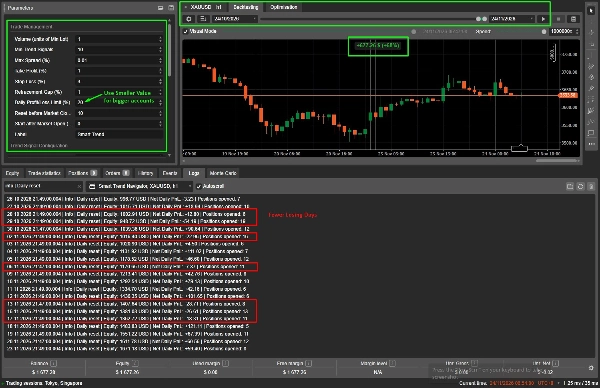
Daily Profit/Loss Limit defines an equity-change threshold for both gains and losses. When either threshold is reached, the bot initiates a reset and closes its positions.
A lower limit may help you finish the day sooner after a gain or loss. A higher limit gives the strategy more room to trade. Choose a value that fits your account and the level of daily movement you are comfortable with.
The limit is calculated from account equity when the bot starts and uses account-wide equity, so other positions and account activity can affect it.
7️⃣ Choose when to start and reset ⏱️🌙
Daily Start makes the bot wait after it starts or detects a market reopening. A longer wait can help avoid trading immediately during potentially unsettled opening conditions, though it may also miss early moves. Setting it to 0 removes the delay.
Daily Reset sets how many minutes before market close the bot begins its reset. This can help avoid holding positions into a closure. Setting it to 0 disables the scheduled pre-close reset, while the equity-limit reset remains active.
A thoughtful way to begin 🌟
Smart Trend Navigator aims to capture intraday opportunities using its trend model and position-management rules to work with gold’s movements. Results will vary: averaging can improve an outcome after a retracement, but a sustained adverse move can also increase losses.
Start with a demo account, conservative volume and a daily limit that fits your preferences. Backtest across different XAUUSD market conditions and review profit, drawdown, margin usage, number of positions and trading costs before moving to live trading.
Disclaimer: Trading involves risk. Past performance does not guarantee future results.