

Description
# M-Algo Triple Recovery PRO
**Automated EURUSD Trading | Triple Recovery Strategy | Advanced Risk & Position Management**
M-Algo Triple Recovery PRO is an automated Forex trading cBot developed by **M-Algo Systems** exclusively for the cTrader platform.
Designed for EURUSD trading, the system combines three independently managed recovery baskets, automated position management, configurable trading controls, cost-aware Take Profit management, and optional account equity protection.
The cBot supports automated trading on **Demo and Live hedging accounts**, as well as historical Backtesting, Visual Backtesting, and Optimization.
**Recommended starting configuration: EURUSD H1 with default parameters.**
---
## KEY FEATURES
**Automated Trading**
The cBot evaluates trading conditions, opens positions, manages recovery entries, maintains basket Take Profit levels, and handles position closures according to its internal strategy.
**Triple Recovery Architecture — Baskets A, B and C**
Three baskets use separate entry conditions and can be enabled or disabled individually.
Each basket maintains its own positions, recovery sequence, position limit, and shared Take Profit management.
**Two Basket Take Profit Modes**
- **StandardPriceBased:** Uses the configured basket Take Profit distance.
- **CostAware:** Considers observed trading costs and estimated closing commission when calculating the shared Take Profit target.
CostAware mode may move the target farther away, potentially increasing holding time, swap exposure, and drawdown.
**Position Management**
The system supports position-size progression, independent Buy/Sell position limits, shared basket Take Profit synchronization, and configurable handling of manually closed positions.
**Account Protection**
Optional trailing equity-loss protection can close positions and stop, continue, or temporarily pause trading according to the selected response.
**Advanced Optimization**
Five adjustable optimization controls and a custom GetFitness calculation are available for evaluating different configurations using cTrader's Optimization environment.
---
## CONFIGURABLE PARAMETERS — 22 PUBLIC SETTINGS
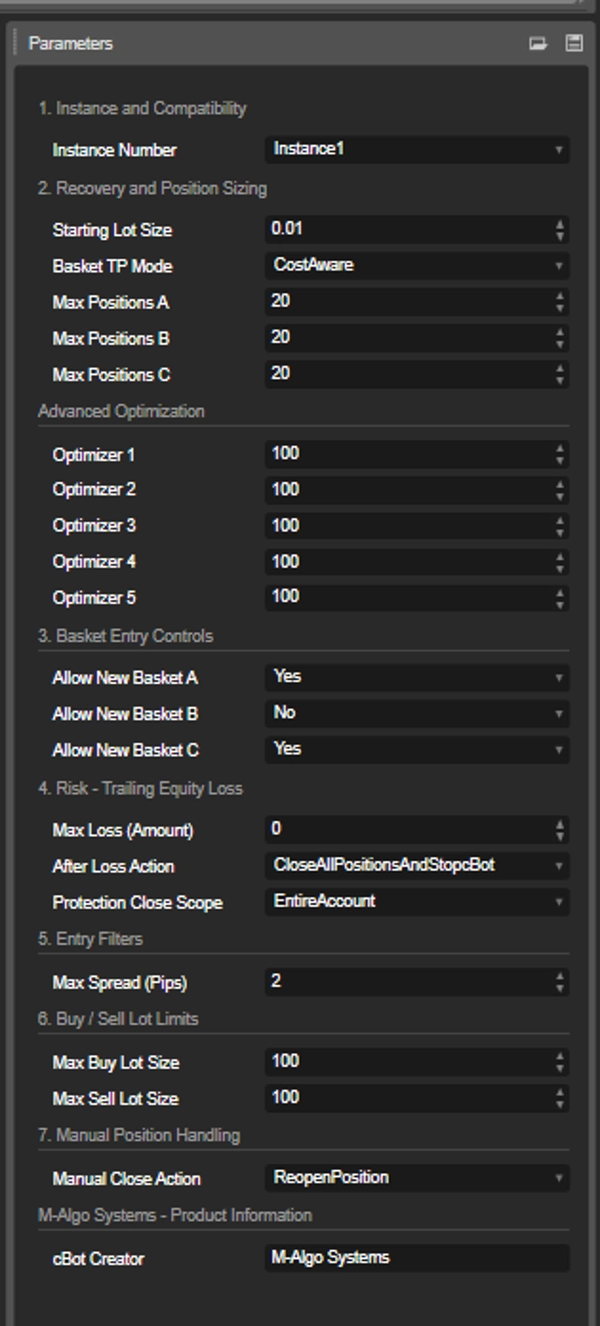
All 22 public parameters are available in the cTrader settings panel.
### 1. Instance and Compatibility
**Instance Number**
Selects the robot instance identity (Instance1–Instance5).
Multiple instances can be configured with separate identities. Each instance must use a unique number when running on the same account, symbol, and chart timeframe.
Do not change the instance identity or chart timeframe while its managed positions remain open.
### 2. Recovery and Position Sizing
**Starting Lot Size**
Defines the initial position size when a new basket opens.
- Default: 0.01 lots
- Adjustable range: 0.01–1.00 lots
Increasing the starting lot size also increases trading exposure and potential losses.
**Basket TP Mode**
Selects the basket-level Take Profit calculation:
- StandardPriceBased
- CostAware (default)
**Max Positions A**
Maximum number of simultaneous positions in Basket A, including recovery positions.
Default: 20. Adjustable range: 5–20.
**Max Positions B**
Maximum number of simultaneous positions in Basket B, including recovery positions.
Default: 20. Adjustable range: 5–20.
**Max Positions C**
Maximum number of simultaneous positions in Basket C, including recovery positions.
Default: 20. Adjustable range: 5–20.
These limits apply individually to each basket, not to the combined number of positions across all baskets.
### 3. Advanced Optimization
The cBot provides five independent strategy-tuning parameters:
- **Optimizer 1**
- **Optimizer 2**
- **Optimizer 3**
- **Optimizer 4**
- **Optimizer 5**
Each optimizer controls a separate internal strategy adjustment through the protected configuration system.
All five have the same public adjustment range:
- Minimum: 90
- Default: 100
- Maximum: 110
- Step: 0.02
The five controls can be adjusted independently or tested using cTrader's built-in Optimization functionality.
The default value of 100 represents the predefined production configuration for each optimizer.
The internal parameter mappings are proprietary to M-Algo Systems.
**Important:** Optimization values can materially change position sizing, trading behavior, profitability, and drawdown. Test any modified configuration before using it in real-time trading.
### 4. Basket Entry Controls
**Allow New Basket A**
Enables or disables the creation of new Basket A trading sequences.
Default: Yes.
**Allow New Basket B**
Enables or disables the creation of new Basket B trading sequences.
Default: No.
**Allow New Basket C**
Enables or disables the creation of new Basket C trading sequences.
Default: Yes.
Disabling new entries does not automatically close existing positions. Already-open baskets continue to be managed by the cBot.
### 5. Risk — Trailing Equity Loss
**Max Loss (Amount)**
Defines the maximum permitted decrease in account equity from the highest equity recorded since startup or the latest protection reset.
The value is expressed in the trading account's deposit currency.
- Default: 0 (protection disabled)
- A positive value enables the trailing equity-loss threshold.
The protection response is triggered when the configured threshold is exceeded.
**After Loss Action**
Controls what happens after the selected positions have been closed following a protection event.
Available responses:
- Close all selected positions and stop the cBot
- Close all selected positions and continue trading
- Close all selected positions and pause for 12 hours
- Close all selected positions and pause for 24 hours
- Close all selected positions and pause for 3 days
- Close all selected positions and pause for 7 days
Restarting the cBot cancels an active protection pause.
**Protection Close Scope**
Determines which positions are targeted when Max Loss protection activates.
- **EntireAccount (default):** May close manual positions and positions belonging to other cBots on the same account.
- **ThisCbotInstanceOnly:** Closes only positions owned by the current cBot instance.
The Max Loss trigger is always based on total account equity, regardless of the selected closure scope.
**Important:** EntireAccount protection does not cancel pending orders. Carefully review these settings before enabling Max Loss protection on an account shared with other strategies.
### 6. Entry Filters
**Max Spread (Pips)**
Sets the maximum permitted spread for new initial entries, recovery entries, and manual replacement entries.
- Default: 2.0 pips
- 0 disables the spread filter.
When the market spread exceeds the selected limit, affected new entries are blocked until conditions permit execution.
### 7. Buy / Sell Lot Limits
**Max Buy Lot Size**
Limits the volume of each individual Buy position.
Default: 100 lots.
**Max Sell Lot Size**
Limits the volume of each individual Sell position.
Default: 100 lots.
Both limits can be configured separately.
These limits apply per position, not to the aggregate exposure of an entire basket or trading account. Broker volume limits also apply.
### 8. Manual Position Handling
**Manual Close Action**
Controls how the cBot responds when a user manually closes a managed position while other positions in the same basket remain open.
Available options:
- **ReopenPosition (default):** The cBot may replace the manually closed position when the relevant basket and safety conditions permit.
- **KeepPositionClosed:** The manually closed position remains closed.
Closing the entire basket does not cause the basket to reopen automatically. Stop Loss, Take Profit, and Stop Out closures are not treated as manual replacement requests.
### 9. Product Information
**cBot Creator**
Displays M-Algo Systems as the developer.
This is an information-only parameter and does not affect trading operations.
---
## BACKTESTING AND OPTIMIZATION
M-Algo Triple Recovery PRO supports:
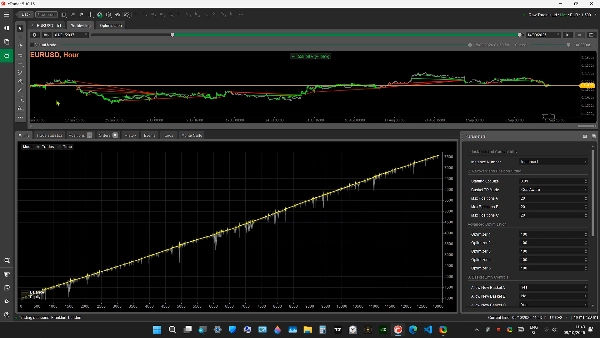
- Historical Backtesting
- Visual Backtesting
- Parameter Optimization
- Custom GetFitness optimization
- Evaluation of different chart timeframes and trading configurations
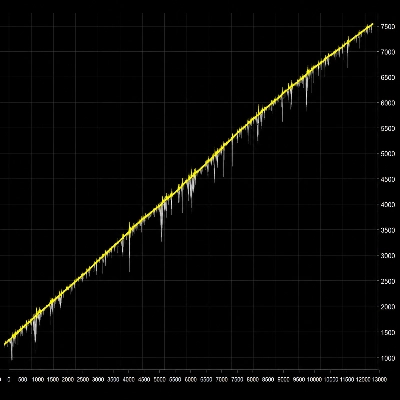
- Historical trade, balance, equity, profit, and drawdown analysis
The primary validated configuration is **EURUSD H1 using the default settings**.
Other chart timeframes can be evaluated through Backtesting and Optimization, but results and risks may differ substantially.
Historical testing results are not a prediction or guarantee of future performance.
---
## SUPPORTED TRADING ENVIRONMENT
**Trading platform:** cTrader
**Supported instrument:** EURUSD only
**Account type:** Hedging required
**Primary tested timeframe:** H1 (1 hour)
**Full PRO execution:** Demo and Live
**Historical testing:** Supported
The cBot does not support netting accounts or trading instruments other than EURUSD.
Broker-specific EURUSD symbols with prefixes or suffixes may be accepted when their underlying base and quote assets are EUR and USD.
### Important Operating Notes
- Use a unique Instance Number for each matching cBot instance.
- Do not change position-sizing, basket management, or optimization parameters while managed baskets remain open.
- Monitor available margin and aggregate position exposure.
- Test the default configuration before experimenting with alternative settings.
- Review account-protection settings carefully when using other cBots or manual positions on the same account.
---
## PURCHASE — FULL PRO VERSION
**ONE-TIME PURCHASE — NO SUBSCRIPTION FEES**
M-Algo Triple Recovery PRO is available as a one-time purchase through the cTrader Store.
The Full PRO version includes:
- Automated real-time trading on supported Demo and Live accounts
- Complete Triple Recovery trading functionality
- All 22 public parameters
- Built-in position and account management
- Backtesting and Optimization support
**Protected Distribution**
The product is delivered as a compiled and obfuscated cTrader algorithm.
- No C# source code included
- No editable source files provided
- Protected trading logic
- No recurring subscription required
**Full PRO Product:**
https://ctrader.com/products/5731
---
## FREE TRIAL — TEST BEFORE PURCHASE
A separate FREE Trial version is available for evaluating the trading system using historical market data.
**The Free Trial includes:**
- Historical Backtesting
- Visual Backtesting
- Parameter Optimization
- Custom GetFitness calculation
**Trial restrictions:**
Real-time trading is DISABLED on both Demo and Live accounts.
The Trial cannot open, modify, or close real-time trading positions.
To enable automated trading on Demo and Live accounts, purchase the Full PRO version.
**Download FREE Trial:**
https://ctrader.com/products/5733
---
## VIDEO DEMONSTRATION
Watch M-Algo Triple Recovery PRO operating in the cTrader historical testing environment.
**YouTube Demonstration:**
---
## IMPORTANT RISK DISCLOSURE
Forex trading involves substantial financial risk.
M-Algo Triple Recovery PRO uses a recovery-based strategy that can open multiple positions and increase market exposure during unfavorable price movements.
Recovery-based position management can lead to significant floating losses, increased margin requirements, prolonged holding periods, and substantial account drawdown.
The account-protection functionality is optional and does not guarantee that losses will remain below a selected amount, particularly during rapid price movements, slippage, insufficient margin, or execution failures.
Users are responsible for evaluating trading risks, broker conditions, account leverage, position sizes, and overall exposure.
**Past performance does not guarantee future results.**
Backtesting and Optimization results may differ from actual Demo or Live trading because of changing market conditions, spreads, commissions, swaps, slippage, liquidity, and broker execution.
No automated trading system can guarantee profitability or prevent financial loss.
This product is trading software and does not constitute financial or investment advice.
---
**DEVELOPED BY M-ALGO SYSTEMS**
Automated Trading Systems for cTrader
© 2026 M-Algo Systems. All rights reserved.
Summary
Key features include a triple recovery system that manages three separate baskets of positions (A, B, and C) to optimize recovery trades, cost-aware basket-level Take Profit calculations that consider trading costs, and advanced position size management with configurable parameters such as starting lot size and maximum positions per basket. The robot incorporates built-in risk and account protection mechanisms that can close positions or pause trading based on equity loss thresholds.
M-Algo Triple Recovery PRO supports comprehensive historical testing, including backtesting, visual backtesting, parameter optimization with five adjustable parameters, and custom fitness calculations for strategy evaluation. Trade-entry controls allow filtering by spread and position limits to suit different market conditions.
The product is delivered as a compiled and obfuscated cBot without source code, available via one-time purchase. A trial version enables backtesting and optimization but does not support real-time trading. The system is intended for professional use with careful consideration of risk, margin, and account settings.
Discussion
Customer reviews
FAQ
More from this author















Price