الوصف
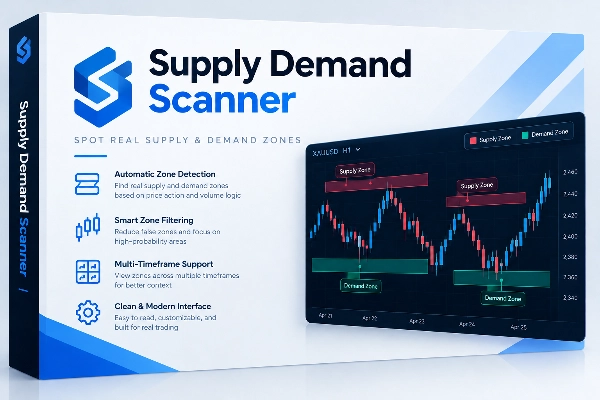
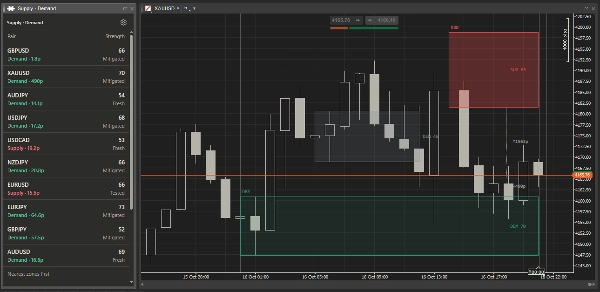
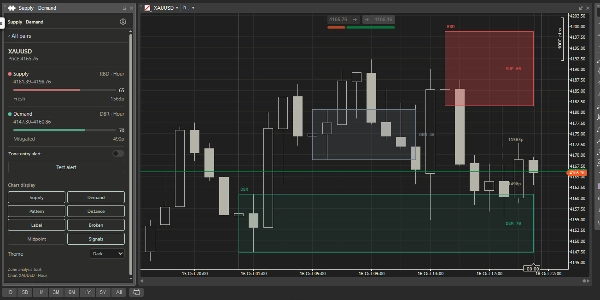
Supply Demand Detector is a cTrader Desktop plugin that identifies supply and demand areas and organizes them in a movable, resizable dashboard beside your charts. It helps traders monitor multiple instruments and review potential areas of interest without repeatedly drawing zones manually.
How it works
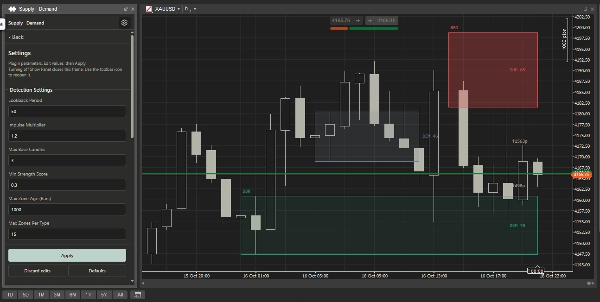
The plugin looks for small-bodied base candles followed by an impulse candle. Supply and demand zones are drawn around the detected base.
Each zone receives a rule-based strength score and a status: Fresh, Tested, Mitigated, or Broken. The dashboard shows nearby supply and demand zones, their price boundaries, pattern classification, and distance from the current bid.
What the plugin adds
- Automatic supply and demand zone detection.
- A multi-instrument scanner using the selected chart’s timeframe.
- Zone strength scores, status tracking, and distance information.
- Optional zone-entry popup alerts for individual instruments.
- Optional reference entry, stop-loss, and take-profit levels.
- Quick controls for chart layers, labels, midpoint lines, signals, and themes.
- A scrollable desktop panel with saved detection and display settings.
Integration into a trading workflow
- Scan the instrument list for nearby supply or demand zones.
- Select an instrument to review its zone boundaries, strength, status, and pattern.
- Open its chart from the panel for closer inspection.
- Enable zone-entry alerts where needed.
- Apply your own confirmation, execution, and risk-management rules.
The plugin follows the selected price chart. Clicking its dashboard retains the last chart target.
Main settings and parameters
Detection settings
- Lookback Period
- Impulse Multiplier
- Max Base Candles
- Min Strength Score
- Max Zone Age
- Max Zones Per Type
Zone appearance
- Supply, demand, and broken-zone colors
- Fresh and tested opacity
- Midpoint-line visibility
- Broken-zone visibility
Scanner and panel
- Scanner Pairs, using broker symbol names
- Panel visibility and native frame resizing
- Quick chart-layer and theme controls
Signals
- Enable Signals
- Stop-loss buffer in pips
- Take-profit risk-to-reward ratio
Reference signals use the zone midpoint as the entry level, a buffered zone boundary for the stop loss, and the configured risk-to-reward ratio for the target.
Common use cases
- Reviewing several instruments before focusing on individual charts.
- Monitoring fresh zones and observing their status after price returns.
- Receiving notifications when price enters a selected instrument’s zone.
- Comparing nearby supply and demand areas.
- Displaying reference trade levels alongside an existing manual trading plan.
Who it is best suited for
The plugin is most suitable for discretionary traders who use supply and demand concepts and understand basic price action.
Intermediate and experienced traders can incorporate it into an established analysis process. Beginners can use the visuals as a learning aid, but should understand zone formation, invalidation, and risk management before relying on signals.
Limitations and usage notes
- The plugin supports analysis; it does not place trades automatically.
- A strength score is not a win probability.
- Zone detection processes closed candles, while live prices can update zone status between closes.
- Historical strength calculations can include subsequent candle movement, so historical scores may differ from scores produced live.
- Reference entry, stop-loss, and target levels do not account for every execution condition.
- Results depend on broker data, available history, symbol names, and parameter choices.
- Zone-age and count limits remove older or weaker areas.
- Remove the original overlay indicator from the same chart to avoid duplicate drawings.
- The plugin does not replace independent analysis or risk management.
الملخص
Key features include a multi-instrument scanner synchronized with the selected chart’s timeframe, zone strength and status tracking, distance from current price, and optional popup alerts for zone entries. Users can also set reference entry, stop-loss, and take-profit levels based on zone midpoints and configurable risk-to-reward ratios. The plugin offers quick controls for chart layers, labels, midpoint lines, signals, and themes, with saved detection and display settings in a scrollable desktop panel.
The workflow supports scanning instruments for nearby zones, reviewing zone details, opening charts for deeper analysis, enabling alerts, and applying personal trading rules. It is suited for discretionary traders familiar with supply and demand concepts and basic price action, serving as an analysis aid rather than an automated trading tool. The plugin processes closed candles for detection and requires removal of overlapping indicators to avoid duplicate drawings.









![شعار "Custom Timeframes [Iridio Capital]"](https://cdn.ctrader.com/image/webp/4d75a920-23c7-4fea-a7b5-594a9d067f2e_63286)