
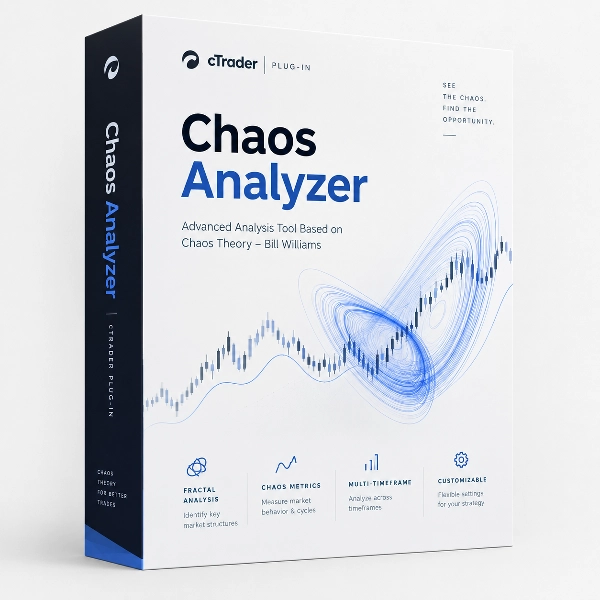
Chaos Analyzer
Desktop plugin
Version 1.0, Oct 2026
Windows, Mac
Since 13/05/2026
5
Free installs
Description
Chaos Analyzer is a cTrader Desktop analysis plugin based on Bill Williams’ Trading Chaos framework. It uses Alligator, Fractals, Awesome Oscillator (AO), and Accelerator Oscillator (AC) to help traders assess trend direction, momentum, and potential trade levels.
The plugin brings these tools into a multi-symbol, multi-timeframe scanner with chart overlays, reference Entry/SL/TP zones, historical zones, and configurable alerts. It supports discretionary analysis and trade planning without placing or managing orders.
- Core analysis tools
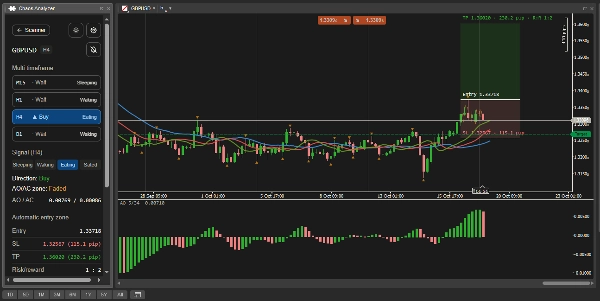
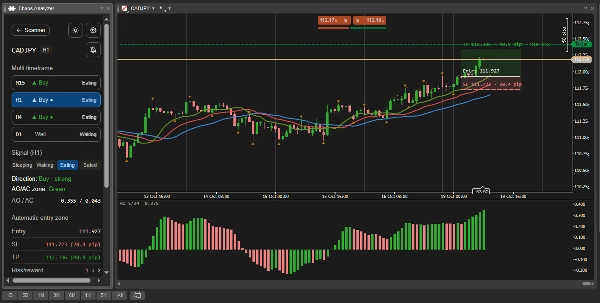
Alligator helps identify trend direction and market conditions through its Jaw, Teeth, and Lips lines. The panel classifies conditions as Sleeping, Waking, Eating, or Sated using simplified rules.
Fractals identify confirmed price extremes that serve as reference entry levels. Left and right candle counts are independently adjustable, allowing traders to control the comparison window and confirmation delay.
AO measures momentum, while AC measures changes in that momentum. Their combined direction produces Green, Red, or Faded momentum zones. Stronger scanner borders highlight directional signals supported by aligned AO and AC. - Multi-symbol and multi-timeframe scanning
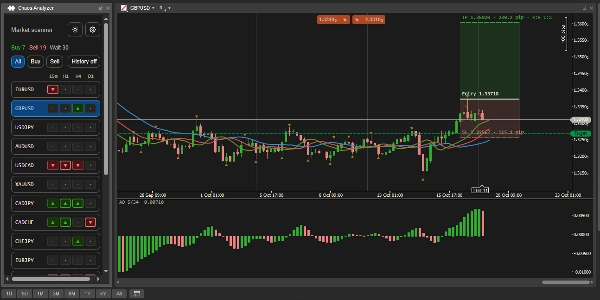
Monitor up to 24 broker-supported symbols across M15, H1, H4, and D1 in one panel.
Each symbol–timeframe combination displays a Buy, Sell, or Wait state. Buy and Sell filters help narrow the scanner, while the detail page provides timeframe comparisons, Alligator phase, momentum readings, and zone prices.
Selecting a symbol or timeframe switches the linked chart, reducing repeated navigation between instruments. - Automatic reference trade zones
The plugin calculates and draws Entry, Stop Loss, and Take Profit levels when its directional conditions and zone requirements are satisfied.
When no valid directional zone is available, the chart may display a dashed Watch zone between the latest confirmed upper and lower Fractals. Price levels and pip distances help traders review the proposed structure before making their own decision. - Buy: bullish Alligator alignment, a close above Lips, and rising AO.
- Sell: bearish Alligator alignment, a close below Lips, and falling AO.
- Entry: the latest confirmed upper Fractal for Buy or lower Fractal for Sell.
- SL: Teeth by default, with an opposite-Fractal alternative.
- TP: calculated from the Entry-to-SL distance and selected risk/reward ratio.
- Historical zones and alerts
Historical zones preserve previous analytical setups as chart drawings without text labels. The scanner’s History on/off button controls their visibility independently of the current zone layer.
Each symbol–timeframe combination retains up to 80 archived zones, with an initial reconstruction from up to 300 recent closed candles. Changing analysis parameters recalculates recent history under the new settings.
The bell button on the detail page enables alerts for that specific symbol and timeframe. Enabled combinations display a bell indicator. A different qualifying setup on a newly closed candle can trigger a local popup and notification sound.
Changes to a setup’s Teeth-based SL/TP do not repeatedly trigger the same alert. Initial history loading and settings recalculation do not announce historical setups. - Main settings and workspace controls
Parameter and symbol changes remain drafts until Save changes is clicked. Unsaved edits can be retained while navigating within the panel or removed with Discard.
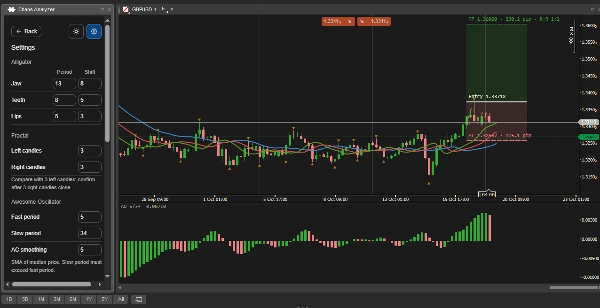
The plugin uses a movable, resizable Custom Frame in Free layout. Chart colours follow the panel theme, and Fractal marker sizes adapt to chart zoom. - Alligator: adjustable Jaw, Teeth, and Lips periods and shifts; defaults are 13/8, 8/5, and 5/3.
- Fractals: independent Left candles and Right candles, from 1 to 20 each; default 2/2.
- AO: adjustable Fast and Slow periods; defaults 5/34.
- AC: adjustable smoothing period; default 5.
- Zone planning: selectable SL basis and risk/reward target; default 1:2.
- Scanner: configurable broker-symbol selection.
- Display: Alligator, Fractal, current-zone, and AO visibility controls, plus historical-zone visibility and dark/light themes.
- Integration into a trading workflow
Begin with the scanner to identify instruments showing directional conditions. Open a symbol’s detail page and compare its timeframes, then review the selected chart’s Alligator alignment, momentum, and reference zone.
Check the relationship between current price, Entry, SL, and TP alongside your own trading criteria and risk limits. Enable a symbol–timeframe alert if you want to monitor subsequent qualifying setups.
The trader remains responsible for choosing trades, calculating position size, placing orders, and managing open positions. - Typical use cases and intended users
Intraday traders can compare M15 and H1 conditions while reviewing H4 or D1 for broader context. Swing traders can focus on H4 and D1 setups. Multi-instrument traders can use the scanner and alerts to reduce repetitive chart checks.
Historical zones also support visual review of earlier analytical setups, although they do not provide a record of executed trades or trading performance.
Chaos Analyzer is most suitable for intermediate and advanced discretionary traders, particularly those familiar with Bill Williams’ indicators, trend analysis, and risk/reward planning. Beginners can use it as a structured visual aid after learning how indicator confirmation and closed-candle signals work. - Limitations and usage notes
Chaos Analyzer implements selected components and simplified rules from the Trading Chaos framework. It does not implement the complete Three Wise Men method. Fractal triggers are not filtered against the Alligator’s mouth or automatically rejected because price previously crossed their level.
Signals are calculated from closed candles. Fractals require the configured number of right-hand candles to close before confirmation, while the AO chart display includes the live candle. Moving averages and confirmation requirements introduce delay, and signals may change frequently in ranging conditions.
Reference zones can appear before price reaches Entry. Touching Entry, SL, or TP does not automatically mark a setup as triggered, completed, or expired. A zone becomes historical when its analytical setup changes or becomes unavailable.
Alerts require cTrader Desktop, the plugin, and market data access to remain active. Historical zones are analytical references, not a backtest or proof of trade outcomes.
The plugin does not send, modify, or close orders, and it does not adjust existing positions.
Summary
AI summary
Chaos Analyzer is a cTrader Desktop plugin implementing Bill Williams’ Trading Chaos framework for market analysis. It integrates core indicators—Alligator, Fractals, Awesome Oscillator (AO), and Accelerator Oscillator (AC)—to evaluate trend direction, momentum, and potential trade levels. The plugin features a multi-symbol, multi-timeframe scanner supporting up to 24 broker symbols across M15, H1, H4, and D1 timeframes, displaying Buy, Sell, or Wait states for each combination.
It automatically calculates and overlays reference trade zones including Entry, Stop Loss, and Take Profit levels based on directional conditions and configurable risk/reward ratios. Historical zones preserve past analytical setups as chart drawings, with up to 80 archived zones per symbol–timeframe and reconstruction from recent closed candles. Configurable alerts notify users of qualifying setups via local popups and sounds.
Settings allow customization of indicator parameters, zone planning, and scanner symbol selection. The plugin supports discretionary trade planning without order execution or management. It is designed for intermediate to advanced traders familiar with Bill Williams’ methods, suitable for intraday, swing, and multi-instrument trading workflows. Users remain responsible for trade decisions, position sizing, and order handling.
It automatically calculates and overlays reference trade zones including Entry, Stop Loss, and Take Profit levels based on directional conditions and configurable risk/reward ratios. Historical zones preserve past analytical setups as chart drawings, with up to 80 archived zones per symbol–timeframe and reconstruction from recent closed candles. Configurable alerts notify users of qualifying setups via local popups and sounds.
Settings allow customization of indicator parameters, zone planning, and scanner symbol selection. The plugin supports discretionary trade planning without order execution or management. It is designed for intermediate to advanced traders familiar with Bill Williams’ methods, suitable for intraday, swing, and multi-instrument trading workflows. Users remain responsible for trade decisions, position sizing, and order handling.
Plugin profile
Plugin category
Scanner
Data access
Market data
History
Chart
Customer reviews
0.0
Reviews: 0
Customer reviews
No reviews for this product yet. Already tried it? Be the first to tell others!
Discussion
FAQ
Risk/Reward
Market Scanner
Trade Alerts
Products available through cTrader Store, including trading bots, indicators and plugins, are provided by third-party developers and made available for informational and technical access purposes only. cTrader Store is not a broker and does not provide investment advice, personal recommendations or any guarantee of future performance.
More from this author
















Price
Since 13/05/2026
5
Free installs