
คำอธิบาย
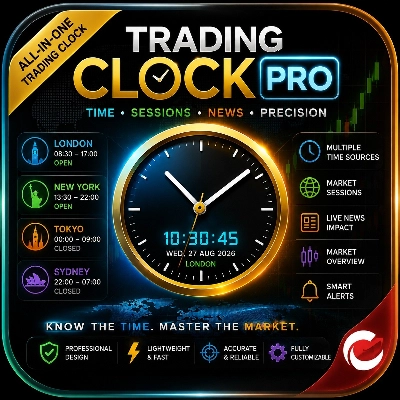
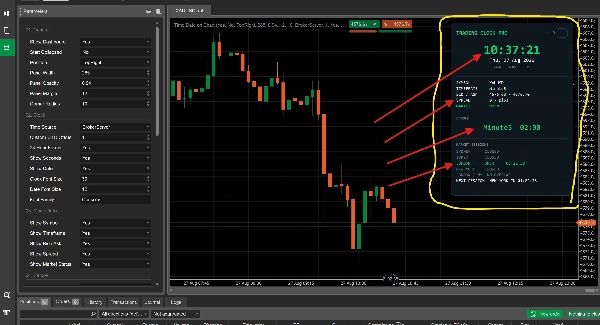
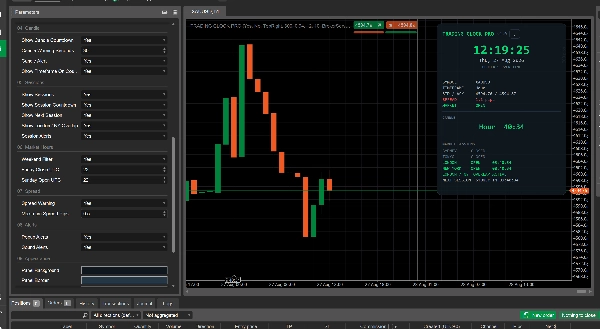
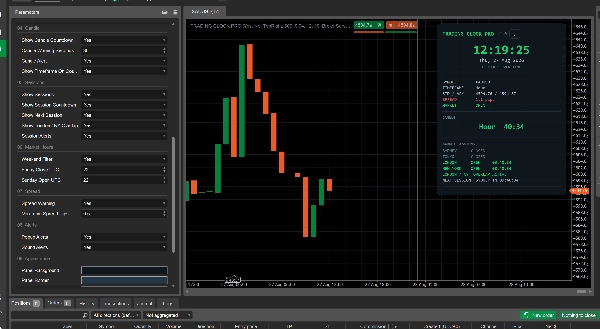
Trading Clock Pro คือแดชบอร์ดจับเวลาตลาดแบบครบวงจรที่ออกแบบมาเพื่อช่วยเทรดเดอร์เข้าใจ เมื่อไหร่ ตลาดมีความเคลื่อนไหวมากที่สุดและตัดสินใจได้อย่างเหมาะสมตามเวลา
มันแสดง:
- 🕐 นาฬิกาเรียลไทม์ พร้อมแหล่งเวลาหลายแหล่ง รวมถึงโบรกเกอร์, UTC, ลอนดอน, นิวยอร์ก, โตเกียว และซิดนีย์
- 🌍 ช่วงเวลาการเทรดฟอเร็กซ์ — ซิดนีย์, โตเกียว, ลอนดอน และนิวยอร์ก — พร้อมสถานะเปิด/ปิดและการนับถอยหลัง
- 🔥 ช่วงเวลาทับซ้อนลอนดอน/นิวยอร์ก ช่วยให้เทรดเดอร์ระบุช่วงเวลาที่ตลาดอาจมีความเคลื่อนไหวเพิ่มขึ้น
- 📊 ข้อมูลตลาด รวมถึงสัญลักษณ์, กรอบเวลา, ราคาซื้อ/ขาย, สเปรด และสถานะเปิดตลาด
- ⏱️ การนับถอยหลังแท่งเทียน แสดงเวลาที่เหลือก่อนแท่งเทียนปัจจุบันจะปิด
- 🔔 การแจ้งเตือนอัจฉริยะ สำหรับการเปิดช่วงเวลา, การปิดแท่งเทียน และสเปรดที่สูงผิดปกติ
- 📅 การรับรู้วันหยุดสุดสัปดาห์/ชั่วโมงตลาด เพื่อให้เทรดเดอร์เห็นได้อย่างรวดเร็วว่าตลาดฟอเร็กซ์เปิดอยู่หรือไม่
แทนที่จะต้องเดาเวลาตลาด เทรดเดอร์สามารถเห็นได้ทันทีว่า ช่วงเวลาหลักใดกำลังเปิดอยู่ ลอนดอนและนิวยอร์กทับซ้อนกันหรือไม่ เมื่อช่วงเวลาถัดไปเริ่มต้น และเมื่อแท่งเทียนกำลังจะปิด สิ่งนี้ช่วยให้เทรดเดอร์โฟกัสการวิเคราะห์ในช่วงเวลาที่พวกเขาถือว่าสำคัญที่สุดสำหรับกลยุทธ์ของตน
Trading Clock Pro เป็นแดชบอร์ดจับเวลาตลาดและข้อมูลการเทรดระดับมืออาชีพสำหรับ cTrader ออกแบบมาเพื่อให้เทรดเดอร์เห็นภาพชัดเจนของ เวลาตลาด, ช่วงเวลาฟอเร็กซ์หลัก, เวลาของแท่งเทียน, สภาพสเปรด และสถานะตลาดพื้นฐาน ได้โดยตรงบนกราฟ
แทนที่จะสร้างสัญญาณซื้อ/ขาย ตัวชี้วัดนี้ช่วยให้เทรดเดอร์เข้าใจ เมื่อไหร่ที่ตลาดมีความเคลื่อนไหวและสภาพการเทรดปัจจุบันเป็นอย่างไร ทำให้พวกเขาสามารถใช้กลยุทธ์ของตนเองได้อย่างเหมาะสมตามเวลา
สิ่งที่ตัวชี้วัดวิเคราะห์
Trading Clock Pro ตรวจสอบและแสดงสภาพตลาดเรียลไทม์หลายอย่าง:
- เวลาตลาดปัจจุบัน โดยใช้แหล่งเวลาที่เลือก
- ช่วงเวลาการเทรดฟอเร็กซ์: ซิดนีย์, โตเกียว, ลอนดอน และนิวยอร์ก
- สถานะทับซ้อนลอนดอน/นิวยอร์ก
- ระยะเวลาแท่งเทียนปัจจุบันและเวลาที่เหลือ ก่อนแท่งเทียนปิด
- ราคาซื้อและขาย สำหรับสัญลักษณ์ที่ใช้งานอยู่
- สเปรดปัจจุบันในหน่วยพิปส์
- สถานะเปิด/ปิดตลาดฟอเร็กซ์ รวมถึงสภาพวันหยุดสุดสัปดาห์
- ช่วงเวลาการเทรดถัดไป และการนับถอยหลัง
- การเปิดช่วงเวลา, การปิดแท่งเทียน และสภาพสเปรดสูงยังสามารถกระตุ้นการแจ้งเตือนได้เมื่อเปิดใช้งาน
วิธีการตีความแดชบอร์ด
แดชบอร์ดให้ภาพรวมที่รวดเร็วโดยไม่ต้องให้เทรดเดอร์ตีความการคำนวณที่ซับซ้อน
ช่วงเวลาตลาด
แต่ละช่วงเวลาจะแสดงเป็น เปิด หรือ ปิด
เมื่อช่วงเวลาเปิดอยู่ แดชบอร์ดยังสามารถแสดงเวลาที่เหลือได้ ตัวชี้วัด ทับซ้อนลอนดอน / นิวยอร์ก เน้นเมื่อทั้งลอนดอนและนิวยอร์กเปิดพร้อมกัน
การแสดงผล ช่วงเวลาถัดไป แสดงช่วงเวลาที่จะมาและมีการนับถอยหลัง
การนับถอยหลังแท่งเทียน
ส่วนแท่งเทียนแสดงกรอบเวลาปัจจุบันและเวลาที่เหลือก่อนแท่งเทียนปัจจุบันจะปิด
ตัวอย่างเช่น:
M15 — 04:32
หมายถึงเวลาประมาณสี่นาทีสามสิบสองวินาทียังคงเหลือในแท่งเทียน 15 นาทีปัจจุบัน
เมื่อแท่งเทียนใกล้ปิด การนับถอยหลังอาจเปลี่ยนเป็นสถานะเตือนตามช่วงเวลาการเตือนที่ตั้งไว้
ข้อมูลตลาด
ส่วนข้อมูลตลาดแสดง:
- สัญลักษณ์
- กรอบเวลา
- ราคาซื้อ / ขาย
- สเปรด
- สถานะตลาด
การแสดงสเปรดสามารถให้การเตือนเมื่อสเปรดปัจจุบันถึงหรือเกินเกณฑ์สูงสุดที่ตั้งไว้
การแจ้งเตือน
เมื่อเปิดใช้งาน ตัวชี้วัดสามารถแจ้งเตือนเทรดเดอร์เมื่อ:
- ช่วงเวลาการเทรดหลักเปิด
- แท่งเทียนใกล้ปิด
- สเปรดถึงระดับเตือนที่ตั้งไว้
การแจ้งเตือนแบบป๊อปอัพและเสียงสามารถเปิดหรือปิดแยกกันได้
การตั้งค่าและพารามิเตอร์หลัก
Trading Clock Pro มีการปรับแต่งอย่างกว้างขวางผ่านพารามิเตอร์ของ cTrader
ทั่วไป
ควบคุม:
- การมองเห็น
- สถานะเริ่มต้นย่อ/ขยาย
- ตำแหน่งบนกราฟ
- ความกว้าง
- ความทึบแสง
- ระยะขอบ
- รัศมีมุม
นาฬิกา
อนุญาตให้เทรดเดอร์เลือกเวลาที่แสดงบนแดชบอร์ด:
- เซิร์ฟเวอร์โบรกเกอร์
- UTC
- คอมพิวเตอร์ท้องถิ่น
- ลากอส
- ลอนดอน
- นิวยอร์ก
- โตเกียว
- ซิดนีย์
- ออฟเซ็ต UTC แบบกำหนดเอง
ตัวเลือกเพิ่มเติมควบคุมรูปแบบ 24 ชั่วโมง/12 ชั่วโมง, วินาที, การแสดงวันที่ และขนาดฟอนต์นาฬิกา
ข้อมูลตลาด
การแสดงผลแต่ละรายการสามารถเปิดหรือปิดได้สำหรับ:
- สัญลักษณ์
- กรอบเวลา
- ราคาซื้อ / ขาย
- สเปรด
- สถานะตลาด
แท่งเทียน
ควบคุม:
- การนับถอยหลังแท่งเทียน
- เกณฑ์เตือนเป็นวินาที
- การแจ้งเตือนแท่งเทียน
- การแสดงกรอบเวลาบนการนับถอยหลัง
ช่วงเวลา
ควบคุม:
- การแสดงช่วงเวลา
- การนับถอยหลังช่วงเวลา
- การแสดงช่วงเวลาถัดไป
- ทับซ้อนลอนดอน/นิวยอร์ก
- การแจ้งเตือนเปิดช่วงเวลา
ชั่วโมงตลาด
รวมการกรองวันหยุดสุดสัปดาห์และตั้งเวลาปิดวันศุกร์และเปิดวันอาทิตย์ใน UTC ได้
สเปรด
เทรดเดอร์สามารถเปิดใช้งานการเตือนสเปรดและกำหนดเกณฑ์สเปรดสูงสุดที่ยอมรับได้ในหน่วยพิปส์
การแจ้งเตือน
การแจ้งเตือนแบบป๊อปอัพและเสียงสามารถเปิดหรือปิดได้
รูปลักษณ์
พื้นหลัง, ขอบ, สีหลัก, สีรอง, สีจาง, สีเปิด, สีปิด, สีเตือน และสีอันตรายของแดชบอร์ดสามารถปรับแต่งได้
กรณีการใช้งานทั่วไป
การเทรดตามช่วงเวลา
เทรดเดอร์ที่สร้างกลยุทธ์รอบลอนดอน, นิวยอร์ก หรือช่วงเวลาหลักอื่น ๆ สามารถใช้แดชบอร์ดเพื่อดูได้ทันทีว่าช่วงเวลาใดเปิดอยู่และเหลือเวลาอีกเท่าไร
ทับซ้อนลอนดอน/นิวยอร์ก
เทรดเดอร์ที่ชอบช่วงเวลาที่ช่วงเวลาหลักทับซ้อนกันสามารถใช้การแสดงผลทับซ้อนเฉพาะเพื่อระบุได้อย่างรวดเร็วว่าลอนดอนและนิวยอร์กเปิดพร้อมกันเมื่อใด
กลยุทธ์ตามแท่งเทียน
เทรดเดอร์ที่รอให้แท่งเทียนปิดก่อนยืนยันการตั้งค่ากลยุทธ์สามารถใช้การนับถอยหลังเพื่อติดตามเวลาที่เหลือของแท่งเทียนโดยไม่ต้องคำนวณเอง
การตรวจสอบสเปรด
ก่อนเข้าทำการเทรด เทรดเดอร์สามารถตรวจสอบสเปรดปัจจุบันและรับการเตือนเมื่อถึงเกณฑ์ที่ตั้งไว้
การเทรดหลายโซนเวลา
เทรดเดอร์ที่ทำงานกับศูนย์ตลาดต่าง ๆ สามารถเลือกแหล่งเวลาที่ต้องการแทนการแปลงเวลาระหว่างโซนเวลาด้วยตนเอง
การตรวจสอบกราฟทั่วไป
แดชบอร์ดสามารถทำหน้าที่เป็นศูนย์ข้อมูลการเทรดขนาดกะทัดรัด ช่วยให้เทรดเดอร์ติดตามเวลาที่สำคัญและข้อมูลตลาดโดยไม่ต้องเพิ่มตัวชี้วัดหลายตัวลงบนกราฟ
เหมาะสำหรับใคร?
Trading Clock Pro เหมาะสำหรับ:
- เทรดเดอร์ฟอเร็กซ์รายวัน
- สแคลเปอร์ที่ใส่ใจเวลาช่วงการเทรด
- เทรดเดอร์อินทราเดย์
- เทรดเดอร์ตามกลยุทธ์ช่วงเวลา
- เทรดเดอร์ที่ใช้การยืนยันการปิดแท่งเทียน
- เทรดเดอร์ที่ตรวจสอบสเปรดก่อนเข้าตำแหน่ง
- เทรดเดอร์ที่เทรดข้ามหลายโซนเวลา
- ผู้เริ่มต้นที่ต้องการภาพรวมเวลาตลาดอย่างง่าย
- เทรดเดอร์ที่มีประสบการณ์ที่ต้องการแดชบอร์ดขนาดกะทัดรัดข้างกราฟ
ไม่ต้องการความรู้เชิงลึกด้านการวิเคราะห์ทางเทคนิคขั้นสูงเพราะเน้นแสดง ข้อมูลเวลาตลาดและสภาพตลาด มากกว่าการให้เทรดเดอร์ตีความตัวชี้วัดทางคณิตศาสตร์ที่ซับซ้อน
ข้อจำกัดและหมายเหตุการใช้งานที่สำคัญ
Trading Clock Pro เป็น เครื่องมือข้อมูลตลาดและจับเวลา ไม่ใช่กลยุทธ์เทรดอัตโนมัติหรือเครื่องสร้างสัญญาณที่รับประกัน
มัน ไม่ กำหนดว่าเทรดเดอร์ควรซื้อหรือขาย และการแจ้งเตือนช่วงเวลาหรือแท่งเทียนไม่ควรถูกตีความว่าเป็นโอกาสเทรดที่รับประกัน
ประโยชน์ของตัวชี้วัดขึ้นอยู่กับกลยุทธ์ของเทรดเดอร์เอง สภาพตลาด และการบริหารความเสี่ยง
เวลาช่วงเวลาคำนวณโดยใช้โซนเวลาและกฎการปรับเวลาออมแสงที่ตั้งโปรแกรมไว้ เทรดเดอร์ควรตรวจสอบให้แน่ใจว่าการตั้งค่าที่เลือกสอดคล้องกับวิธีที่ต้องการตีความแต่ละช่วงเวลา
การเตือนสเปรดขึ้นอยู่กับความแตกต่างราคาซื้อ/ขายปัจจุบันและควรถูกมองว่าเป็นสภาพข้อมูล ไม่ใช่การทำนายพฤติกรรมตลาดในอนาคต
การนับถอยหลังแท่งเทียนขึ้นอยู่กับกรอบเวลาของกราฟและข้อมูลแท่งเทียนที่มีอยู่
Trading Clock Pro เหมาะที่สุดสำหรับใช้เป็นเครื่องมือสนับสนุนการตัดสินใจและการรับรู้ตลาดควบคู่กับกลยุทธ์เทรดที่ชัดเจน การบริหารความเสี่ยงที่เหมาะสม และการวิเคราะห์ตลาดอย่างอิสระ
สรุป
Key features include identification of the London/New York session overlap, candle countdown timers indicating time remaining before the current candle closes, and market information such as symbol, timeframe, bid/ask prices, spread, and market open status. The indicator supports smart alerts for session openings, candle closings, and high spreads, with customizable popup and sound notifications.
Traders can customize the dashboard’s appearance, position, and displayed elements. It also accounts for weekend market hours and allows configuration of spread warning thresholds. Trading Clock Pro is intended as a decision-support tool to enhance market awareness and timing, suitable for forex day traders, scalpers, intraday traders, and those using session-based or candle-close strategies. It does not provide buy/sell signals but helps users monitor market activity and conditions to apply their own trading strategies more effectively.