Deskripsi
Bias Struktur Heikin Ashi (Indikator cTrader)
Zona pasokan–permintaan otomatis dengan bias multi-timeframe.
Apa yang dilakukannya – dalam bahasa Inggris sederhana
Indikator ini secara otomatis:
- Membaca aksi harga Heikin Ashi dan mendeteksi pergeseran pivot yang berarti.
- Membangun zona support dan resistance dinamis di sekitar pivot tersebut, menggunakan baik ekstrem sumbu maupun badan candle (bukan hanya garis acak).
- Menggabungkan zona yang berdekatan secara cerdas sehingga Anda melihat level yang bersih dan dapat diperdagangkan, bukan hutan garis horizontal.
- Menghasilkan bias bullish atau bearish yang jelas kapan pun harga benar-benar menembus zona support atau resistance terbaru.
- Menunjukkan bias untuk:
-
- Timeframe grafik Anda, dan
- Timeframe lebih tinggi opsional (default H2) — tanpa menggambar kekacauan HTF di grafik Anda.
Hasil: dengan sekali lihat Anda tahu di mana level sebenarnya dan apakah pasar saat ini condong ke atas atau ke bawah.
Masalah yang diselesaikannya
Kebanyakan trader memiliki masalah yang sama:
- Garis support/resistance yang digambar manual adalah:
-
- subjektif,
- tidak konsisten,
- dan sering berlebihan.
- Indikator sederhana “zigzag + garis horizontal”:
-
- tidak menangani lebar zona dengan benar,
- menumpuk level di atas satu sama lain,
- atau memperluas zona sampai menutupi setengah grafik.
- Bias sering “ada di kepala Anda” – bukan sesuatu yang bisa Anda lihat jelas atau gunakan secara aturan.
Indikator ini dibuat untuk:
- Mengubah struktur Heikin Ashi menjadi zona yang jelas dan objektif,
- Memberi Anda trend/bias berbasis aturan berdasarkan zona tersebut,
- Sambil menjaga grafik bersih dan mudah dibaca.
Bagaimana zona dibangun (penjelasan ramah trader)
Untuk setiap pivot Heikin Ashi, indikator melihat struktur 3 candle:
- Ketika HA berbalik dari merah ke hijau, itu menandai pivot support.
- Ketika HA berbalik dari hijau ke merah, itu menandai pivot resistance.
Kemudian membangun zona:
Zona support
- Menemukan sumbu terendah di antara 3 candle (ekstrem sejati).
- Menemukan low terendah berikutnya yang masih lebih tinggi dari ekstrem itu.
- Menggunakan badan candle (open/close) dekat low dalam itu untuk mendefinisikan sisi “dapat diperdagangkan” dari zona.
- Zona support akhir:
-
- Bawah = sumbu low ekstrem,
- Atas = level dalam berbasis badan.
Zona resistance
- Menemukan sumbu tertinggi di antara 3 candle.
- Menemukan high tertinggi berikutnya yang masih lebih rendah dari ekstrem itu.
- Menggunakan badan dekat high dalam itu.
- Zona resistance akhir:
-
- Atas = sumbu high ekstrem,
- Bawah = level dalam berbasis badan.
Jadi setiap zona bukan hanya pita sembarangan:
Ini adalah rentang sumbu-ke-badan yang mewakili di mana harga benar-benar ditolak atau berbalik.
Logika penggabungan (mengapa grafik tetap bersih)
Zona dengan tipe yang sama (support dengan support, resistance dengan resistance):
- Diperlakukan sebagai unit pada garis waktu.
- Hanya bisa bergabung jika benar-benar tumpang tindih dalam harga.
- Penggabungan bersifat lokal:
-
- Zona baru dapat bergabung dengan:
-
- zona terbaru (berdampingan), atau
- zona kedua terbaru (+1 celah), dan
- Satu penggabungan “jangkar” tambahan di belakang itu jika zona gabungan baru sekarang tumpang tindih dengan struktur sebelumnya.
Ini menjaga perilaku tetap intuitif:
- Zona tidak “menelan” seluruh sejarah.
- Level lama dihormati tapi tidak diizinkan membuat mega-zona raksasa.
- Struktur lokal seperti A–B–C atau A–C+D ditangani dengan cara yang terkendali.
Logika bias (bagaimana Anda benar-benar berdagang dengannya)
Untuk setiap timeframe (utama dan HTF):
- Indikator melacak zona support gabungan terbaru dan zona resistance gabungan terbaru.
- Kemudian, pada setiap candle yang tertutup:
-
- Jika harga menutup di atas zona resistance terbaru → bias menjadi Bullish.
- Jika harga menutup di bawah zona support terbaru → bias menjadi Bearish.
Indikator menyimpan:
- Waktu terakhir bias berubah,
- Level harga saat harga menembus zona.
Di grafik, panel teks kecil menunjukkan:
Bias Utama (H1): BullishPerubahan Utama (H1): 11/26 15:00 @1.08750
Jika HTF diaktifkan, Anda juga akan melihat sesuatu seperti:
Bias HTF (H2): BearishPerubahan HTF (H2): 11/25 08:00 @1.09200
Anda juga dapat mengaktifkan peringatan suara saat bias timeframe utama berubah.
Apa yang Anda lihat di grafik
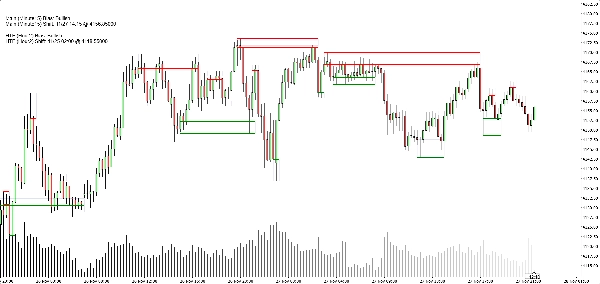
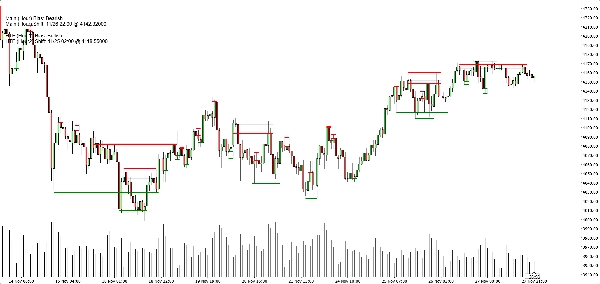
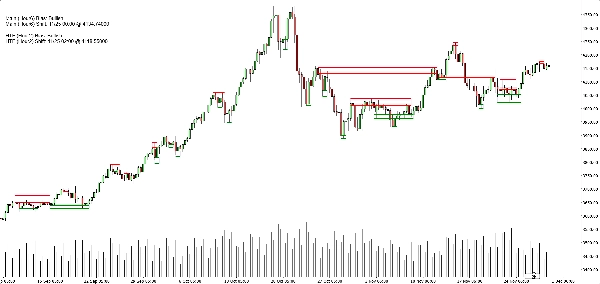
- Zona support:
-
- Garis dasar/trigger horizontal hijau (opsional),
- Sebuah persegi panjang navy lembut (opasitas sangat rendah) yang menunjukkan pita support penuh.
- Zona resistance:
-
- Garis merah + persegi panjang navy lembut untuk pita.
- Tombol tampilan bersih:
-
- Tampilkan/sembunyikan zona support,
- Tampilkan/sembunyikan zona resistance,
- Nyalakan/matikan persegi panjang terisi,
- Nyalakan/matikan garis dasar/trigger,
- Nyalakan/matikan panel bias.
Ini memungkinkan trader berbeda memilih antara:
- Tampilan yang lebih minimalis (mungkin hanya persegi panjang), atau
- Tampilan yang lebih presisi (garis tepat terlihat).
Kasus penggunaan tipikal
Anda dapat memposisikannya berguna untuk:
- Penyaringan tren
-
- Hanya cari beli ketika kedua bias TF utama dan HTF adalah Bullish.
- Hanya cari jual ketika keduanya Bearish.
- Entri zona
-
- Gunakan zona sebagai area minat untuk:
-
- Limit order,
- Entri konfirmasi (misalnya harga kembali ke zona yang telah ditembus dan ditolak lagi),
- Penempatan stop tepat di luar pita luar.
- Analisis top-down
-
- Bias HTF (H2 secara default) sebagai gambaran besar,
- Bias TF grafik untuk timing,
- Zona untuk level eksekusi konkret.
Apa yang BUKAN (penting untuk penjualan jujur)
- Ini bukan robot yang berdagang otomatis untuk Anda.
- Ini bukan sinyal “holy grail” yang menjamin keuntungan.
- Ini adalah mesin struktur dan bias:
-
- Mendefinisikan zona secara objektif,
- Mendefinisikan trend/bias secara objektif berdasarkan zona tersebut,
- Meninggalkan manajemen perdagangan aktual kepada trader/strategi.
Ringkasan
It provides a rule-based bullish or bearish bias by tracking price breaks above resistance or below support zones on both the current chart timeframe and an optional higher timeframe. This bias is displayed on a built-in dashboard panel, with optional sound alerts for bias changes.
The indicator works across all timeframes and markets where price forms swings, including forex, crypto, stocks, and futures. It features customizable lookback periods, automatic cleanup of old zones, and toggles for display elements to suit different trader preferences.
Typical uses include trend filtering by aligning biases across timeframes, identifying zone entries for limit or confirmation orders, and supporting top-down analysis. The tool timestamps and sequences pivots and bias shifts, facilitating automation or journaling. It is a structure and bias engine that aids traders in objectively defining market levels and trends while maintaining chart clarity.
Ulasan pelanggan
5 | 33 % | |
4 | 67 % | |
3 | 0 % | |
2 | 0 % | |
1 | 0 % |