![Trading product for [Fx4U]Risk & Reward Trading Tool Pro cBot Forex Signal, image 1](https://cdn.ctrader.com/image/webp/e26324ec-9547-4365-a38e-ccd0e7c4d86f_31374)
![Trading product for [Fx4U]Risk & Reward Trading Tool Pro cBot Forex Signal, image 2](https://cdn.ctrader.com/image/webp/b39abd48-eefe-40d1-b5fc-2e6386f54a71_31375)
![Trading product for [Fx4U]Risk & Reward Trading Tool Pro cBot Forex Signal, image 3](https://cdn.ctrader.com/image/webp/67aa0c0c-8c57-48a7-9162-ad929ad7a475_31376)
![Trading product for [Fx4U]Risk & Reward Trading Tool Pro cBot Forex Signal, image 4](https://cdn.ctrader.com/image/webp/e3992ca9-7ae3-4710-9ddd-d3b38a430fc6_31377)
![Trading product for [Fx4U]Risk & Reward Trading Tool Pro cBot Forex Signal, image 5](https://cdn.ctrader.com/image/webp/3708b80a-d8a6-4ed1-aa3e-621594a534d9_31378)
![Trading product for [Fx4U]Risk & Reward Trading Tool Pro cBot Forex Signal, image 6](https://cdn.ctrader.com/image/webp/02d28981-4163-48c7-8fdb-f47c6e94e0d6_31379)
Mô tả
Phiên bản mới nhất được cập nhật tại liên kết dưới đây:
https://ctrader.com/products/2100 (cbot)
https://ctrader.com/products/2101 (indicator)
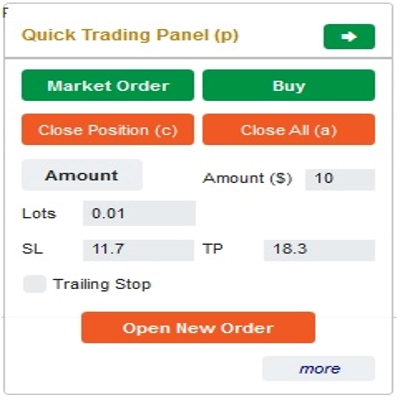
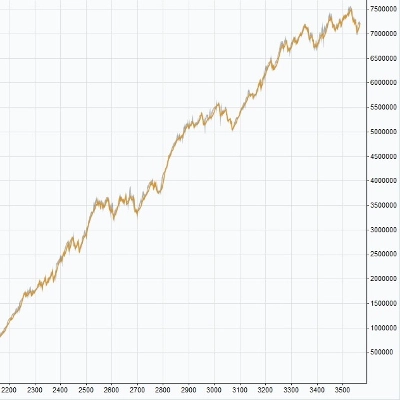
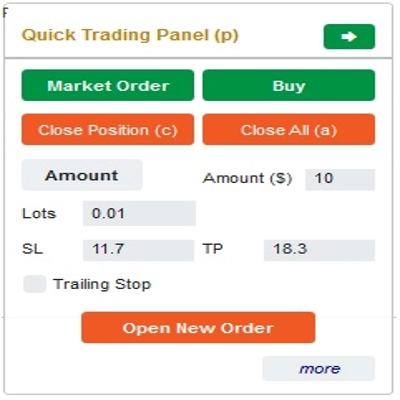
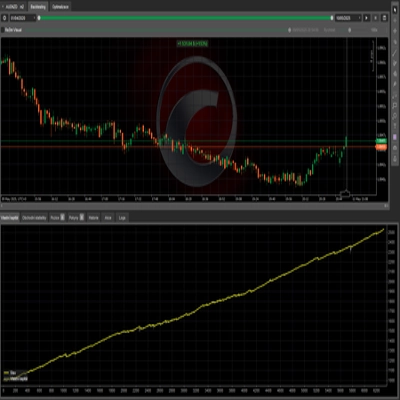
Đây là một công cụ giúp các nhà giao dịch mở/đóng lệnh/sửa đổi lệnh nhanh chóng chỉ với một cú nhấp chuột. Công cụ này đã tính toán số lượng Lots dựa trên mức độ rủi ro cho mỗi lệnh và StopLoss bạn chọn. Nó có thể hoạt động cả ở chế độ Thực tế cho giao dịch trực tiếp cũng như ở chế độ Backtesting để kiểm tra các chiến lược của bạn.
Lưu ý quan trọng:
- "Nút màu xanh" là các nút thay đổi trạng thái (Lệnh Thị trường => Lệnh Giới hạn => Lệnh Dừng => Lệnh Thị trường; Mua => Bán => Mua)
- "Nút màu đỏ" là các nút "Thực thi". => Để mở lệnh - sử dụng nút "Mở Lệnh Mới"; để đóng vị thế - sử dụng nút "Đóng Vị Thế" hoặc nút "Đóng Tất Cả"; để Hủy Lệnh Đang Chờ - sử dụng nút "Hủy Lệnh" hoặc nút "Đóng Tất Cả".
Trong “Bảng Giao Dịch Nhanh”:
Để chuyển đổi giữa lệnh MUA và BÁN, bạn có thể kéo đường StopLoss trên biểu đồ lên hoặc xuống so với Đường Vào Lệnh.
– Bạn có thể mở và đóng cả lệnh thị trường và lệnh Giới hạn hoặc lệnh Dừng.
– Bạn có thể điều chỉnh số lượng lệnh theo %Số dư hoặc số lượng lệnh cố định cho mỗi lệnh. Dựa trên số lượng này và StopLoss bạn chọn, bot sẽ tự động tính toán số lượng Lots để mở lệnh.
– Bạn có thể chỉnh sửa StopLoss, TakeProfit hoặc Giá Vào Lệnh (cho các lệnh đang chờ) bằng cách thay đổi số SL, TP hoặc Range trong “Bảng Giao Dịch Nhanh” hoặc kéo các đường ngang trên biểu đồ.
– SL, TP và Range (cho các lệnh đang chờ) được tính bằng Pips, trong khi Expiry (phút) được tính bằng Phút (Nếu bạn không sử dụng Expiry, để trống hoặc nhập 0)
Trong “Bảng Sửa Đổi Nhanh”:
– Trong Bảng này bạn có thể đóng các lệnh hoặc chỉnh sửa các tham số lệnh như StopLoss (theo Giá), TakeProfit (theo Giá), TrailingStop hoặc Range (theo Pips) và Expiry (theo Phút)
(Lưu ý rằng StopLoss và TakeProfit trong bảng này là giá bạn dự định di chuyển đến)
– Trong Bảng này bạn cũng có thể thay đổi StopLoss, TakeProfit hoặc Range (theo Pips) bằng số trong bảng hoặc kéo đường ngang trên biểu đồ đến vị trí mong muốn.
– Bạn có thể chuyển đổi qua lại giữa các lệnh để hiển thị các tham số của các lệnh đó trên Bảng
Lưu ý: Số trong hình chữ nhật màu vàng là số ID của lệnh đang được chọn để chỉnh sửa
Chúc bạn giao dịch thành công!
Tóm tắt
The interface includes a Quick Trading Panel where users can toggle between buy and sell orders by adjusting the stop loss line on the chart. Users can specify order amounts as a percentage of their balance or as fixed values. StopLoss, TakeProfit, and entry prices for pending orders can be edited either numerically or by dragging lines on the chart. Parameters such as SL, TP, and range are measured in pips, while expiry times are set in minutes.
A Quick Modifying Panel allows users to close orders or adjust order parameters including StopLoss, TakeProfit, TrailingStop, range, and expiry. Changes can be made by entering values or dragging chart lines. The panel also enables switching between orders to view and edit their details.
This tool operates in both real-time trading and backtesting modes, supporting multiple forex symbols including EURUSD, GBPUSD, USDJPY, and XAUUSD (gold). It is intended to streamline risk and reward management in forex trading environments.
Thảo luận
Đánh giá của khách hàng
5 | 33 % | |
4 | 33 % | |
3 | 33 % | |
2 | 0 % | |
1 | 0 % |
![Logo "[Fx4U] GBPUSD - Price Action"](https://cdn.ctrader.com/image/webp/d80b34fc-da3c-4f01-a321-456450665649_26190)
![Logo "[Fx4U] CADJPY - Price Action"](https://cdn.ctrader.com/image/webp/1ba81247-b6b7-4f3c-a297-fa3eb1d57fe1_26195)

![Logo "[Fx4U] AUDCHF - Price Action"](https://cdn.ctrader.com/image/webp/0a22e9aa-c83b-42cd-b0b8-c1a2da593207_26148)

![Logo "[Fx4U] EURAUD - Price Action"](https://cdn.ctrader.com/image/webp/baf8dde4-1ef3-4beb-8ae2-0fed8320f65d_26177)