

Dem
Chỉ báo
2 lượt mua
Phiên bản 2.0, Apr 2026
Windows, Mac
4.2
Đánh giá: 4


Kể từ 14/03/2025
25
Lượt bán
Mô tả
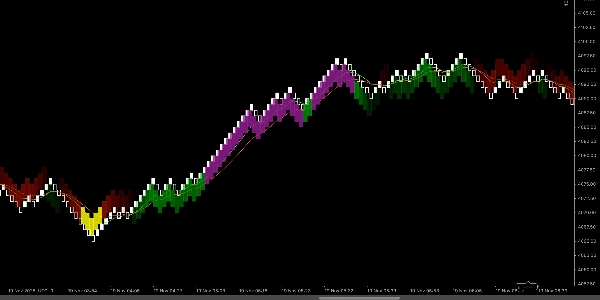
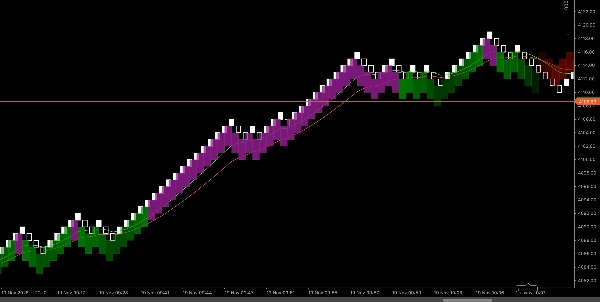
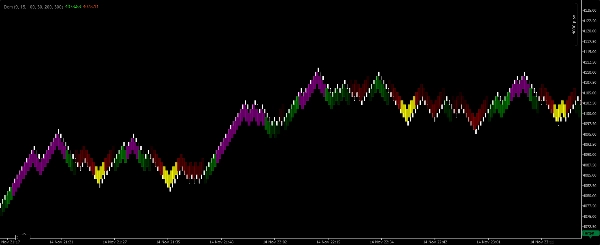
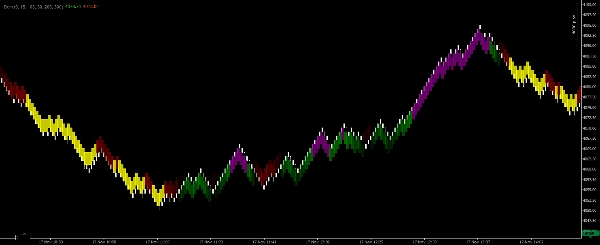
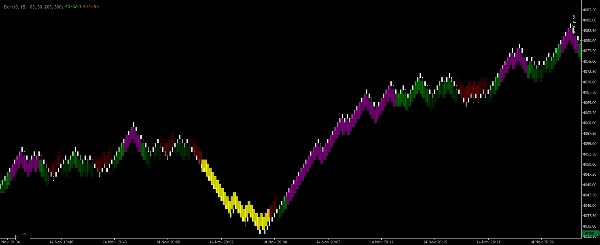
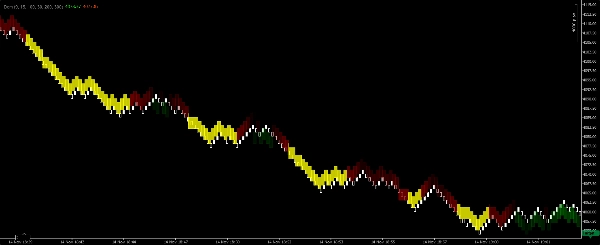
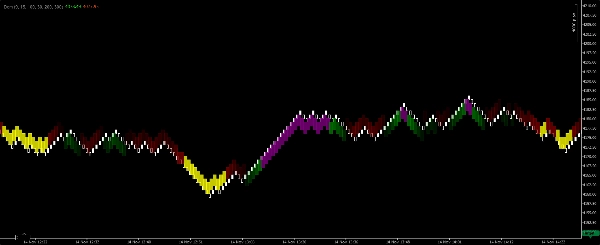
Vùng Renko EMA-Scalper là một chỉ báo scalper trực quan nhẹ được xây dựng riêng cho biểu đồ Renko 100-pip trên nền tảng cTrader. Nó sử dụng hai Đường Trung Bình Động Lũy Thừa (EMA) để xác định hướng xu hướng ngắn hạn và làm nổi bật các vùng giao dịch sạch, có thể giao dịch được. Chỉ báo vẽ các hình chữ nhật tô màu trên biểu đồ với bốn màu sắc để các scalper có thể ngay lập tức đọc được xu hướng thị trường và phát hiện các điểm vào lệnh có xác suất cao hơn mà không cần phải tính toán thủ công.
Ý nghĩa của từng màu
- Hình chữ nhật màu xanh lá cây — Xu hướng tăng được xác nhận. EMA nhanh nằm trên EMA chậm và các EMA hướng lên trên. Dùng cho các lệnh mua ngắn hạn theo xu hướng.
- Hình chữ nhật màu tím — Vùng vào lệnh mua trong bối cảnh xu hướng tăng. Chỉ ra sự điều chỉnh ngắn hạn hoặc tích lũy trong xu hướng tăng đang hoạt động có thể cung cấp cơ hội vào lệnh scalping.
- Hình chữ nhật màu đỏ — Xu hướng giảm được xác nhận. EMA nhanh nằm dưới EMA chậm và các EMA hướng xuống dưới. Dùng cho các lệnh bán ngắn hạn theo xu hướng.
- Hình chữ nhật màu vàng — Vùng vào lệnh bán trong bối cảnh xu hướng giảm. Chỉ ra sự điều chỉnh ngắn hạn hoặc tích lũy trong xu hướng giảm đang hoạt động có thể cung cấp cơ hội vào lệnh scalping.
Cách hoạt động (tóm tắt logic)
- Chỉ báo tính toán hai EMA (Nhanh và Chậm) trên biểu đồ Renko 100-pip và đánh giá sự căn chỉnh tương đối và độ dốc của chúng để xác định hướng xu hướng.
- Khi các EMA cho thấy sự căn chỉnh và động lực tăng rõ ràng, chỉ báo sẽ vẽ một hình chữ nhật màu xanh lá cây bao phủ vùng xu hướng. Nếu xuất hiện sự tích lũy hoặc điều chỉnh ngắn hạn trong vùng tăng đó, chỉ báo sẽ vẽ một hình chữ nhật màu tím để đánh dấu cơ hội vào lệnh mua.
- Logic tương tự áp dụng ngược lại cho điều kiện giảm, tạo ra các hình chữ nhật màu đỏ (xu hướng) và màu vàng (vào lệnh).
- Các hình chữ nhật được vẽ dưới dạng các vùng (không phải thanh đơn lẻ) để các scalper có thể đánh giá trực quan nơi nên vào và thoát lệnh nhanh chóng.
Cài đặt đề xuất (mặc định cho scalper)
- Loại biểu đồ: Renko
- Kích thước viên gạch Renko: 100 pips (chỉ báo được thiết kế cho kích thước viên gạch này).
- Độ nhạy / phát hiện — một tham số có thể điều chỉnh kiểm soát mức độ nghiêm ngặt mà chỉ báo yêu cầu sự căn chỉnh EMA trước khi vẽ các hình chữ nhật xu hướng (thấp hơn = nhiều tín hiệu hơn; cao hơn = ít tín hiệu hơn nhưng mạnh hơn).
- Độ mờ của hình chữ nhật — điều chỉnh để rõ ràng trực quan trên các thanh giá.
- Bộ lọc phiên — khuyến nghị giới hạn trong các giờ có thanh khoản cao để scalping.
- Chiều rộng vùng tối đa (số thanh) — giới hạn tùy chọn để tránh các vùng bị kéo dài quá mức.
Hướng dẫn sử dụng & quy tắc scalper
- Xem các hình chữ nhật màu xanh lá cây/màu đỏ như xác nhận xu hướng. Ưu tiên giao dịch theo hướng của vùng xu hướng có màu và tránh các lệnh scalping ngược xu hướng khi một hình chữ nhật xu hướng chiếm ưu thế.
- Sử dụng các hình chữ nhật màu tím/màu vàng như cửa sổ vào lệnh scalping trong xu hướng đã được xác nhận — tìm tín hiệu kích hoạt cấu trúc vi mô nhanh (ví dụ: thanh động lượng, phá vỡ một vùng tích lũy nhỏ) trước khi vào lệnh.
- Mục tiêu nên chặt chẽ và thực tế cho scalping (bội số nhỏ của điểm dừng của bạn). Sử dụng mục tiêu pip cố định hoặc xác nhận theo số thanh tùy thuộc vào hồ sơ rủi ro của bạn.
- Đặt điểm dừng ngoài mức thấp/cao cấu trúc vi mô gần nhất hoặc ngoài vùng vào lệnh; scalping yêu cầu kỷ luật với các khoản lỗ nhỏ.
- Kết hợp với xác nhận khối lượng/hành động giá (nếu có) và chỉ giao dịch trong các phiên hoạt động.
- Kiểm tra lại bằng mắt trên các công cụ của bạn — Renko 100-pip ưu tiên các cặp và công cụ biến động, nơi các viên gạch 100-pip tạo ra cấu trúc giá hữu ích cho scalping.
Tóm tắt
Tóm tắt AI
Renko EMA-Scalper Zones is a scalping indicator designed for use on Renko charts with 100-pip brick size within the cTrader platform. It employs two Exponential Moving Averages (EMAs)—a fast and a slow EMA—to determine short-term trend direction and identify tradeable zones. The indicator visually represents market conditions by drawing colored rectangles on the chart: green for confirmed bullish trends, purple for buy-entry zones during bullish pullbacks, red for confirmed bearish trends, and yellow for sell-entry zones during bearish pullbacks. These rectangles span zones rather than single bars, allowing traders to quickly assess trend bias and potential entry points. Users can adjust sensitivity to control signal frequency, rectangle opacity for clarity, and apply session filters to focus on high-liquidity trading hours. The indicator is intended to support scalping strategies by highlighting trend confirmations and entry windows, recommending tight targets and disciplined stop placements based on recent price structure. It is suitable for volatile instruments such as Forex pairs (e.g., BTCUSD), commodities (e.g., XAUUSD), and cryptocurrencies. The tool facilitates visual, momentum-based scalping decisions without manual calculation, emphasizing trend-following entries within clearly defined zones.
Hồ sơ chỉ báo
Thảo luận
Đánh giá của khách hàng
4.2
Đánh giá: 4
5 | 50 % | |
4 | 25 % | |
3 | 25 % | |
2 | 0 % | |
1 | 0 % |
Đánh giá của khách hàng
November 25, 2025
A decent setup here should survive 50 quick trades without looking messy. A few sessions of data make the result easier to trust. The useful comparison is hit rate versus average R.
November 18, 2025
The product feels more useful when the plan is already written down. A 13 setup run on daily close keeps the review grounded.
November 18, 2025
This feels useful when you already has a plan. The main value is short term execution, not chasing every signal that appears. Early sizing should stay modest until the journal looks stable.
November 18, 2025
Useful tool, but not for lazy entries. It supports short term execution and feels more useful if the trader stays selective.
Câu hỏi thường gặp
BTCUSD
Forex
Signal
Scalping
Commodities
Crypto
XAUUSD
Các sản phẩm có sẵn trên cTrader Store, bao gồm bot giao dịch, chỉ báo và plugin, được cung cấp bởi các nhà phát triển bên thứ ba và chỉ nhằm mục đích cung cấp thông tin và tiếp cận kỹ thuật. cTrader Store không phải là nhà môi giới và không cung cấp lời khuyên đầu tư, khuyến nghị cá nhân hay bất kỳ đảm bảo nào về hiệu suất trong tương lai.
Sản phẩm khác của tác giả này











Giá
Kể từ 14/03/2025
25
Lượt bán