
AlgoVisionCraft V2.1 (AVC)
cBot
版本 1.0, Jan 2025
Windows 版、Mac 版, Mobile, Web
5.0
评价:3
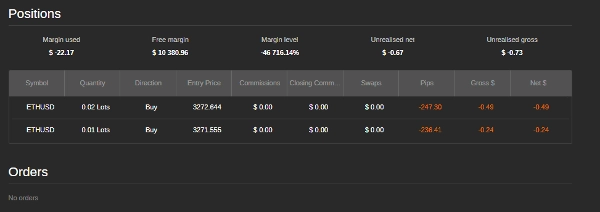
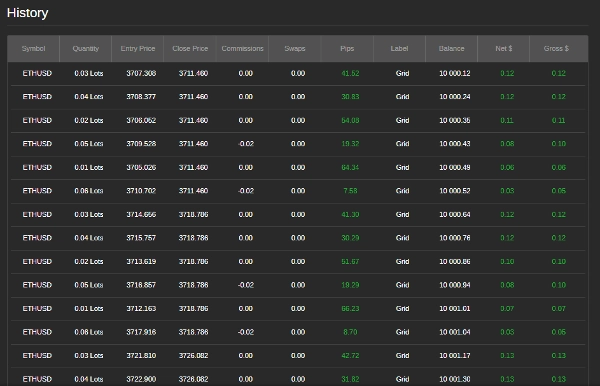
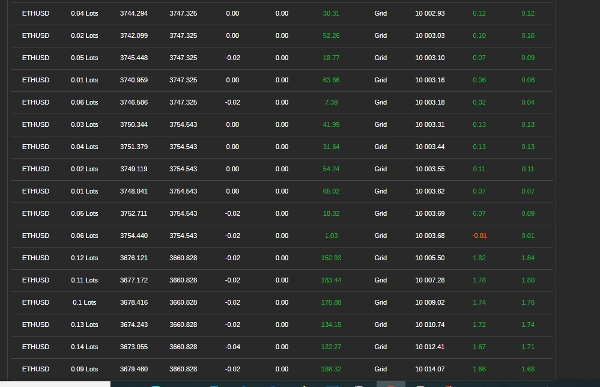
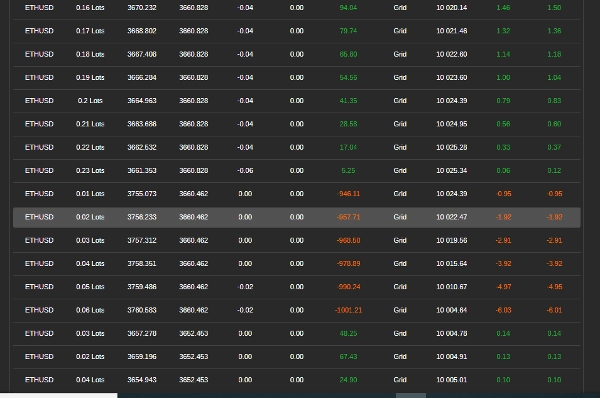

注册日期 27/01/2025
1
销售
4
免费安装
说明
如何使用带有RSI的网格交易机器人
该机器人使用相对强弱指数(RSI)自动执行网格交易,以指导交易的进出。它根据预定义规则管理仓位,以最大化利润同时控制风险。请按照以下步骤有效设置、配置和使用该机器人。
步骤1:设置机器人
- 将机器人添加到您的交易平台
-
- 打开您的交易平台(例如,cTrader)。
- 进入“机器人”部分,将机器人添加到您的图表中。
- 将机器人附加到交易对
-
- 选择您希望机器人交易的货币对(例如,EUR/USD,GBP/USD)。
- 确保您的账户有足够资金
-
- 确保您的账户余额充足以支持交易,因为网格交易涉及多个持仓。
步骤2:配置机器人设置
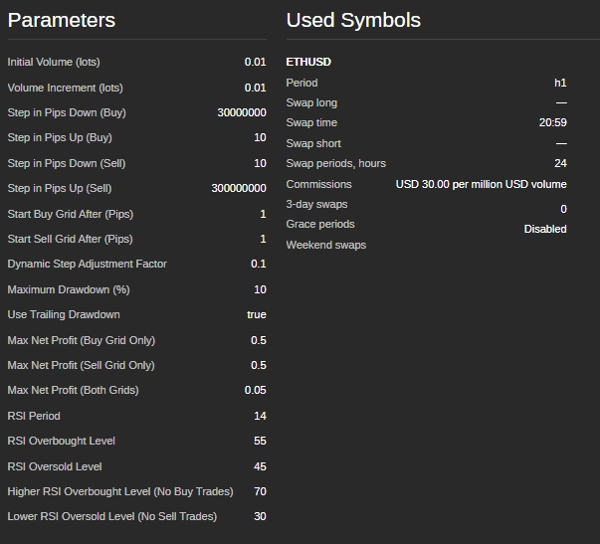
该机器人允许根据市场状况和风险承受能力进行自定义。以下是您可以调整的主要参数:
交易量设置
- 初始交易规模(手数) – 网格中第一笔交易的规模。
- 交易量递增(手数) – 每个持仓后交易规模的增加量。
网格级别(交易间距)
- 买入步长(点数) – 连续买单之间的距离。
- 卖出步长(点数) – 连续卖单之间的距离。
- 开始买入网格(点数) – 买入交易开始前所需的价格变动。
- 开始卖出网格(点数) – 卖出交易开始前所需的价格变动。
基于RSI的交易条件
- RSI周期 – 用于计算RSI的蜡烛数量。
- 超买水平 – 如果RSI超过此水平,市场被视为超买(潜在卖出区)。
- 超卖水平 – 如果RSI低于此水平,市场被视为超卖(潜在买入区)。
- 无买入区RSI水平 – 如果RSI过高,机器人避免买入。
- 无卖出区RSI水平 – 如果RSI过低,机器人避免卖出。
风险管理功能
- 最大回撤(%) – 机器人停止交易前允许的最大亏损。
- 跟踪回撤 – 随账户权益增长动态调整最大回撤限制。
- 每个网格的利润目标 – 当总利润达到此值时,机器人关闭该网格中的所有交易。
步骤3:运行机器人
- 仔细检查设置
-
- 确保所有参数均根据您的风险管理策略设置。
- 启动机器人
-
- 点击平台中的“开始”按钮。
- 机器人将开始自动分析市场并执行交易。
步骤4:监控和管理交易
- 检查交易日志
-
- 机器人在平台的日志窗口提供其实时操作更新。
- 监控账户回撤
-
- 跟踪您的账户余额,确保亏损不超过可接受的限度。
- 审查盈亏情况
-
- 当达到利润目标时,机器人会自动平仓。
步骤5:停止机器人
- 手动停止
-
- 如果您希望停止交易,点击“停止”按钮。
- 自动停止
-
- 当达到最大回撤或账户余额过低无法开新仓时,机器人会自动停止。
最佳性能提示
- 先在模拟账户测试 – 在使用真钱前,先测试机器人以了解其行为。
- 根据市场状况调整设置 – 机器人在横盘或轻微趋势市场中表现最佳。
- 关注新闻和市场事件 – 避免在重大经济事件或新闻发布期间运行机器人。
- 避免低成交量市场 – 在市场活动低迷时交易可能导致执行不良和更高风险。
EUR/USD示例设置
- 初始交易规模: 0.01手
- 交易步长: 20点
- RSI周期: 14
- RSI超买水平: 70
- RSI超卖水平: 30
- 最大回撤: 5%
- 每个网格的利润目标: $5
需要帮助吗?
如果您遇到问题或有疑问,请联系机器人的支持团队 @ siyabongamsg764109@gmail.com 或 Whats App +2773 714 0490。
避免在重大新闻事件期间交易至关重要,因为这些时期通常伴随着高度波动和不可预测的价格变动。新闻交易可能导致市场行为异常,偏离典型趋势,增加亏损风险。同样,在盘整市场——价格横盘无明显方向时——交易可能导致假突破和有限的盈利机会,使得实施连贯策略变得困难。此外,低成交量日通常流动性较低,可能导致点差扩大和滑点,进一步增加交易执行的复杂性。通过避开新闻交易、盘整市场和低成交量时期,交易者可以专注于更稳定的市场环境,这些环境提供更清晰的趋势和更好的执行,最终提升整体交易表现。
摘要
AI 摘要
AlgoVisionCraft V2.1 (AVC) is an automated grid trading bot that uses the Relative Strength Index (RSI) to guide trade entries and exits. Designed for platforms like cTrader, it operates by placing multiple buy and sell orders at predefined price intervals (grid levels) and adjusts trade volumes incrementally. The bot’s key configurable parameters include initial trade size, volume increments, buy/sell step distances, and RSI settings such as period, overbought and oversold levels, and no-trade zones based on RSI values.
Risk management features allow users to set maximum drawdown limits, trailing drawdown adjustments, and profit targets per grid, enabling the bot to stop trading automatically under specified loss conditions. The bot supports trading on currency pairs like EUR/USD and GBP/USD, with example settings including a 0.01 lot initial trade size, 20-pip trade steps, RSI period of 14, and a 5% max drawdown.
Users add the bot to their trading platform, attach it to a chosen trading pair, configure settings according to market conditions and risk tolerance, and start the bot to begin automated trading. The bot provides real-time trade logs and manages positions to close trades when profit targets are met. It is recommended to test the bot on a demo account and avoid trading during major news events, ranging markets, or low-volume periods for optimal performance.
Risk management features allow users to set maximum drawdown limits, trailing drawdown adjustments, and profit targets per grid, enabling the bot to stop trading automatically under specified loss conditions. The bot supports trading on currency pairs like EUR/USD and GBP/USD, with example settings including a 0.01 lot initial trade size, 20-pip trade steps, RSI period of 14, and a 5% max drawdown.
Users add the bot to their trading platform, attach it to a chosen trading pair, configure settings according to market conditions and risk tolerance, and start the bot to begin automated trading. The bot provides real-time trade logs and manages positions to close trades when profit targets are met. It is recommended to test the bot on a demo account and avoid trading during major news events, ranging markets, or low-volume periods for optimal performance.
交易概览
客户评价
5.0
评价:3
5 | 100 % | |
4 | 0 % | |
3 | 0 % | |
2 | 0 % | |
1 | 0 % |
客户评价
February 11, 2025
A normal forward sample says more than a polished screenshot. For oscillator setups, 20 setups on daily close feels like a fair first read.
February 11, 2025
This feels useful once the plan already has a plan. The main value is checking stretched conditions, not chasing every signal that appears. A smaller first run keeps the risk easier to read.
February 10, 2025
This belongs in the review stack for oscillator setups. A sample of 104 setups on Asian session should show whether it really improves the routine.
讨论
常见问答
Forex
Indices
RSI
Grid
cTrader Store 提供的所有产品,包括交易机器人、指标和插件,均由第三方开发者提供,仅供信息参考和技术访问之用。cTrader Store 并非经纪商,不提供投资建议、个人推荐或任何未来业绩保证。
该作者的其他作品

















价格
注册日期 27/01/2025
1
销售
4
免费安装