Deskripsi
RiskFit Trader - Risk Sizing is a cTrader Desktop plugin for planning and placing manual trades with risk-based position sizing. Its panel brings Entry, Stop Loss, optional Take Profit, calculated volume and order type into one workflow.
Plan and size a trade
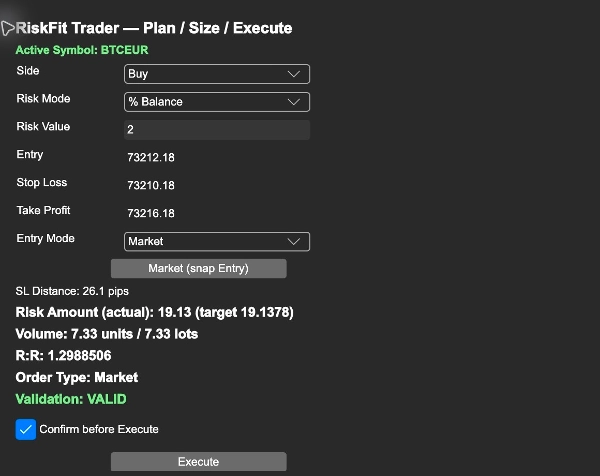
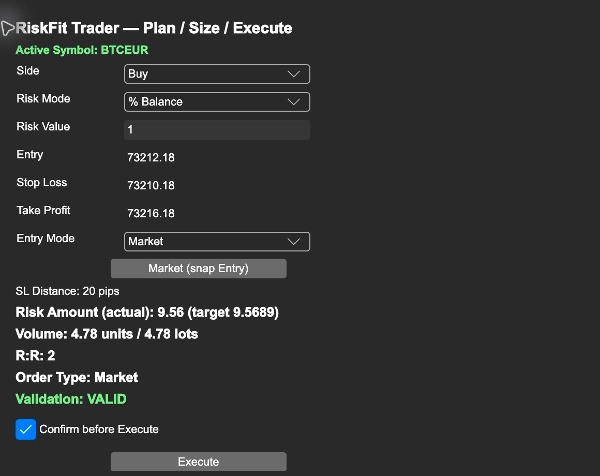
Choose Buy or Sell and enter your risk as a percentage of account balance, a percentage of equity, or a fixed amount in the account currency. Set the Entry and Stop Loss, then optionally add a Take Profit. The panel shows the stop distance, calculated volume in units and lots, estimated stop-loss risk, and risk-to-reward ratio when a Take Profit is supplied.
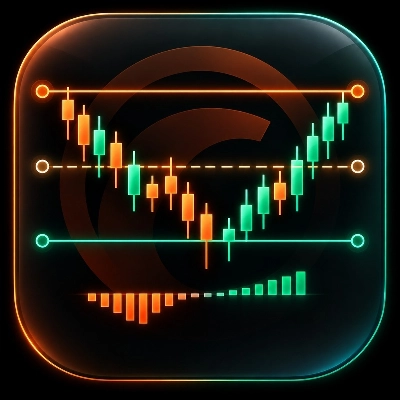
Entry, Stop Loss and Take Profit are also represented by lines on the active chart. Moving the lines updates the planning inputs. Review the displayed symbol and values after switching charts.
Choose an order workflow
Market mode uses the current market price for the selected side. Planned mode uses your Entry price to classify the order as a Buy Limit, Sell Limit, Buy Stop or Sell Stop. Review the displayed order type before proceeding.
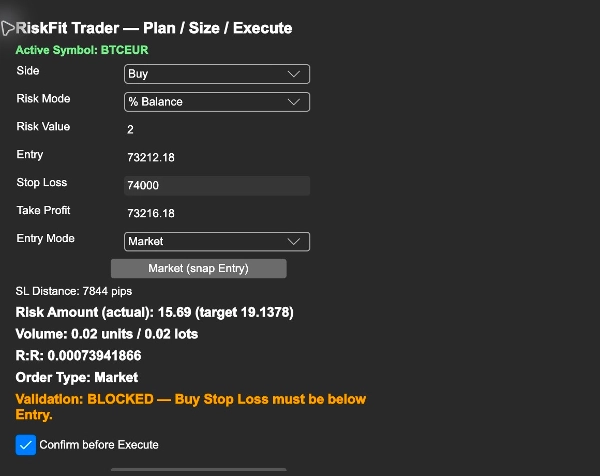
The plugin rounds volume down to the symbol's supported step. It blocks invalid inputs and sizes below the symbol minimum. When the calculated size exceeds the symbol maximum, it caps the volume and displays the resulting estimated risk.
Get started
1. Install the purchased RiskFit Trader - Risk Sizing in cTrader Desktop under the same cTrader ID used for the purchase. Open Settings > Plugins and enable RiskFit Trader - Risk Sizing.
2. Open a native cTrader chart for the symbol you want to trade. Show TradeWatch using the layout controls and select its RiskFit Trader tab. The panel title is RiskFit Trader — Plan / Size / Execute.
3. Check Active Symbol, choose Side, Risk Mode and Risk Value, then set Entry, Stop Loss and optional Take Profit.
4. Choose Market or Planned under Entry Mode. Use Market (snap Entry) to return the Entry to the current market price.
5. Review Volume, Risk Amount, R:R, Order Type and Validation. With Confirm before Execute enabled, the first click asks you to review the trade; click Confirm Execute to submit it. Confirmation is enabled by default.
Trading requires the relevant cTrader trading permission. Review the result shown by the plugin after each submission. Risk estimates are based on the selected stop distance and symbol settings; execution price, slippage, fees and broker conditions can affect realised losses. RiskFit Trader does not provide trading signals or promise trading returns.
Reading the screenshots
The screenshots show the Full desktop plugin on a demo account: risk percentage and calculated size; Entry, Stop Loss and Take Profit with the order type; and an invalid Buy Stop Loss blocked before execution. They illustrate controls and validation, not trading results. No order is placed merely by changing planning inputs.
Limitations
This is a desktop plugin, not a cBot or an automated strategy. It requires an active native cTrader chart and broker-supported symbol specifications. Market prices and estimates can change while reviewing a plan. Check the account, symbol, order direction, prices and calculated size immediately before confirming an order. Start on a demo account to learn the controls. No separate Store trial is provided.
Ringkasan
Entry, Stop Loss, and Take Profit levels are visually represented as lines on the active chart, which can be adjusted interactively. The plugin supports Market mode, using current market prices, and Planned mode, which classifies orders as Buy Limit, Sell Limit, Buy Stop, or Sell Stop based on the Entry price. It enforces symbol-specific volume steps and limits, blocking invalid inputs and capping volume at the symbol maximum while showing the resulting estimated risk.
RiskFit Trader requires an active native cTrader chart and relevant trading permissions. It provides trade planning and sizing tools but does not generate trading signals or guarantees trading outcomes. The plugin includes confirmation prompts before order execution to review trade details.