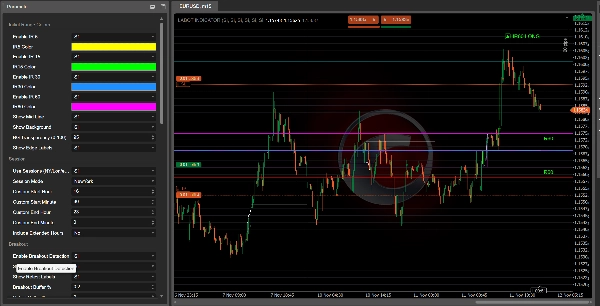

Opis
Czym jest wskaźnik „Initial Range”?
Ten wskaźnik to przeniesienie narzędzia Pine Script „Opening Range Breakout”.
Początkowo nazywał się ORB – Opening Range Breakout: bierzesz zakres cen z pierwszych minut sesji, a następnie handlujesz wyłamaniem tego zakresu.
W tej wersji zmieniliśmy nazwę na IR – Initial Range, ale idea pozostaje ta sama:
- Wskaźnik tworzy kilka Initial Ranges:
-
- IR5 – pierwsze 5 minut
- IR15 – pierwsze 15 minut
- IR30 – pierwsze 30 minut
- IR60 – pierwsze 60 minut
- Dla każdego IR masz:
-
- IR High
- IR Low
- IR Mid (środek zakresu)
- Możesz wybrać, które zakresy są aktywne i jakich kolorów używają.
Gdy zakres jest zakończony, wskaźnik szuka wybicia ceny z tego zakresu:
- Przebicie powyżej IR High → IR60 LONG, IR30 LONG itd.
- Przebicie poniżej IR Low → IR60 SHORT, IR30 SHORT itd.
Te etykiety pojawiają się na wykresie, abyś mógł szybko zobaczyć, który początkowy zakres wygenerował sygnał.
Filtry i potwierdzenia
Wskaźnik jest zaprojektowany tak, aby unikać losowych wybicia, łącząc kilka filtrów:
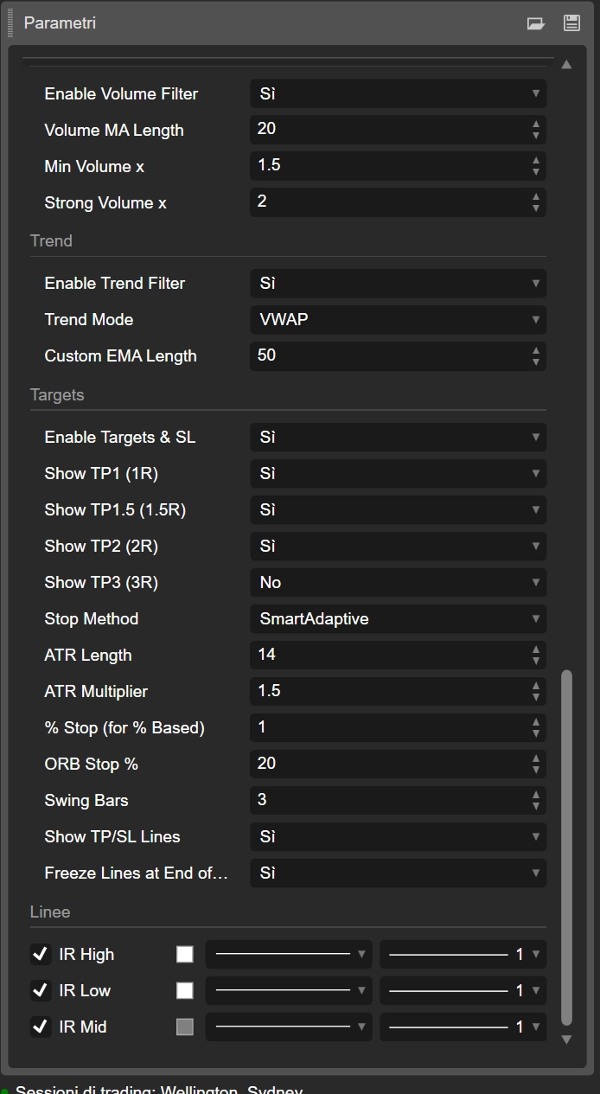
- Filtr trendu
Możesz użyć: -
- VWAP
- EMA
- Niestandardowa długość EMA
- VWAP + EMA razem
Wybicia w kierunku trendu są preferowane (na przykład LONG tylko gdy cena jest powyżej VWAP/EMA).
- Filtr wolumenu
Wskaźnik porównuje aktualny wolumen z średnią kroczącą wolumenu: -
- „normalne” potwierdzenie
- „silny” wolumen
Wybicia z słabym wolumenem można zignorować, jeśli chcesz.
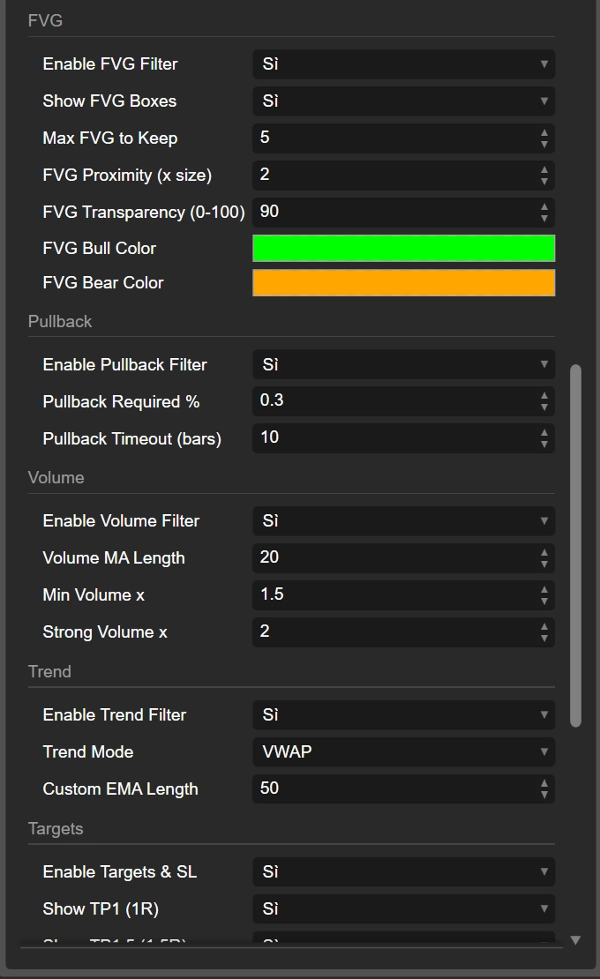
- Filtr FVG (Fair Value Gap)
Wykrywa bycze i niedźwiedzie FVG i może wymagać, aby wybicie nastąpiło w pobliżu odpowiedniego FVG: -
- Bycze FVG blisko IR High wspiera LONG
- Niedźwiedzie FVG blisko IR Low wspiera SHORT
- Filtr cofnięcia
Możesz wymagać minimalnego cofnięcia po wybiciu oraz okna czasowego (w słupkach) na to cofnięcie. Pomaga to skupić się na wybiciach, które faktycznie „oddychają” przed kontynuacją.
Wybicia, retesty i nieudane wybicia
Po wybiciu z Initial Range wskaźnik śledzi, co cena robi dalej:
- Liczy ile słupków pozostaje na zewnątrz zakresu.
- Sprawdza, czy cena porusza się wystarczająco daleko (minimalna odległość w %).
- Następnie obserwuje retest powrót do zakresu.
Możesz zobaczyć:
- IR60 LONG / IR60 SHORT (wybicie)
- Retest LONG / Retest SHORT etykiety, gdy cena wraca po solidnym ruchu
- Failed LONG / Failed SHORT etykiety, gdy wybicie szybko się nie udaje i cena ponownie wchodzi do zakresu bez zaangażowania.
Daje to trzy rodzaje informacji:
- czyste wybicie
- zdrowe wybicie z retestem
- fałszywe/nieudane wybicie
Cele, stop loss i wizualizacja transakcji
Wskaźnik oblicza również automatyczne poziomy TP i SL na podstawie:
- ATR
- % szerokości IR
- stałe % stopów
- punkty zwrotne
- „inteligentne” adaptacyjne i skalowane tryby ATR
Na podstawie ceny wejścia i poziomu stopu oblicza kilka celów:
- TP1 (1R)
- TP1.5 (1.5R)
- TP2 (2R)
- TP3 (3R)
Możesz wybrać, które cele pokazać.
Linie są rysowane na wykresie:
- IR_ENTRY_LONG / IR_ENTRY_SHORT
- IR_SL_LONG / IR_SL_SHORT
- IR_TP1 / IR_TP1.5 / IR_TP2 / IR_TP3
Gdy cena osiąga cel lub stop, stan jest aktualizowany, a linie mogą zostać „zamrożone” albo po ostatnim TP, albo na koniec dnia, w zależności od ustawień.
W skrócie
- Stara nazwa: ORB (Opening Range Breakout)
- Nowa nazwa: IR (Initial Range) – ta sama koncepcja, czystsza nazwa
- Tworzy zakresy z wczesnej sesji (IR5, IR15, IR30, IR60)
- Oznacza wybicia LONG / SHORT, retesty oraz nieudane wybicia
- Używa filtrów trendu, wolumenu, FVG i cofnięcia dla poprawy jakości
- Rysuje wejście, stop i wiele celów bezpośrednio na wykresie
Więc gdy widzisz „IR60 LONG” na wykresie, zasadniczo patrzysz na Opening Range Breakout z pierwszych 60 minut sesji – tylko z bardziej nowoczesną, konfigurowalną nazwą i wieloma dodatkowymi funkcjami.
Podsumowanie
The indicator marks breakout signals when price moves above the range high (LONG) or below the range low (SHORT), displaying corresponding labels on the chart. It also tracks retests and failed breakouts, distinguishing clean breakouts, healthy retests, and fake moves.
To improve signal quality, the indicator incorporates multiple filters: trend filters using VWAP and EMA, volume filters comparing current volume to averages, Fair Value Gap (FVG) filters detecting bullish or bearish imbalances near breakout levels, and pullback filters requiring minimum retracements after breakouts.
Additionally, it calculates and plots automatic entry, stop loss, and multiple take profit levels based on ATR, percentage of the initial range width, fixed percentages, swing points, and adaptive ATR modes. These visual aids help traders manage risk and targets directly on the chart.
The Initial Range indicator supports various markets including Forex, stocks, indices, commodities, and cryptocurrencies, and is designed to enhance breakout trading strategies with customizable parameters and comprehensive trade visualization.
Opinie klientów
5 | 100 % | |
4 | 0 % | |
3 | 0 % | |
2 | 0 % | |
1 | 0 % |

















![Logo „[Hamster-Coder] Moving Average MTF”](https://cdn.ctrader.com/image/webp/b11b98b1-194d-4b8e-b00e-d611826ad159_31226)