present
Sign up and get $50 off your first purchase
Magic Position Tool
Desktop plugin
172 downloads
Version 1.1, Jun 2026
Windows, Mac
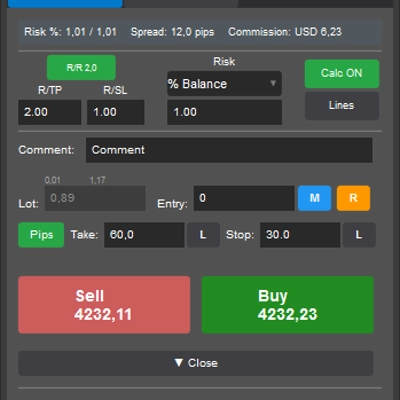
Trading product for Magic Position Tool Desktop plugin Position Sizer Risk Calculator, image 2
Trading product for Magic Position Tool Desktop plugin Position Sizer Risk Calculator, image 3
Trading product for Magic Position Tool Desktop plugin Position Sizer Risk Calculator, image 4
Trading product for Magic Position Tool Desktop plugin Position Sizer Risk Calculator, image 5
Trading product for Magic Position Tool Desktop plugin Position Sizer Risk Calculator, image 6
Since 23/06/2025
173
Free installs

Description

Stop calculating. Start trading.

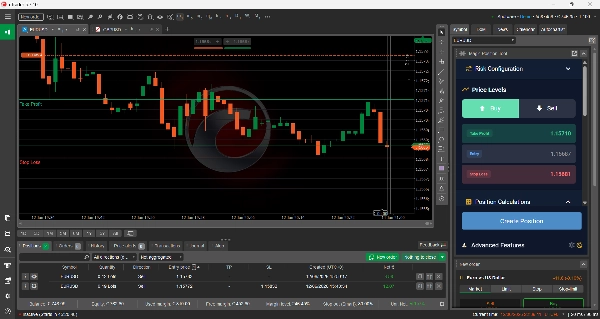
Set your risk once. From then on, taking a position is effortless: drop your Stop Loss on the chart and Magic Position Tool instantly works out the exact lot size that keeps you inside your risk — then opens the trade in a single click.

Zero calculations, zero lot-size errors. No spreadsheets, no mental math, no second-guessing. Your focus stays where it belongs: on the trade itself.

How It Works

  1. Configure your risk once.
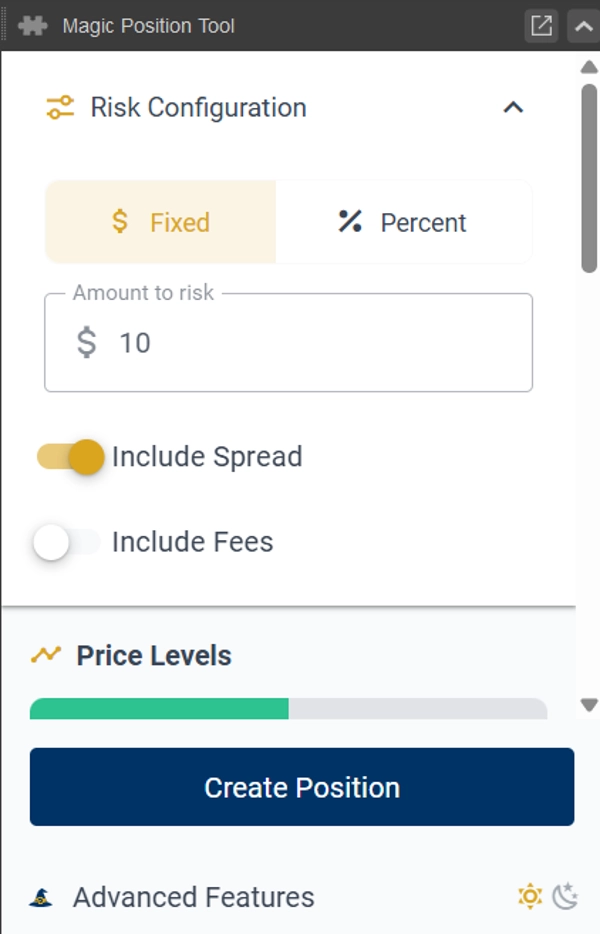
    Set your risk per trade — a fixed amount or a percentage of your balance. You set it once; the tool remembers it.
  2. Place your Stop Loss on the chart.
    The lot size is calculated automatically from the distance to your stop, so the trade always matches your risk — whatever the symbol or volatility.
  3. Open the position in one click.
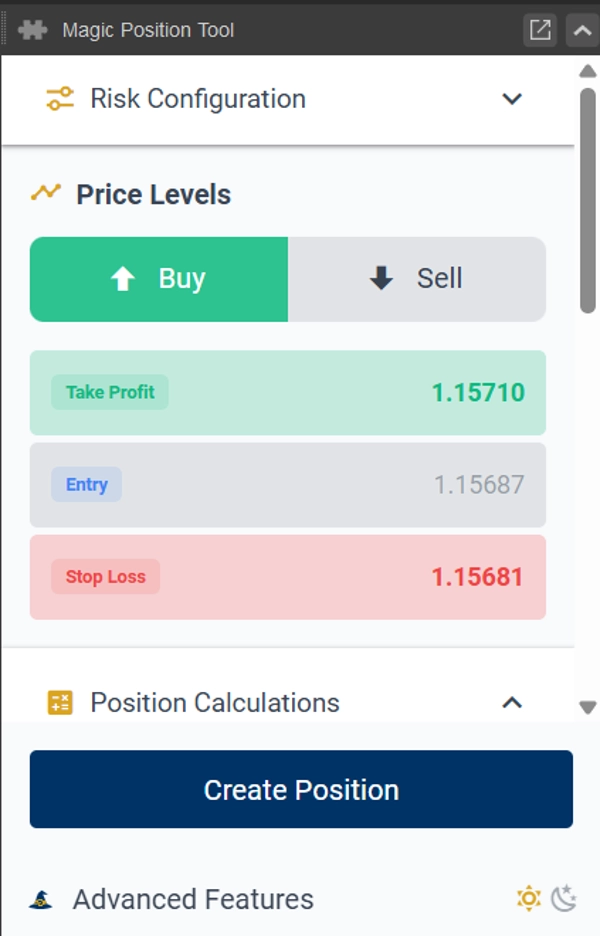
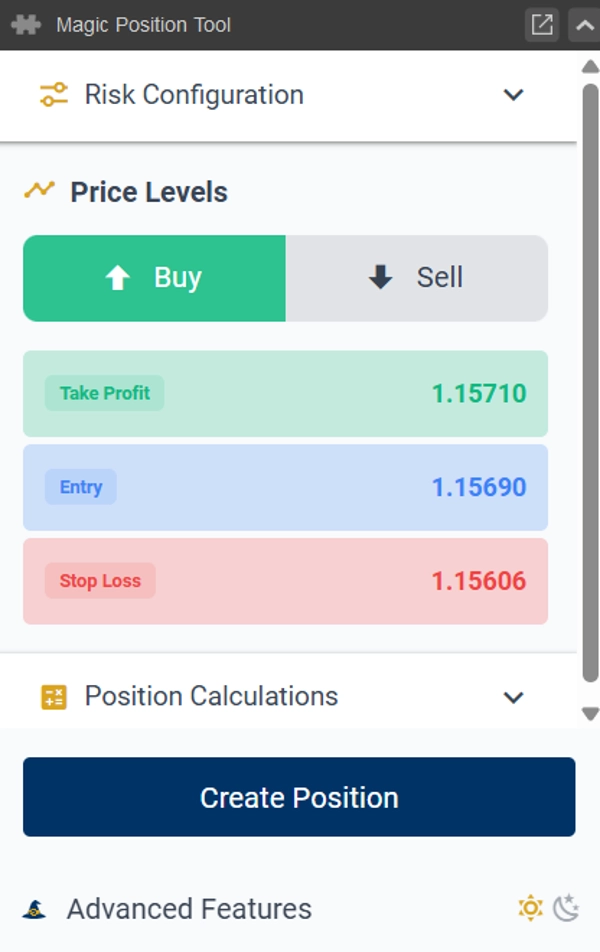
    Leave the entry empty for a market order, or set an entry price for a limit / stop order. Stop Loss and Take Profit are attached automatically.

Why Traders Use It

• Risk set once, applied every time.
No recalculating before each trade — your stop position drives the lot size automatically.

• One-click entry, market or limit.
Add an entry price or don't — that single choice is the whole difference between a pending and an instant order. Position entry, simplified.

• Everything visual.
Stop Loss, Entry, and Take Profit are lines you place directly on the cTrader chart. Calculations update live as you move them.

• Never oversize again.
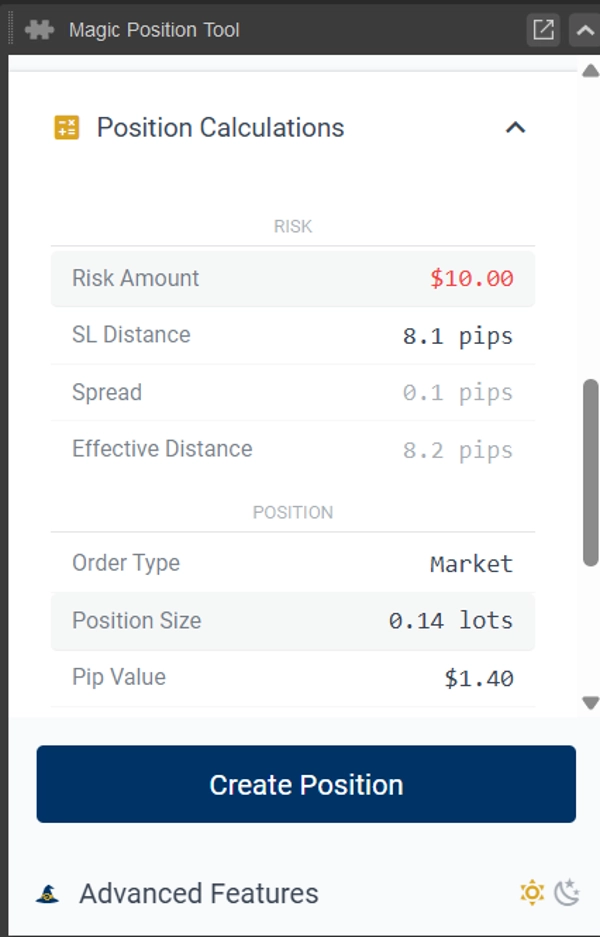
Required margin and reward-to-risk ratio are shown before you commit. You always know what's at stake.

• It remembers you.
Buy/Sell direction and your settings are saved per symbol, so each instrument opens ready to trade.

Features

• One-click order placement — market, limit, or stop — with Stop Loss and Take Profit attached
• Lot size calculated automatically from your stop-loss distance and risk setting
• Stop Loss, Entry, and Take Profit lines drawn directly on the chart
• Live required-margin and reward-to-risk display before entry
• Per-symbol memory of direction and settings
• Works on all symbols and timeframes
• Dark and light themes
• Built-in risk-management guidance

Good To Know

Magic Position Tool opens your position for you — at market, or as a pending limit/stop order when you set an entry price — with your Stop Loss and Take Profit in place.

It does not manage, modify, or close positions after they are opened: trade management stays entirely in your hands.

Disclaimer: Trading involves risk. Past performance does not guarantee future results.

Summary

AI summary
Magic Position Tool is a trading plugin designed to simplify position sizing and order placement on the cTrader platform. Users set their risk per trade once—either as a fixed amount or a percentage of their balance—and the tool automatically calculates the appropriate lot size based on the Stop Loss distance placed directly on the chart. This eliminates manual calculations and reduces lot-size errors.

The tool supports one-click order execution for market, limit, or stop orders, automatically attaching Stop Loss and Take Profit levels as visual lines on the chart. It provides live updates of required margin and reward-to-risk ratios before trade entry, helping traders understand their exposure. Settings, including buy/sell direction, are saved per symbol for quick reuse.

Magic Position Tool works across all symbols and timeframes, offers dark and light themes, and includes built-in risk management guidance. It does not manage or modify positions after opening; trade management remains the user's responsibility. This plugin focuses on streamlining risk-based position sizing and order placement to enhance trading efficiency.

Plugin profile

Discussion

Customer reviews

0.0
Reviews: 0
Customer reviews
No reviews for this product yet. Already tried it? Be the first to tell others!

FAQ

Position Sizer
Risk Calculator
Products available through cTrader Store, including trading bots, indicators and plugins, are provided by third-party developers and made available for informational and technical access purposes only. cTrader Store is not a broker and does not provide investment advice, personal recommendations or any guarantee of future performance.

You may also like

Desktop plugin
Risk/Reward
Trade Journal
+2
Review cTrader trades with a P&L calendar, detailed analytics, personal notes, and offline reports. English and Russian.
Desktop plugin
AlgoBuilderX makes cBot creation easy – build and automate your trading strategies on cTrader with zero programming.
Desktop plugin
Prop
Forex
+4
Visual monthly trading journal that displays your performance day-by-day in a calendar view.
Desktop plugin
Prop Firm Fit
Trade Journal
+2
Paper trade your broker’s live prices in cTrader: demo accounts, prop challenges, a stats dashboard and trading journal
Desktop plugin
Prop
Forex
+1
Multiple timeframes, multiple instruments, one cBot, one go! OmniSimulation
"TradeGuard" logo
Popular
4.6
(3)
$25
Desktop plugin
ATR
Prop
+5
cTrader risk management plugin with daily & total drawdown limits, CBot control, and risk-based order execution.
Desktop plugin
Prop
Forex
+4
Professional risk management plugin with automatic lot calculation, chart panels, and R:R automation. Version 1.4.2.
Desktop plugin
ATR
RSI
+24
One-click toggle for Positions / Pending Orders on cTrader charts with fixed on-chart warnings and an ASP control panel
Desktop plugin
An MT-style Data Window for enhanced data visualization – hope this will be helpful!
Desktop plugin
Forex
Crypto
+4
Apply Stop Loss and Take Profit to all positions and pending orders in one click.
Desktop plugin
External Data
Study economic event reactions with broker M1 history, bar replay, range comparisons and a reproducible export.
Desktop plugin
Trade Journal
AI Integration
+1
#1 Trade Journal, PnL analytics, bot monitoring and strategy statistics.
Desktop plugin
Forex
Commodities
Close all non crypto trades at 19:55 utc Friday
Desktop plugin
SL Manager
Break Even
+5
Risk-based position sizing, multi-target take profits, automated trailing stops, and bulk exits directly on your chart.
Desktop plugin
Risk/Reward
Trade Alerts
+3
QC Signals - regime-aware entries, enforced reward:risk, and risk-based one-click trading, right in the Symbol panel.
Desktop plugin
Fixed Risk %
Risk/Reward
+5
⚡Place orders, set SL/TP, and manage positions with Hotkeys or directly on the chart.
Desktop plugin
SL Manager
Risk/Reward
+5
Drag SL & TP on the chart, see risk, reward, R:R and lot size live, then place Buy or Sell orders in one click
Desktop plugin
Risk/Reward
Trade Journal
+5
cTrader Journal - Automatic Trade Capture. Offline Reviews. No Subscription.

Price

Since 23/06/2025
173
Free installs