Description
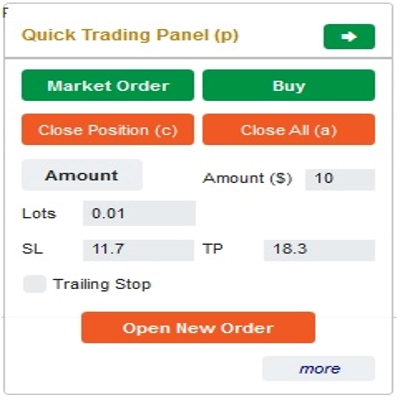
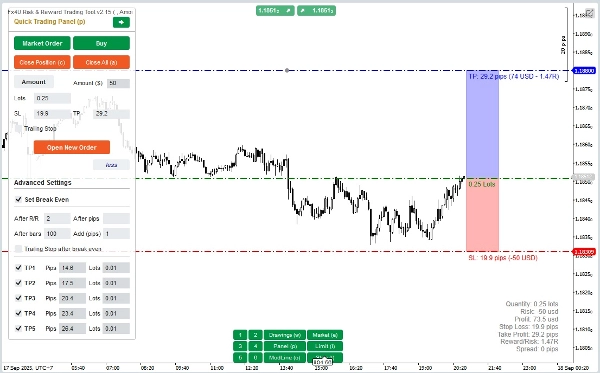
Ceci est un outil pour aider les traders à ouvrir/fermer des ordres/modifier des ordres rapidement en un seul clic. Cet outil a déjà calculé le nombre de Lots en fonction du montant du risque pour chaque ordre et du StopLoss que vous choisissez. Il peut fonctionner à la fois en mode Temps réel pour le trading en direct ainsi qu'en mode Backtesting pour tester vos stratégies.
Note importante :
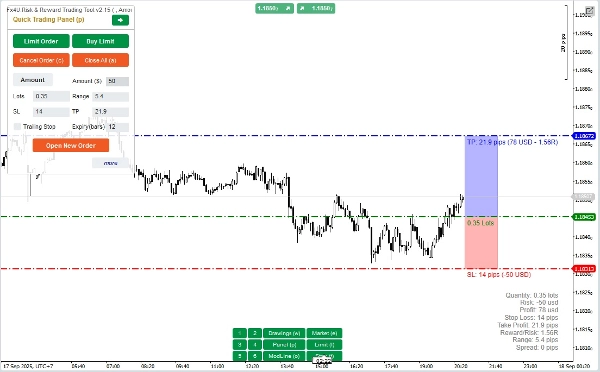
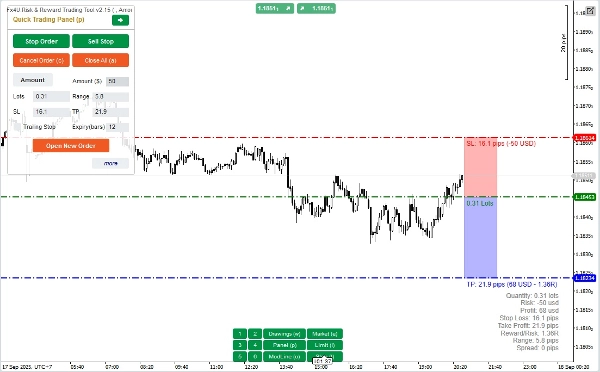
- Les "boutons bleus" sont les boutons de changement d’état (Ordre au marché => Ordre limite => Ordre stop => Ordre au marché ; Achat => Vente => Achat)
- Les "boutons rouges" sont les boutons "Exécution". => Pour ouvrir un ordre - utilisez le bouton "Ouvrir un nouvel ordre" ; pour fermer une position - utilisez le bouton "Fermer la position" ou le bouton "Tout fermer" ; pour annuler un ordre en attente - utilisez le bouton "Annuler l’ordre" ou le bouton "Tout fermer".
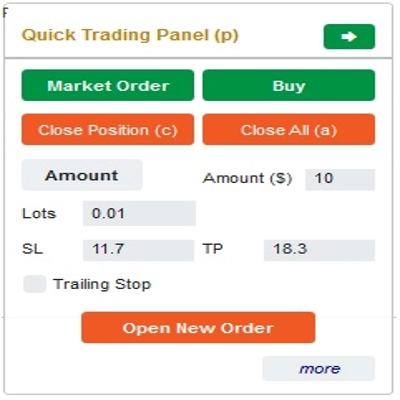
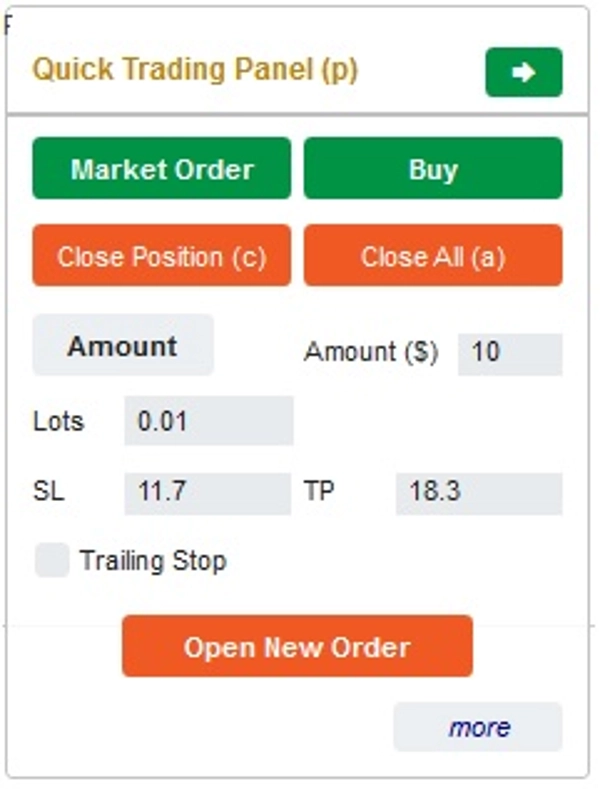
Dans le « Panneau de trading rapide » :
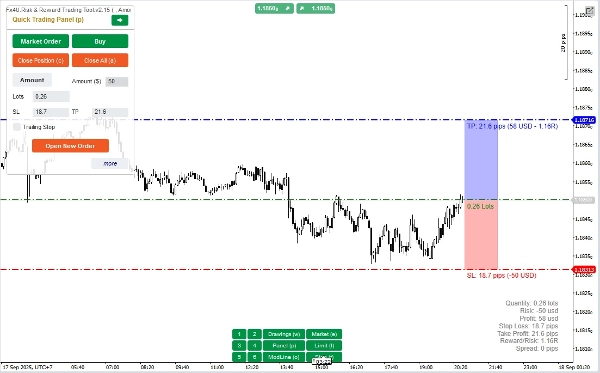
Pour changer entre les ordres ACHAT et VENTE, vous pouvez faire glisser la ligne StopLoss sur le graphique au-dessus ou en dessous de la ligne d’entrée.
– Vous pouvez ouvrir et fermer à la fois des ordres au marché, des ordres limite ou des ordres stop.
– Vous pouvez ajuster le montant de l’ordre en % du solde ou un montant fixe pour chaque ordre. En fonction de ce montant et du StopLoss que vous choisissez, le bot calculera automatiquement le nombre de Lots pour ouvrir l’ordre.
– Vous pouvez modifier le StopLoss, le TakeProfit ou le prix d’entrée (pour les ordres en attente) en changeant les chiffres SL, TP ou Range dans le « Panneau de trading rapide » ou en faisant glisser les lignes horizontales sur le graphique.
– SL, TP et Range (pour les ordres en attente) sont calculés en Pips, tandis que l’Expiration (min) est calculée en minutes (Si vous n’utilisez pas l’Expiration, laissez-la à 0 ou vide)
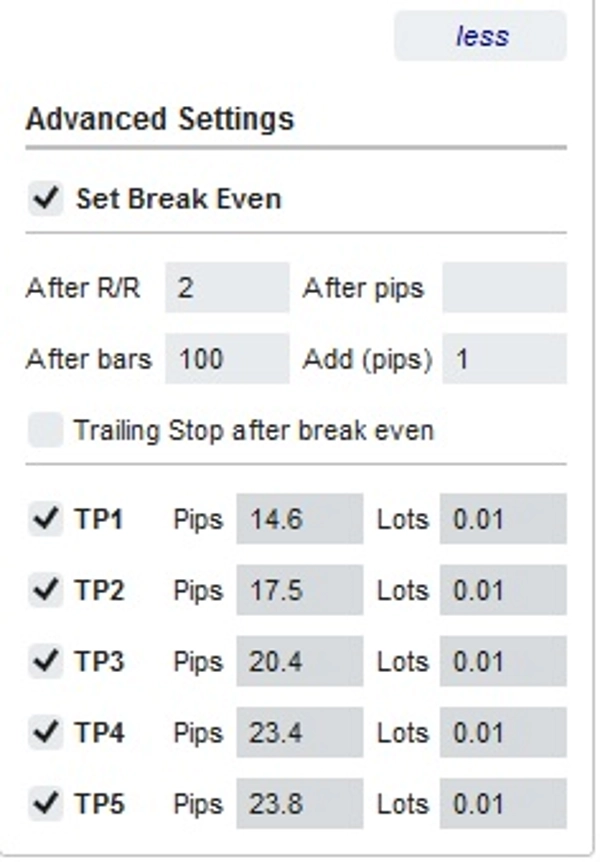
– Il y a aussi une section de paramètres avancés qui vous permet (Note : Paramètres avancés uniquement lorsque l’indicateur est actif) :
+ Définir le "Break Even" lorsque le prix se déplace d’un certain nombre de Pips ("Après Pips") ou lorsque le prix se déplace positivement "R/R" fois le Stoploss ("Après R/R") ou après que l’ordre ouvre "n" barres ("Après Barres")
+ Vous permet de "Take Profit Avancé" avec 5 niveaux parmi lesquels vous pouvez choisir
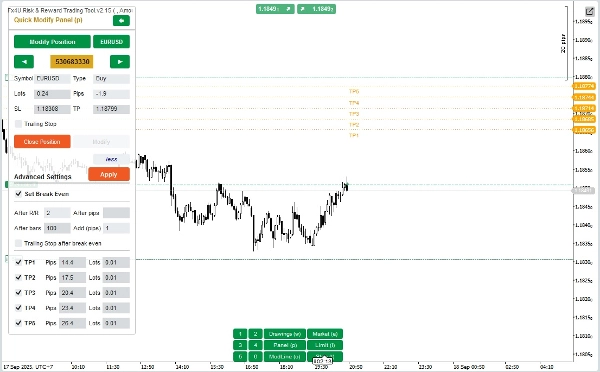
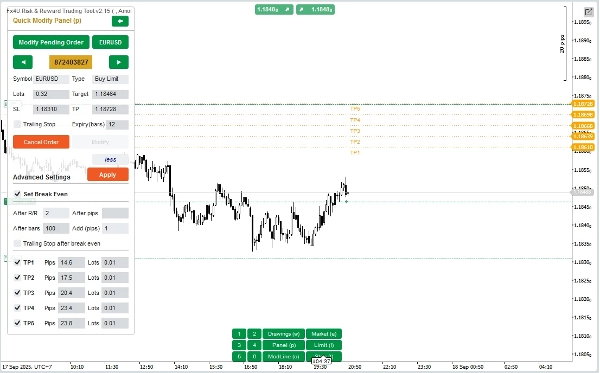
Dans le « Panneau de modification rapide » :
– Dans ce panneau, vous pouvez fermer des ordres ou modifier les paramètres de l’ordre tels que StopLoss (en prix), TakeProfit (en prix), TrailingStop ou Range (en Pips) et Expiration (en minutes)
(Notez que StopLoss et TakeProfit dans ce panneau sont les prix vers lesquels vous souhaitez déplacer)
– Dans ce panneau, vous pouvez également modifier StopLoss, TakeProfit ou Range (en Pips) par un nombre dans le panneau ou faire glisser la ligne horizontale sur le graphique à la position souhaitée.
– Vous pouvez naviguer entre les ordres pour afficher les paramètres de ces ordres sur le panneau
Note : Le numéro dans le rectangle jaune est le numéro d’identification de l’ordre sélectionné pour modification
– Il y a aussi une section de paramètres avancés qui vous permet (Note : Paramètres avancés uniquement lorsque l’indicateur est actif) :
+ Modifier le paramètre "Break Even" lorsque le prix se déplace d’un certain nombre de Pips ("Après Pips") ou lorsque le prix se déplace positivement "R/R" fois le Stoploss ("Après R/R") ou après que l’ordre ouvre "n" barres ("Après Barres")
+ Modifier le "Take Profit Avancé" avec 5 niveaux parmi lesquels vous pouvez choisir
Nous vous souhaitons un trading réussi !
Résumé
Key features include:
- A Quick Trading Panel allowing drag-and-drop adjustment of StopLoss lines to switch between buy and sell orders.
- Order amount settings adjustable by percentage of balance or fixed amount.
- Editable StopLoss, TakeProfit, and Entry Price parameters via panel inputs or chart line dragging.
- Support for order expiry times measured in minutes.
- Advanced settings for automatic Break Even adjustments triggered by price movement in pips, risk/reward ratio, or elapsed bars.
- Multi-level Advanced Take Profit options with up to five levels.
- A Quick Modifying Panel to close orders or edit StopLoss, TakeProfit, TrailingStop, Range, and Expiry parameters, with visual order selection by ID.
The tool operates in both real-time live trading and backtesting modes. It supports major Forex symbols including EURUSD, GBPUSD, USDJPY, and XAUUSD (gold). The interface uses color-coded buttons for order status changes and execution commands to streamline trading operations.
Discussion
Avis clients
5 | 50 % | |
4 | 50 % | |
3 | 0 % | |
2 | 0 % | |
1 | 0 % |
![Logo de "[Fx4U] GBPUSD - Price Action"](https://cdn.ctrader.com/image/webp/d80b34fc-da3c-4f01-a321-456450665649_26190)
![Logo de "[Fx4U] CADJPY - Price Action"](https://cdn.ctrader.com/image/webp/1ba81247-b6b7-4f3c-a297-fa3eb1d57fe1_26195)

![Logo de "[Fx4U] AUDCHF - Price Action"](https://cdn.ctrader.com/image/webp/0a22e9aa-c83b-42cd-b0b8-c1a2da593207_26148)

![Logo de "[Fx4U] EURAUD - Price Action"](https://cdn.ctrader.com/image/webp/baf8dde4-1ef3-4beb-8ae2-0fed8320f65d_26177)