
Description
🔧 ATR_RR_SignalPanel — Description technique et détaillée (EN) 🧠📈
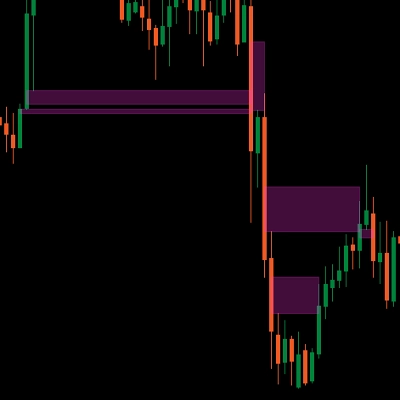
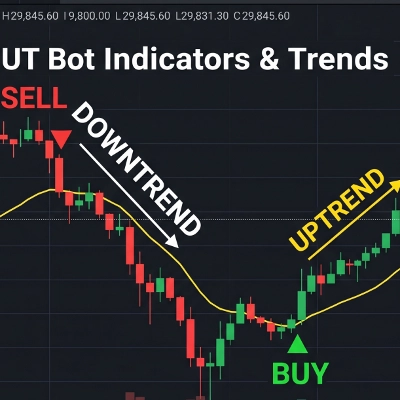
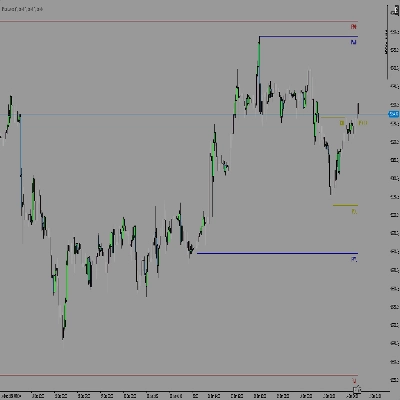
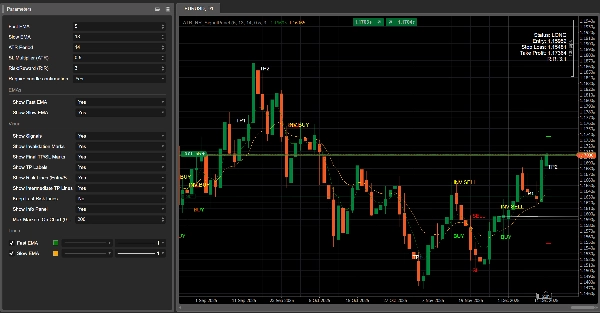
ATR_RR_SignalPanel est un indicateur superposé pour cTrader qui génère des signaux d'entrée de changement de tendance en utilisant un régime EMA rapide vs EMA lente, puis construit un cadre complet de trading virtuel (Entrée 🏁, Stop Loss 🛑, Take Profit final 🎯, Objectifs intermédiaires 🟢) en utilisant une taille de risque basée sur l'ATR et un multiplicateur Risque:Récompense configurable ⚖️.
🧭 Logique principale (Moteur de signal) 🚦
- L'indicateur calcule :
-
- EMA rapide ⚡ et EMA lente 🐢 sur la clôture.
- ATR (lissage Wilder) 🌡️ pour la distance de stop basée sur la volatilité.
- Un régime de tendance est défini comme :
-
- Tendance haussière 🟢 lorsque
EMA rapide > EMA lente - Tendance baissière 🔴 lorsque
EMA rapide < EMA lente
- Tendance haussière 🟢 lorsque
- Un changement de tendance 🔁 se déclenche lorsque l'état haussier/baissier diffère de la barre précédente (équivalent à Pine’s
bullTrend != bullTrend[1]).
🎯 Conditions d'entrée (ACHAT/VENTE) 🟩🟥
Lorsqu'un changement de tendance se produit :
- Signal ACHAT 🟢 si :
-
- La tendance haussière est active et un changement de tendance est détecté
- Confirmation optionnelle de la bougie ✅ : Clôture > Ouverture (bougie haussière)
- Signal VENTE 🔴 si :
-
- La tendance baissière est active et un changement de tendance est détecté
- Confirmation optionnelle de la bougie ✅ : Clôture < Ouverture (bougie baissière)
🧪 Gestion de position virtuelle (Pas un cBot) 🧩
Cet indicateur ne place pas d'ordres. Il simule plutôt une “position virtuelle” interne :
- Sur un nouveau signal ACHAT/VENTE, il définit :
-
- Prix d'entrée = clôture actuelle 🏁
- Stop Loss = extrême de la bougie ± ATR × multiplicateur 🛑
- Take Profit final = Entrée ± (Risque × RiskReward) 🎯
- Niveaux TP intermédiaires = étapes à 1R, 2R, … jusqu'à floor(RR)-1 🟢
- Il surveille l'action des prix barre par barre :
-
- Si TP final est atteint ➜ marque 🎯 et ferme la position virtuelle ✅
- Si SL est atteint ➜ marque 🛑 et ferme la position virtuelle ❌
- Les hits TP intermédiaires sont suivis une seule fois 🧷
🔁 Logique d'invalidation (Signal opposé pendant l'activité) ⚠️
Si un nouveau signal arrive alors qu'une position virtuelle dans la direction opposée existe :
- L'entrée précédente est marquée comme INVALIDÉE ⚠️ (INV ACHAT / INV VENTE)
- La position virtuelle antérieure est terminée 🧯
- Une nouvelle position virtuelle est créée dans la nouvelle direction 🔄
🧼 Multi-instance sécurisée (Copies multiples sur le même graphique) 🧩🧩
Chaque instance d'indicateur génère un ID interne unique 🆔, donc :
- Les lignes/textes d'une instance n'écraseront pas une autre instance ✅
- Vous pouvez exécuter plusieurs configurations en parallèle (par exemple, scalping + swing) 🧠📊
🧯 Contrôles anti-encombrement (Limiteur de marqueurs) 🧹✨
Pour garder les graphiques lisibles, il peut :
- Limiter le nombre de marqueurs de texte dessinés (ACHAT/VENTE/TP/SL/INV/TP1…) 🧾
- Supprimer automatiquement les marqueurs plus anciens lorsque la limite est dépassée ♻️
🧷 Option “Conserver les dernières lignes de risque” 🧠📌
Lorsqu'activé, les dernières lignes Entrée/SL/TP restent visibles même après la fermeture TP/SL :
- Idéal pour la revue post-trade 🧑🔬
- Idéal pour le journal de trading 📒✅
⚙️ Paramètres — Explication détaillée (EN) 🔍📌
📈 Noyau Signal & Risque
⚡ EMA rapide
- Ce que ça fait 🧠 : Définit la période de l'EMA rapide utilisée pour détecter les changements de régime.
- Effet 📊 : Valeurs plus basses = plus réactif ➜ plus de signaux ; plus hautes = plus lisse ➜ moins de signaux.
- Plages typiques 🎛️ : 3–10 pour marchés rapides ⚡, 10–20 pour configurations plus calmes 🐢
🐢 EMA lente
- Ce que ça fait 🧠 : Définit la période de l'EMA lente utilisée comme base de tendance.
- Effet 📊 : EMA lente plus élevée = filtrage plus fort ➜ moins de déclenchements de changement de tendance.
- Plages typiques 🎛️ : 13–55 selon le style 🧭
🌡️ Période ATR
- Ce que ça fait 🧠 : Contrôle la longueur de la mesure de volatilité pour l'ATR.
- Effet 📏 : ATR court réagit rapidement (SL plus serré), ATR long stabilise (SL plus stable).
- Plages typiques 🎛️ : 10–21 est courant ✅
🛑 Multiplicateur SL (ATR)
- Ce que ça fait 🧠 : Définit la distance du Stop Loss en unités ATR.
- Long 🟢 :
SL = Low - ATR * Mult - Short 🔴 :
SL = High + ATR * Mult - Effet 🎯 : Multiplicateur plus élevé = SL plus large (moins d'arrêts, risque plus grand) ; plus bas = SL plus serré (plus d'arrêts).
- Valeurs typiques 🎛️ : 0.3–2.0 selon la volatilité 🌪️
⚖️ Risque:Récompense (R:R)
- Ce que ça fait 🧠 : Multiplie la distance “risque” pour calculer le TP final.
- Formule 📌 :
-
- Risque = |Entrée − SL|
- TP final = Entrée ± Risque × RR 🎯
- TP intermédiaires 🟢 : TP1 à 1R, TP2 à 2R, … jusqu'à
floor(RR)-1 - Exemple 🧪 : RR=3 ➜ TP1 (1R), TP2 (2R), TP final (3R) 🎯🎯🎯
✅ Exiger la confirmation de la bougie
- Ce que ça fait 🧠 : Ajoute une validation de la direction de la bougie sur la barre du signal.
- ACHAT 🟢 : nécessite Clôture > Ouverture
- VENTE 🔴 : nécessite Clôture < Ouverture
- Effet 🧽 : Filtre les retournements faibles, réduit le bruit, peut entrer plus tard ⏳
📌 Affichage des EMAs
👁️ Afficher EMA rapide
- Ce que ça fait 🧠 : Affiche/masque la ligne EMA rapide.
- Cas d'utilisation 💡 : Masquer si vous voulez un graphique épuré 🧼
👁️ Afficher EMA lente
- Ce que ça fait 🧠 : Affiche/masque la ligne EMA lente.
- Cas d'utilisation 💡 : Garder visible pour le contexte de tendance 🧭
🎛️ Contrôles visuels (Gestion de l'encombrement) 🧹✨
🚦 Afficher les signaux
- Ce que ça fait 🧠 : Affiche/masque les marqueurs ACHAT/VENTE.
- Inclut 🧷 : marqueurs ACHAT 🟢 / VENTE 🔴 (seulement)
- Astuce 💡 : Désactiver pour le mode “lignes uniquement” 📏
🏷️ Afficher les étiquettes TP
- Ce que ça fait 🧠 : Affiche/masque les étiquettes comme TP1, TP2…
- Effet 🧼 : Désactiver enlève beaucoup de bruit textuel sur les TF supérieurs 📉
- Note 🧷 : Les étiquettes apparaissent une seule fois par hit TP ✅
⚠️ Afficher les marques d'invalidation
- Ce que ça fait 🧠 : Affiche/masque les marqueurs INV ACHAT / INV VENTE.
- Cas d'utilisation 🧠 : Utile lorsque vous souhaitez étudier les inversions de signal 🔁
🎯🛑 Afficher les marques TP/SL finales
- Ce que ça fait 🧠 : Affiche/masque les marqueurs TP et SL finaux.
- Cas d'utilisation 📒 : Idéal pour revoir la distribution des résultats 🎲
📏 Afficher les lignes de risque (Entrée/SL/TP)
- Ce que ça fait 🧠 : Dessine les lignes Entrée 🏁, SL 🛑, TP final 🎯 sur le graphique.
- Effet 📌 : Visualise instantanément la structure du trade virtuel 🧠
🟢 Afficher les lignes TP intermédiaires
- Ce que ça fait 🧠 : Dessine des lignes pointillées pour les niveaux TP1/TP2/…
- Astuce 🧼 : Désactiver si le graphique devient trop “spaghetti vert” 🍝🟢
📌 Conserver les dernières lignes de risque
- Ce que ça fait 🧠 : Garde les dernières lignes Entrée/SL/TP visibles après la sortie virtuelle (TP/SL).
- Pourquoi c'est utile 📒 : Parfait pour le journal de trading et l'analyse post-trade 🧑🔬✅
🧾 Nombre maximum de marqueurs sur le graphique (0=illimité)
- Ce que ça fait 🧠 : Limite le nombre d'objets texte que l'indicateur laisse sur le graphique.
- Comment ça fonctionne ♻️ : Lorsque la limite est dépassée, les marqueurs les plus anciens sont supprimés automatiquement.
- Recommandé 🎛️ : 80–200 selon la période et la profondeur de l'historique 🕰️
🧾 Afficher le panneau d'information
- Ce que ça fait 🧠 : Affiche un panneau d'état compact sur le graphique.
- Affiche 📋 : État (LONG/Court/Pas de position), Entrée, SL, TP, RR calculé.
Résumé
The indicator simulates virtual trades by setting entry price, stop loss, and take profit levels using Average True Range (ATR) for volatility-based risk sizing combined with a configurable risk-to-reward multiplier. It tracks intermediate take profit levels and monitors price action bar-by-bar to mark virtual trade outcomes without placing actual orders.
Key features include optional candle confirmation for signals, multi-instance support to run multiple configurations on the same chart, and visual clutter controls such as limiting markers and toggling display of EMAs, signals, and risk lines. An info panel provides a compact status overview of virtual positions. Parameters allow customization of EMA periods, ATR period, stop loss multiplier, and risk-reward ratio to adapt to different trading styles and market conditions.
Supported markets include Forex, indices, commodities, stocks, and cryptocurrencies, with symbols like GBPUSD, EURUSD, XAUUSD, NAS100, and BTCUSD among the tagged assets.
Avis clients
5 | 75 % | |
4 | 25 % | |
3 | 0 % | |
2 | 0 % | |
1 | 0 % |