
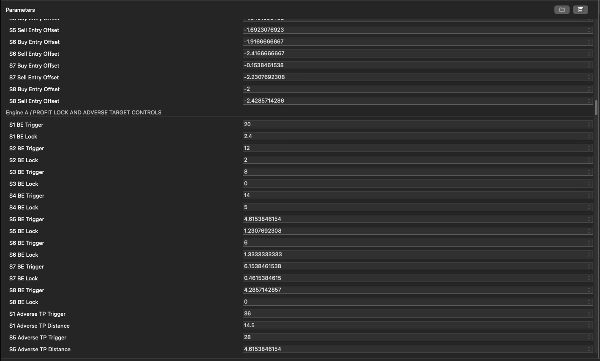
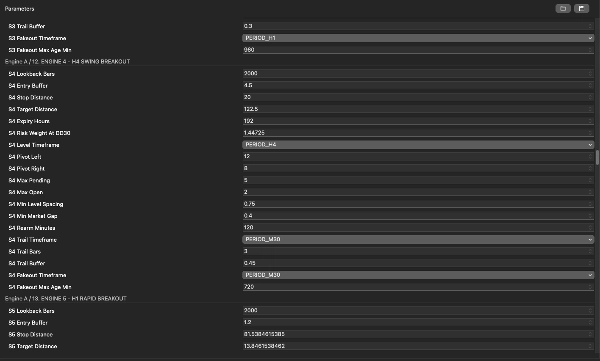

Description
Super, mon pote — l’image uniquement avec le symbole a été téléchargée avec succès. Voici le texte que vous pouvez utiliser pour la liste cTrader.
Je me suis basé sur votre version locale régulière Warden R2 cTrader build 2.007 source. Il y a plusieurs versions plus anciennes et “Vidéo” sur votre Mac, donc la version Store sélectionnée doit correspondre avant publication.
Description courte — moins de 120 caractères
cBot XAUUSD à trois moteurs combinant stratégies de breakout, de session et de portefeuille avec contrôles de risque configurables.
Description détaillée — prête à coller
ECFX XAU Warden — Trading automatisé de l’or pour cTrader
ECFX XAU Warden est un cBot multi-stratégies conçu pour le trading de l’or XAUUSD. Il combine trois moteurs de trading contrôlés indépendamment dans une seule application, réunissant des breakouts de niveaux de prix, du trading programmé par session et un portefeuille de stratégies techniques.
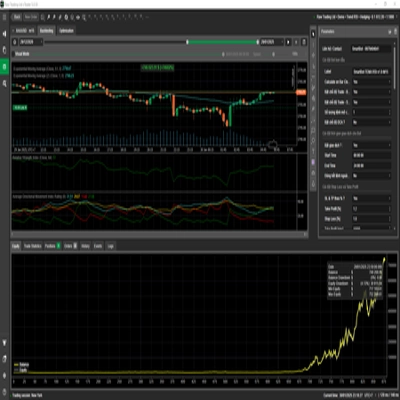
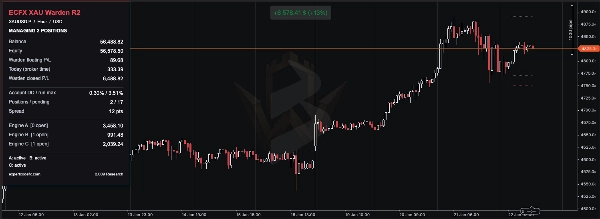
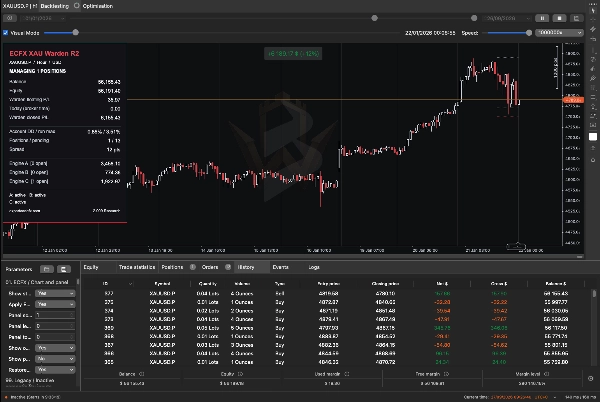
Un tableau de bord partagé affiche le solde du compte, l’équité, le profit et la perte flottants, le drawdown, les positions ouvertes, les ordres en attente et les résultats individuels des moteurs.
Warden est conçu pour fonctionner sur un graphique or H1 utilisant un compte de couverture. Ses stratégies analysent également d’autres périodes en interne. Chaque moteur peut être activé ou désactivé, permettant aux utilisateurs de tester des composants individuels ou le système combiné.
Comment Warden trade
Moteur A — Stratégies de breakout de niveaux de prix
Le moteur A identifie les hauts et bas confirmés sur plusieurs périodes et utilise ces niveaux pour préparer des ordres buy-stop et sell-stop.
Les entrées sont placées au-delà des niveaux de prix qualifiants, selon le buffer d’entrée de la stratégie sélectionnée, la distance minimale, les règles d’espacement des ordres et les limites d’exposition. Les ordres en attente peuvent expirer ou être renouvelés selon l’évolution de la structure du marché.
Le moteur contient neuf emplacements de stratégie configurables. Le nombre utilisé dépend du mode de fréquence de trading sélectionné, des règles de sélection automatique ou des commutations manuelles de stratégie. Activer le moteur n’active pas nécessairement tous les emplacements.
La gestion des trades inclut :
- Distances stop-loss et take-profit spécifiques à chaque stratégie.
- Comportement configurable de verrouillage des profits et trailing-stop basé sur les swings.
- Filtre de sortie en cas de faux breakout.
- Ajustement dynamique optionnel du take-profit sur certaines stratégies.
- Contrôles configurables de spread, vendredi et liés au NFP pour les entrées.
L’ajustement dynamique de la cible peut rapprocher une sortie après un mouvement de prix défavorable. Un trade clôturé à son niveau de take-profit ajusté peut donc encore subir une perte.
Moteur B — Trading basé sur les sessions
Le moteur B combine des règles de session distinctes en utilisant une horloge configurée selon l’heure du broker.
Ses composants disponibles incluent :
- Breakout de range : construit une plage haut-bas pendant une période spécifiée et vérifie une cassure ultérieure au-dessus ou en dessous. Un filtre sur le corps de la bougie du jour précédent s’applique également.
- Achat programmé : cherche une entrée d’achat dans une fenêtre temporelle définie les jours ouvrables éligibles, puis gère le trade selon sa règle de durée de détention.
- Breakout de momentum optionnel : vérifie un haut ou bas sur plusieurs jours avec un seuil récent de momentum de prix.
Les composants range et achat programmé sont activés dans les valeurs par défaut inspectées ; le composant momentum optionnel est désactivé.
Les positions utilisent des stops protecteurs et des sorties basées sur le temps. Le moteur peut aussi fermer sa position d’achat programmé avant d’agir sur un signal de vente opposé, selon les réglages.
Une variation optionnelle répétable de timing, niveau et taille est disponible. Gardez la graine aléatoire et les réglages associés inchangés lors de la reproduction d’un backtest.
Les étiquettes de session A, B et C dans ce moteur sont ses propres sous-stratégies, distinctes des trois moteurs principaux de Warden.
Moteur C — Portefeuille de stratégies techniques
Le moteur C combine trois groupes internes :
- Portefeuille technique : contient douze familles de signaux, incluant conditions de moyenne mobile et RSI, ruptures de structure, compressions de volatilité, retracements, balayages de liquidité et modèles de retournement.
- Complément de tendance : utilise la direction de la moyenne mobile, la volatilité ATR et les niveaux de breakout 48-barres/72-barres pour préparer des entrées conditionnelles.
- Stratégies souveraines : utilisent des configurations d’ordres en attente séparées avec distances d’entrée, stop et cible basées sur l’ATR.
Les commutateurs de stratégie, filtres de direction autorisée, règles de session, limites de spread, périodes de refroidissement et plafonds d’exposition déterminent quels signaux peuvent devenir des ordres. La présence de douze familles de signaux ne signifie pas que les douze traderont sous chaque configuration.
Selon le groupe, la gestion inclut stop loss, objectifs de profit, ajustements au point mort, stops suiveurs ATR, expiration des ordres en attente et périodes maximales de détention.
Comment les moteurs fonctionnent ensemble
Chaque moteur identifie et gère ses propres trades via des identifiants et étiquettes dédiés. Plus d’une position peut être ouverte simultanément, et différentes stratégies peuvent détenir des positions opposées.
Tous les moteurs partagent la même équité de compte et marge disponible. Leur exposition combinée compte : un pourcentage de risque attribué à une stratégie n’est pas un pourcentage de risque maximal pour l’ensemble du cBot.
Évitez d’exécuter des instances Warden en double avec les mêmes paramètres de propriété sur le même compte et symbole. Ne modifiez pas les identifiants de trade ou les paramètres liés à la propriété tant que des trades Warden existants restent ouverts.
Paramètres de risque et distinctions importantes
Warden offre plusieurs méthodes de dimensionnement et contrôles protecteurs, mais leur comportement diffère selon les moteurs.
Le moteur A supporte des lots de départ fixes et un dimensionnement basé sur le risque. Sa référence de dimensionnement du drawdown (%) affecte la taille des positions ; ce n’est pas automatiquement un plafond de perte appliqué. Dans les valeurs par défaut inspectées, sa limite quotidienne de drawdown est désactivée et son interrupteur d’application du drawdown total séparé est éteint.
Le moteur B supporte un dimensionnement automatique, un risque en pourcentage et des lots fixes. Un zéro dans un champ de dimensionnement inactif ne désactive pas nécessairement le trading. Son option de clôture sur drawdown d’équité est désactivée dans les valeurs par défaut inspectées.
Le moteur C fournit des contrôles de perte quotidienne, des verrous de drawdown, des limites de position et des protections supplémentaires spécifiques au groupe. Son verrouillage permanent du drawdown max pour backtest est activé dans les valeurs par défaut inspectées. Cela peut faire que le comportement du test historique diffère de l’opération avec ce verrou appliqué. Examinez ce paramètre explicitement avant d’interpréter un test comme représentatif de l’opération en direct.
Certains contrôles surveillent l’équité globale du compte mais n’agissent que sur les positions détenues par leur moteur. Ils ne doivent pas être décrits comme une garantie de perte unique à l’échelle du compte. Le moteur B dispose aussi d’une option Fermer toutes les positions du compte qui peut affecter des trades non liés si activée.
Les stops loss et protections logicielles ne peuvent garantir une perte maximale exacte lors de gaps, slippage, déconnexions ou rejets de demandes de trade.
Configuration initiale
- Installez Warden via le cTrader Store et ouvrez cTrader Windows ou Mac.
- Sélectionnez un compte de couverture démo pour la configuration initiale.
- Ouvrez cTrader Algo, localisez Warden et créez une instance.
- Sélectionnez le symbole or de votre broker, tel que XAUUSD ou l’équivalent suffixé approprié.
- Réglez la période du graphique de l’instance sur H1.
- Commencez avec les valeurs par défaut pour votre version exacte ou un préréglage fourni pour cette version.
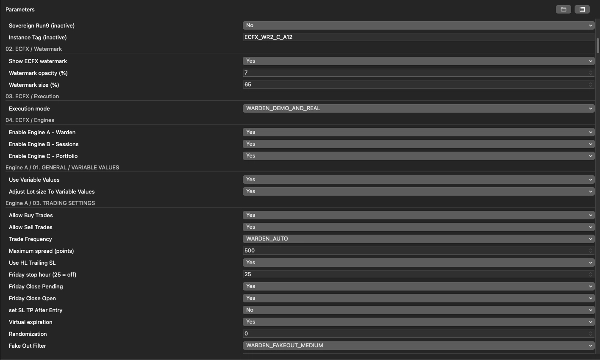
- Passez en revue les trois interrupteurs principaux des moteurs et les paramètres de risque dans chaque moteur.
- Examinez le mode d’exécution. La source inspectée supporte uniquement le backtesting, démo plus backtesting, ou démo/en direct plus backtesting. Sa valeur par défaut permet l’exécution démo et en direct.
- Vérifiez l’horloge de stratégie, les unités de spread et les spécifications du symbole broker avant de commencer.
- Commencez en démo et inspectez le journal pour la réussite de l’initialisation, les messages de chargement d’historique et les erreurs d’ordre éventuelles.
Il n’existe pas de dépôt minimum universel ou de paramètre de levier adapté à chaque configuration. La taille du compte, le volume minimum de trade, la distance de stop, les positions simultanées et les exigences de marge du broker doivent être évalués ensemble.
Heure du broker, points et pips
Le timing des sessions affecte directement la stratégie.
Le décalage UTC du broker MT5 (minutes) définit l’horloge de référence de la stratégie dans l’implémentation cTrader. C’est un décalage fixe qui ne suit pas automatiquement les changements d’heure d’été. Le moteur C contient aussi des réglages de décalage horaire séparés, il faut donc les vérifier systématiquement.
Le taille du point MT5 contrôle la valeur en prix d’un point de stratégie. Une valeur zéro la dérive des chiffres du symbole. Cela peut différer de la taille native du pip de cTrader.
Le moteur C conserve un pip de stratégie de 0.01 unités de prix. Ne copiez pas les valeurs de spread ou de distance entre des symboles or cotés différemment sans vérifier leurs unités.
Comment backtester Warden
- Ouvrez la section Backtesting de l’instance Warden dans cTrader Windows ou Mac.
- Sélectionnez le symbole or voulu et la période H1.
- Choisissez les dates de test et le capital de départ. Notez la devise du compte, le levier et le préréglage exact.
- Sélectionnez Données tick du serveur pour une évaluation détaillée des ordres en attente et de la gestion intrabar.
- Configurez les hypothèses de spread et commission pour refléter le broker prévu. Confirmez les unités affichées par cTrader.
- Vérifiez les décalages horaires de la stratégie, la correspondance de la taille du point et les paramètres de verrouillage du risque.
- Effectuez d’abord un test visuel court pour inspecter le tableau de bord, les entrées, sorties et le comportement des ordres.
- Effectuez l’évaluation complète sans mode visuel lorsque c’est possible.
- Laissez le test atteindre sa date de fin sélectionnée avant de considérer les chiffres comme définitifs.
- Sauvegardez le rapport et les paramètres pour pouvoir reproduire l’exécution.
Warden a besoin de données historiques pour ses périodes internes et ses retours en arrière. L’absence d’historique peut retarder les signaux ou empêcher certaines stratégies de trader. Inspectez le journal et assurez-vous d’avoir suffisamment d’historique avant la période que vous souhaitez évaluer.
Pour les contrôles de backtesting de la plateforme, consultez le guide officiel de backtesting cTrader.
Ce qu’il faut examiner dans les résultats
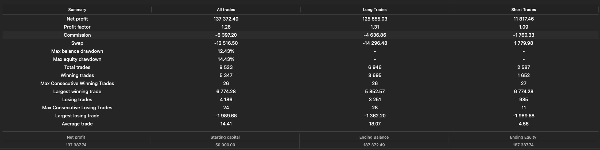
Évaluez plus que le chiffre final du profit :
- Drawdown maximal de l’équité et drawdown du solde.
- Profit réalisé versus profit ou perte flottante à la fin.
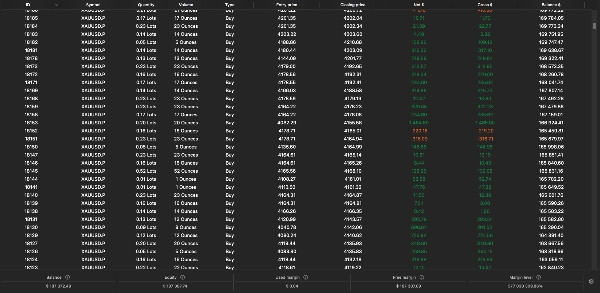
- Nombre de trades, séries de pertes et périodes de détention.
- Nombre maximal de positions simultanées et utilisation de la marge.
- Sensibilité au spread et à la commission.
- Rejets d’ordres, avertissements d’historique manquant et événements de verrouillage de risque.
- Résultats sur différentes périodes de marché.
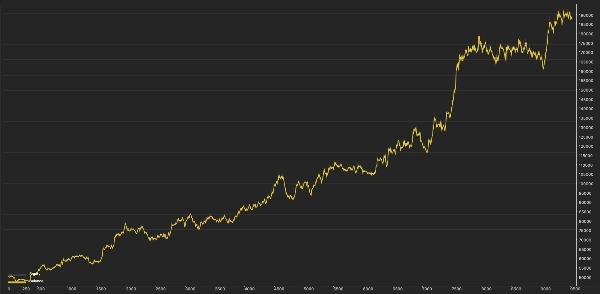
Testez chaque moteur séparément ainsi que la configuration combinée. Les résultats des moteurs isolés ne s’additionneront pas nécessairement au résultat combiné car l’équité du compte, le dimensionnement, la marge et les protections basées sur le compte interagissent.
Si vous optimisez, conservez une période distincte qui n’a pas été utilisée pour choisir les paramètres. Évitez de sélectionner une configuration uniquement parce qu’elle a produit le profit historique le plus élevé.
Tableau de bord et vérifications opérationnelles
Le panneau partagé aide à distinguer les conditions du compte des résultats de trading propres à Warden. Sur un compte avec d’autres activités de trading, le solde et l’équité du compte incluront cette activité.
Avant d’examiner un manque de trades, vérifiez :
- Le compte est en mode couverture plutôt qu’en netting.
- Le mode d’exécution permet l’environnement actuel.
- Les moteurs et sous-stratégies prévus sont activés.
- Les données historiques requises ont été chargées.
- La session de trading est ouverte.
- Les exigences de spread, marge et volume minimum sont satisfaites.
- Un verrouillage quotidien ou de drawdown n’a pas bloqué l’activité.
- Les ordres ou positions existants n’ont pas atteint une limite d’exposition.
Arrêter le cBot ne ferme pas nécessairement ses positions ni n’annule tous les ordres en attente sur tous les moteurs. Inspectez le compte après arrêt. Le trailing dynamique, les sorties temporisées et autres actions gérées par logiciel nécessitent que le cBot reste en fonctionnement.
Différences de plateforme
L’implémentation cTrader de Warden utilise les systèmes d’exécution, de données de marché et de compte de cTrader. Des trades ou performances identiques entre MT5 et cTrader n’ont pas été établis.
Le calendrier économique MQL5 n’est pas disponible dans cette implémentation. Le filtrage NFP applicable repose sur des horodatages fournis ou un repli approximatif ; il ne doit pas être considéré comme un filtre complet d’actualités en direct.
Les entrées marquées inactives ou héritées sont conservées pour compatibilité et ne fournissent pas de fonctionnalité active dans cette version.
Avertissement sur les risques
Le trading comporte des risques. Les performances passées ne garantissent pas les résultats futurs. Les simulations historiques peuvent différer considérablement du trading en direct en raison des conditions de prix, spread, commission, slippage, qualité des données, marge et exécution. Warden ne garantit pas de profit, une limite de drawdown fixe ou la réussite d’un challenge de prop-firm.
Résumé
- Engine A employs price-level breakout strategies by identifying swing highs and lows across multiple timeframes to place buy-stop and sell-stop orders with configurable stop-loss, take-profit, trailing stops, and filters for false breakouts and news events.
- Engine B uses session-based trading rules based on broker time, including range breakouts, scheduled buys, and optional momentum breakouts, with time-based exits and protective stops.
- Engine C combines a portfolio of technical strategies, including moving averages, RSI, volatility squeezes, pullbacks, and reversal patterns, with trend complements and sovereign strategies, all managed with risk controls like stop losses, profit targets, and drawdown locks.
A shared dashboard displays account metrics, open positions, pending orders, and individual engine results. The cBot supports multiple sizing methods and risk controls that vary by engine. It allows enabling or disabling each engine independently for testing or combined operation. The system requires careful setup of broker symbol, time offsets, and risk parameters. Backtesting is supported with detailed configuration options. The cBot uses market and account data from cTrader and does not guarantee profits or fixed drawdown limits.