
Description
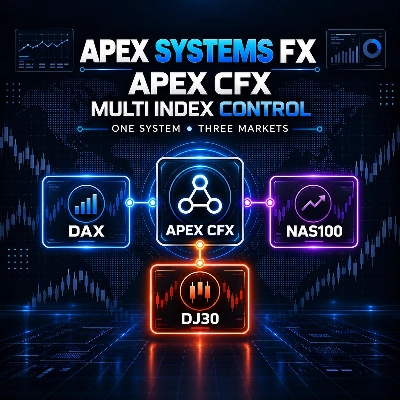
APEX CFX – MULTI INDEX CONTROL
ONE SYSTEM. THREE MARKETS.
Apex CFX – Multi Index Control brings the configurable Apex CFX framework into one cBot that can be used on:
• DAX / Germany 40
• NAS100 / Nasdaq 100
• DJ30 / Dow Jones 30
The system uses the same strategy structure and risk-management tools available in the dedicated Apex CFX single-market products.
It does not use martingale, grid logic or automatic position increases after losses.
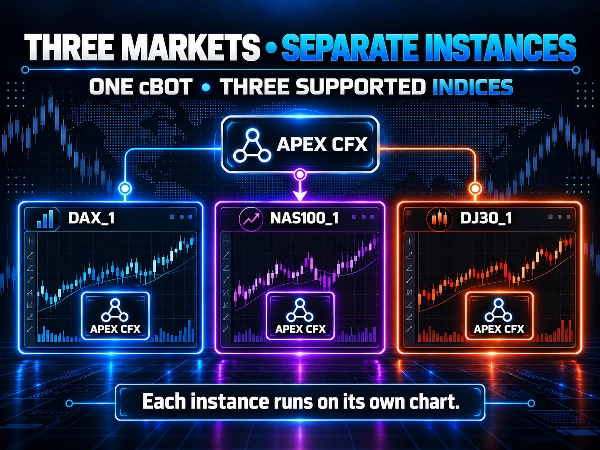
📊 THREE MARKETS, SEPARATE INSTANCES
To use multiple markets, the cBot must be started separately on the chart of each symbol.
Example:
• one DAX instance with Instance ID: DAX_1
• one NAS100 instance with Instance ID: NAS100_1
• one DJ30 instance with Instance ID: DJ30_1
A single instance does not analyse all three markets simultaneously. Each instance analyses and manages only the chart on which it is running.
The Instance ID must be set by the user and should be unique so that separate instances and their positions can be identified correctly.
📈 CONFIGURABLE TREND-FOLLOWING ENGINE
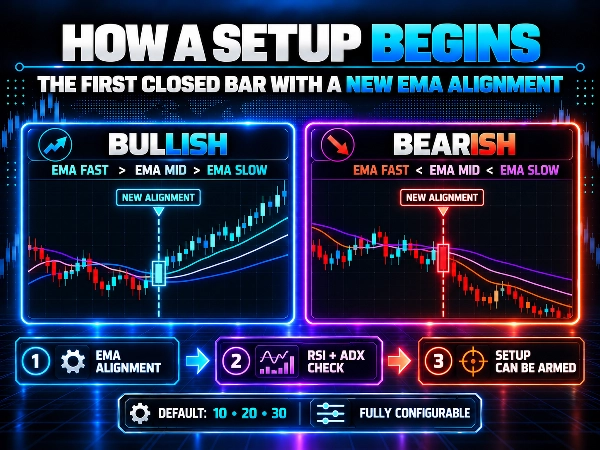
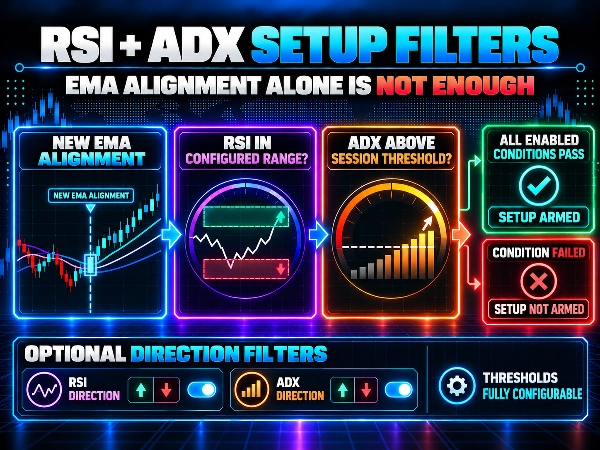
The strategy uses three exponential moving averages together with RSI and ADX filters.
Default values are:
• EMA Fast: 10
• EMA Mid: 20
• EMA Slow: 30
• RSI Period: 14
• ADX Period: 14
These values are fully configurable and are not mandatory settings.
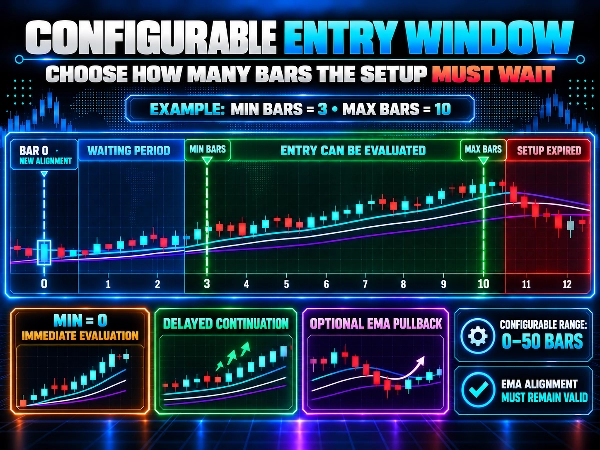
The system identifies a new bullish or bearish alignment of the three EMAs. A setup can be armed only when RSI and ADX meet the configured conditions.
Users can configure:
• the minimum number of bars to wait after the alignment;
• the maximum number of bars during which the setup remains valid;
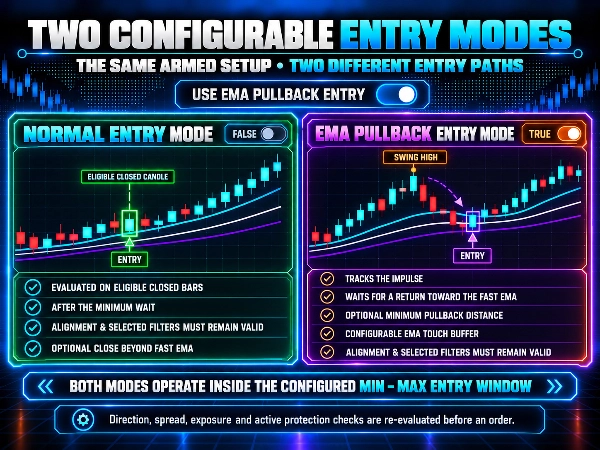
• confirmation of the close beyond the fast EMA;
• an RSI range check at entry;
• a minimum ADX value at entry;
• optional RSI and ADX direction filters;
• an optional pullback entry towards the fast EMA.
This allows users to test both entries close to a new EMA alignment and continuation entries after the trend structure has remained valid for multiple bars.
↕️ TRADE DIRECTION CONTROL
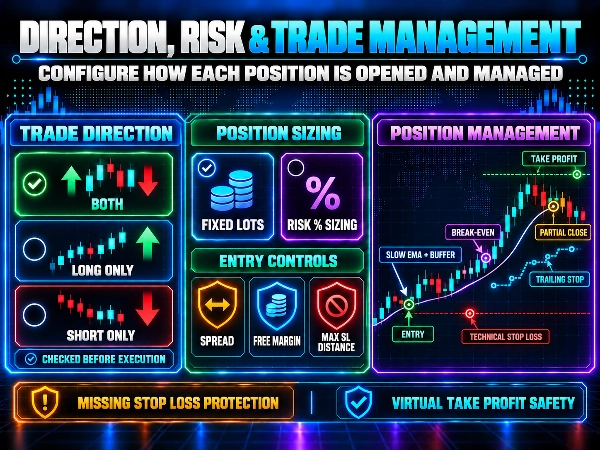
Trade Direction can be configured as:
• Both
• Long Only
• Short Only
The selected direction is checked during setup detection and before order execution.
⚙️ POSITION AND RISK MANAGEMENT
Apex CFX – Multi Index Control supports:
• fixed-lot sizing;
• optional risk-percentage sizing;
• technical stop loss based on the slow EMA;
• minimum stop-loss distance control;
• optional maximum stop-loss distance filter;
• spread filter;
• estimated free-margin control after entry;
• optional take profit;
• optional break-even;
• optional trailing stop;
• optional partial close;
• Missing Stop Loss Protection;
• Virtual Take Profit Safety.
All values must be reviewed and adapted to the symbol specifications, broker conditions, leverage, account balance and personal risk tolerance.
⏱️ SESSIONS, BLACKOUT WINDOWS AND SHUTDOWN TIME
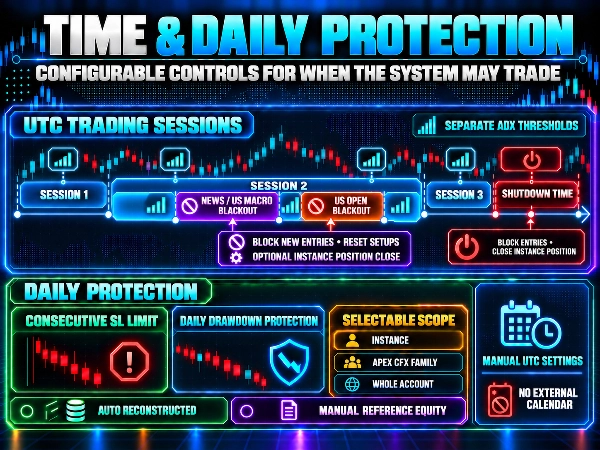
The cBot provides configurable trading sessions with separate ADX thresholds.
Two independent Entry Blackout windows are also available:
• News / US Macro Entry Blackout
• US Open Entry Blackout
During a blackout window, the system can block new entries, reset active setups and, if configured, close the position belonging to the same instance.
Times must be entered manually in UTC. The cBot does not connect to an external economic calendar and does not interpret news events automatically.
Shutdown Time can prevent new entries after the configured time and, if enabled, close positions belonging to the same instance.
🛡️ DAILY PROTECTION
Available tools include:
• stop after a configurable number of consecutive stop-loss results;
• Daily Drawdown Protection;
• selectable scope: individual instance, Apex CFX family or whole account;
• AutoReconstructed mode;
• ManualReferenceEquity mode;
• optional closing of Apex CFX positions when the configured limit is reached.
These functions are risk-management tools. They do not guarantee compliance with broker, funded-account or prop-firm rules.
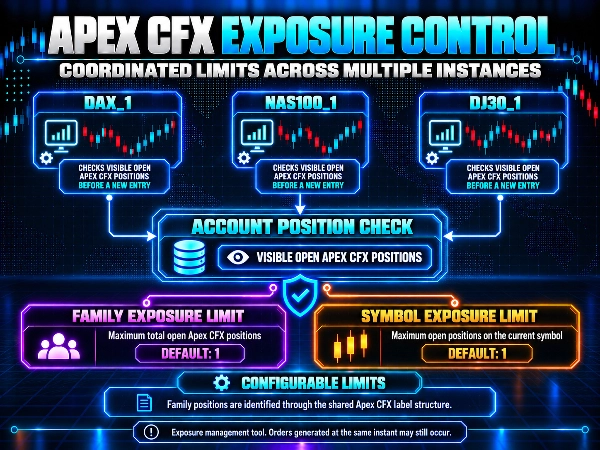
🔗 APEX CFX EXPOSURE CONTROL
Apex CFX instances can coordinate exposure through the positions visible on the trading account.
Before submitting a new order, each instance can check:
• the total number of open Apex CFX positions;
• the number of open Apex CFX positions on the current symbol;
• positions identified through the shared Apex CFX family label.
Default settings are:
• Use Apex CFX Family Exposure Limit: enabled;
• Max Apex CFX Open Positions: 1;
• Use Symbol Exposure Limit: enabled;
• Max Apex CFX Positions On This Symbol: 1.
With these settings, an existing Apex CFX position can prevent other instances from opening another trade.
The limits are configurable. Increasing the total family limit can allow additional simultaneous exposure while retaining a separate limit for each symbol.
Exposure Control is designed to reduce operational overlap across Apex CFX instances and products. It is not an absolute guarantee against separate instances submitting orders at exactly the same moment.
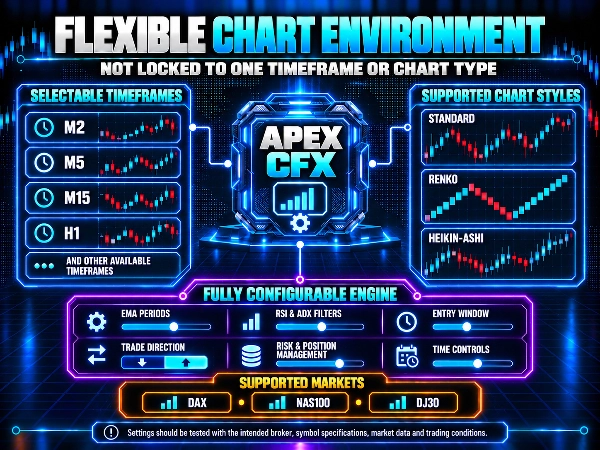
🖥️ TIMEFRAME AND CHART COMPATIBILITY
The cBot is not restricted to M2 or to standard time-based charts.
It can be used on different timeframes and on chart types supported by cTrader, including Renko and Heikin-Ashi.
Each combination of market, timeframe, chart type, broker and parameters requires separate testing and adjustment.
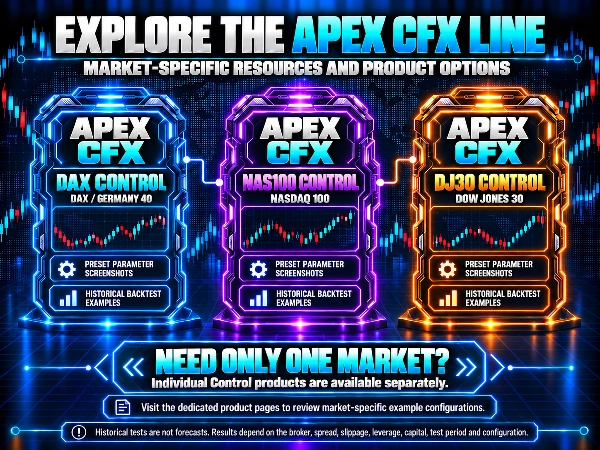
📌 MARKET-SPECIFIC REFERENCE CONFIGURATIONS
Complete reference configurations and historical results for each supported market are presented on the dedicated products available from the ApexSystemsFX seller profile:
• Apex CFX – DAX Control
• Apex CFX – NAS100 Control
• Apex CFX – DJ30 Control
The dedicated product pages contain complete parameter screenshots and the historical results associated with their respective reference configurations.
Preset files are not included. The displayed settings must be reproduced manually inside the cBot.
Results published on the dedicated products belong to separate historical backtests. They must not be added together or interpreted as combined portfolio results for Apex CFX – Multi Index Control.
Dedicated versions are available separately for users interested in only one market.
👤 DESIGNED FOR USERS WHO
• want to use the Apex CFX framework on DAX, NAS100 and DJ30;
• want to configure each market through a separate instance;
• prefer a selective and configurable trend-following system;
• want control over direction, risk, trading times and exposure;
• need to coordinate multiple Apex CFX instances;
• understand backtesting, optimisation and position sizing.
⚠️ RISK DISCLAIMER
Trading involves risk and may result in financial loss.
Historical results, backtests and optimisation results do not guarantee future or live performance.
This cBot does not guarantee profits, funded-account eligibility, prop-firm compliance or challenge success.
Users are responsible for checking symbol compatibility and adapting every parameter to their broker, account, leverage and personal risk tolerance.
Demo testing is strongly recommended before using real capital.
SUPPORT
For setup assistance, symbol compatibility or technical questions, please use the Discussion section on the cTrader Store product page.
Summary
Trade direction can be set to long only, short only, or both, with risk and position management features including fixed lot sizing, risk-percentage sizing, technical stop loss based on the slow EMA, take profit, trailing stops, partial closes, and controls for spread and margin. The system avoids martingale and grid trading methods.
Additional features include configurable trading sessions, blackout windows for news and market open times, daily protection mechanisms like drawdown limits and stop-loss counters, and coordinated exposure control across multiple Apex CFX instances to limit simultaneous positions per symbol and overall.
The cBot supports various chart types and timeframes compatible with cTrader, including Renko and Heikin-Ashi. Users must manually configure parameters and instance IDs for proper operation. This product is intended for users familiar with backtesting, optimization, and position sizing who seek selective trend-following control across multiple indices.