
Deskripsi
Volume Profile TPO Bubble — oleh The Quant
Volume Profile TPO Bubble adalah indikator cTrader premium yang dibuat oleh The Quant.
Ingin bergabung dengan kami? Tautan ada di bio
━━━━━━━━━━━━━━━━━━━━━━
VOLUME PROFILE TPO BUBBLE
━━━━━━━━━━━━━━━━━━━━━━
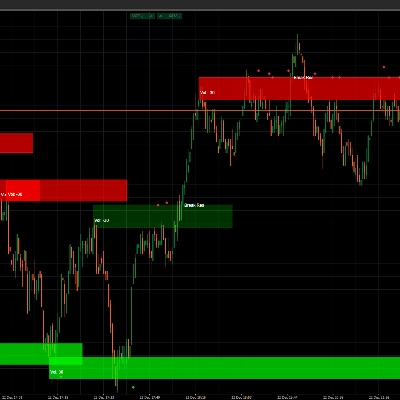
Volume Profile TPO Bubble adalah indikator pembaca pasar lengkap untuk cTrader.
Ini menggabungkan alat pembaca pasar yang kuat dalam satu indikator yang bersih:
◆ Volume Profile
◆ Bubble Chart
◆ TPO
◆ Sinyal POC Break & Retest untuk robot
Alat ini dirancang untuk trader yang ingin membaca zona volume dengan lebih jelas, mengidentifikasi level POC penting, dan menggunakan level tersebut dalam strategi manual atau otomatis.
Ini dibuat untuk cTrader, dengan mempertimbangkan analisis visual dan otomasi cBot.
━━━━━━━━━━━━━━━━━━━━━━
APA YANG DILAKUKAN INDIKATOR INI
━━━━━━━━━━━━━━━━━━━━━━
Zona Aktivitas Pasar
Volume Profile TPO Bubble membantu Anda mengidentifikasi zona di mana pasar aktif.
Zona-zona ini disebut POC, atau Points of Control.
Sebuah POC adalah area harga di mana aktivitas terkonsentrasi.
Ketika harga kembali ke area ini, bisa saja menembusnya, menguji ulangnya, menolaknya, atau bereaksi darinya.
Tujuan Utama
Tujuannya bukan untuk memprediksi pasar.
Tujuannya adalah membuat zona pasar penting lebih mudah dilihat, lebih mudah dipahami, dan lebih mudah digunakan dalam strategi.
━━━━━━━━━━━━━━━━━━━━━━
MODE VISUAL UTAMA
━━━━━━━━━━━━━━━━━━━━━━
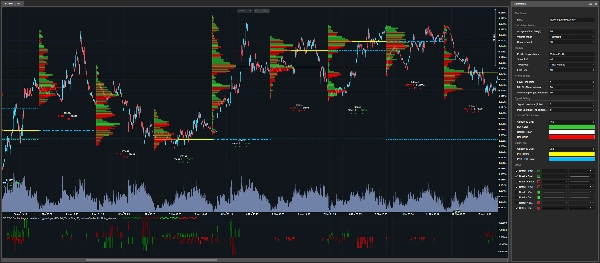
◆ Volume Profile
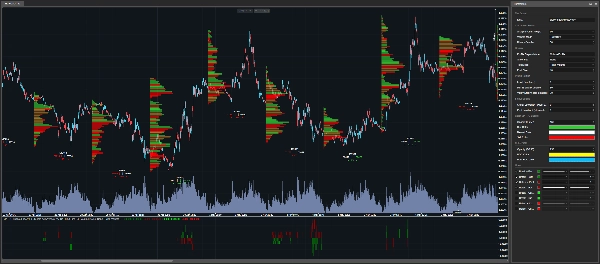
Mode Volume Profile menampilkan batang volume horizontal langsung di grafik cTrader.
Semakin besar batangnya, semakin penting zona harga selama lilin analisis yang dipilih.
Mode ini berguna saat Anda ingin melihat struktur penuh dari distribusi volume.
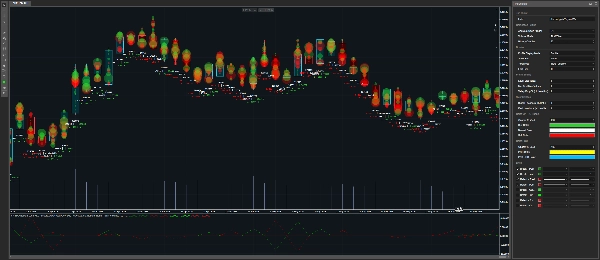
◆ Bubble Chart
Mode Bubble Chart menampilkan zona volume penting sebagai gelembung.
Semakin besar gelembung, semakin penting zona yang terdeteksi.
Mode ini dibuat untuk pembacaan visual cepat.
Ini membantu Anda dengan cepat menemukan area paling penting di grafik.
Jika Anda ingin menggunakan indikator terutama sebagai Bubble Chart, Anda dapat mengatur Tampilkan POC ke Tidak Ada, lalu sesuaikan:
• Min % dari Volume Maks
• Penurunan Lembah %
Pengaturan ini mengontrol berapa banyak gelembung yang ingin Anda lihat.
Nilai lebih rendah menunjukkan lebih banyak gelembung.
Nilai lebih tinggi hanya mempertahankan zona yang paling bersih.
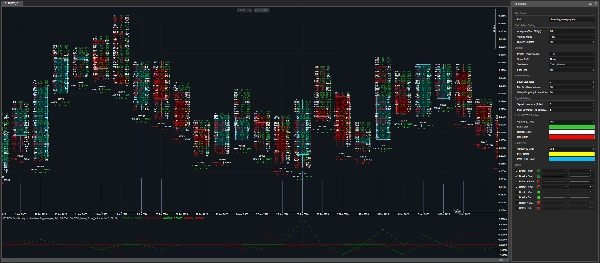
◆ TPO
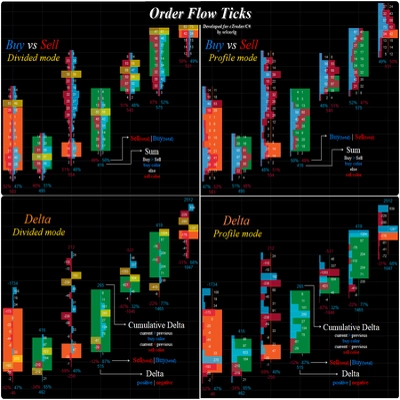
Mode TPO memberikan pandangan lebih rinci tentang apa yang terjadi di dalam sebuah lilin.
Ini menampilkan:
• Volume beli
• Volume jual
• Delta
• Aktivitas level harga
Mode ini berguna saat Anda ingin memahami struktur internal sebuah zona, bukan hanya melihat di mana volume berada.
━━━━━━━━━━━━━━━━━━━━━━
LOGIKA TICK DAN TICKXSIZE
━━━━━━━━━━━━━━━━━━━━━━
Konteks Volume CFD
Pada CFD, trader tidak menerima volume bursa terpusat seperti di pasar berjangka.
Sebaliknya, volume didasarkan pada data tick broker.
Indikator ini memberikan dua mode perhitungan volume:
• Tick
• TickXSize
◆ Tick
Setiap tick dihitung sebagai satu unit.
Ini adalah pembacaan sederhana dari aliran tick broker.
◆ TickXSize
Tick diberi bobot berdasarkan ukuran pergerakan harga.
Tick yang menggerakkan harga sebesar 1 pip memiliki bobot lebih besar daripada tick yang menggerakkan harga sebesar 0,1 pip.
Ini dapat membantu mengungkap zona di mana pergerakan memiliki dampak lebih besar, meskipun hitungan tick mentah saja tidak membuat zona tersebut jelas.
Perbedaan Sederhana
Tick menghitung kejadian.
TickXSize menghitung kejadian dengan bobot pergerakan.
━━━━━━━━━━━━━━━━━━━━━━
DETEKSI POC
━━━━━━━━━━━━━━━━━━━━━━
Cara POC Dideteksi
Indikator mendeteksi zona POC menggunakan puncak volume dan logika penyaringan.
Sebuah zona harus cukup kuat dan cukup terisolasi agar dianggap relevan.
Ini membantu menghindari menampilkan setiap area kecil yang berisik di grafik.
POC Saat Ini dan Masa Lalu
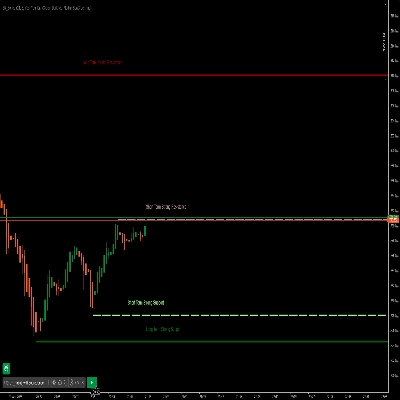
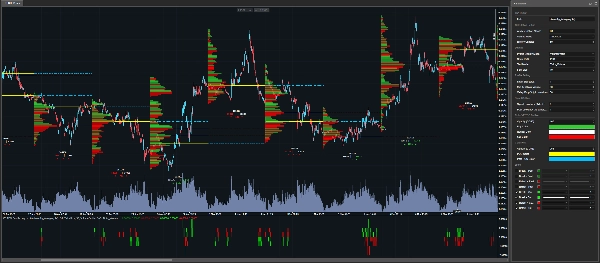
POC Saat Ini dapat ditampilkan langsung di grafik.
Mereka juga dapat diperpanjang ke lilin analisis berikutnya dengan garis putus-putus.
POC Masa Lalu juga dapat ditampilkan, memungkinkan trader melacak level lama yang mungkin masih penting.
━━━━━━━━━━━━━━━━━━━━━━
SINYAL BREAK & RETEST SIAP ROBOT
━━━━━━━━━━━━━━━━━━━━━━
Indikator Visual dan Alat Otomasi
Volume Profile TPO Bubble bukan hanya indikator visual.
Ini juga menampilkan seri output yang dapat digunakan dalam cBot atau robot trading.
Jenis Sinyal yang Terdeteksi
Indikator dapat mendeteksi:
• Break level POC saat ini
• Retest level POC saat ini
• Break level POC masa lalu
• Retest level POC masa lalu
Ini memungkinkan robot mendeteksi ketika harga berinteraksi dengan zona volume penting.
━━━━━━━━━━━━━━━━━━━━━━
SKOR SINYAL
━━━━━━━━━━━━━━━━━━━━━━
Apa Arti Skor
Indikator tidak hanya mengembalikan sinyal.
Ini juga mengembalikan sebuah skor.
Skor memberi tahu robot zona POC mana yang disentuh, ditembus, atau diuji ulang.
Logika Skor
Peringkat didasarkan pada harga pembukaan dari lilin analisis yang dipilih.
Skor positif mewakili zona POC di atas harga pembukaan.
Skor negatif mewakili zona POC di bawah harga pembukaan.
Contoh
• +1 = zona POC pertama di atas harga pembukaan
• -1 = zona POC pertama di bawah harga pembukaan
• +2 = zona POC kedua di atas harga pembukaan
• -3 = zona POC ketiga di bawah harga pembukaan
Semakin jauh angkanya dari nol, semakin jauh zona tersebut dari harga pembukaan.
Mengapa Ini Penting untuk Otomasi
Ini berguna untuk otomasi karena robot tidak hanya tahu bahwa sinyal terjadi.
Robot juga tahu di mana sinyal terjadi.
━━━━━━━━━━━━━━━━━━━━━━
PARAMETER
━━━━━━━━━━━━━━━━━━━━━━
Semua parameter diorganisasikan berdasarkan kategori sehingga Anda dapat dengan cepat memahami apa yang dikontrol oleh setiap pengaturan.
━━━━━━━━━━━━━━━━━━━━━━
PENGATURAN PERHITUNGAN
━━━━━━━━━━━━━━━━━━━━━━
◆ Kerangka Waktu Analisis
• Memilih kerangka waktu yang digunakan untuk membangun profil.
• Kerangka waktu ini adalah dasar yang digunakan untuk membangun profil, mendeteksi POC, dan mengatur skor sinyal.
Contoh:
• Harian = satu profil per hari
• H4 = satu profil setiap empat jam
◆ Mode Volume
• Memilih bagaimana volume tick dihitung.
Mode yang tersedia:
• Tick = satu tick sama dengan satu unit
• TickXSize = tick diberi bobot berdasarkan ukuran pergerakan harga
Tick adalah mode sederhana.
TickXSize memberikan bobot lebih pada tick yang menggerakkan harga lebih kuat.
◆ Lilin Riwayat
• Menentukan berapa banyak lilin masa lalu dari Kerangka Waktu Analisis yang disimpan di grafik.
• Lebih banyak lilin memberikan konteks historis lebih banyak.
• Lebih sedikit lilin membuat grafik lebih ringan.
• Indikator mungkin menyimpan margin tambahan kecil secara internal agar POC, Break, dan Retest dihitung dengan benar.
━━━━━━━━━━━━━━━━━━━━━━
PENGATURAN TAMPILAN
━━━━━━━━━━━━━━━━━━━━━━
◆ Mode Tampilan Profil
• Pilih apa yang ditampilkan di grafik:
• Tidak Ada
• Volume Profile
• Bubble
• TPO
Tidak Ada berguna untuk otomasi karena menghapus gambar dari grafik sambil menjaga output indikator tetap tersedia.
Ini memungkinkan trader menjaga grafik bersih dan tetap menggunakan sinyal dalam robot.
◆ Tampilkan POC
• Mengontrol level POC mana yang ditampilkan.
Opsi yang tersedia:
• Tidak Ada = tidak ada garis POC
• PoC = level POC saat ini
• PoC Masa Lalu = level POC masa lalu
• Semua = level POC saat ini dan masa lalu
POC saat ini dapat diperpanjang ke lilin analisis berikutnya dengan garis putus-putus.
◆ Mode Teks
• Mengontrol informasi volume yang ditampilkan di bawah lilin.
Opsi yang tersedia:
• Tidak Ada = tanpa teks
• Volume Tick = informasi volume tick
• Persentase Delta = ketidakseimbangan ditampilkan sebagai persentase
Untuk otomasi, ini dapat diatur ke Tidak Ada agar grafik tetap bersih.
◆ Ukuran Font
• Mengontrol ukuran teks yang ditampilkan.
• Tingkatkan untuk keterbacaan yang lebih baik.
• Kurangi jika grafik terlalu penuh.
━━━━━━━━━━━━━━━━━━━━━━
PENGATURAN PROFIL
━━━━━━━━━━━━━━━━━━━━━━
◆ Ukuran Level
• Mengontrol ukuran setiap level harga.
• Nilai lebih kecil memberikan detail lebih banyak.
• Nilai lebih besar menciptakan profil yang lebih bersih dan ringan.
• Indikator menyertakan mekanisme pengaman untuk menghindari pembuatan terlalu banyak objek grafik.
Jika pesan merekomendasikan meningkatkan Ukuran Level, itu berarti indikator melindungi grafik dari kelebihan beban yang tidak perlu.
Dalam kasus tersebut, level minimum yang aman sudah diterapkan secara internal.
◆ Min % dari Volume Maks
• Menyaring zona berdasarkan kekuatannya.
• Indikator pertama menemukan zona volume terkuat di dalam lilin.
• Kemudian hanya mempertahankan zona yang mencapai setidaknya persentase yang dipilih dari zona maksimum tersebut.
Contoh:
• Jika Min % dari Volume Maks diatur ke 80%, hanya zona dengan setidaknya 80% dari zona volume tertinggi yang dapat dipilih.
Nilai lebih rendah menunjukkan lebih banyak zona.
Nilai lebih tinggi menunjukkan zona yang lebih sedikit tetapi lebih kuat.
Min % dari Volume Maks adalah filter kekuatan.
◆ Penurunan Lembah %
• Memeriksa apakah sebuah POC benar-benar terisolasi.
• Anggap POC sebagai puncak gunung.
• Untuk mengonfirmasi bahwa itu adalah puncak nyata, indikator memeriksa apakah volume turun cukup di sekitarnya.
Nilai lebih rendah menerima lebih banyak zona.
Nilai lebih tinggi hanya mempertahankan zona yang lebih bersih dan lebih terpisah.
Penurunan Lembah adalah filter isolasi.
━━━━━━━━━━━━━━━━━━━━━━
PENGATURAN SINYAL
━━━━━━━━━━━━━━━━━━━━━━
◆ Signal Lookback
• Memilih lilin tertutup mana yang menyediakan POC yang digunakan untuk sinyal Break dan Retest saat ini.
Nilai yang tersedia:
• 0 = lilin tertutup terakhir
• 1 = lilin sebelum lilin tertutup terakhir
• 2 = lebih jauh lagi ke belakang
Ini memungkinkan trader menguji sinyal berdasarkan referensi POC yang lebih baru atau lebih lama.
◆ Past Lookback
• Menentukan berapa banyak lilin lama yang dipindai untuk membangun level POC masa lalu.
• Nilai yang lebih tinggi memungkinkan indikator mencari zona POC lama yang mungkin masih penting.
━━━━━━━━━━━━━━━━━━━━━━
PENGATURAN WARNA
━━━━━━━━━━━━━━━━━━━━━━
◆ Warna Profil
Pengaturan ini menyesuaikan warna profil visual:
• Warna Beli
• Warna Jual
• Warna Netral
• Opasitas Profil
Pengaturan ini mengontrol tampilan Volume Profile, Bubble Chart, dan TPO elemen.
◆ Warna POC
Pengaturan ini menyesuaikan warna level POC saat ini dan masa lalu:
• Warna POC
• Warna POC Masa Lalu
• Opasitas POC
Menggunakan warna berbeda untuk POC saat ini dan POC masa lalu membuat grafik lebih mudah dibaca.
━━━━━━━━━━━━━━━━━━━━━━
SIAPA YANG DITUJU INDIKATOR INI?
━━━━━━━━━━━━━━━━━━━━━━
Indikator ini dirancang untuk:
◆ Pengguna cTrader
◆ Trader Volume Profile
◆ Trader TPO
◆ Pengguna Bubble Chart
◆ Trader POC
◆ Trader Algo
◆ Pengembang cBot
◆ Trader yang menginginkan alat visual dan output siap robot
◆ Trader yang ingin menguji logika Break dan Retest di sekitar zona volume
━━━━━━━━━━━━━━━━━━━━━━
CATATAN PENTING
━━━━━━━━━━━━━━━━━━━━━━
Indikator ini bukan tombol ajaib.
Indikator ini tidak memprediksi pasar.
Indikator ini membantu trader mengidentifikasi zona pasar penting, mengamati reaksi harga, dan membangun strategi yang dapat dites, dioptimalkan, dan diotomatisasi.
Selalu uji strategi Anda sebelum menggunakannya secara langsung.
━━━━━━━━━━━━━━━━━━━━━━
THE QUANT
━━━━━━━━━━━━━━━━━━━━━━
The Quant adalah proyek trading dan algo trading yang berfokus pada:
◆ Data
◆ Otomasi
◆ Backtesting
◆ Optimasi
◆ Anti-overfitting
Tujuannya adalah membantu trader beralih dari ide menjadi strategi yang dapat diuji, terstruktur, dan dapat diotomatisasi.
The Quant, untuk para penganut data.
Ringkasan
Designed for both manual traders and algorithmic developers, it supports cBot automation by providing break and retest signals of current and past POC levels, along with scoring to indicate the relative position of these zones to the candle open price. This facilitates the creation and testing of volume-based trading strategies.
Volume calculation can be set to simple tick counts or weighted by price movement size (TickXSize), enhancing the detection of impactful volume zones, especially in CFD markets where volume data is broker-dependent. The indicator offers customizable display modes, filtering parameters for volume zone strength and isolation, and color settings for clarity.
Intended for cTrader users interested in volume profile, TPO, bubble chart visualization, and automated trading strategies, it aids in identifying significant volume zones and price reactions without predicting market direction.
Ulasan pelanggan
5 | 100 % | |
4 | 0 % | |
3 | 0 % | |
2 | 0 % | |
1 | 0 % |

![Logo "[Stellar Strategies] Inside Bar with Signals"](https://cdn.ctrader.com/image/webp/1d9e8bfa-3b2c-4440-bb37-5856902008a7_30683)