Описание
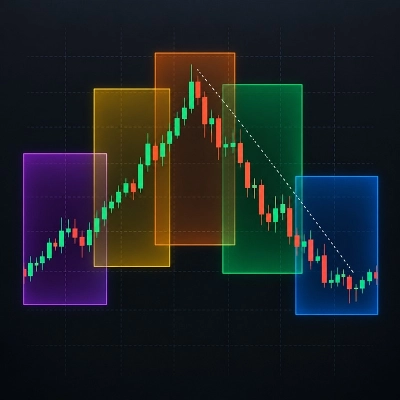
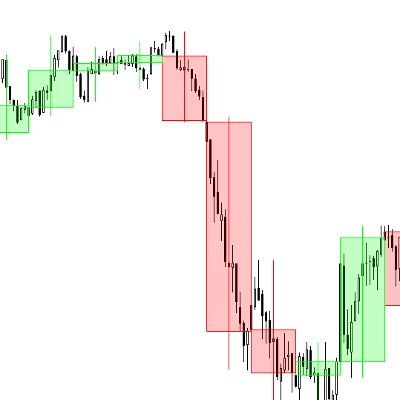
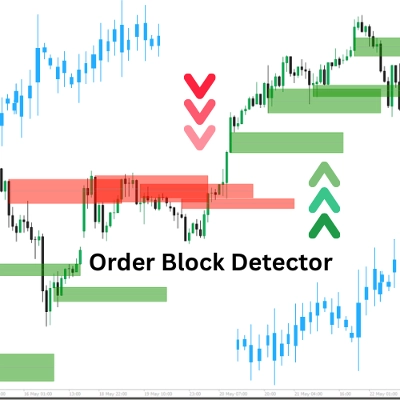
Индикатор "Order Block Detector" создан для обнаружения и отображения Order Blocks (OBs) на графике цены — ключевых зон, где крупные игроки (институции) размещают значительные ордера на покупку или продажу, часто вызывая сильные ценовые реакции. Он помогает трейдерам точно определять потенциальные зоны поддержки/сопротивления для более умных входов в сделки, установки стоп-лоссов или тейк-профитов.
Концепция
- Order Blocks: Это ценовые зоны, где рынок разворачивается или приостанавливается из-за интенсивного институционального потока ордеров. Индикатор обнаруживает OB, анализируя пики объема и состояние рынка (бычье/медвежье).
- Как это работает:
-
- Определяет состояние рынка (бычье/медвежье), сравнивая максимумы/минимумы с периодом обратного просмотра (Length).
- Определяет OB на пиках объема, связанных с ключевыми ценовыми уровнями.
- Рисует прямоугольники и средние линии для обозначения OB, одновременно проверяя и удаляя устранённые OB при пробое цены.
- Применение: Трейдеры могут использовать OB как зоны с высокой вероятностью для настройки сделок, управления рисками или целей по прибыли.
Разбор параметров
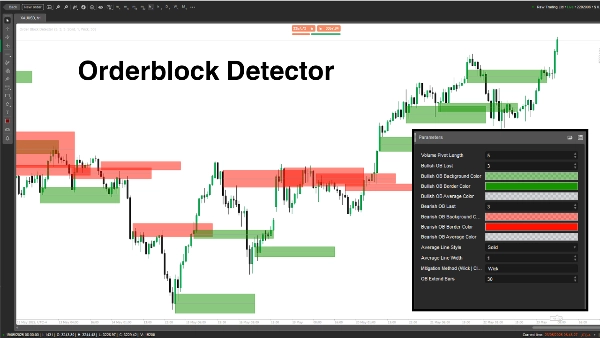
- Длина пивота объема (Length, по умолчанию: 5, мин: 1)
-
- Что делает: Устанавливает период обратного просмотра (количество баров) для расчёта максимумов/минимумов и пиков объема.
- Почему важно: Более длинный период повышает точность, но снижает частоту OB; короткий период ловит больше OB, но может включать шум.
- Последний бычий OB (BullExtLast, по умолчанию: 3, мин: 1)
-
- Что делает: Ограничивает количество сохраняемых и отслеживаемых бычьих OB.
- Почему важно: Ограничивает количество отображаемых бычьих OB для поддержания чистоты графика и оптимизации производительности.
- Цвет фона бычьего OB (BgBullCss, по умолчанию: #80169400)
-
- Что делает: Устанавливает цвет фона и прозрачность прямоугольников бычьих OB.
- Почему важно: Помогает визуально выделять бычьи OB на графике.
- Цвет границы бычьего OB (BullCss, по умолчанию: #169400)
-
- Что делает: Определяет цвет границы прямоугольников бычьих OB.
- Почему важно: Повышает видимость зон бычьих OB.
- Цвет средней линии бычьего OB (BullAvgCss, по умолчанию: #609598A1)
-
- Что делает: Окрашивает среднюю линию внутри бычьих OB.
- Почему важно: Отмечает середину OB, служащую ключевым уровнем для трейдеров.
- Последний медвежий OB (BearExtLast, по умолчанию: 3, мин: 1)
-
- Что делает: Ограничивает количество сохраняемых и отслеживаемых медвежьих OB.
- Почему важно: Как и BullExtLast, поддерживает график в чистоте, ограничивая количество медвежьих OB.
- Цвет фона медвежьего OB (BgBearCss, по умолчанию: #80FF1100)
-
- Что делает: Устанавливает цвет фона и прозрачность прямоугольников медвежьих OB.
- Почему важно: Отличает медвежьи OB от бычьих.
- Цвет границы медвежьего OB (BearCss, по умолчанию: #FF1100)
-
- Что делает: Определяет цвет границы прямоугольников медвежьих OB.
- Почему важно: Делает медвежьи OB заметными для быстрого распознавания.
- Цвет средней линии медвежьего OB (BearAvgCss, по умолчанию: #609598A1)
-
- Что делает: Окрашивает среднюю линию внутри медвежьих OB.
- Почему важно: Выделяет центральный ценовой уровень медвежьих OB для планирования сделок.
- Стиль средней линии (LineStyle, по умолчанию: Solid)
-
- Что делает: Устанавливает стиль средней линии OB (сплошная, пунктирная, точечная).
- Почему важно: Позволяет настроить внешний вид средней линии под предпочтения трейдера.
- Толщина средней линии (LineWidth, по умолчанию: 1, мин: 1)
-
- Что делает: Регулирует толщину средней линии OB.
- Почему важно: Контролирует, насколько заметной будет средняя линия на графике.
- Метод устранения (Mitigation, по умолчанию: "Wick")
-
- Что делает: Определяет, как OB считаются недействительными:
-
- Wick: Использует минимальную цену (бычий OB) или максимальную цену (медвежий OB) для проверки устранения.
- Close: Использует цену закрытия для проверки устранения.
- Почему важно: Влияет на чувствительность индикатора к пробою ценой зон OB, определяя момент удаления OB.
Order Block Detector — мощный инструмент для обнаружения институциональных зон ордеров на основе всплесков объема и ценового действия. Он рисует четкие прямоугольники OB со средними линиями и динамически удаляет недействительные. Трейдеры могут настраивать параметры для точной настройки обнаружения, отображения и управления OB в соответствии со своим стилем торговли.
Сводка
The indicator works by analyzing volume pivot highs and determining market state (bullish or bearish) based on highs and lows over a configurable lookback period. It marks OBs with rectangles and average lines, dynamically removing those invalidated when price breaks through the zones. Users can customize parameters such as the lookback length, the number of bullish and bearish OBs tracked, colors and styles of OB rectangles and average lines, and the method used to detect OB mitigation (using wick or close prices).
This flexibility allows traders to tailor the detection and visualization of Order Blocks to their trading style, aiding in identifying high-probability zones for trade setups, risk management, and profit targeting.
Отзывы покупателей
5 | 100 % | |
4 | 0 % | |
3 | 0 % | |
2 | 0 % | |
1 | 0 % |