![Trading product for Session Volume Profile (SVP) [Iridio Capital] Indicatore Forex Scalping, image 1](https://cdn.ctrader.com/image/webp/b058beb7-b143-45f3-87d0-8c524c00b203_61552)
![Trading product for Session Volume Profile (SVP) [Iridio Capital] Indicatore Forex Scalping, image 2](https://cdn.ctrader.com/image/webp/5a718c06-1f7f-4392-9713-cbbaf6909edc_40921)
![Trading product for Session Volume Profile (SVP) [Iridio Capital] Indicatore Forex Scalping, image 3](https://cdn.ctrader.com/image/webp/98670b21-a217-47cd-9316-d435e137d110_40922)
![Trading product for Session Volume Profile (SVP) [Iridio Capital] Indicatore Forex Scalping, image 4](https://cdn.ctrader.com/image/webp/4aed1925-fc56-43fb-b779-33e537d4199f_40923)
![Trading product for Session Volume Profile (SVP) [Iridio Capital] Indicatore Forex Scalping, image 5](https://cdn.ctrader.com/image/webp/0c3dba4a-5e71-4f39-8b63-c68427d2ffd0_40924)
![Trading product for Session Volume Profile (SVP) [Iridio Capital] Indicatore Forex Scalping, image 6](https://cdn.ctrader.com/image/webp/feceeb45-4749-44b9-a262-124329597692_40925)
![Trading product for Session Volume Profile (SVP) [Iridio Capital] Indicatore Forex Scalping, image 7](https://cdn.ctrader.com/image/webp/30a6dcda-3437-408d-a21a-c8aec6266e12_40926)
![Trading product for Session Volume Profile (SVP) [Iridio Capital] Indicatore Forex Scalping, image 8](https://cdn.ctrader.com/image/webp/a7c4a5e6-46ae-4e3d-8b5a-81c83e524654_40927)
![Trading product for Session Volume Profile (SVP) [Iridio Capital] Indicatore Forex Scalping, image 9](https://cdn.ctrader.com/image/webp/7e806695-af0e-4b39-a1e6-1bb4dd113a09_61551)
Descrizione
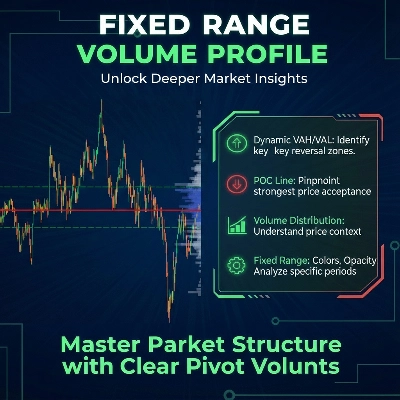
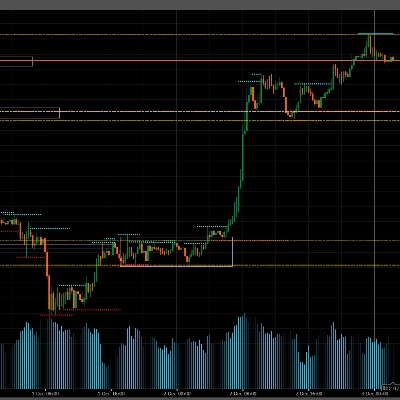
Session Volume Profile che costruisce un profilo separato per ogni sessione di trading e estende automaticamente i livelli POC, VAH e VAL nel futuro fino a quando il prezzo li tocca. È progettato per i trader che desiderano un'analisi del volume in stile futures sui mercati CFD e forex, senza pagare per dati di borsa costosi.
Cosa fa questo indicatore
-Traccia un Volume Profile basato sulla sessione utilizzando il volume tick per ogni giorno di trading o sessione personalizzata.
-Separa l'attività di acquisto e vendita per livello di prezzo usando la direzione della candela, mostrando volumi verdi (acquisto) e rossi (vendita) in ogni riga.
-Calcola automaticamente POC (Point of Control) come il livello di prezzo con la massima attività nella sessione.
-Disegna Value Area (VA) basata su una percentuale configurabile (default 70%), con chiare VAH (Value Area High) e VAL (Value Area Low) come confini.
-Estende POC, VAH e VAL orizzontalmente verso destra dopo la chiusura della sessione e li mantiene sul grafico fino a quando il mercato ritesta questi livelli.
-Rileva le ore di trading dalle Market Hours del simbolo o permette di definire orari di sessione personalizzati.
-Mostra più sessioni sullo stesso grafico, con separatori verticali opzionali.
-Offre completa personalizzazione di colori, opacità, numero di righe, larghezza dell'istogramma e lato (sinistro o destro).
Questo lo rende una “mappa della sessione” compatta della partecipazione al mercato, evidenziando zone chiave di supporto e resistenza derivate dalla distribuzione del volume piuttosto che solo dagli oscillamenti di prezzo.
Come funziona (in termini semplici)
Per ogni sessione, l'indicatore misura il volume tick di ogni candela e lo distribuisce tra le righe di prezzo tra il massimo e il minimo della barra. Il volume tick è il numero di aggiornamenti di prezzo, che nei mercati liquidi è un ottimo indicatore dell'attività reale di trading. Il risultato è un istogramma orizzontale che mostra dove il mercato ha speso più energia durante quella sessione.
-Da questa distribuzione l'indicatore poi:
-Trova il POC (riga di volume massimo).
-Costruisce una Value Area attorno al POC fino a contenere la percentuale scelta del volume totale della sessione (70% di default).
-Segna VAH/VAL come la parte superiore e inferiore di quest'area, ampiamente usate come potenziali supporti/resistenze nella teoria del volume profile.
-Dopo la chiusura della sessione, POC/VAH/VAL sono proiettati in avanti come linee orizzontali estese. Ogni linea rimane attiva fino alla prima volta che il prezzo la tocca; questo le rende livelli di riferimento potenti per rientri verso la media, inversioni o configurazioni di continuazione.
Casi d'uso nel trading
Puoi usare Session Volume Profile per:
-Identificare zone di “fair value” ad alto volume e zone di rifiuto a basso volume per trading intraday o swing.
-Fare trading sui test di POC estesi come potenziali magneti o punti decisionali dove il mercato può reagire fortemente.
-Usare le estensioni VAH e VAL come confini dinamici di supporto e resistenza basati sulla sessione.
-Vedere dove acquirenti o venditori sono stati più aggressivi all'interno di una sessione grazie alla divisione acquisto/vendita.
-Combinare i livelli di sessione dei giorni precedenti con la tua azione di prezzo, orderflow o concetti di liquidità sui grafici CFD/forex.
L'indicatore funziona bene su forex, indici, commodities e CFD crypto ed è più utile sui timeframe intraday (M5–H1), ma può essere applicato anche a timeframe più alti per trader swing.
Volume tick vs volume reale: un compromesso pratico
I mercati CFD e spot forex non espongono il volume “reale” centralizzato degli scambi. Questo indicatore usa il volume tick (il numero di cambiamenti di prezzo) come proxy per l'attività di trading. Sebbene non sia lo stesso del vero volume futures, confronti pratici mostrano che i profili di volume tick spesso producono zone POC, VAH e VAL molto simili a quelle ottenute dai dati di borsa, specialmente su strumenti liquidi.
Dovresti considerare il volume tick come un'approssimazione del volume reale scambiato:
Non mostra la dimensione esatta dei contratti, ma cattura dove il mercato è più attivo.
Dipende dal broker, ma rimane una “mappa dell'attività” altamente informativa per il trading quotidiano.
Questo rende Session Volume Profile una alternativa economica ai feed professionali futures. Puoi portare
la logica di base del volume profile e del market profile nei tuoi grafici Trader CFD a una frazione del costo delle piattaforme specializzate di orderflow.
Caratteristiche principali
Tipo di indicatore: Volume / Market Profile basato sul volume tick.
Sessioni: rilevate automaticamente dalle Market Hours del simbolo o completamente personalizzabili.
Livelli: POC, VAH, VAL calcolati per sessione ed estesi fino al tocco.
Visualizzazione: divisione acquisto/vendita, righe istogramma (10–200), larghezza e lato regolabili.
Strumenti: forex, indici, commodities, CFD crypto (qualsiasi simbolo con volume tick).
Timeframe: funziona su tutti i timeframe, consigliati M5–H1 per intraday.
Riepilogo
SVP detects trading sessions based on the symbol’s market hours or allows custom session definitions. It supports multiple sessions on one chart with optional vertical separators and offers extensive customization of colors, opacity, histogram rows (10–200), width, and display side.
The indicator works on forex, indices, commodities, and crypto CFDs, suitable for all timeframes but recommended for intraday (M5–H1). It uses tick volume as a proxy for real traded volume, providing a cost-effective alternative to futures exchange data. Traders can identify high-volume fair value zones, low-volume rejection areas, and use extended POC, VAH, and VAL levels as dynamic support and resistance for intraday or swing trading strategies.
Recensioni dei clienti
5 | 50 % | |
4 | 50 % | |
3 | 0 % | |
2 | 0 % | |
1 | 0 % |

![Logo di "Smart Money Concepts (SMC) [Iridio Capital]"](https://cdn.ctrader.com/image/webp/b4b5414d-a5ca-44b7-a947-e28eca44a218_61548)
![Logo di "Trend Angle Indicator [Iridio Capital]"](https://cdn.ctrader.com/image/webp/75f1045e-ef06-4d88-8208-bc347c788992_61558)
![Logo di "High-Low Divergence [Iridio Capital]"](https://cdn.ctrader.com/image/webp/10a9e91b-243a-43f6-bbfe-7376bad5a214_61554)
![Logo di "Wyckoff Toolkit [Iridio Capital]"](https://cdn.ctrader.com/image/webp/5318c788-91ef-4297-bca6-4ce73b1516a8_61556)
![Logo di "Gaussian Channel [Iridio Capital]"](https://cdn.ctrader.com/image/webp/2c4f9ca9-4e9b-476d-b5a6-787c8095032b_61546)
![Logo di "Custom Timeframes [Iridio Capital]"](https://cdn.ctrader.com/image/webp/4d75a920-23c7-4fea-a7b5-594a9d067f2e_63286)
![Logo di "Inverse Fair Value Gap (iFVG) [Iridio Capital]"](https://cdn.ctrader.com/image/webp/314e3224-d85e-48a4-9111-a2b0baaf3477_61527)
![Logo di "Forecast Indicator [Iridio Capital]"](https://cdn.ctrader.com/image/webp/0115b1cf-e645-41d0-88db-5919a94116aa_61550)