
Description
📊 COT Indicator History Pro — Actor Flow + Direction (Institutional / Hedgers / Retail)
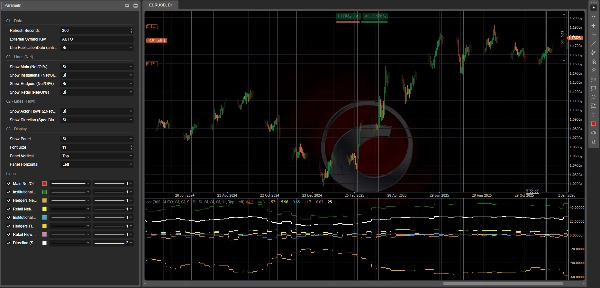
CotIndicatorHistoryPro brings an advanced Commitments of Traders (COT) read directly onto your chart, with a clear breakdown by market participants (Institutional, Hedgers/Commercial, Retail).
It shows not only where each actor is positioned (predominantly long/short), but also what they are doing right now (increasing longs or shorts), plus a synthetic Direction line to highlight the prevailing bias.
The indicator loads its dataset from a secured JSON feed (HISTORY + OUTPUT) and aligns it safely on the chart (anti-lookahead option using PublicationDate).
🗓️ Weekly Data Update (Friday 21:00)
The COT dataset is updated every Friday at 21:00 (Europe/Rome time) thanks to a dedicated automation pipeline:
a sophisticated processing script performs the calculations and publishes the updated values to the JSON feed used by the indicator (and the related cBot ecosystem if installed).
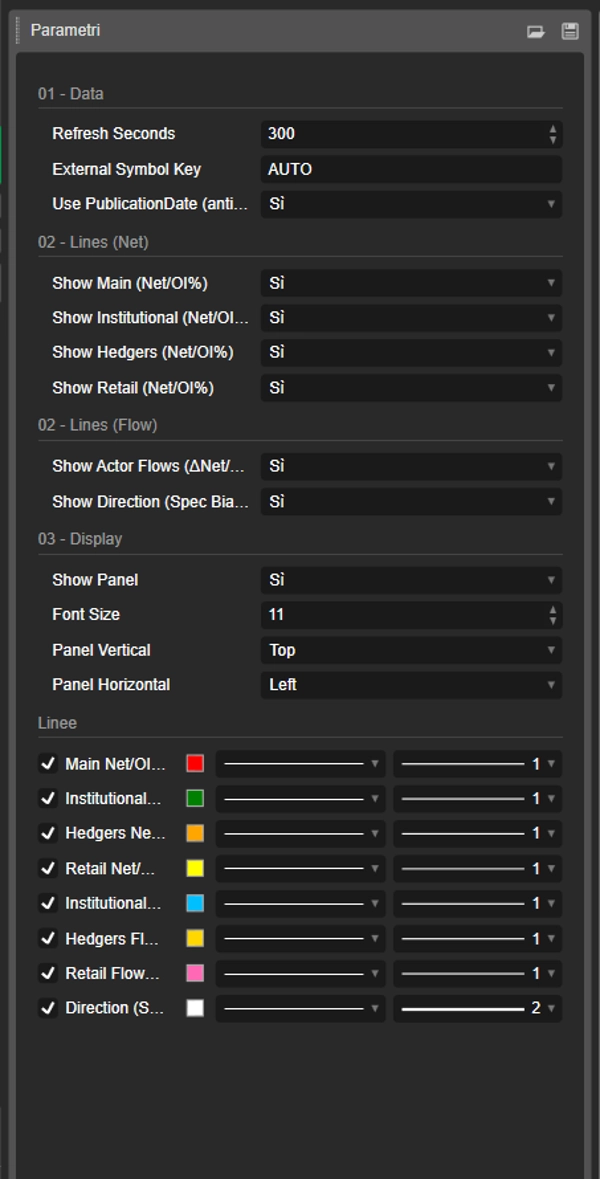
✅ The indicator itself refreshes on-platform using your Refresh Seconds setting and will display the new weekly data as soon as it is published.
✅ What You Get (Lines + Panel)
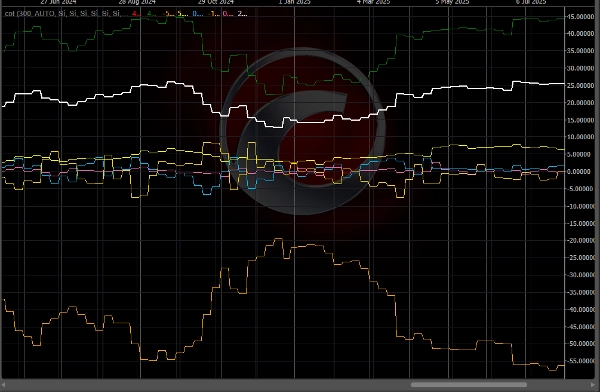
🔥 “Flow” Lines (3 Actors) — ΔNet/OI%
These lines represent the week-over-week change in Net positions, normalized by Open Interest:
- 🔵 Institutional Flow (ΔNet/OI%)
- 🟡 Hedgers / Commercial Flow (ΔNet/OI%)
- 💗 Retail Flow (ΔNet/OI%)
📌 How to read it:
- Above 0 ⇒ the actor is increasing Net LONG (adding longs and/or covering shorts)
- Below 0 ⇒ the actor is increasing Net SHORT (adding shorts and/or cutting longs)
- Larger absolute values (e.g., ±1.5%, ±3%) ⇒ stronger and more meaningful positioning changes
🧭 “Direction” Line — Spec Bias Net/OI%
- ⚪ Direction (Spec Bias) Net/OI% summarizes the prevailing “speculative” direction (average of Institutional + Retail, with fallback if needed).
📌 How to read it:
- > 0 ⇒ Speculative bias LONG
- < 0 ⇒ Speculative bias SHORT
- ≈ 0 ⇒ FLAT / neutral phase
🧩 Info Panel (Full Context)
A built-in panel displays:
- 📄 Report Date / Publication Date
- 📌 Open Interest + WoW (week-over-week) change
- 🎯 Text signal (if available in OUTPUT)
- For each actor:
- Bias (predominantly LONG / SHORT / FLAT) based on Net
- Net/OI%
- Flow (ΔNet/OI%)
- WoW ΔLong / ΔShort / ΔNet to understand how the position changed
🧠 How to Read It (Simple & Practical)
✅ Flow vs Bias (Key Difference)
- Flow = what they are doing now (adding longs or shorts)
- Bias = how they are positioned overall (predominantly long or short)
Example:
- Institutional Bias LONG + positive Flow ⇒ they are still pushing long
- Institutional Bias LONG + negative Flow ⇒ long reduction / possible rotation
🚦 Typical Trading Scenarios
✅ Scenario A — Trend Confirmation
- Direction > 0
- Institutional Flow > 0
➡️ Long pressure is consistent: often a continuation setup.
✅ Scenario B — Potential Reversal (Smart Money vs Retail)
- Institutional Flow > 0 while Retail Flow < 0
➡️ Retail sells/shorts while institutions buy: possible accumulation.
(Opposite = possible distribution)
✅ Scenario C — Hedgers as an “Alert”
- Hedgers at extreme levels (Net/OI far from neutral) + strong Flow
➡️ Possible excess zone / aggressive hedging (often better as a warning than a direct entry trigger).
✅ Scenario D — Market “Loading Up” (Breakout Risk)
- Strong Flow + Open Interest WoW rising
➡️ New positions are entering: probability of extended moves often increases.
⚡ 10-Second Reading Routine
- Check Direction: LONG (>0) or SHORT (<0)
- Check Institutional Flow: confirms or diverges?
- Check Retail Flow: confirms or does the opposite?
- Check Open Interest WoW: expansion or position unwinding?
✅ Supported Symbols + Key Legend (JSON Symbol Keys)
The indicator can analyze any instrument available in the JSON feed (field data[].symbol in OUTPUT).
How to select the correct instrument
- External Symbol Key = AUTO 👉 automatically uses the chart symbol (and removes any suffix after “.”, e.g.,
US2000.ecn→US2000). - If your broker uses different symbol names 👉 set External Symbol Key to the exact JSON key (case-insensitive).
Current keys in the feed (example snapshot: reportDate 2026-02-17, publicationDate 2026-02-20)
- FX:
AUDUSD,EURUSD,GBPUSD,USDMXN - Indices:
US100,US2000,DOW30,VIX - Commodities/Metals/Agriculture:
BRENT,WTI,COPPER,CORN,WHEAT,XAU(Gold),XAG(Silver) - Crypto:
BTC,ETH
📌 If you don’t see values on the chart:
- verify the chart symbol matches a JSON key
- set External Symbol Key manually (e.g.,
ETH,US2000) - check the panel Report/Publication Date to confirm the latest dataset loaded
⚙️ Notes
- Supports safer alignment with Use PublicationDate (anti-lookahead) ✅
- Lines and panel can be enabled/disabled individually.
📌 Disclaimer: informational indicator only, not financial advice. COT data is weekly and should be contextualized with trend, key levels, and volatility.
Summary
The indicator sources data from a secured JSON feed updated every Friday at 21:00 (Europe/Rome time) and aligns it on the chart using publication dates to prevent lookahead bias. Users can view flow lines for each actor, a direction line indicating overall market bias, and an info panel detailing report dates, open interest, net positions, and weekly changes.
It supports a wide range of instruments including Forex pairs (e.g., EURUSD, GBPUSD), indices (e.g., US100, DOW30), commodities (e.g., Brent, Gold), and cryptocurrencies (BTC, ETH). Symbol selection can be automatic or manually set to match feed keys.
Typical use cases include trend confirmation, spotting potential reversals by comparing smart money and retail flows, hedger activity alerts, and breakout risk assessment based on open interest changes. The indicator is informational and designed to complement other technical analysis tools.
Discussion
Customer reviews
5 | 50 % | |
4 | 50 % | |
3 | 0 % | |
2 | 0 % | |
1 | 0 % |