
Description
🚀 TradeCopierBot — Fast, Clean, and Broker-Proof Trade Copying (Local/VPS) 🔁✨
Copy your trades from a MASTER account to one (or more) SLAVE accounts with a lightweight, event-driven copier designed for real trading conditions: different brokers, different symbol names, different lot rules.
Perfect for multi-account execution, risk scaling, and strategy distribution—with detailed debug logs so you always know what’s happening. 🧠📈
✅ Optimized for Local / VPS setups (same machine).
❌ Not designed for cTrader Cloud (instances are isolated, so signals can’t be shared). ☁️🚫
Attention: if you have two different cTrader accounts, you need to purchase two cBots; otherwise, you won’t be able to copy them. We are at your complete disposal for any information.
🧠 How it works (MASTER → SLAVE) 🧩
🔁 1) Signal transport (how trades “travel”)
This copier uses cTrader LocalStorage (Device scope) as a shared “message bus”.
✅ MASTER
- Listens to position events: Opened / Modified / Closed
- Creates a
TradeSignal(OPEN / MODIFY / CLOSE) - Appends it to a signals list in LocalStorageScope .Device
- Calls Flush() so the SLAVE can read it immediately
✅ SLAVE
- Runs a Timer every Poll Interval seconds
- Calls Reload()
- Reads the signals list
- Processes only new signals (using
_lastSignalIndexProcessed)
🧷 2) Position mapping (so CLOSE works)
When the SLAVE opens a trade, it stores:
🧩 MasterPositionId → SlavePositionId
This mapping is also saved into LocalStorage, so it survives restarts:
- ✅ CLOSE still works after reboot
- ✅ MODIFY still finds the correct position
🧭 3) Symbol translation (MASTER symbol → SLAVE symbol)
🗺️ Symbol Map (MASTER=SLAVE;...)
Used when symbol names differ between brokers/accounts.
Format:
MASTER=SLAVE;MASTER2=SLAVE2;...
Example (your case):
- MASTER opens
USTEC - SLAVE must trade
US100
➡️ USTEC=US100
✅ Left side = symbol arriving from MASTER
✅ Right side = symbol on SLAVE broker
📏 4) Volume logic (the key part) 🔥
✅ Works in lots/quantity (decimals supported)
To handle decimals (0.10, 0. 01, etc.), the SLAVE:
- Calculates desired lots
- Applies multiplier / min / step
- Converts lots → volume using
QuantityToVolumeInUnits(lots) - Sends the order using an overload that accepts double volume ✅
This is what makes it robust even when brokers enforce different lot precision rules.
⚙️ Parameters explained (with icons)
🧩 Core
- 🧭 Mode
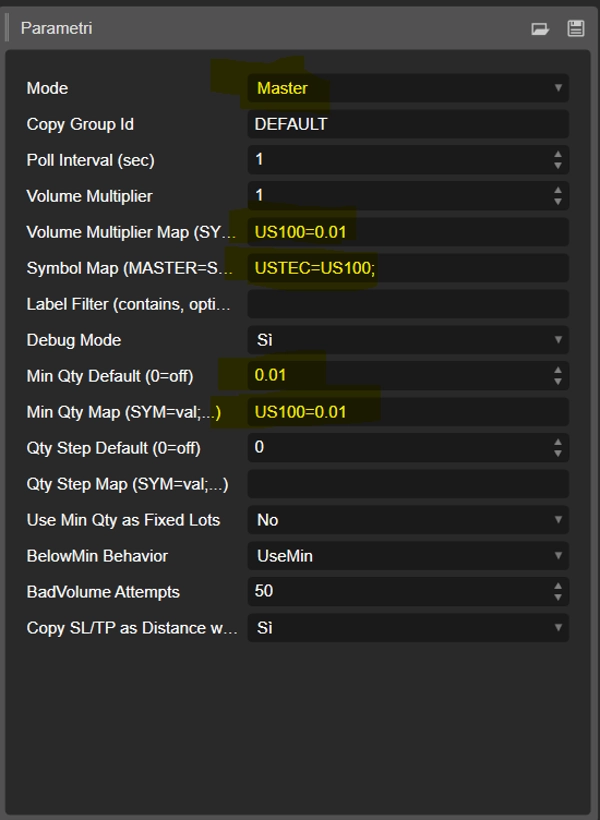
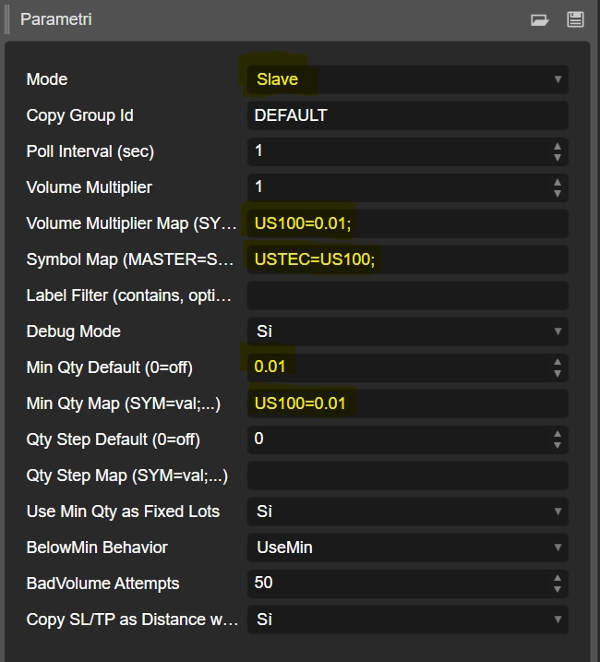
Master= publishes signalsSlave= reads signals and copies trades
- 🧷 Copy Group Id
- Communication channel. MASTER and SLAVE must match (e.g.,
DEFAULT)
- Communication channel. MASTER and SLAVE must match (e.g.,
- ⏱️ Poll Interval (sec)
- SLAVE checks new signals every N seconds
- 🐞 Debug Mode
- Prints detailed logs (recommended during setup)
🗺️ Symbol Translation
- 🧾 Symbol Map (MASTER=SLAVE;...)
- Example:
USTEC=US100;XAUUSD=GOLD;NAS100=USTEC
- Example:
🎚️ Volume scaling (MOST IMPORTANT) ✅
🔢 Global multiplier
- ➗ Volume Multiplier
- Scales all copied lots:
desiredLots = masterLots * VolumeMultiplier
🎛️ Per-symbol multiplier (your main tool)
- 🧷 Volume Multiplier Map (SYM=mult;...)
- Overrides multiplier per symbol (SLAVE-side symbol)
- Example:
US100= 0. 10- Italian format is also OK:
US100=0,10
✅ This is how you achieve: 1. 00 on MASTER → 0. 10 on SLAVE
🧱 Broker lot constraints (min and step)
- 🧱 Min Qty Default (0=off)
- Global minimum lots if enabled
- 🧱 Min Qty Map (SYM=val;...)
- Minimum lots per symbol
- Example:
US100=0. 10
- 🪜 Qty Step Default (0=off)
- Global step if enabled
- 🪜 Qty Step Map (SYM=val;...)
- Step per symbol
- Example:
US100=0. 10→ allowed values: 0. 10, 0 .20, 0.30…
🧯 Safety behaviors
- 🧷 Use Min Qty as Fixed Lots
- If
true: SLAVE ignores master size and always uses MinQty (fixed sizing)
- If
- ⚠️ BelowMin Behavior
UseMin= if below min → raise to minSkip= if below min → don’t open
- 🔁 BadVolume Attempts
- If broker returns BadVolume, tries small adjustments up to N times
🎯 SL/TP copy logic
- 🛡️ Copy SL/TP as Distance when Symbol differs
- If MASTER and SLAVE symbols differ:
- SL/TP is copied as distance from entry, not absolute price
- This keeps risk controls consistent across instruments
✅ Recommended setup (USTEC → US100, SLAVE lot = 0. 10)
On the SLAVE:
🗺️ Symbol translation:
Symbol Map=USTEC=US100
🎛️ Volume scaling:
Volume Multiplier Map=US100=0,10
🧱 Broker constraints:
Min Qty Map=US100=0,10Qty Step Map=US100=0,10
Result:
- ✅ MASTER 1. 00 → SLAVE 0. 10 on US100
☁️ Important: Local/VPS only (not Cloud) ❌
🖥️ Local/VPS ✅
Works because MASTER and SLAVE share the same LocalStorageScope .Device (same machine/environment).
☁️ cTrader Cloud ❌
Does not work because Cloud instances are isolated, so they don’t share LocalStorage and the SLAVE can’t see MASTER signals.
✅ Conclusion:
- ✔️ Use on the same PC or on a VPS where both instances run together
- ❌ For Cloud you need an external relay (HTTP/WebSocket server)
Summary
Key features include:
- Position mapping to maintain correct trade management across restarts.
- Symbol translation via customizable symbol maps to handle differing broker symbol names.
- Volume scaling with global and per-symbol multipliers, supporting decimal lot sizes and broker-specific minimum quantity and step constraints.
- Safety behaviors such as fixed lot sizing and handling of trades below minimum lot sizes.
- Stop loss and take profit copying as distance from entry price when symbols differ, preserving consistent risk control.
Parameters include mode selection (MASTER or SLAVE), communication group ID, polling interval, debug mode, symbol maps, volume multipliers, and broker lot constraints. The bot is not compatible with cTrader Cloud due to isolated instances but functions reliably on local or VPS setups where MASTER and SLAVE share the same environment.
Customer reviews
5 | 67 % | |
4 | 0 % | |
3 | 33 % | |
2 | 0 % | |
1 | 0 % |