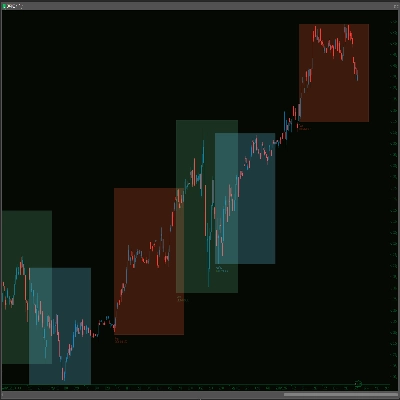
![Trading product for [Hamster-Coder] Pivot Points MTF 지표, image 1](https://cdn.ctrader.com/image/webp/4c143e5a-309c-40e3-a578-f04d1e133ffa_31159)
![Trading product for [Hamster-Coder] Pivot Points MTF 지표, image 2](https://cdn.ctrader.com/image/webp/ca2b8a33-5aa0-4c41-85d0-90dab2c80964_31160)
![Trading product for [Hamster-Coder] Pivot Points MTF 지표, image 3](https://cdn.ctrader.com/image/webp/65fd53d9-cdfe-4cd0-bee5-b3415a017b4c_31161)

설명
📌 현재 버전
!!! 이것은 [Hamster-Coder] Pivot Points MTF 입니다 - MOD 차이에 대한 전체 정보는 "사용 가능한 버전" 섹션을 확인하세요.
차트에 표시된 버전이 이 값과 일치하는지 확인하세요:
버전: v1.1.11
버전 날짜: 2025-08-02 03:00:00
🔧 사용 가능한 버전
🔹 MTF 버전 (다중 타임프레임) - [Hamster-Coder] Pivot Points MTF
MTF 버전은 지표의 가장 강력한 변형입니다.
완전한 다중 타임프레임 지원을 포함하여 사용자가 차트의 타임프레임과 독립적으로 피벗 포인트 계산을 위해 임의의 사용자 지정 타임프레임을 선택할 수 있습니다.
낮은 타임프레임에서 거래할 때 더 높은 타임프레임 구조와 주요 돌파 수준을 식별하는 데 이상적입니다.
🔹 표준 버전 - [Hamster-Coder] Pivot Points
표준 버전은 다중 타임프레임 지원 선택을 제외한 [Hamster-Coder] Pivot Points MTF의 기능을 포함합니다.
🔹 데모 버전 - [Hamster-Coder] Pivot Points (Demo)
데모 버전은 고정된 left 및 right 매개변수를 제외한 [Hamster-Coder] Pivot Points의 기능을 포함합니다. 이 버전은 구매 전에 지표가 차트에서 어떻게 보이고 작동하는지 미리 볼 수 있도록 설계되었습니다.
📖 설명
[Hamster-Coder] Pivot Points는 사용자 정의된 source— 예를 들어 high, low, close, hl2, ohlc4 등과 같은 지역 고점과 저점(피벗 포인트)을 감지하는 유연한 피벗 포인트 지표입니다. 트레이더가 다음을 할 수 있도록 도와줍니다:
- 더 넓은 시장 구조와 추세를 파악
- 더 높은 관련성의 돌파 수준 식별
- HTF 피벗을 동적 지지/저항으로 사용
🧠 Hamster-Coder™ Algo 시리즈
이 지표는 각 주요 매개변수에 별도의 타임프레임을 할당할 수 있는 독점 개념인 타임프레임 분리를 구현하는 강력한 도구 키트의 일부입니다.
결과: 단일 차트에서의 진정한 다중 타임프레임 분석 — 현대 트레이더에게 혁신적인 기능입니다.
🔎 이 시리즈의 다른 지표를 더 탐색하려면 cTrader 플랫폼에서 “Hamster-Coder”를 검색하세요.
🚀 주요 기능
- 🧠 타임프레임 분리 (시리즈 기능)
기준(예: 이동 평균) 및 편차 소스와 같은 구성 요소에 독립적인 타임프레임을 할당하여 정밀 제어를 제공합니다. - 🕒 다중 타임프레임 가격 입력
다음 중에서 선택 가능:Open,Close,High,Low,HL2,HLC3,HLCC4, 또는OHLC4— 사용 가능한 모든 타임프레임에서. - ⚡ 실시간 조정
지표가 적용된 후 매개변수를 변경할 수 있습니다 — cTrader의 기본 소스 속성에서는 불가능한 기능입니다. - 조정 가능한 민감도
피벗 감지를 미세 조정하기 위해Left및Right바 카운트(기간)를 사용하여 극값을 확인해야 하는 이전 및 이후 바 수를 제어합니다. - 🔌 원활한 통합
수동 거래와 자동화 전략 모두에 완벽하게 작동하도록 설계되었습니다.
🛠️ 사용 방법
- 차트에 적용 – 예:
1m차트에서 - 피벗 고 타임프레임 선택 – 예:
5m - 피벗 고 소스 선택 – 예:
High - 피벗 고 왼쪽 설정 – 예:
5 - 피벗 고 오른쪽 설정 – 예:
3 - 피벗 저 타임프레임 선택 – 예:
15m - 피벗 저 소스 선택 – 예:
Low - 피벗 저 왼쪽 설정 – 예:
2 - 피벗 저 오른쪽 설정 – 예:
1
➡️ *이제 5m 고 피벗 포인트와 15m 저 피벗 포인트가 표시됩니다
또한, 차트에서 피벗 포인트 레이블을 제거할 수 있습니다 (로봇에서 사용할 때 가장 유용함)
✅ 버전 확인
차트 오른쪽 하단에 현재 버전을 표시하려면 Show Version = Yes로 설정하세요.
- ✅ 이 버전이 이 설명 상단에 나열된 "현재 버전"과 일치하는지 확인하세요.
- ❗ 불일치가 있을 경우 — 지원팀에 연락하거나 개발자에게 직접 문의하세요.
🙋♂️ P.S.
행복한 거래 되세요!
제안, 기능 요청 또는 맞춤 개발 문의가 있으면 자유롭게 댓글을 남겨주세요.
요약
Key features include:
- Multi-timeframe support to select any custom timeframe for pivot calculation, independent of the chart’s timeframe.
- Adjustable sensitivity through configurable left and right bar counts to confirm pivot points.
- Real-time parameter adjustments after application.
- Multiple price input options from any timeframe.
- Compatibility with manual and automated trading strategies.
Usage involves applying the indicator to a chart, selecting pivot high and low timeframes and sources, and setting sensitivity parameters. This allows traders to visualize higher timeframe market structures and breakout levels while trading on lower timeframes, using pivot points as dynamic support and resistance.
The product is available in three versions: MTF (full multi-timeframe support), Standard (without multi-timeframe selection), and Demo (limited parameter control for preview purposes).
고객 리뷰
5 | 60 % | |
4 | 40 % | |
3 | 0 % | |
2 | 0 % | |
1 | 0 % |
!["[Hamster-Coder] Moving Average" 로고](https://cdn.ctrader.com/image/webp/1bd952ad-57d2-4db2-9b49-b01be0b048b8_30113)
!["[Hamster-Coder] Bollinger Bands" 로고](https://cdn.ctrader.com/image/webp/21d8e5d6-fb11-4bac-b9ee-cd05c2b76804_30327)
!["[Hamster-Coder] Pivot Points (Demo)" 로고](https://cdn.ctrader.com/image/webp/87b54299-8c73-4942-9207-4bc6db824811_31153)
!["[Hamster-Coder] Moving Average MTF" 로고](https://cdn.ctrader.com/image/webp/b11b98b1-194d-4b8e-b00e-d611826ad159_31226)
!["[Hamster-Coder] Price" 로고](https://cdn.ctrader.com/image/webp/893fb641-d5b3-44d8-91fb-6a2dc6f3d309_30647)
!["[Hamster-Coder] Pivot Points" 로고](https://cdn.ctrader.com/image/webp/cdac5a8c-e5cf-40b7-9507-25d4cdfb1e29_31156)