

Descrizione
📊 COT Indicator History Pro — Flusso Attori + Direzione (Istituzionale / Hedgers / Retail)
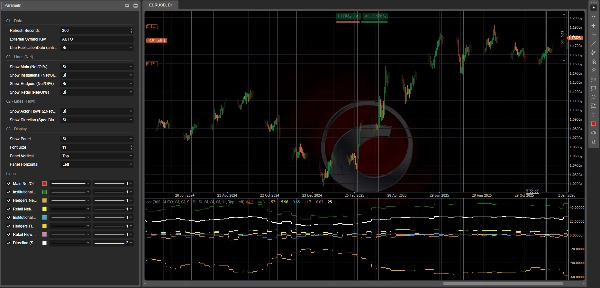
CotIndicatorHistoryPro porta una lettura avanzata dei Commitments of Traders (COT) direttamente sul tuo grafico, con una chiara suddivisione per partecipanti al mercato (Istituzionale, Hedgers/Commerciale, Retail).
Mostra non solo dove è posizionato ciascun attore (principalmente long/short), ma anche cosa stanno facendo in questo momento (aumentando long o short), oltre a una linea sintetica di Direzione per evidenziare il bias prevalente.
L'indicatore carica il suo dataset da un feed JSON protetto (STORIA + OUTPUT) e lo allinea in modo sicuro sul grafico (opzione anti-lookahead usando PublicationDate).
🗓️ Aggiornamento dati settimanale (venerdì 21:00)
Il dataset COT viene aggiornato ogni venerdì alle 21:00 (ora Europa/Roma) grazie a una pipeline di automazione dedicata:
uno script di elaborazione sofisticato esegue i calcoli e pubblica i valori aggiornati sul feed JSON utilizzato dall'indicatore (e dall'ecosistema cBot correlato se installato).
✅ L'indicatore stesso si aggiorna sulla piattaforma usando la tua impostazione Refresh Seconds e mostrerà i nuovi dati settimanali appena pubblicati.
✅ Cosa Ottieni (Linee + Pannello)
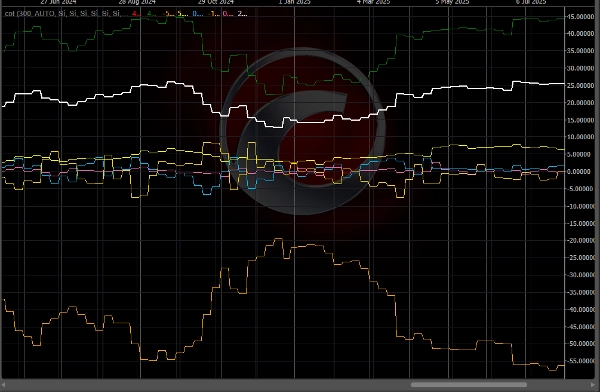
🔥 Linee “Flusso” (3 Attori) — ΔNet/OI%
Queste linee rappresentano il cambiamento settimana su settimana nelle posizioni nette, normalizzato per l'Open Interest:
- 🔵 Flusso Istituzionale (ΔNet/OI%)
- 🟡 Flusso Hedgers / Commerciale (ΔNet/OI%)
- 💗 Flusso Retail (ΔNet/OI%)
📌 Come leggerlo:
- Sopra 0 ⇒ l'attore sta aumentando il Net LONG (aggiungendo long e/o coprendo short)
- Sotto 0 ⇒ l'attore sta aumentando il Net SHORT (aggiungendo short e/o riducendo long)
- Valori assoluti maggiori (es. ±1,5%, ±3%) ⇒ cambiamenti di posizionamento più forti e significativi
🧭 Linea “Direzione” — Spec Bias Net/OI%
- ⚪ Direzione (Spec Bias) Net/OI% riassume la direzione “speculativa” prevalente (media di Istituzionale + Retail, con fallback se necessario).
📌 Come leggerlo:
- > 0 ⇒ Bias speculativo LONG
- < 0 ⇒ Bias speculativo SHORT
- ≈ 0 ⇒ fase FLAT / neutra
🧩 Pannello Informazioni (Contesto Completo)
Un pannello integrato mostra:
- 📄 Data Rapporto / Data Pubblicazione
- 📌 Open Interest + WoW (variazione settimana su settimana)
- 🎯 Segnale testuale (se disponibile in OUTPUT)
- Per ogni attore:
-
- Bias (principalmente LONG / SHORT / FLAT) basato su Net
- Net/OI%
- Flusso (ΔNet/OI%)
- WoW ΔLong / ΔShort / ΔNet per capire come è cambiata la posizione
🧠 Come leggerlo (Semplice & Pratico)
✅ Flusso vs Bias (Differenza Chiave)
- Flusso = cosa stanno facendo ora (aggiungendo long o short)
- Bias = come sono posizionati complessivamente (principalmente long o short)
Esempio:
- Istituzionale Bias LONG + Flusso positivo ⇒ stanno ancora spingendo long
- Istituzionale Bias LONG + Flusso negativo ⇒ riduzione long / possibile rotazione
🚦 Scenari Tipici di Trading
✅ Scenario A — Conferma del Trend
- Direzione > 0
- Flusso Istituzionale > 0
➡️ La pressione long è coerente: spesso un setup di continuazione.
✅ Scenario B — Potenziale Inversione (Smart Money vs Retail)
- Flusso Istituzionale > 0 mentre Flusso Retail < 0
➡️ Il retail vende/shorta mentre le istituzioni comprano: possibile accumulazione.
(Opposto = possibile distribuzione)
✅ Scenario C — Hedgers come “Allarme”
- Hedgers a livelli estremi (Net/OI lontano dal neutro) + flusso forte
➡️ Possibile zona di eccesso / copertura aggressiva (spesso meglio come avvertimento che come trigger diretto di ingresso).
✅ Scenario D — “Caricamento” del Mercato (Rischio Breakout)
- Flusso forte + Open Interest WoW in aumento
➡️ Entrano nuove posizioni: spesso aumenta la probabilità di movimenti estesi.
⚡ Routine di Lettura in 10 Secondi
- Controlla Direzione: LONG (>0) o SHORT (<0)
- Controlla Flusso Istituzionale: conferma o diverge?
- Controlla Flusso Retail: conferma o fa il contrario?
- Controlla Open Interest WoW: espansione o riduzione posizioni?
✅ Simboli Supportati + Legenda Chiave (Chiavi Simbolo JSON)
L'indicatore può analizzare qualsiasi strumento disponibile nel feed JSON (campo data[].symbol in OUTPUT).
Come selezionare lo strumento corretto
- Chiave Simbolo Esterna = AUTO 👉 usa automaticamente il simbolo del grafico (e rimuove qualsiasi suffisso dopo “.”, es.
US2000.ecn→US2000). - Se il tuo broker usa nomi simbolo diversi 👉 imposta Chiave Simbolo Esterna alla chiave JSON esatta (case-insensitive).
Chiavi attuali nel feed (esempio snapshot: reportDate 2026-02-17, publicationDate 2026-02-20)
- FX:
AUDUSD,EURUSD,GBPUSD,USDMXN - Indici:
US100,US2000,DOW30,VIX - Materie Prime/Metalli/Agricoltura:
BRENT,WTI,COPPER,CORN,WHEAT,XAU(Oro),XAG(Argento) - Crypto:
BTC,ETH
📌 Se non vedi valori sul grafico:
- verifica che il simbolo del grafico corrisponda a una chiave JSON
- imposta manualmente Chiave Simbolo Esterna (es.
ETH,US2000) - controlla il pannello Data Rapporto/Data Pubblicazione per confermare il caricamento dell'ultimo dataset
⚙️ Note
- Supporta un allineamento più sicuro con Use PublicationDate (anti-lookahead) ✅
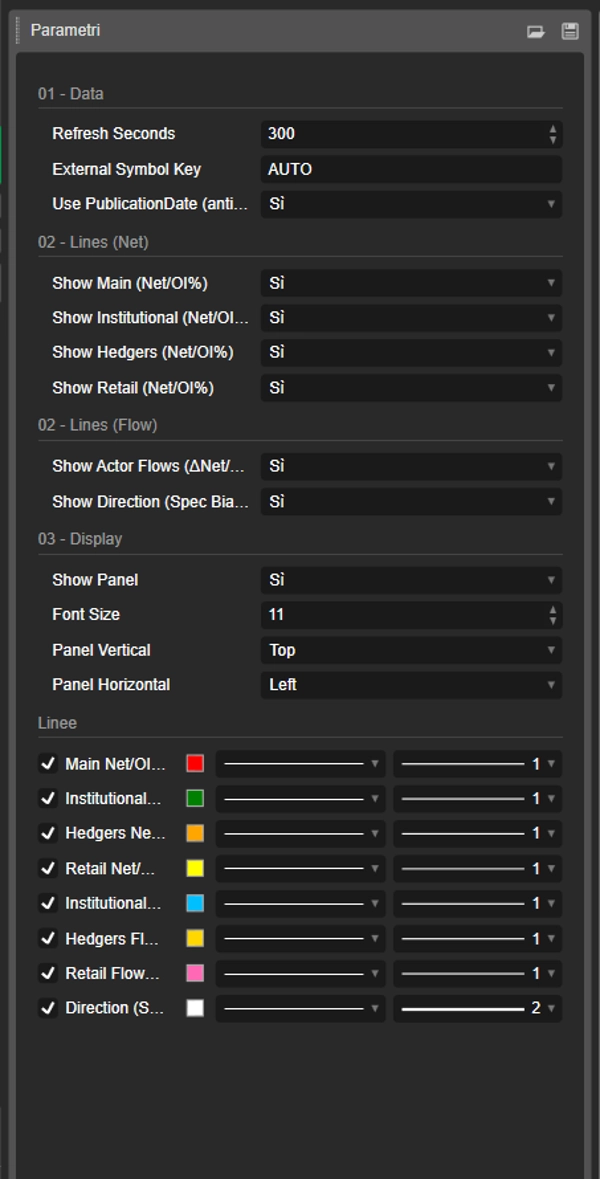
- Linee e pannello possono essere abilitati/disabilitati singolarmente.
📌 Disclaimer: indicatore informativo solamente, non un consiglio finanziario. I dati COT sono settimanali e devono essere contestualizzati con trend, livelli chiave e volatilità.
Riepilogo
The indicator sources data from a secured JSON feed updated every Friday at 21:00 (Europe/Rome time) and aligns it on the chart using publication dates to prevent lookahead bias. Users can view flow lines for each actor, a direction line indicating overall market bias, and an info panel detailing report dates, open interest, net positions, and weekly changes.
It supports a wide range of instruments including Forex pairs (e.g., EURUSD, GBPUSD), indices (e.g., US100, DOW30), commodities (e.g., Brent, Gold), and cryptocurrencies (BTC, ETH). Symbol selection can be automatic or manually set to match feed keys.
Typical use cases include trend confirmation, spotting potential reversals by comparing smart money and retail flows, hedger activity alerts, and breakout risk assessment based on open interest changes. The indicator is informational and designed to complement other technical analysis tools.
Recensioni dei clienti
5 | 50 % | |
4 | 50 % | |
3 | 0 % | |
2 | 0 % | |
1 | 0 % |




















![Logo di "Smart Money Concepts (SMC) [Iridio Capital]"](https://cdn.ctrader.com/image/webp/b4b5414d-a5ca-44b7-a947-e28eca44a218_61548)