present
Registrati e ricevi uno sconto da $50 sul tuo primo acquisto
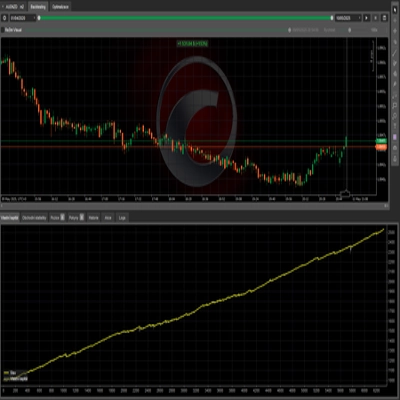
Trading product for Backtest-OHLC-Exporter cBot Key Levels Volume, image 1
Backtest-OHLC-Exporter
cBot
Versione 1.0, Jun 2026
Windows, Mac, Web
Trading product for Backtest-OHLC-Exporter cBot Key Levels Volume, image 2
Trading product for Backtest-OHLC-Exporter cBot Key Levels Volume, image 3
Trading product for Backtest-OHLC-Exporter cBot Key Levels Volume, image 4
Trading product for Backtest-OHLC-Exporter cBot Key Levels Volume, image 5
Trading product for Backtest-OHLC-Exporter cBot Key Levels Volume, image 6
Trading product for Backtest-OHLC-Exporter cBot Key Levels Volume, image 7
Trading product for Backtest-OHLC-Exporter cBot Key Levels Volume, image 8
Trading product for Backtest-OHLC-Exporter cBot Key Levels Volume, image 9
Trading product for Backtest-OHLC-Exporter cBot Key Levels Volume, image 10
6
Vendite
79
Installazioni gratuite

Descrizione

# Esportatore OHLC per Backtest


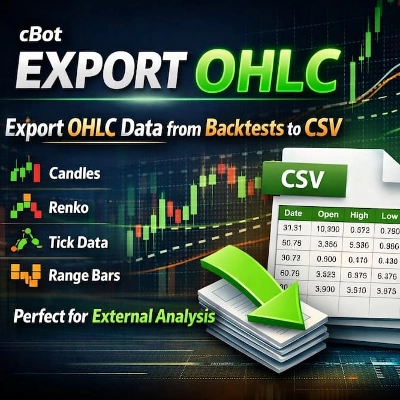
**Esporta i dati OHLC da qualsiasi backtest in CSV.** Analizza i risultati del tuo backtest esternamente con Excel, Python, R o qualsiasi altro strumento di analisi.


## 🔹 COSA FA


Questo cBot esporta i dati Open, High, Low, Close (OHLC) e Volume dal tuo backtest direttamente in un file CSV. Niente più copia manuale o esportazioni di dati limitate.


## 🔹 CARATTERISTICHE PRINCIPALI


✔ **Esportazione dati OHLC** – Timestamp, Open, High, Low, Close, Volume

✔ **Funziona su QUALSIASI tipo di grafico** – Candele (da M1 a Mensile), Renko (qualsiasi dimensione del mattone), Tick, Range, Volume, Point & Figure, Kagi

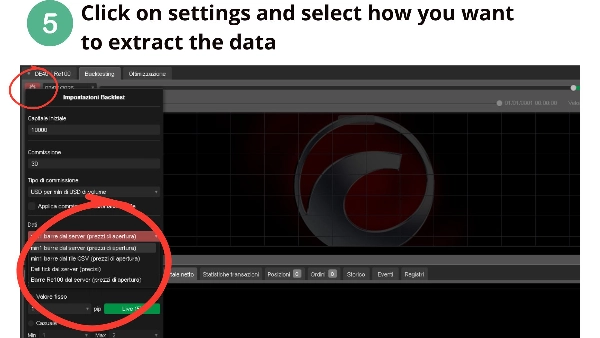
✔ **Impostazioni configurabili** – Prefisso file, separatore (virgola o punto e virgola), formato decimale

✔ **Nominazione automatica dei file** – Nomi unici con simbolo e timestamp

✔ **Salvataggio periodico** – Salva ogni 1000 barre (previene la perdita di dati)

✔ **Formato CSV pulito** – Pronto per analisi esterne

✔ **Nessun permesso speciale richiesto** – Sicuro da usare, nessun accesso al sistema


## 🔹 PERCHÉ TI SERVE


• cTrader non esporta nativamente i dati OHLC – questo risolve il problema

• Analizza i dati del backtest in Excel, Python, R o MATLAB

• Esegui analisi statistiche personalizzate sulla tua strategia

• Conserva un record permanente dei dati del tuo backtest

• Valida la tua strategia con strumenti esterni


## 🔹 COME USARLO


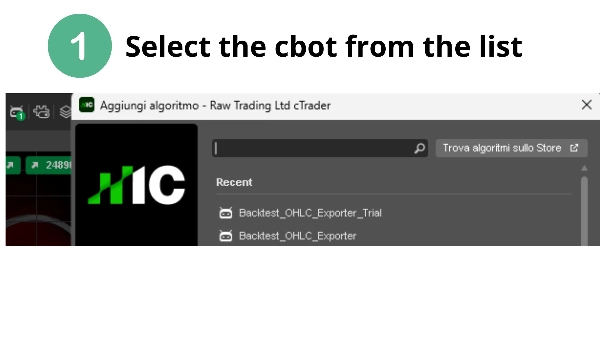
1. Aggiungi questo cBot a qualsiasi grafico

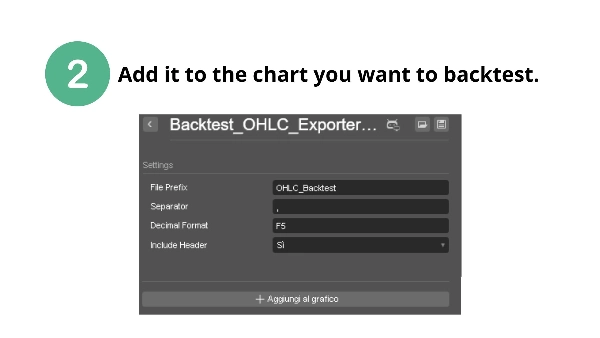
2. Configura il prefisso del file e il separatore (opzionale)

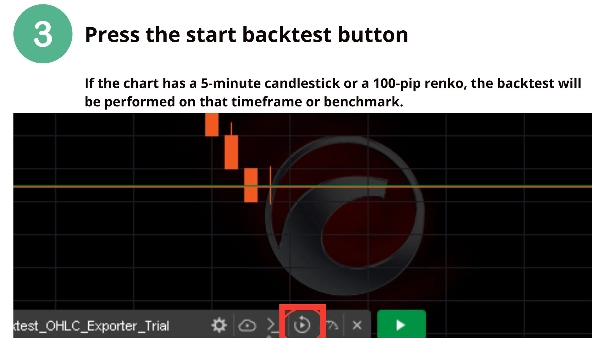
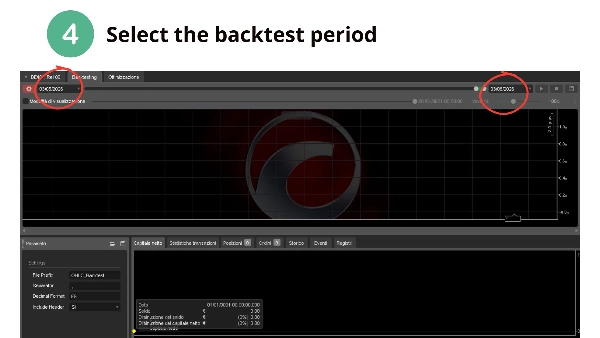
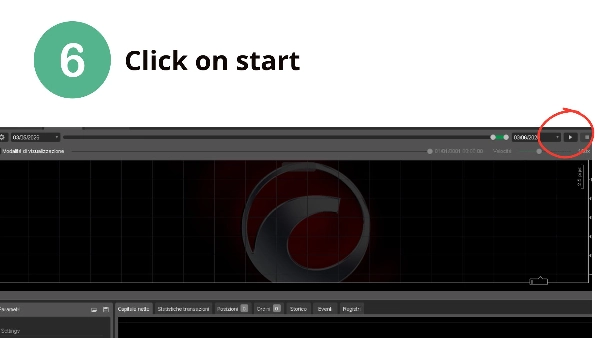
3. Esegui il tuo backtest normalmente

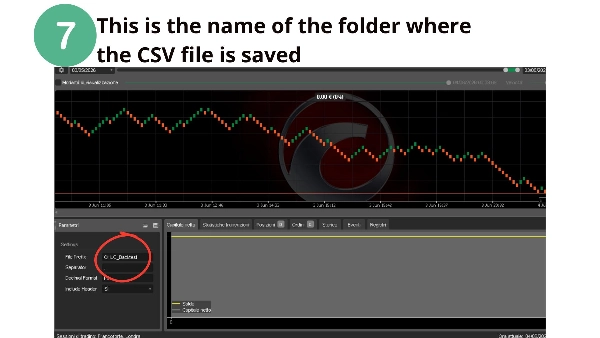
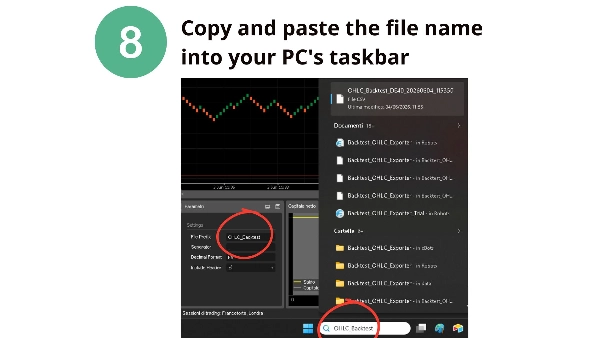
4. Trova il file CSV nella cartella dati del cBot:

`Documents\cAlgo\Data\cBots\BacktestOHLCExporter\`


## 🔹 FORMATO DI OUTPUT


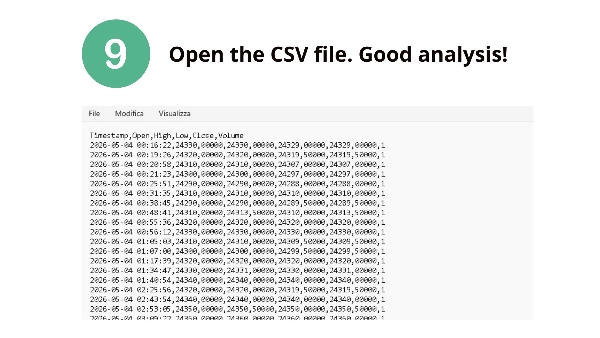
```csv

Timestamp,Open,High,Low,Close,Volume

2025-06-01 00:00:00,1.08950,1.08960,1.08940,1.08955,1245

...


## 🔹 IMPOSTAZIONI


| Parametro | Predefinito | Descrizione |

|-----------|---------|-------------|

| Prefisso File | OHLC_Backtest | Prefisso per i nomi dei file |

| Separatore | , | Separatore CSV (virgola o punto e virgola) |

| Formato Decimale | F5 | Numero di cifre decimali |

| Includi Intestazione | True | Includi intestazioni di colonna |


⚠️ **DICHIARAZIONE DI RESPONSABILITÀ**: Il trading comporta il rischio di perdite. Questo strumento esporta dati per analisi esterne. Le performance passate non garantiscono risultati futuri.


📌 **Domande o richieste di funzionalità?** Contattami tramite il cTrader Store.


**Buon backtesting! – CapitalMente**

Riepilogo

Riepilogo AI
Backtest-OHLC-Exporter is a cBot designed to export Open, High, Low, Close (OHLC) and Volume data from any backtest into a CSV file for external analysis. It supports all chart types including Candles (from 1 minute to Monthly), Renko (any brick size), Tick, Range, Volume, Point & Figure, and Kagi charts. The exported CSV includes timestamped OHLC and volume data, formatted cleanly for use in tools like Excel, Python, R, or MATLAB.

Key features include configurable file prefix, CSV separator (comma or semicolon), decimal formatting, and automatic unique file naming with symbol and timestamp. The bot saves data periodically every 1000 bars to prevent data loss. It operates without requiring special system permissions, ensuring safe usage.

To use, add the cBot to any chart, optionally configure settings, run the backtest, and retrieve the CSV file from the designated cBot data folder. This tool addresses the lack of native OHLC export in cTrader, enabling users to keep permanent backtest records and perform custom statistical or validation analyses externally.

Profilo di trading

Recensioni dei clienti

0.0
Recensioni: 0
Recensioni dei clienti
Questo prodotto non ha ancora ricevuto recensioni. L'hai già provato? Fallo sapere agli altri per primo!

Discussioni

Domande frequenti

Key Levels
Volume
I prodotti disponibili tramite cTrader Store, inclusi bot di trading, indicatori e plugin, sono forniti da sviluppatori terzi e resi disponibili esclusivamente a scopo informativo e di accesso tecnico. cTrader Store non è un broker e non fornisce consulenze in materia di investimento, raccomandazioni individualizzate o garanzie di risultati futuri.

Altro da questo autore

Indicatore
Key Levels
Support & Resistance
Renko Multi-Level Grid Overlay draws configurable horizontal grid lines on any chart type, for multi-timeframe analysis.
Indicatore
ADX
ATR
+5
Signal Quality Score - 0-100 filter combining RSI, Volume, ATR, Trend Strength & Alignment. Works on ANY chart type.
Indicatore
Volume
Key Levels
+4
Session & Kill Zone Highlighter - Visual tool for London, NY, Tokyo, Sydney sessions plus ICT Kill Zones.
Indicatore
ADX
ATR
+5
Identifies TRENDING, RANGING and VOLATILE markets with pullback detection. Anti-noise filter. Works on ANY chart.
Indicatore
Market Structure
Support & Resistance
Auto-centers price when it moves beyond threshold. Adjustable zoom. Works on any chart type. Never lose price again.

Potrebbe interessarti anche

cBot
Grid
Forex
+11
Semi bot will manage your position by moving stoploss and cover loss with 3 martingale style
cBot
ATR
RSI
+4
UltimateAI Trading Robot – Smart Trend & Momentum Trader for cTrader
cBot
ATR
Signal
+1
✨ N.B.: Results with an initial invested capital of 100 euros.📈
cBot
SL Manager
TP Manager
+4
Fast manual execution + automatic TP/SL management in one powerful cTrader trading panel.
cBot
SL Manager
TP Manager
+2
cBot de Risk Control para cTrader que calcula el lotaje según el riesgo y coloca automáticamente Stop Loss y Take Profit
cBot
Scalping
ICT Framework cBot – Advanced Trading Automation for Any Pair & Timeframe
cBot
Fixed Lot
TP Manager
+5
Automatically copies trading signals from your channels or groups straight to your cTrader account.
cBot
Indices
Scalping
HIGHLY PROFITABLE NASDAQ100 SCALPING ALGORITHM
7%
ROI
3.46
Fattore di profitto
cBot
SL Manager
Trailing Stop
+2
Smart trade management, automatically protects positions, progressively locks in profits as trades move in your favor.
cBot
AI
RSI
+6
Prices Action Focus Bot, Please use default setting before making any changes!!! ENJOY!!!
cBot
MACD
BTCUSD
+3
Combina los indicadores Índice Direccional Promedio (ADX) y Convergencia/Divergencia de Medias Móviles (MACD).
457%
ROI
1.2
Fattore di profitto
cBot
ADX
ATR
+5
Automated XAUUSD structure-break and pullback strategy that waits for confirmed breakouts and retests
53.3%
ROI
1.65
Fattore di profitto
cBot
SMC
Prop
+12
Risk On Trade | Auto Position Size Calculator | Risk & Reward Tool | Auto Lot Size Calculator
cBot
SL Manager
TP Manager
+5
Floating P&L display, Quick close buttons, Auto SL, Auto Breakeven, Auto close % when trade is at specific $ in profit
cBot
Forex
Crypto
+5
Smart position sizing, visual SL/TP lines, risk-based lot calculation, RR display, margin & lot limits, and hotkey trade
cBot
AI
SMC
+18
Review and Parameter Guide for the "Moving Average" cBot
cBot
AI
XAUUSD
+4
Gold Pulse Pro – An automated trading system for gold (XAUUSD) precisely engineered and powered by advanced algorithms
cBot
AI
ATR
+21
A price-action-first algorithm to trade Breakout, Approach, and Return around prior High/Low levels—with Prop-style risk

Prezzo

6
Vendite
79
Installazioni gratuite