

Breakout channel
インジケーター
612 ダウンロード数
バージョン 1.0、Nov 2025
Windows、Mac

42.11M
取引数量
6.13M
獲得pips
278
販売
10.82K
無料インストール
説明
ブレイクアウトチャネル
その機能
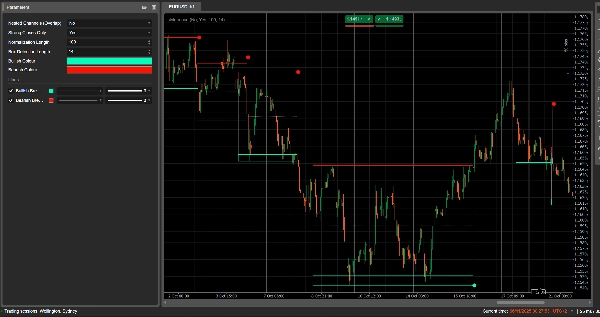
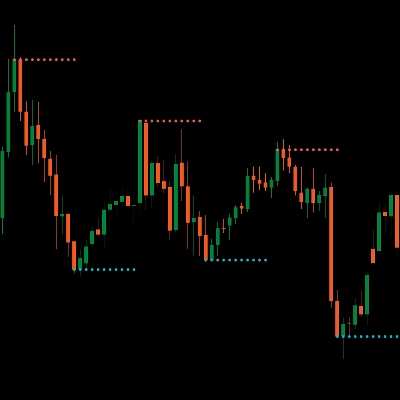
ブレイクアウトチャネルは自動的に統合レンジ(価格の「ボックス」)を検出し、価格がそのレンジを抜けたときにブレイクアウトポイントをマークします。
以下を描画します:
- 統合ゾーンの周りのグレーのチャネルボックス
- (潜在的な抵抗となる)赤い上部バンド
- (潜在的なサポートとなる)緑の下部バンド
- (チャネルの中点となる)白い点線の中央線
- ブレイクアウトが発生したときの色付きの点:
-
- ボックスの下の緑/シアンの点 → 強気のブレイクアウト
- ボックスの上の赤い点 → 弱気のブレイクアウト
このアイデアは、価格が収縮しているエリアと、レンジが破られたときに強い動きが始まる可能性が高いエリアを視覚的に強調することです。
計算方法
- 価格の正規化
-
- 過去のNormalization Length本のバーで、最高値と最安値を見つけます。
- 終値を0〜1の範囲に正規化します:
normalizedPrice=Close−LowestLowHighestHigh−LowestLow\text{normalizedPrice} = \frac{\text{Close} - \text{LowestLow}}{\text{HighestHigh} - \text{LowestLow}}normalizedPrice=HighestHigh−LowestLowClose−LowestLow
- ボラティリティの測定
-
- 14本のバーにわたる正規化価格の標準偏差を計算します。
- これにより、市場構造の転換点を検出するためのボラティリティ系列が得られます。
- 上部/下部の「ボラティリティライン」
-
- 過去の(Box Detection Length + 1)本のバーで、以下を見つけます:
-
- ボラティリティが最も高かったバー
- ボラティリティが最も低かったバー
- これらの極値が何本前のバーで発生したかに基づいて、2つの合成ラインを構築します: 上部と下部。
- これらのラインの交差は、チャネルフェーズの開始/終了の可能性を示します。
- チャネルの開始と期間
-
- 下部が上部を上回る交差が発生した場合、インジケーターは潜在的なチャネル開始をマークします。
- そのバーから期間とその期間内の最高値/最安値を追跡します。
- チャネルの作成
-
- 後に上部が再び下部を上回る交差があり、期間が10本以上の場合:
-
- その期間の最高値をチャネルの上部として定義します。
- 最安値をチャネルの下部として定義します。
- 現在のATR/2を測定し、上部と下部に薄いゾーンを分けます:
-
- 赤いバンド(弱気バンド)を上部に
- 緑のバンド(強気バンド)を下部に
- 以下を描画します:
-
- グレーのアウトライン長方形(チャネル全体)
- 赤い上部アウトライン
- 緑の下部アウトライン
- 中央を通る白い点線の中央線
- チャネルはブレイクアウト後も削除されず、履歴構造としてチャートに残ります。
- ブレイクアウト検出
-
- 各アクティブチャネルについて、新しいバーごとに基準価格を計算します:
-
- もしStrong Closes Only = trueなら、ローソク足の実体の中点を使用します:
refPrice=(Open+Close)/2\text{refPrice} = (\text{Open} + \text{Close})/2refPrice=(Open+Close)/2
これは実体の半分以上がボックスの外にあることを必要とします。 - もしStrong Closes Only = falseなら、単純に終値を使用します。
- もしStrong Closes Only = trueなら、ローソク足の実体の中点を使用します:
- ブレイクアウトルール:
-
- もし
refPrice > Topなら → 強気のブレイクアウト -
- チャネルの下部に緑の点をプロットします。
- このチャネルを非アクティブにし(延長を停止)、ボックスは表示されたままにします。
- もし
refPrice < Bottomなら → 弱気のブレイクアウト -
- チャネルの上部に赤い点をプロットします。
- チャネルを非アクティブにします。
- それ以外の場合、チャネルはまだアクティブであり、その右端は現在のバーまで延長されます。
- もし
- ネストチャネルオプション
-
- もしNested Channels = trueなら、複数のチャネルが時間と価格で重複することができます。
- もしfalseなら、既存のチャネルと重複する新しいチャネルの作成をブロックします。
読み方と使い方
- グレーボックス(チャネル)
-
- 価格がしばらく取引されていた統合/バランスゾーンを表します。
- ボックスが長くて高いほど、レンジの重要性が増します。
- 赤い上部バンド(抵抗ゾーン)
-
- チャネルの上部で、潜在的な抵抗エリアとして視覚的に強調されています。
- このバンド付近での繰り返しの拒否は、レンジ内の売り圧力を示唆します。
- 緑の下部バンド(サポートゾーン)
-
- チャネルの下部で、潜在的なサポートとして強調されています。
- 繰り返しの反発は、買い手がレンジの下端を守っていることを示唆します。
- 白い点線の中央線
-
- チャネルの中点で、局所的な「公正価値」のようなものです。
- 価格がこの線の周りで振動している場合はバランスを示し、強い動きが離れると反対側のバンドのテストがしばしば続きます。
- ブレイクアウトドット
-
- ボックスの下の緑の点:
-
- 価格がチャネルの上部を強く上回って終値をつけた(または単に上回って終値をつけた、Strong Closes Onlyによる)。
- これは強気のブレイクアウトを示唆し、ボラティリティスクイーズからの上昇の始まりの可能性があります。
- ボックスの上の赤い点:
-
- 価格がチャネルの下部を強く下回って終値をつけた。
- これは弱気のブレイクアウトを示唆し、下降の始まりの可能性があります。
- 典型的な使い方(アイデアレベル)
-
- トレンドフォローのブレイクアウト
-
- ブレイクアウトの方向にトレードします(緑の点の後に買い、赤の点の後に売り)、理想的には上位時間軸のトレンドや他のインジケーターと合致している場合に。
- フィルターと確認
-
- チャネルとそのブレイクアウトを、既存の戦略のフィルターとしてのみ使用します(例:最後のシグナルが強気のブレイクアウトの場合のみロングセットアップを取るなど)。
- リスクの配置
-
- 強気のブレイクアウトの場合、多くのトレーダーはストップを以前のチャネル内またはそのすぐ下に置きます。弱気の場合はボックス内または上に置きます。
概要
AI summary
Breakout Channels is a technical indicator designed to identify consolidation zones and signal potential price breakouts. It automatically detects price ranges where the market is coiling, marking these with a grey channel box that highlights the consolidation area. The indicator draws a red upper band indicating potential resistance, a green lower band indicating potential support, and a white dotted midline representing the channel midpoint or local fair value.
Breakout points are signaled by colored dots: a green or cyan dot below the box indicates a bullish breakout, while a red dot above signals a bearish breakout. The indicator calculates these zones by normalizing price data, measuring volatility through the standard deviation of normalized prices, and identifying volatility extremes to define channel start and duration.
Channels remain visible on the chart as historical structures even after breakouts. Users can enable nested channels to allow overlapping consolidation zones. Breakout detection uses either candle body midpoints or close prices, depending on settings, to confirm strong closes outside the channel.
Typical uses include trading in the breakout direction, filtering existing strategies, and placing risk stops near channel boundaries. The indicator supports various markets including forex, indices, commodities, stocks, and cryptocurrencies.
Breakout points are signaled by colored dots: a green or cyan dot below the box indicates a bullish breakout, while a red dot above signals a bearish breakout. The indicator calculates these zones by normalizing price data, measuring volatility through the standard deviation of normalized prices, and identifying volatility extremes to define channel start and duration.
Channels remain visible on the chart as historical structures even after breakouts. Users can enable nested channels to allow overlapping consolidation zones. Breakout detection uses either candle body midpoints or close prices, depending on settings, to confirm strong closes outside the channel.
Typical uses include trading in the breakout direction, filtering existing strategies, and placing risk stops near channel boundaries. The indicator supports various markets including forex, indices, commodities, stocks, and cryptocurrencies.
インジケーターのプロフィール
カスタマーレビュー
0.0
レビュー: 0
カスタマーレビュー
この商品にはまだレビューがありません。お使いになったことがある方は、ぜひレビューをお願いします。
ディスカッション
よくあるご質問
Signal
Indices
Commodities
GBPUSD
RSI
Bollinger
Fibonacci
Scalping
AI
XAUUSD
NAS100
MACD
BTCUSD
Forex
Breakout
EURUSD
NZDUSD
Martingale
Prop
ZigZag
Supertrend
Fair Value Gap
SMC
Crypto
Grid
Stocks
ATR
USDJPY
VWAP
cTrader Storeで入手可能な取引ボット、インジケーター、プラグインなどの商品は、第三者の開発者が提供するものであり、情報と技術の取得のみを目的としてご利用いただけます。cTrader Storeはブローカーではなく、投資助言や個人的な推奨を行うことも、将来のパフォーマンスを保証することもありません。




















価格
42.11M
取引数量
6.13M
獲得pips
278
販売
10.82K
無料インストール