
Beschreibung
🎯 PRO SNIPER [Algotrend] — Komplettanleitung & professionelle Bewertung
📋 INHALTSVERZEICHNIS
- Allgemeine Übersicht
- Funktionsweise — Signalarchitektur
- Die Confluence Scoring Engine (10 Faktoren)
- Parameter — Detaillierte Anleitung für jede Einstellung
- Auto-Voreinstellungen — Vergleichstabelle
- Das Bewertungssystem (A+, A, B, C)
- Risikomanagement — SL, TP & Trailing
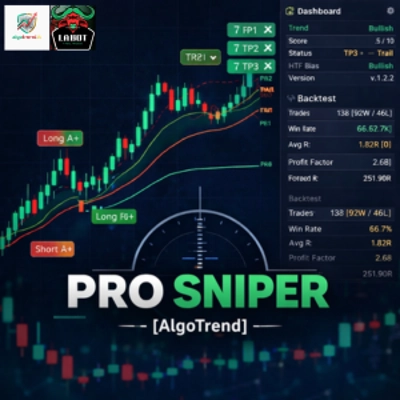
- Dashboard & Backtest-Tracker
- Praktische Anwendungstipps
- Stärken & Einschränkungen
1. 🔭 ALLGEMEINE ÜBERSICHT
Pro Sniper ist ein Multi-Confluence-Overlay-Indikator, der entwickelt wurde, um hochzuverlässige Long- und Short-Signale zu generieren. Er verlässt sich nicht auf einen einzelnen Indikator – stattdessen kombiniert er 10 verschiedene technische Faktoren zu einem Confluence-Score von 0 bis 10. Ein Signal wird nur ausgelöst, wenn der Score den konfigurierten Mindestschwellenwert überschreitet.
Das zugrunde liegende Konzept ist einfach, aber kraftvoll: Ein einzelner Indikator (z. B. RSI im überverkauften Bereich) kann falsche Signale erzeugen. Aber wenn RSI, MACD, EMA, VWAP, Volumen, ADX und der Trend des höheren Zeitrahmens gleichzeitig in dieselbe Richtung zeigen, steigt die Wahrscheinlichkeit, dass der Trade erfolgreich ist, erheblich.
Der Indikator beinhaltet auch ein komplettes Trade-Management-System mit 3 Take-Profit-Stufen, strukturellem Stop-Loss und automatischem Trailing-Stop sowie einen integrierten Backtest-Tracker, der historische Leistungsstatistiken in Echtzeit anzeigt.
2. ⚙️ FUNKTIONSWEISE — SIGNALARCHITEKTUR
Ein Pro Sniper-Signal entsteht durch das Zusammenfallen von 6 gleichzeitigen Bedingungen:
Bedingung 1 — EMA-Kreuzung 🔀 Die schnelle EMA muss die langsame EMA kreuzen. Ein Aufwärtskreuz = Long-Kandidat, ein Abwärtskreuz = Short-Kandidat. Ohne diese Kreuzung kann kein Signal ausgelöst werden. Dies ist der grundlegende "Auslöser".
Bedingung 2 — Momentum 📈 Für einen Long muss der Preis über sowohl der schnellen als auch der langsamen EMA liegen. Für einen Short darunter. Dies filtert falsche Kreuzungen heraus, bei denen der Preis "zwischen" den beiden gleitenden Durchschnitten "gefangen" ist.
Bedingung 3 — RSI-Filter 📊 Der RSI darf sich nicht in einer Extremzone befinden: Für Longs muss er unter 75 liegen (nicht überkauft), für Shorts über 25 (nicht überverkauft). Dies verhindert Einstiege, wenn das Momentum bereits erschöpft ist.
Bedingung 4 — Mindestscore 🏆 Der Confluence-Score (0 bis 10, berechnet aus 10 Faktoren) muss den konfigurierten Mindestschwellenwert erreichen. Mit der Standardvoreinstellung sind mindestens 5/10 erforderlich.
Bedingung 5 — Bewertungsfilter 🏅 Das Signal muss den ausgewählten Qualitätsfilter bestehen (Alle, A+/A oder nur A+).
Bedingung 6 — Richtung 🚫 Aufeinanderfolgende Signale in dieselbe Richtung werden nicht erzeugt. Nach einem Long kann das nächste Signal nur ein Short sein (oder ein neuer Long, nachdem der SL getroffen wurde und die Richtung zurückgesetzt wurde).
3. 🧮 DIE CONFLUENCE SCORING ENGINE
Das Herzstück des Indikators ist seine Scoring-Engine. Für jede Kerze werden sowohl ein bullScore als auch ein bearScore berechnet, die jeweils aus 10 Faktoren bestehen:
Für LONG-Signale (Bull Score):
#FaktorBedingungGewichtung
1
📈 EMA-Richtung
Schnelle EMA > Langsame EMA
+1.0
2
📊 Makrotrend
Preis > Trend-EMA (Langzeitperiode)
+1.0
3
💪 RSI-Momentum
RSI zwischen 50 und 75 (positives Momentum, nicht erschöpft)
+1.0
4
📉 MACD-Histogramm
MACD-Histogramm > 0
+1.0
5
🔀 MACD-Kreuzung
MACD-Linie > Signallinie
+1.0
6
⚖️ VWAP-Position
Preis > VWAP (über dem volumengewichteten Durchschnittspreis)
+1.0
7
📦 Volumen
Aktuelles Volumen > SMA(20) × 1,2 (überdurchschnittliches Volumen)
+1.0
8
🎯 ADX + DI
ADX > 20 und DI+ > DI- (starker Trend in die richtige Richtung)
+1.0
9
🌐 HTF-Bias
Schnelle EMA > Langsame EMA im höheren Zeitrahmen
+1.5
10
✨ Preis vs. Schnell
Preis > schnelle EMA (zusätzliche Bestätigung)
+0.5
Maximaler theoretischer Score: 10,0 Punkte
Die Gewichtungen sind nicht bei allen Faktoren gleich. Der Bias des höheren Zeitrahmens (HTF) ist 1,5 Punkte wert, da er der wichtigste Filter ist: Gegen den Makrotrend zu handeln ist die Hauptursache für Verluste. Der Faktor "Preis vs. schnelle EMA" ist nur 0,5 wert, da er eine geringfügige Bestätigung darstellt.
Für SHORT-Signale (Bear Score) ist die Logik gespiegelt: schnelle EMA < langsam, Preis unter Trend-EMA, RSI zwischen 25 und 50, negativer MACD usw.
4. 📖 PARAMETER — DETAILLIERTE ANLEITUNG
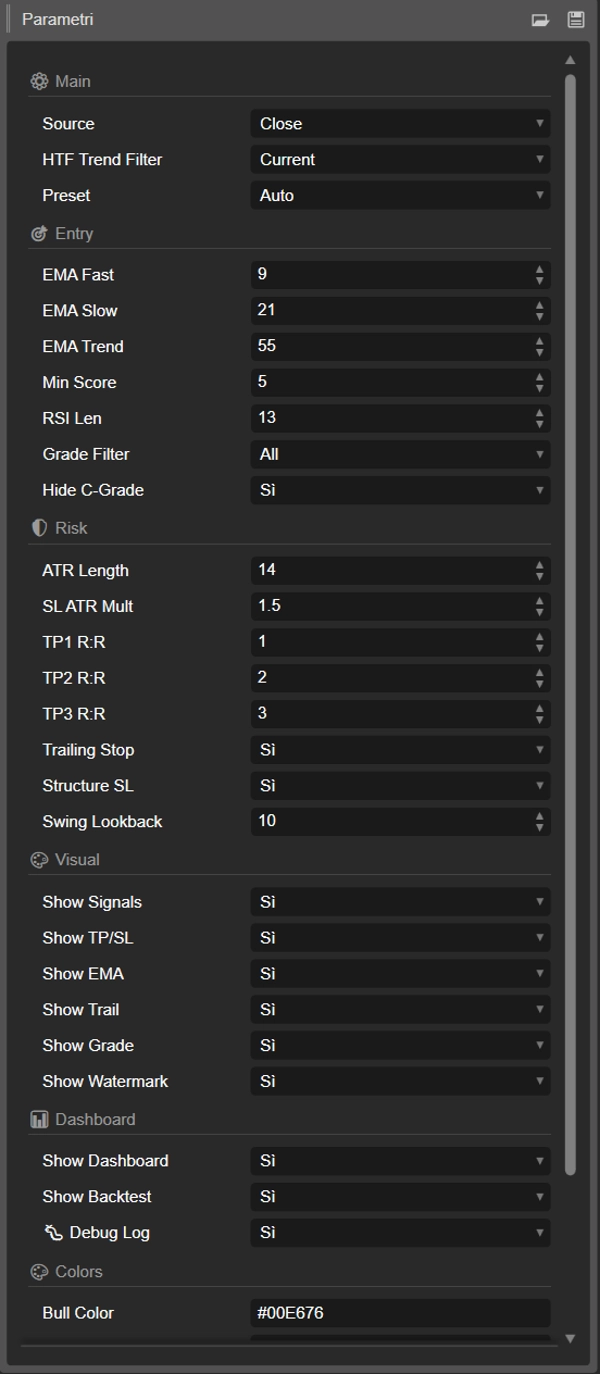
⚙️ GRUPPE: Haupteinstellungen
🔹 Quelle (Standard: Close) Die Preisreihe, die für alle Berechnungen (EMA, RSI, MACD) verwendet wird. Optionen sind: Close, Open, High, Low, Median (HL/2), Typical (HLC/3), Weighted ((H+L+2C)/4). In den meisten Fällen ist Close die beste Wahl. Typical kann bei hochvolatilen Instrumenten nützlich sein, da es die Daten leicht glättet.
🔹 HTF-Trendfilter (Standard: Aktuell) Der höhere Zeitrahmen, der zur Berechnung des Makrotrend-Bias verwendet wird. Wenn auf "Aktuell" eingestellt, wird derselbe Zeitrahmen wie im Chart verwendet. Empfohlene Konfiguration: Wenn Sie auf M5-M15 handeln, verwenden Sie H1, bei H1 verwenden Sie H4, bei H4 verwenden Sie Daily. Dieser Filter ist 1,5 Punkte im Score wert und soll verhindern, gegen den dominanten Trend zu handeln. Die HTF-Daten verwenden die vorherige bestätigte Kerze, um Repainting zu vermeiden.
🔹 Voreinstellung (Standard: Auto) Wählt ein vorkonfiguriertes Profil, das automatisch alle Parameter in den Gruppen Entry und Risk setzt. Bei "Auto" wird die Voreinstellung basierend auf dem Chart-Zeitrahmen gewählt: M1-M5 → Scalping, M6-H1 → Standard, H2-H4 → Aggressiv, D1+ → Swing. Die Auswahl von "Custom" erlaubt die manuelle Änderung aller Parameter.
🎯 GRUPPE: Entry Engine
🔹 EMA Schnell (Standard: 9 | Bereich: 3-50) Die Periode der schnellen exponentiellen gleitenden Durchschnittslinie. Niedrigere Werte (5-8) machen sie reaktionsschneller auf Preisbewegungen und erzeugen häufigere Kreuzungen, aber mit mehr Rauschen. Höhere Werte (12-15) machen sie langsamer, aber die Signale sind zuverlässiger. Wird von der ausgewählten Voreinstellung überschrieben (außer bei "Custom"). Werte pro Voreinstellung: Scalping=5, Aggressiv=8, Standard=9, Konservativ=12, Swing=13.
🔹 EMA Langsam (Standard: 21 | Bereich: 10-100) Die Periode der langsamen EMA. Zusammen mit der schnellen EMA bildet sie das "Band", das im Chart sichtbar ist. Die Kreuzung zwischen Schnell und Langsam ist der grundlegende Auslöser für jedes Signal. Der Abstand zwischen den beiden Perioden beeinflusst die Häufigkeit der Kreuzungen: engere Perioden (z. B. 9/18) erzeugen mehr Signale; weitere Perioden (z. B. 13/34) erzeugen weniger Signale, aber bei bedeutenderen Bewegungen. Werte pro Voreinstellung: Scalping=13, Aggressiv=18, Standard=21, Konservativ=26, Swing=34.
🔹 EMA Trend (Standard: 55 | Bereich: 20-200) Die Langzeit-EMA, die den Makrotrend definiert. Preis über dieser EMA zeigt einen bullischen Kontext, darunter einen bärischen. Sie wird im Chart als gepunktete graue Linie dargestellt. Typische Werte sind 50, 55, 89 (Fibonacci-Zahl), 100 oder 200. Werte pro Voreinstellung: Scalping=34, Standard=55, Konservativ/Swing=89.
🔹 Mindestscore (Standard: 5 | Bereich: 1-10) Der minimale Confluence-Schwellenwert, der erforderlich ist, um ein Signal zu generieren. Dies ist der einflussreichste Parameter des gesamten Indikators. Ein Wert von 3 erzeugt viele Signale (mehr Trades, mehr Rauschen). Ein Wert von 7 erzeugt sehr wenige Signale, aber diese sind stark gefiltert. Die Beziehung ist nicht linear: Der Wechsel von 5 auf 7 kann die Signale um 70-80 % reduzieren. Werte pro Voreinstellung: Scalping=4, Aggressiv=3, Standard=5, Swing=6, Konservativ=7.
🔹 RSI-Länge (Standard: 13 | Bereich: 5-30) Die Periode des Relative Strength Index. Kürzere Perioden (8-10) machen den RSI nervöser und reaktionsschneller, nützlich für Scalping. Längere Perioden (14-21) machen ihn stabiler, geeignet für Swing-Trading. Der RSI wird nicht als direktes Signal verwendet, trägt aber +1,0 zum Score bei, wenn er sich in der richtigen Zone befindet (50-75 für Long, 25-50 für Short) und wirkt als Filter (blockiert Longs, wenn RSI > 75, blockiert Shorts, wenn RSI < 25).
🔹 Bewertungsfilter (Standard: Alle) Filtert Signale nach Qualitätsgrad (siehe Abschnitt Bewertung). "Alle" zeigt jedes gültige Signal. "A+ und A" zeigt nur Signale mit Score ≥ 6,5. "Nur A+" zeigt nur Signale mit Score ≥ 8,0. Dieser Filter wird zusätzlich zum Mindestscore angewendet. Beispiel: Wenn Sie die aggressive Voreinstellung (minScore=3) mit dem Bewertungsfilter "Nur A+" verwenden, werden Signale mit Scores von 3-7,9 trotzdem herausgefiltert.
🔹 C-Grade ausblenden (Standard: true) Wenn aktiviert, werden Signale mit Score < 5,0 (C-Grade) ausgeblendet. Nützlich bei niedrigen Schwellenwert-Voreinstellungen (Aggressiv, Scalping), um minderwertige Signale zu vermeiden. Hat keine Wirkung, wenn der Bewertungsfilter bereits auf "A+" oder "A+ und A" eingestellt ist, da diese Schwellenwerte bereits über 5,0 liegen.
🛡️ GRUPPE: Risikomanagement
🔹 ATR-Länge (Standard: 14 | Bereich: 5-50) Die Periode des Average True Range, der die durchschnittliche Volatilität des Instruments misst. Wird verwendet, um die Stop-Loss-Distanz und indirekt die Take-Profit-Stufen zu berechnen. Ein 14-Perioden-ATR ist der Industriestandard. Kürzere Werte (10) reagieren schneller auf Volatilitätsänderungen. Werte pro Voreinstellung: Scalping=10, Standard=14, Swing/Krypto=20.
🔹 SL ATR-Mult (Standard: 1,5 | Bereich: 0,5-5,0) Der ATR-Multiplikator für die Stop-Loss-Berechnung. Der SL wird in einer Entfernung = ATR × diesem Wert vom Einstieg platziert. Beispiel: Wenn ATR = 100 Pips und der Multiplikator 1,5 ist, liegt der SL 150 Pips vom Einstieg entfernt. Engere Werte (0,8-1,2) bedeuten weniger Risiko pro Trade, aber mehr Stop-Outs. Weitere Werte (2,0-3,0) geben dem Trade mehr Spielraum, aber höheres Risiko. Werte pro Voreinstellung: Scalping=0,8, Aggressiv=1,2, Standard=1,5, Konservativ=2,0, Swing=2,5.
🔹 TP1 R:R (Standard: 1,0 | Bereich: 0,5-5,0) Die erste Take-Profit-Stufe, ausgedrückt als Vielfaches des Risikos. Mit TP1=1,0 liegt das Ziel in einer Entfernung, die dem SL vom Einstieg entspricht (1:1 Risiko-Ertrags-Verhältnis). Wenn der SL 150 Pips entfernt ist, liegt TP1 bei 150 Pips Gewinn. Dies ist das Ziel für die "Teilgewinnmitnahme" — am wahrscheinlichsten zu erreichen.
🔹 TP2 R:R (Standard: 2,0 | Bereich: 1,0-8,0) Der zweite Take-Profit. Mit TP2=2,0 liegt das Ziel in doppelter SL-Entfernung. Stellt einen guten Punkt dar, um einen weiteren Teil der Position zu schließen. Wenn Trailing aktiv ist, wird beim Erreichen von TP2 der Stop auf TP1 verschoben (Gewinn wird gesichert).
🔹 TP3 R:R (Standard: 3,0 | Bereich: 1,5-12,0) Der dritte und letzte Take-Profit — der "Runner". Mit TP3=3,0 liegt das Ziel in dreifacher SL-Entfernung. Das Erreichen von TP3 ist seltener, aber sehr profitabel. Stellt Trades dar, die weit in die richtige Richtung "laufen".
🔹 Trailing Stop (Standard: true) 🔄 Wenn aktiv, wird der SL progressiv verschoben, wenn TPs erreicht werden: Nach TP1 → SL wird auf Break-even (Einstiegspreis) verschoben. Nach TP2 → SL wird auf TP1-Niveau verschoben. Nach TP3 → SL wird auf TP2-Niveau verschoben. Dieser Mechanismus sichert Gewinne und macht einen Teil des Trades risikofrei. Wird dringend empfohlen, aktiv zu lassen.
🔹 Struktur-SL (Standard: true) 🏗️ Wenn aktiv, wird der Stop-Loss unter/über dem jüngsten Swing-Tief/Hoch statt in reinem ATR-Abstand platziert. Diese Platzierung ist realistischer, da der SL hinter einem strukturellen Unterstützungs-/Widerstandsniveau liegt. Der Indikator wählt den besseren der beiden Stops (ATR oder strukturell) mit einem garantierten Mindestabstand von 0,5×ATR, um zu enge Stops zu vermeiden.
🔹 Swing Lookback (Standard: 10 | Bereich: 3-30) Die Anzahl der Kerzen, die zurückgeschaut werden, um das jüngste Swing-Tief/Hoch zu finden, verwendet vom Struktur-SL. Mit 10 sucht der Indikator das Minimum/Maximum der letzten 10 Kerzen. Höhere Werte (15-20) finden bedeutendere strukturelle Niveaus, die aber potenziell weiter entfernt sind, was das Risiko pro Trade erhöht.
🎨 GRUPPE: Visuelle Einstellungen
🔹 Signale anzeigen (Standard: true) — Zeigt/verbirgt die Pfeile und "Long"/"Short"-Beschriftungen im Chart.
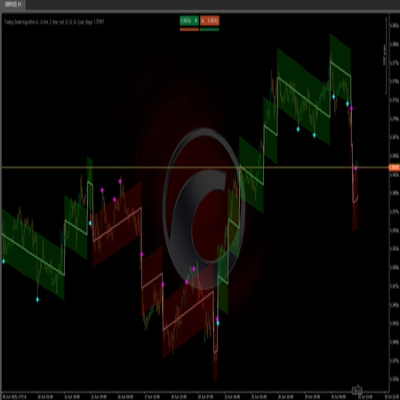
🔹 TP/SL anzeigen (Standard: true) — Zeigt/verbirgt die horizontalen Linien für Entry (blau), Stop Loss (rot), TP1/TP2/TP3 (gestrichelt grün) und deren zugehörigen Text. Erreichte Levels werden türkis mit einem Häkchen ✓.
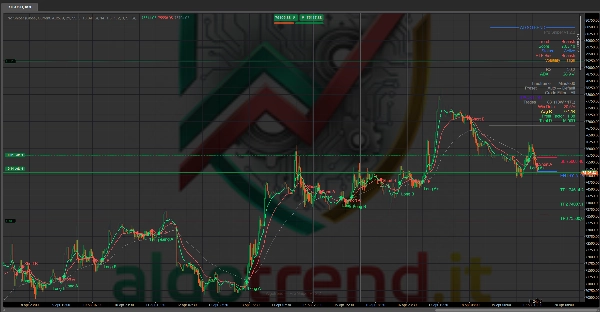
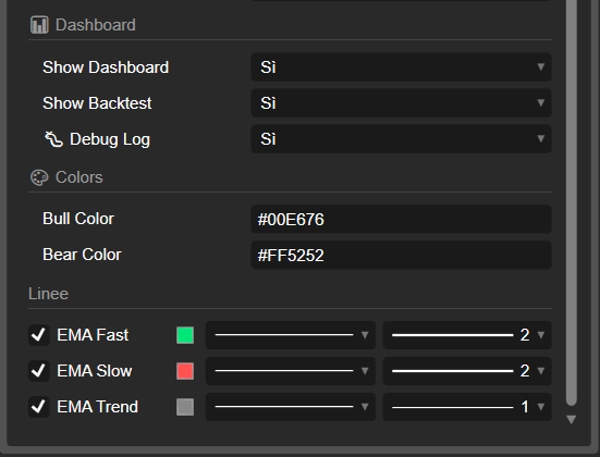
🔹 EMA anzeigen (Standard: true) — Zeigt/verbirgt die drei EMA-Linien (Schnell=grün, Langsam=rot, Trend=gestrichelt grau).
🔹 Trailing anzeigen (Standard: true) — Zeigt/verbirgt die Trailing-Stop-Linie (orange, gestrichelt), wenn das Trailing aktiv ist und sich vom ursprünglichen SL-Niveau verschoben hat.
🔹 Bewertung anzeigen (Standard: true) — Fügt die Qualitätsbewertung (A+, A, B, C) zum Signal-Label hinzu. Beispiel: "Long A+" oder "Short B".
🔹 Wasserzeichen anzeigen (Standard: true) — Zeigt den Text "Algotrend — ProSniper v1.2.2" unten mittig im Chart an.
📊 GRUPPE: Dashboard
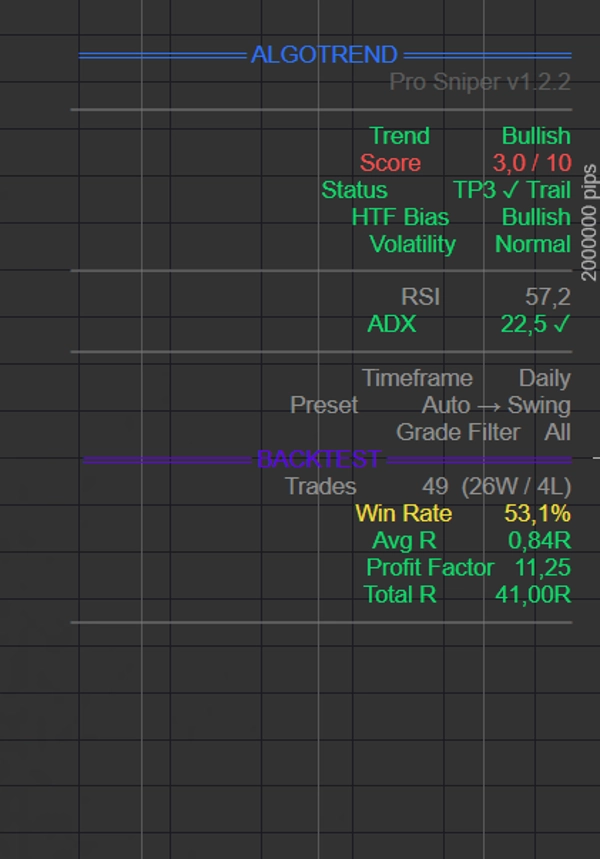
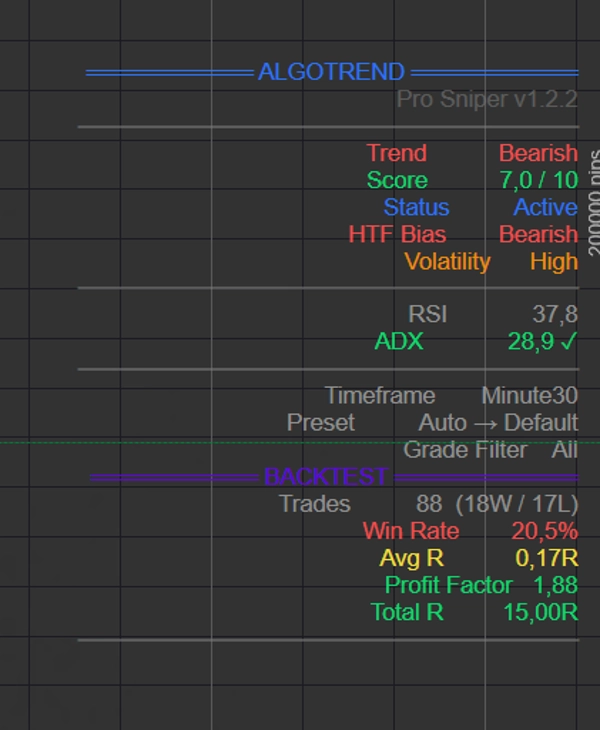
🔹 Dashboard anzeigen (Standard: true) — Zeigt das Informationspanel oben rechts mit: aktuellem Trend, Score, Trade-Status, HTF-Bias, Volatilität, RSI, ADX, Zeitrahmen, aktiver Voreinstellung, Bewertungsfilter und Version.
🔹 Backtest anzeigen (Standard: true) — Zeigt das Statistikpanel unter dem Dashboard. Enthält: Gesamtzahl geschlossener Trades (W/L), Gewinnrate in Prozent, Durchschnittliches R (mittlere Rendite pro Trade), Profitfaktor (Gewinn/Verlust-Verhältnis) und kumulatives Total R. Die Panel-Farbe ändert sich dynamisch: 🟢 grün bei positivem Total R (Nettogewinn), 🔴 rot bei negativem Total R (Nettoverlust), 🟡 gelb bei Break-even, ⚪ grau bei keinen Trades.
🔹 Debug-Log (Standard: false) 🐛 — Aktiviert die Diagnoseprotokollierung in der cTrader-Log-Konsole. Nützlich zur Fehlerbehebung: Zeigt jede erkannte EMA-Kreuzung mit vollständigen Bedingungsdetails (Score, Momentum, RSI, Bewertung, Richtung), jedes generierte Signal und eine abschließende Zusammenfassung. Sollte im normalen Betrieb deaktiviert sein, um das Log nicht zu überladen.
🎨 GRUPPE: Farben
🔹 Bull-Farbe (Standard: #00E676) — Die Farbe für Long-Signale, die schnelle EMA und bullische Pfeile. Ein helles Grün, das auf dunklem Hintergrund gut sichtbar ist.
🔹 Bear-Farbe (Standard: #FF5252) — Die Farbe für Short-Signale, die langsame EMA und bärische Pfeile. Ein Korallenrot, das auf dunklem Hintergrund gut sichtbar ist.
5. 📊 VOREINSTELLUNGEN — VERGLEICHSTABELLE
Jede Voreinstellung konfiguriert automatisch 7 Parameter. Hier ist der vollständige Vergleich:
Parameter🏎️ Scalping⚡ Aggressiv⚖️ Standard🛡️ Konservativ📅 Swing🌐 Krypto 24/7
EMA Schnell
5
8
9
12
13
9
EMA Langsam
13
18
21
26
34
21
EMA Trend
34
50
55
89
89
55
RSI-Länge
8
11
13
14
21
14
ATR-Länge
10
12
14
14
20
20
Mindestscore
4
3
5
7
6
5
SL-Mult
0,8×
1,2×
1,5×
2,0×
2,5×
2,0×
Wann welche Voreinstellung verwenden:
🏎️ Scalping — Zeitrahmen M1-M5. Schnelle Signale, enge Stops, viele Trades. Erfordert ständige Aufmerksamkeit und niedrige Spreads. Ideal für Indizes und Forex-Majors auf M1-M5.
⚡ Aggressiv — Zeitrahmen M5-M30. Viele Signale (minScore=3), geeignet für diejenigen, die mehr Chancen wollen und manuell filtern. Risiko: mehr falsche Signale.
⚖️ Standard — Zeitrahmen M15-H1. Ausgewogen zwischen Häufigkeit und Zuverlässigkeit. Der empfohlene Startpunkt für die meisten Trader.
🛡️ Konservativ — Zeitrahmen H1-H4. Sehr wenige Signale (minScore=7), aber hohe Qualität. Weite Stops geben mehr Spielraum. Ideal für diejenigen, die den Chart nicht ständig überwachen können.
📅 Swing — Zeitrahmen H4-D1. Für Trades, die Tage dauern. Langsame EMAs (13/34/89), sehr weite Stops (2,5×ATR). Wenige Signale pro Woche.
🌐 Krypto 24/7 — Wie Standard, aber mit weiteren ATR- und SL-Werten, um die 24-Stunden-Volatilität der Kryptomärkte zu bewältigen. Kein Sitzungs-Bias.
6. 🏅 DAS BEWERTUNGSSYSTEM
Jedes Signal erhält eine Bewertung basierend auf seinem Confluence-Score:
BewertungErforderlicher ScoreBedeutung
🥇 A+
≥ 8,0 / 10
Außergewöhnlich — maximale Übereinstimmung, alle Indikatoren ausgerichtet
🥈 A
≥ 6,5 / 10
Gut — die meisten Faktoren bestätigen den Trade
🥉 B
≥ 5,0 / 10
Durchschnittlich — ausreichende Übereinstimmung, aber nicht stark
❌ C
< 5,0 / 10
Schwach — viele Faktoren bestätigen nicht, hohes Risiko
Die Bewertung wird neben dem Signal im Chart angezeigt (z. B. "Long A+" oder "Short B") und kann verwendet werden, um Signale über den Bewertungsfilter zu filtern.
Ein A+-Signal auf einem H1-Zeitrahmen mit der Standardvoreinstellung bedeutet, dass mindestens 8 der 10 Faktoren in dieselbe Richtung zeigen, einschließlich des HTF-Bias (1,5 Punkte). Diese Art von Setup ist selten, hat aber historisch eine sehr hohe Erfolgsrate.
7. 🛡️ RISIKOMANAGEMENT — WIE ES IM DETAIL FUNKTIONIERT
Stop-Loss-Berechnung
Wenn ein Signal ausgelöst wird, wird der SL auf zwei Arten berechnet (wenn Struktur-SL aktiviert ist):
- ATR-Stop: Einstieg ± (ATR × SL-Multiplikator). Beispiel: Einstieg=100, ATR=2, Mult=1,5 → Long SL = 97,0
- Struktur-Stop: Jüngstes Swing-Tief − 0,2×ATR (für Longs) oder Swing-Hoch + 0,2×ATR (für Shorts). Der 0,2×ATR-Puffer verhindert, dass der SL genau auf dem strukturellen Niveau liegt (wo häufig Stop-Hunts auftreten).
Der Indikator wählt das günstigere (engere) Niveau von beiden, mit einem garantierten Mindestabstand von 0,5×ATR.
Take-Profit-Berechnung
TPs werden als Vielfache des Risikos (Entfernung Einstieg zu SL) berechnet:
Risiko = |Einstieg − SL| TP1 = Einstieg ± Risiko × TP1_Multiplikator TP2 = Einstieg ± Risiko × TP2_Multiplikator TP3 = Einstieg ± Risiko × TP3_Multiplikator
Trailing Stop — Ablauf
Mit aktiviertem Trailing verläuft die Abfolge: Ursprünglicher SL → TP1 erreicht → SL wird auf Break-even verschoben → TP2 erreicht → SL wird auf TP1 verschoben → TP3 erreicht → SL wird auf TP2 verschoben. Wenn der Preis nach TP2 zurückfällt und TP1 (das neue Trailing-Niveau) berührt, wird der Trade mit einem Gewinn entsprechend TP1 geschlossen statt mit Verlust.
Wie ein Trade im Backtest geschlossen wird
Ein Trade wird geschlossen, wenn: der SL (oder Trailing Stop) getroffen wird oder ein entgegengesetztes Signal ausgelöst wird. Das Ergebnis in "R" hängt davon ab, wie viele TPs vor dem Schließen erreicht wurden. Mit aktiviertem Trailing wird, wenn der SL nach TP2 getroffen wird, die aufgezeichnete Rendite TP1 sein (weil das Trailing dort geparkt war), nicht TP2.
8. 📊 DASHBOARD — DATEN LESEN
Hauptpanel
FeldBedeutung
Trend
Bullisch (schnelle EMA > langsam UND Preis > Trend-EMA), Bärisch (umgekehrt) oder Neutral
Score
Aktueller Confluence-Score (des offenen Trades oder des maximalen Bull-/Bear-Scores)
Status
"Kein Trade", "Aktiv", "TP1 ✓ Trail", "TP2 ✓ Trail", "TP3 ✓ Trail"
HTF-Bias
Trenrichtung im höheren Zeitrahmen
Volatilität
"Hoch" (ATR > 1,3× Durchschnitt), "Normal", "Niedrig" (ATR < 0,7× Durchschnitt)
RSI
Aktueller RSI-Wert
ADX
Aktueller ADX-Wert. ✓ = starker Trend (> 20)
Zeitrahmen
Der aktuelle Chart-Zeitrahmen
Voreinstellung
Die aktive Voreinstellung. Bei Auto wird "Auto → [aufgelöste Voreinstellung]" angezeigt
Bewertungsfilter
Der aktive Bewertungsfilter
Version
v1.2.2
Backtest-Panel (farbcodiert)
FeldBedeutung
Trades
Gesamtzahl geschlossener Trades (Gewinne / Verluste)
Gewinnrate
Prozentsatz der Gewinntrades (mindestens TP1 erreicht)
Durchschnittliches R
Mittlere Rendite pro Trade in Risikoeinheiten. > 0,5R = gut
Profitfaktor
Summe der Gewinne / Summe der Verluste. > 1,5 = gut, > 2,0 = ausgezeichnet
Total R
Kumulierte Gesamtrendite in Risikoeinheiten
9. 💡 PRAKTISCHE ANWENDUNGSTIPPS
🔹 Beginnen Sie mit der Standardvoreinstellung auf einem M15- oder H1-Zeitrahmen. Es ist der ausgewogenste Startpunkt.
🔹 Stellen Sie den HTF-Trendfilter ein eine Stufe über Ihrem Arbeitszeitrahmen: M15 → H1, H1 → H4, H4 → Daily. Der HTF-Bias ist 1,5 Punkte wert und macht einen großen Unterschied in der Signalqualität.
🔹 Senken Sie den Mindestscore nicht unter 4 ohne triftigen Grund. Signale unter 4/10 haben unzureichende Übereinstimmung.
🔹 Verwenden Sie den Bewertungsfilter "A+ und A", wenn Sie Qualität über Quantität bevorzugen. Sie erhalten weniger Signale, aber jeder Trade hat mindestens 6-7 ausgerichtete Faktoren.
🔹 Lassen Sie den Trailing Stop aktiv. Er wandelt Gewinntrades systematisch nach TP1 in risikofreie Operationen um.
🔹 Überprüfen Sie den Backtest vor dem Trading. Wenn das Panel bei Ihrem Instrument/Zeitfenster rot ist, sollten Sie die Voreinstellung oder den Zeitrahmen ändern, bevor Sie echtes Kapital riskieren.
🔹 In Seitwärtsmärkten (ADX < 20, Volatilität "Niedrig") sind Signale weniger zuverlässig. Der ADX im Dashboard zeigt dies in Echtzeit an.
🔹 Für Krypto, verwenden Sie die Voreinstellung "Krypto 24/7", die weitere Stops hat, um Lücken und Übernachtvolatilität zu bewältigen.
🔹 Das Debug-Log ist nützlich, wenn ein erwartetes Signal nicht ausgelöst wird. Aktivieren Sie es, laden Sie den Chart neu und prüfen Sie im Log, welche Bedingung das Signal blockiert.
10. ⚖️ STÄRKEN & EINSCHRÄNKUNGEN
✅ Stärken
Echte Multi-Confluence — 10 unabhängige Faktoren, nicht nur überlappende Indikatoren. Jeder Faktor erfasst einen anderen Aspekt des Marktes (Trend, Momentum, Volumen, Volatilität, höherer Zeitrahmen).
Intelligente Voreinstellungen — Das Auto-System wählt optimale Parameter für den Zeitrahmen, wodurch die manuelle Optimierung für die meisten Nutzer entfällt.
Integriertes Risikomanagement — Struktureller SL + automatisches Trailing + 3 TP-Stufen bieten professionelles Trade-Management ohne externe Tools.
Echtzeit-Backtest — Sie können sofort bewerten, ob der Indikator auf Ihrem Instrument funktioniert, bevor Sie Kapital riskieren.
Nicht-Repainting HTF — Der Bias des höheren Zeitrahmens verwendet die vorherige bestätigte Kerze, wodurch sich rückwirkend ändernde Signale vermieden werden.
Transparente Bewertung — Sie können genau sehen, warum ein Signal A+ oder B ist, indem Sie den Score und die Faktoren im Dashboard betrachten.
⚠️ Einschränkungen
Kein automatisiertes System — Es ist ein Indikator, kein Bot. Signale sollten visuell vom Trader bestätigt werden. Es öffnet oder schließt keine Trades.
Vereinfachter Backtest — Geht von Einstieg am Kerzenschluss aus und berücksichtigt keinen Slippage, keine Kommissionen oder Spreads. Die realen Ergebnisse werden etwas schlechter sein.
Ungefähre VWAP — In cTrader wird VWAP mit Tick-Volumen (nicht echtem Volumen) berechnet, was bei OTC-Instrumenten wie Forex weniger genau ist.
Schwäche in Seitwärtsmärkten — Wie alle EMA-Kreuzungsindikatoren erzeugt es falsche Signale in trendlosen, seitwärts gerichteten Märkten.
Trailing kann Gewinne begrenzen — In sehr starken Trends kann der Trailing Stop den Trade vorzeitig schließen. Ohne Trailing würde ein Trade, der TP3 erreicht, +3R aufzeichnen; mit Trailing wird, wenn der SL nach TP3 getroffen wird, die aufgezeichnete Rendite +2R sein (weil das Trailing bei TP2 geparkt war).
📌 Dokument erstellt für Pro Sniper v1.2.2 — cTrader Port Zuletzt aktualisiert: April 2026
Zusammenfassung
Key features include:
- Signal architecture based on six conditions including EMA crossover, momentum filters, RSI limits, minimum confluence score, quality grading, and directional control to avoid consecutive same-direction signals.
- A confluence scoring engine that weights factors differently, with higher importance on higher-timeframe bias.
- Integrated trade management with three configurable Take Profit levels, structural Stop Loss placement considering recent swing points, and automatic trailing stops to lock in profits.
- Multiple presets tailored for various trading styles and timeframes, from scalping (M1-M5) to swing trading (H4-D1) and a crypto-specific preset for 24/7 markets.
- A dashboard displaying real-time trend, score, trade status, volatility, RSI, ADX, and backtest statistics including win rate and profit factor.
- Visual customization options for signals, EMAs, stops, and grading labels.
The indicator does not automate trade execution but provides comprehensive signals and risk management tools for manual trading decisions. It supports trend analysis and risk control across multiple markets and timeframes.
Kundenbewertungen
5 | 40 % | |
4 | 40 % | |
3 | 0 % | |
2 | 20 % | |
1 | 0 % |