Penerangan
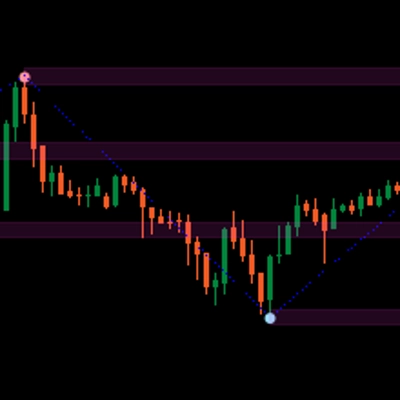
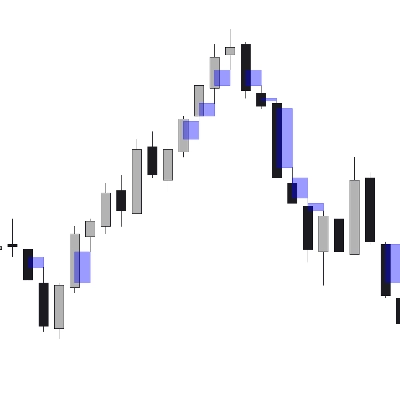
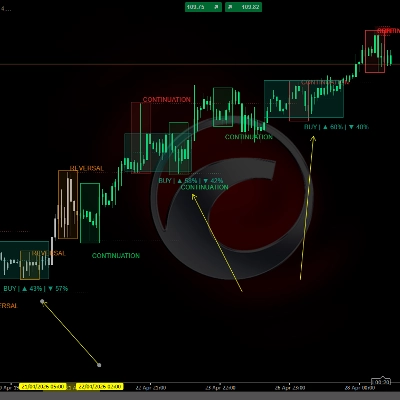
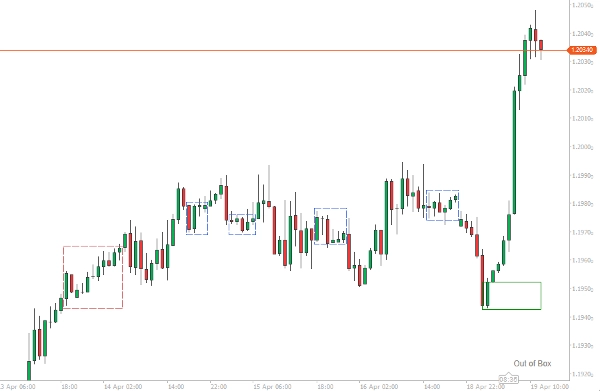
Tujuan algoritma cTrader indikator Boxify ini adalah untuk cuba meletakkan tindakan harga ke dalam zon, atau lebih baik, kotak. Dengan cara ini, pedagang boleh mendapat kelebihan dalam posisi perdagangannya. Ini bukan indikator yang boleh berdiri sendiri, tetapi alat yang bagus yang boleh melengkapkan mana-mana strategi atau susunan perdagangan.
Mengesan pergerakan mendatar boleh membantu pedagang mengamankan keuntungan, memotong kerugian atau meletakkan pesanan had mengikut kelebihannya. Ini adalah beberapa cara yang kita boleh gunakan kotak:
Mengesan kawasan pengukuhan
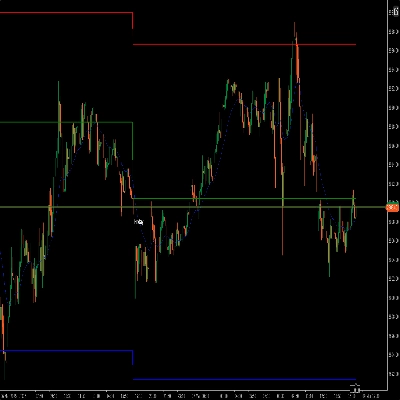
Untuk kotak-kotak lalu yang mengandungi beberapa bar di dalamnya, kita boleh dengan selamat menganggap bahawa ini adalah kawasan pengukuhan dan bahawa kita mempunyai pergerakan mendatar. Kawasan ini boleh berfungsi sebagai tahap sokongan atau rintangan dalam analisis tindakan harga anda.
Letakkan perdagangan anda dengan lebih baik
Sekiranya anda mempunyai susunan untuk perdagangan dan anda melihat harga membentuk kotak, anda sentiasa boleh menggunakan kotak itu sebagai panduan untuk tindakan harga, untuk mendapatkan posisi yang lebih menguntungkan untuk perdagangan anda. Kotak yang sedang terbentuk boleh digunakan sama ada untuk mengamankan beberapa keuntungan dalam posisi menang, masuk semula ke pasaran tren atau meletakkan stop loss.
Letakkan pesanan had
Pergerakan mendatar yang panjang akhirnya akan membawa kepada pecahan. Boxify boleh membantu anda meletakkan pesanan had, di atas atau di bawah, untuk mendapatkan hasil maksimum dari permulaan pecahan.
Pilihan indikator
Indikator akan cuba membentuk kotak harga dari sekurang-kurangnya 2 bar dan ke atas. Mesej dari indikator akan muncul di sudut kanan bawah kawasan carta.
- Jika harga sedang tren, mesej “Out of Box” akan muncul.
- Jika harga sedang membentuk kotak, mesej “Boxing” akan muncul.
- Jika harga sedang membentuk kotak dan harga memecah had atas, “Breaking High” akan muncul.
- Jika harga sedang membentuk kotak dan harga memecah had bawah, “Breaking Low” akan muncul.
Kotak dianggap lengkap pada pembukaan bar baru, kerana harga sentiasa boleh menarik balik ke dalam kotak.
Bilangan Minimum Bar untuk Kotak
Nombor ini mewakili bilangan minimum bar yang perlu ada dalam kotak untuk dianggap lengkap. Gunakan nombor yang lebih rendah untuk titik masuk, dan nombor yang lebih tinggi untuk kawasan pengukuhan.
Penapis ATR
Boxify mempunyai indikator ATR dalaman, yang boleh anda gunakan sebagai pilihan penapisan, sekiranya anda mahu menghentikan pembentukan kotak pada mana-mana bar yang panjangnya (Tinggi-Rendah) melebihi nilai ATR. Gunakan pilihan ini jika anda mahu memasuki perdagangan.
Gabungkan Pertindihan
Permulaan kotak boleh bermula sebelum kotak sebelumnya berakhir (terutamanya jika kita memilih nombor yang sangat rendah untuk panjang kotak). Kita boleh menggabungkan kotak-kotak ini dengan pilihan ini, supaya kita dapat melihat kotak yang lebih besar terbentuk – Kotak-kotak ini akan mempunyai sempadan berwarna biru.
Toleransi
Nombor yang mencerminkan toleransi yang boleh ada pada had atas/bawah kotak. Nombor kecil harus digunakan apabila kita mahu memasuki perdagangan, nombor yang lebih besar harus digunakan apabila kita mahu mencari kawasan pengukuhan.
Ringkasan
Key features include:
- Detection of price boxing with messages displayed on the chart indicating states such as “Boxing,” “Out of Box,” “Breaking High,” and “Breaking Low.”
- Configurable minimum bars per box to differentiate between entry points and consolidation zones.
- An internal Average True Range (ATR) filter to exclude bars exceeding volatility thresholds from box formation.
- Option to merge overlapping boxes to form larger zones, visually distinguished by blue borders.
- Adjustable tolerance for box boundary limits to fine-tune sensitivity for trade entries or consolidation identification.
Boxify complements existing trading strategies by providing visual zones that enhance decision-making across Forex, indices, commodities, and cryptocurrencies.
Ulasan pelanggan
5 | 50 % | |
4 | 50 % | |
3 | 0 % | |
2 | 0 % | |
1 | 0 % |