Descrizione
MarketSessions – Il tuo vantaggio nel trading, visualizzato
Trasforma il tempo di mercato in potere di trading
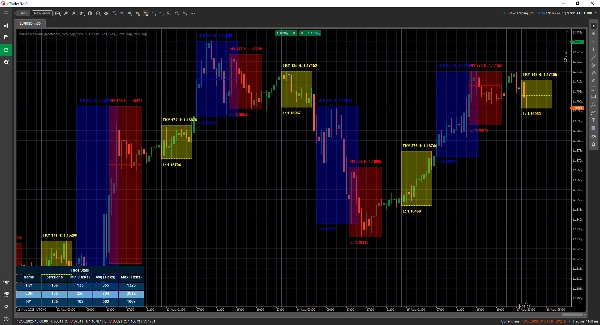
MarketSessions è un indicatore cTrader di livello professionale che dà vita alle sessioni di mercato globali — così puoi fare trading dove il momentum è reale e il tempismo diventa il tuo vantaggio.
🚀 Perché i trader si fidano di MarketSessions
Vedi il ritmo del mercato
Visualizza istantaneamente Londra, New York, Tokyo, Sydney – e qualsiasi altra sessione desideri – con sovrapposizioni pulite ed eleganti che si adattano al tuo grafico.
Fai trading in modo più intelligente, non più tardi
Ricevi notifiche in tempo reale quando le sessioni si aprono, chiudono o raggiungono livelli chiave – inviate tramite Telegram o Discord (a tua scelta).
Attacca le zone ad alta probabilità
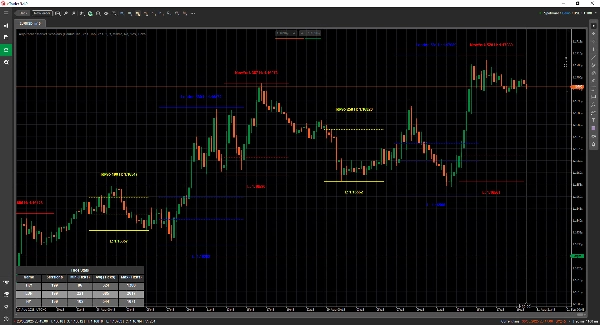
Sfrutta gli strumenti integrati come l’Opening Range Breakout, Point of Control (POC) e le linee di sessione di precisione così non perderai mai un breakout o un rifiuto.
🎯 Caratteristiche principali
- Visualizzazione e gestione delle sessioni – orari, colori e etichette completamente personalizzabili, anche per mercati sovrapposti
- Strumenti di disegno avanzati – include disegnatori Double ❘❘ e Middle line, rettangoli breakout, marcatori di testo e una Modalità Doppia Linea per trader minimalisti
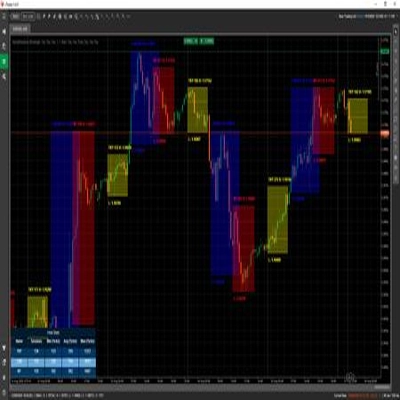
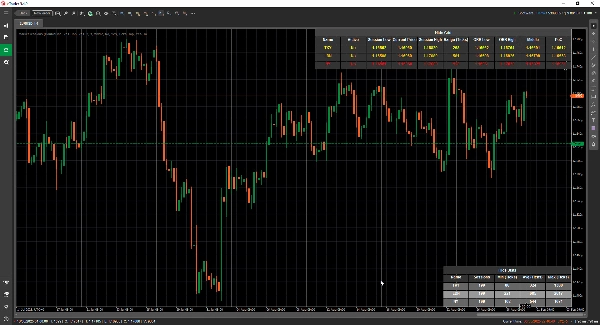
- Pannello Statistiche – visualizza il totale delle sessioni, i range Min, Avg e Max per ogni sessione (in Ticks, Pips o %)
- Modalità Griglia - ti permette di vedere le sessioni attive correnti in una tabella, così puoi osservare le sessioni in un timeframe superiore.
- Configurazione flessibile – personalizza la posizione del testo, le modalità di range, le preferenze di disegno e i temi
- Avvisi e integrazioni – integrazione Telegram/Discord con avvisi sonori e visivi
📦 Cosa ottieni
- MarketSessions.algo (pronto all’uso)
- Aggiornamenti a vita (nessun costo ricorrente)
- Supporto amichevole (accesso diretto se hai bisogno di aiuto)
💻 Requisiti
- Piattaforma cTrader
- Runtime .NET 6.0
✅ Installa in pochi minuti
✅ Fai trading con assoluta fiducia
📘 Riferimento parametri (versione amichevole)
Elenco delle sessioni disponibili
- New York
- Londra
- Francoforte
- Tokyo
- Hong Kong
- Shanghai
- Singapore
- Wellington
- Sydney
- Toronto
Impostazioni generali
- Modalità di disegno – Scegli come vengono disegnate le linee di sessione sul grafico (Rettangolo / Doppia Linea / Linea Centrale)
- Mostra nome sessione – Visualizza il nome di ogni sessione direttamente sul tuo grafico
- Posizione nome sessione – Decidi dove appare il testo del nome sessione (alto, centro, basso)
- Testo in grassetto – Rende il nome della sessione in grassetto per facilitarne la lettura
- Offset testo superiore – Aggiunge spazio extra dalla parte superiore (così il testo non si sovrappone alle candele)
- Offset testo inferiore – Aggiunge spazio extra dalla parte inferiore dell’area della sessione
- Posizione ora testo – Mostra l’ora della sessione insieme al nome della sessione
- Usa nome sessione breve – Passa a nomi più corti (es. NY invece di New York)
- Mostra intervallo sessione – Evidenzia l’intero intervallo di prezzo coperto dalla sessione
- Modalità intervallo sessione – Scegli come viene calcolato l’intervallo di prezzo (massimo/minimo o apertura/chiusura)
- Posizione intervallo sessione – Posiziona il marcatore dell’intervallo in alto o in basso all’intervallo
- Mostra massimo – Visualizza il prezzo massimo della sessione
- Posizione massimo – Scegli dove appare l’etichetta del massimo
- Mostra minimo – Visualizza il prezzo minimo della sessione
- Posizione minimo – Scegli dove appare l’etichetta del minimo
- Estendi linee massimo/minimo (minuti) - Permette di estendere queste linee per x minuti in avanti
- Mostra breakout intervallo apertura – Disegna un riquadro breakout all’apertura della sessione
- Estendi linee ORB (minuti) - Permette di estendere queste linee per x minuti in avanti
- Mostra linee centrali – Aggiungi linee mediane per aiutare a identificare il valore equo
- Estendi linee centrali (minuti) - Permette di estendere questa linea per x minuti in avanti
- Mostra PoC – Visualizza il Point of Control (prezzo più scambiato della sessione)
- Estendi linee centrali (minuti) - Permette di estendere questa linea per x minuti in avanti
- Trasparenza riempimento – Controlla quanto è trasparente il riempimento di sfondo della sessione
Statistiche
- Mostra statistiche – Mostra/nascondi il pannello delle statistiche sul tuo grafico
- Allineamento orizzontale statistiche – Allinea il pannello (Sinistra / Centro / Destra)
- Allineamento verticale statistiche – Scegli se il pannello appare in alto o in basso
- Colore titolo – Colore del testo per il titolo “Statistiche”
- Colore righe pari – Colore di sfondo per le righe pari nel pannello
- Colore righe dispari – Colore di sfondo per le righe dispari nel pannello
- Colore primo piano – Colore del testo usato all’interno del pannello
Telegram
- Usa – Abilita o disabilita gli avvisi Telegram
- Token – Il token del tuo Bot Telegram
- ChatId – L’ID della chat dove verranno inviati gli avvisi
Discord
- Usa – Abilita o disabilita gli avvisi Discord
- WebhookUrl – URL webhook Discord per l’invio degli avvisi di sessione
Avvisi sonori
- Avviso sonoro nuova sessione – Riproduce un suono quando inizia una nuova sessione
- Avviso sonoro sessione completata – Riproduce un suono quando una sessione termina
Griglia
- Forza griglia - Forza il rendering della griglia indipendentemente dal TimeFrame utilizzato
- Griglia visibile per TimeFrame superiore - Ti permette di selezionare a partire da quale TimeFrame questa griglia è visibile
- Notifica messaggio a comparsa - Notifica il motivo per cui la modalità di rendering normale non è possibile e passa alla modalità griglia
- Allineamento orizzontale griglia
- Allineamento verticale griglia
Esempio di sessione (New York)
⚠️ Gli stessi parametri si applicano a ogni sessione (Londra, Tokyo, Sydney, ecc.)
- Attiva – Abilita o disabilita questa specifica sessione
- Colore – Colore della sessione usato sul grafico
- Riempimento area – Riempi lo sfondo dell’area della sessione
- Stile linea – Scegli lo stile della linea (solida, tratteggiata, ecc.)
- Spessore linea – Controlla lo spessore dei bordi della sessione
Fai dell’orologio del mercato il tuo alleato
Acquista MarketSessions oggi e non perdere mai più una sessione redditizia.
Riepilogo
Key features include a statistics panel displaying session ranges in ticks, pips, or percentages; advanced drawing tools like breakout rectangles and text markers; and real-time alerts for session openings, closings, and key levels via Telegram or Discord integrations. It highlights important trading zones such as Opening Range Breakouts and Points of Control (POC) to assist in identifying breakout or rejection points.
Users can configure text placement, range calculation methods, transparency, and alert sounds. The indicator supports multiple sessions with individual settings for activation, color, fill, line style, and thickness. It requires the cTrader platform and .NET 6.0 runtime to operate. This tool aims to help traders align their strategies with market momentum by clearly displaying session rhythms and statistics.










![Logo di "[Hamster-Coder] Bollinger Bands"](https://cdn.ctrader.com/image/webp/21d8e5d6-fb11-4bac-b9ee-cd05c2b76804_30327)