present
Zarejestruj się i otrzymaj 50 $ zniżki na pierwszy zakup
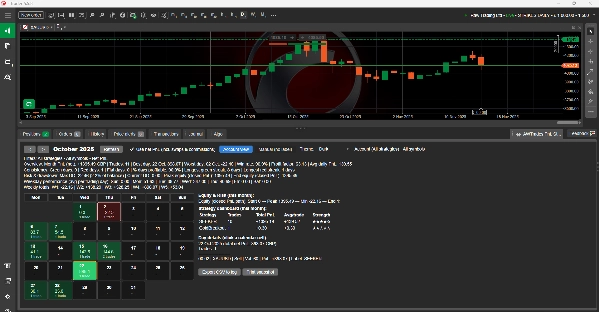
Trading product for AWTradesPnLStudio Wtyczka desktopowa Signal Indices, image 1
AWTradesPnLStudio
Wtyczka desktopowa
Wersja 1.0, Nov 2025
Windows, Mac
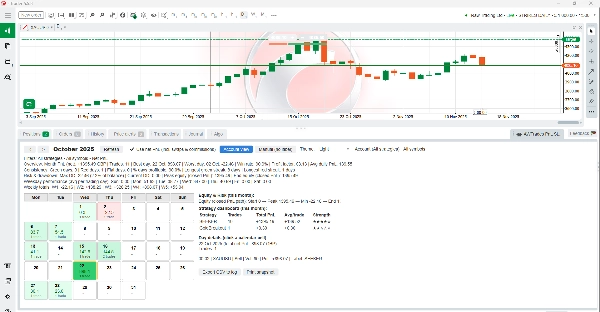
Trading product for AWTradesPnLStudio Wtyczka desktopowa Signal Indices, image 2
Trading product for AWTradesPnLStudio Wtyczka desktopowa Signal Indices, image 3
Trading product for AWTradesPnLStudio Wtyczka desktopowa Signal Indices, image 4
Trading product for AWTradesPnLStudio Wtyczka desktopowa Signal Indices, image 5
Trading product for AWTradesPnLStudio Wtyczka desktopowa Signal Indices, image 6
Trading product for AWTradesPnLStudio Wtyczka desktopowa Signal Indices, image 7
Trading product for AWTradesPnLStudio Wtyczka desktopowa Signal Indices, image 8
182.36M
Wolumen transakcji
368.54K
Zysk w pipsach
67
Sprzedaż
279
Bezpłatne instalacje

Opis

AWTrades PnL Studio to potężna wtyczka do śledzenia wyników, która zamienia historię cTrader w czysty, kolorowy kalendarz PnL – z analizą strategii, statystykami ryzyka i wglądem w kapitał, wszystko w panelu TradeWatch.

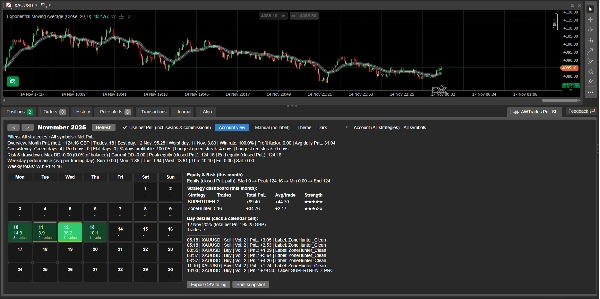
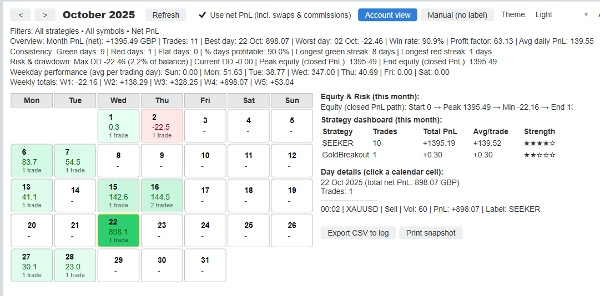
Zamiast przeszukiwać surową historię, otrzymujesz natychmiastowy wizualny obraz tego, jak przebiega Twój miesiąc: zielone i czerwone pola kalendarza dla każdego dnia, podziały strategii, tygodniowe sumy oraz maksymalne obsunięcie kapitału / ścieżka kapitału – wszystko filtrowalne według symbolu, etykiety (strategii) oraz PnL netto vs brutto.

Używaj go do monitorowania pojedynczego bota, grupy strategii lub całego konta na pierwszy rzut oka.

Kluczowe funkcje

Kalendarz PnL w TradeWatch
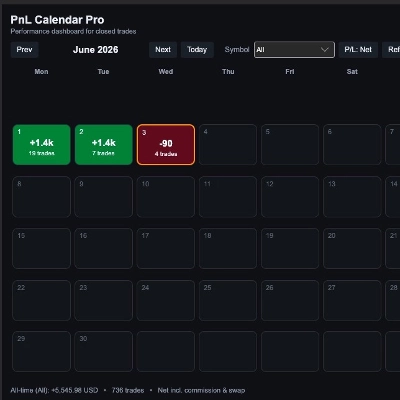
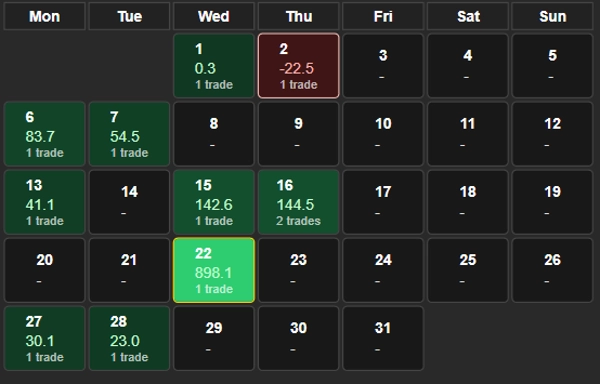
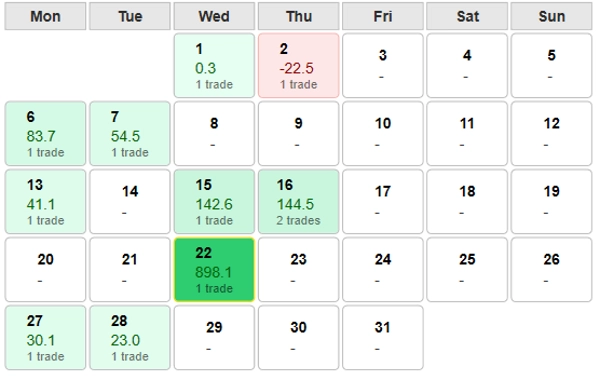
Zobacz swoje miesięczne wyniki jako siatkę kalendarza – każdy dzień pokazuje PnL i liczbę transakcji, z wyróżnionymi najlepszymi i najgorszymi dniami dla szybkiego przeglądu.

Panel Strategii (na miesiąc)
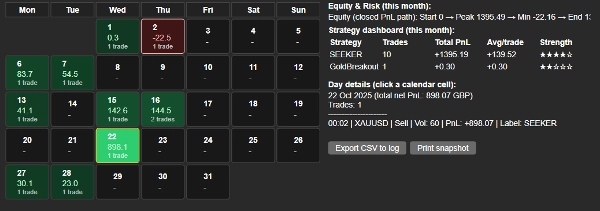
Automatyczny podział według etykiety (strategii): całkowity PnL, liczba transakcji, średni PnL na transakcję oraz ocena „siły” 1–5 ★, dzięki czemu możesz natychmiast zobaczyć, które boty niosą konto.

Wbudowane statystyki kapitału i obsunięcia
Podsumowanie ścieżki kapitału z zamkniętego PnL (start → szczyt → minimum → koniec) oraz maksymalne obsunięcie, aktualne obsunięcie i DD jako % salda – idealne do monitorowania ryzyka i raportowania inwestorom.

Wgląd w dni tygodnia i tygodnie
Średni PnL według dni tygodnia i sumy tygodniowe, dzięki czemu możesz zobaczyć, które dni i tygodnie napędzają lub hamują wyniki.

Szybkie filtry i presety
Filtruj według:

  • Konto (wszystkie strategie)
  • Tylko ręczne (bez etykiety)
  • Dowolna konkretna etykieta / strategia
  • Dowolny symbol lub wszystkie symbole
    Przełączaj między brutto a netto (w tym swapy i prowizje) za pomocą jednego pola wyboru.

Przyjazny trybom jasnemu i ciemnemu
Optymalizowany zarówno dla ciemnych, jak i jasnych motywów cTrader: kolory, obramowania i kontrast tekstu są dostrojone tak, aby kalendarz był czytelny w każdym schemacie.

Szczegóły na poziomie transakcji
Kliknij dowolny dzień kalendarza, aby zobaczyć wszystkie transakcje z tego dnia: czas, symbol, kierunek, wolumen, PnL i etykietę – idealne do szybkiego przeglądu lub prowadzenia dziennika.

Narzędzia eksportu i migawki
Eksportuj bieżący widok do CSV w dzienniku lub wydrukuj zwięzłą linię migawki wyników, którą możesz wkleić do raportów, czatu lub dziennika handlowego.


Jak używać

  1. Dodaj AWTrades PnL Studio jako wtyczkę w cTrader.
  2. Otwórz panel TradeWatch i wybierz kartę „AWTrades PnL Studio”.
  3. Użyj strzałek miesiąca oraz presetów Widok konta / Ręczne (bez etykiety), aby zmieniać perspektywy.
  4. Filtruj według symbolu lub etykiety strategii, aby analizować pojedyncze boty lub portfele.
  5. Kliknij dni kalendarza, aby zobaczyć listy transakcji; użyj Eksportuj CSV lub Drukuj migawkę do prowadzenia dziennika lub aktualizacji dla inwestorów.

AWTrades PnL Studio jest stworzone przez AWTrades, systematycznego tradera skupionego na jasnych, praktycznych narzędziach, które pomagają zrozumieć, co Twoje strategie naprawdę robią – dzień po dniu, tydzień po tygodniu, miesiąc po miesiącu.

Podsumowanie

Podsumowanie AI
AWTrades PnL Studio is a plugin for cTrader that transforms your trading history into a detailed, color-coded profit and loss (PnL) calendar within the TradeWatch panel. It provides a clear monthly performance overview with daily PnL and trade counts, highlighting best and worst days. The plugin includes a strategy dashboard that breaks down results by strategy label, showing total PnL, trade count, average PnL per trade, and a 1–5 star strength rating. It also features built-in equity and drawdown statistics, including closed-PnL equity path summaries and max/current drawdown metrics for risk monitoring. Users can analyze average PnL by weekday and weekly totals to identify performance trends. Filters allow viewing by account, manual trades, specific strategies, or symbols, with options to toggle between gross and net PnL. The interface supports both light and dark modes for readability. Detailed trade-level drilldowns are available by clicking calendar days, showing trade time, symbol, direction, volume, PnL, and label. Export options include CSV and printable snapshots for journaling or reporting. AWTrades PnL Studio is designed to help traders monitor individual bots, strategy clusters, or entire accounts efficiently.
Profil wtyczki

Opinie klientów

0.0
Opinie: 0
Opinie klientów
Ten produkt nie ma jeszcze opinii. Wypróbowałeś(-aś) go już? Bądź pierwszy(-a) i powiedz o tym innym!

Dyskusja

Częste pytania

Signal
Indices
Commodities
GBPUSD
RSI
Bollinger
Fibonacci
Scalping
AI
XAUUSD
NAS100
MACD
BTCUSD
Forex
Breakout
EURUSD
NZDUSD
Martingale
Prop
ZigZag
Supertrend
Fair Value Gap
SMC
Crypto
Grid
Stocks
ATR
USDJPY
VWAP
Produkty dostępne za pośrednictwem cTrader Store, w tym boty handlowe, wskaźniki i wtyczki, dostarczane są przez deweloperów zewnętrznych i udostępniane wyłącznie w celach informacyjnych oraz w celu zapewnienia dostępu technicznego. cTrader Store nie jest brokerem i nie zapewnia doradztwa inwestycyjnego, nie udziela spersonalizowanych rekomendacji ani nie gwarantuje przyszłych wyników.

Możesz także polubić

Wtyczka desktopowa
Prop
Forex
+4
Visual monthly trading journal that displays your performance day-by-day in a calendar view.
Wtyczka desktopowa
Trade Journal
AI Integration
+1
Turn your closed-trade history into an at-a-glance monthly calendar and a deep performance dashboard.
Logo „TradeGuard”
Popularne
4.6
(3)
Wtyczka desktopowa
ATR
Prop
+5
cTrader risk management plugin with daily & total drawdown limits, CBot control, and risk-based order execution.
Wtyczka desktopowa
AI
ATR
+27
Trade Analytics delivers advanced trading insights and heatmaps directly inside TradeWatch.
Wtyczka desktopowa
Risk Reward management tools (风险回报管理工具)
Wtyczka desktopowa
Prop
Forex
+3
Visual calendar with daily PnL, trades, win rate, profit factor, and performance insights.
Wtyczka desktopowa
Risk/Reward
Chart UI Tools
+3
Visual cTrader backtesting tool with trade drawing, risk sizing, stats, and automatic trade simulation.
Wtyczka desktopowa
Prop
Forex
+5
Place professional OCO & OSO orders in cTrader — visually, instantly, and without execution mistakes.
Wtyczka desktopowa
Forex
Signal
+2
Adaptive Renko chart builder for precise, flexible trading - ideal for both scalping and trend analysis.
Wtyczka desktopowa
Trade Journal
AI Integration
+1
#1 Trade Journal, PnL analytics, bot monitoring and strategy statistics.
Wtyczka desktopowa
SMC
Grid
+5
The all-in-one trade management plugin that automates your risk, execution, and position management.
Wtyczka desktopowa
Market Scanner
An 8-currency strength ranking, multi-TF heatmap & impulse tracker — read the real driver at a glance. Read-only.
Wtyczka desktopowa
Forex
Crypto
+4
Apply Stop Loss and Take Profit to all positions and pending orders in one click.
Wtyczka desktopowa
Balanced
Low Frequency
+5
Premarket confluence dashboard for session bias, VWAP, value area, key levels and chart overlays.
Wtyczka desktopowa
Forex
Crypto
+3
Build custom second and tick charts using adjustable bar sampling intervals.
Wtyczka desktopowa
AI
ATR
+27
Turn your cTrader trade history into a visual performance dashboard to see trading patterns and strategy strength
Wtyczka desktopowa
Break Even
Fixed Risk %
+5
Chart-based risk sizing, Entry/SL/TP planning and user-confirmed market or pending orders for cTrader Desktop.
Wtyczka desktopowa
Prop
Forex
+4
Professional risk management plugin with automatic lot calculation, chart panels, and R:R automation. Version 1.4.2.

Cena

182.36M
Wolumen transakcji
368.54K
Zysk w pipsach
67
Sprzedaż
279
Bezpłatne instalacje